


Deckard Simple Event Calendar
A lightweight event calendar with month and list views, event pages, online events, saved venues and add-to-calendar buttons.

Solid choice
Deckard Simple Event Calendar is a solid plugin choice in 2026, with a few things worth checking first. Was last updated 1 week ago, and scores 64/100 on our health check.
- Actively developed — last update 1 week ago
- Tested with the latest WordPress (7.1)
- Small user base (<10 active installs)
- Very few reviews so far
How does it stack up?
Side-by-side on installs, updates, ratings & support



Daily downloads
Download spikes usually follow a new release — each site that auto-updates counts as a download.
Rankings
Where Deckard Simple Event Calend… stands todayWordPress.org search rankings
Live position in the plugin search, top 100| Keyword | Position |
|---|---|
| calendar | >100 |
| event calendar | >100 |
| events | >100 |
| schedule | >100 |
| venues | >100 |
About Deckard Simple Event Calendar
From the official readme · v1.1.1Description
Deckard Simple Event Calendar is a fast, lightweight event calendar for WordPress. Add events in the dashboard and your visitors get a clean, mobile-friendly calendar with no ads, upsells or third-party accounts.
Features
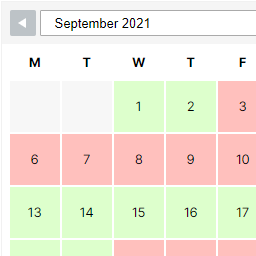
- Month and List views with an event pop-up showing the image, time, location and buttons.
- Ready-made events page at /events/ that uses your theme’s header and footer.
- Event pages with the title, featured image, date and time, location, directions link, cost and a registration button.
- In-person, online or both: add a physical address, an online link (YouTube, Zoom, Facebook Live and more) or both.
- Saved venues: save a venue’s name, address and online link once, then pick it from a dropdown for future events.
- Repeating events: daily, weekly, every two weeks, monthly or yearly, with an optional end date.
- Categories with colors so events are easy to tell apart on the calendar.
- Add to calendar buttons for Google Calendar and Apple Calendar / Outlook (.ics), shown where you choose.
- Event structured data (schema.org Event) so search engines can understand your events.
- Upcoming events list for your homepage or sidebar.
- Mobile friendly and keyboard accessible, and it uses your theme’s fonts.
Website, demo and help
Shortcodes
[deckard_event_calendar]shows the full calendar. Options:view="list",category="slug"(separate several with commas),month="2026-12".[deckard_upcoming_events]shows a list of upcoming events. Options:limit="5",category="slug",days="365",show_image="yes".
In the block editor, add a Shortcode block and paste a shortcode into it. Shortcodes also work in page builders such as Elementor.
For developers
- Copy
templates/single-event.phpinto your theme assingle-deckcal_event.php, ortemplates/archive-events.phpasarchive-deckcal_event.php, to customize those pages. - Filters:
deckcal_output_schema(return false to turn off the structured data),deckcal_schema(change it),deckcal_currency(currency for prices, default USD),deckcal_use_single_templateanddeckcal_archive_title.
External services
This plugin does not send any data to outside services by itself. It only shows links that a visitor can choose to click:
- Google Maps – the “Get directions” link opens Google Maps with the event’s venue name and address. Terms of Service, Privacy Policy.
- Google Calendar – the “Google Calendar” button opens Google Calendar with the event’s title, date, time, location and a link to the event. Terms of Service, Privacy Policy.
Online event links (for example YouTube or Zoom) go to whatever address the site owner enters for that event.
Installation
- In your dashboard, go to Plugins → Add New Plugin and search for “Deckard Simple Event Calendar”, or upload the plugin zip under Upload Plugin.
- Activate the plugin. An Events menu appears in the dashboard.
- Go to Events → Calendar Settings to set your accent color, week start and other options.
- Add your first event under Events → Add Event.
- Visit /events/ on your site to see the calendar, or place
[deckard_event_calendar]on any page.
Changelog
Buttons and links now always use your accent color, whatever your theme.
1.1.1
- Added links to the new plugin website, live demo and contact page.
- Buttons and links in the calendar, pop-up and event pages now always use your accent color, even when the theme styles buttons and links its own way (for example Hello Elementor’s pink hover color).
1.1.0
- Renamed to Deckard Simple Event Calendar and prepared for the WordPress.org plugin directory.
- New shortcode names:
[deckard_event_calendar]and[deckard_upcoming_events]. The old[event_calendar]and[upcoming_events]keep working. - Internal names now use a longer, unique prefix. Existing events, categories, venues and settings are moved over automatically.
- Editor scripts and styles moved into their own files.
- Settings are removed when the plugin is deleted; events and venues are kept.
1.0.7
- Saved venues: pick a saved venue to fill in an event’s location, or save a new one while creating an event.
1.0.6
- Add-to-calendar buttons can be shown on event pages and the pop-up, on event pages only, or not at all.
1.0.5
- Turning off the add-to-calendar buttons now hides them in the calendar pop-up too.
1.0.4
- Event type: in person, online (link) or both.
Screenshots


For developers
Is this your plugin? Show off the numbers.
Add a live badge to your site, docs or GitHub README. It updates on its own — no account needed.
Best Deckard Simple Event Calendar alternatives
All calendar plugins →




FAQ
Deckard Simple Event Calendar: quick answers
Straight answers, pulled from live WordPress.org data.
Source: WordPress.org
Is Deckard Simple Event Calendar free?
Yes. Deckard Simple Event Calendar is free to download and use from the official WordPress.org plugin directory.
Is Deckard Simple Event Calendar safe to use in 2026?
Deckard Simple Event Calendar is a solid plugin choice in 2026, with a few things worth checking first. Was last updated 1 week ago, and scores 64/100 on our health check.
How many websites use Deckard Simple Event Calendar?
Deckard Simple Event Calendar is active on <10 WordPress websites and has been downloaded 175 times since it launched in November 2026. It was downloaded 184 times in the last 30 days.
Does Deckard Simple Event Calendar work with WordPress 7.1?
Yes. The developer has tested Deckard Simple Event Calendar up to WordPress 7.1.5, the latest release. It requires WordPress 6.2 or newer.
What PHP version does Deckard Simple Event Calendar need?
Deckard Simple Event Calendar requires PHP 7.4 or higher. Most hosts run PHP 8.x today, so it works on any modern WordPress hosting.
When was Deckard Simple Event Calendar last updated?
The latest version, 1.1.1, was released on November 18, 2026 (1 week ago).
Who makes Deckard Simple Event Calendar?
Deckard Simple Event Calendar is developed and maintained by deckardandcompany.
What are the best alternatives to Deckard Simple Event Calendar?
The most popular alternatives to Deckard Simple Event Calendar are The Events Calendar (600K+ installs), Events Manager (60K+ installs) and SimplyBook.me (30K+ installs).
Powered by PageForge
One template and a spreadsheet. A real page for every search.
PageForge turns each row of a CSV into a WordPress page with its own title, URL, SEO fields and schema, built on the layout you already designed. Free on WordPress.org.
- CSV and XLSX, plus Google Sheets on Professional and Enterprise
- Its own title, URL, SEO fields and schema for every page
- Works with the block editor, Elementor, Divi and Avada
- Free on WordPress.org, no credit card