



DearDocs – Documentation, Knowledge Base, Help Center & FAQs
Create a searchable Documentation site, Knowledge Base, or Help Center. Manage your support wiki and product docs with this powerful WordPress plugin.

Use with caution
DearDocs works, but test it on a staging site before relying on it in 2026. Is rated 5/5 and was last updated 9 months ago, and scores 43/100 on our health check.
- Small user base (<10 active installs)
- Very few reviews so far
- Only tested up to WordPress 6.9 (latest is 7.1)
How does it stack up?
Side-by-side on installs, updates, ratings & support



Daily downloads
Download spikes usually follow a new release — each site that auto-updates counts as a download.
Rankings
Where DearDocs stands todayWordPress.org search rankings
Live position in the plugin search, top 100| Keyword | Position |
|---|---|
| documentation | >100 |
| faqs | >100 |
| help center | >100 |
| knowledge base | >100 |
| support | >100 |
Rating breakdown
★★★★★★★★★★ 5 from 2 reviews
About DearDocs
From the official readme · v1.0.25Description
DearDocs is the ultimate Documentation Plugin for WordPress, designed to help you build a professional Knowledge Base, Help Center, or Support Wiki in minutes. Whether you need to create Technical Documentation, Product User Manuals, or an extensive FAQ section, DearDocs provides a sleek, searchable interface that your users will love.
With its AJAX-powered search and hierarchical organization, it transforms your standard WordPress site into a comprehensive Self-Service Support Center. Reduce support tickets by empowering your customers to find answers fast using a high-performance Documentation Knowledge Base.
Key Features
- ⚡ Instant AJAX Documentation Search: A lightning-fast help center search that suggests documentation articles as users type.
- 📚 Hierarchical Knowledge Base: Organize your support docs effectively with unlimited categories and subcategories for a structured wiki experience.
- 📑 Table of Contents (TOC): Automatically generate a Table of Contents for your long documentation articles and technical guides.
- 🧱 Gutenberg Documentation Block: Display your documentation grid anywhere using the native Gutenberg block with 4 professional layout designs.
- 🔍 SEO Optimized Support Docs: Built with SEO best practices. Semantic HTML and heading structures help your Knowledge Base rank higher in search results.
- 🎨 Powerful Customization: Adjust your help center sidebar width, content layout, and colors directly from the settings panel.
- 🧩 Shortcode Support: Use
[deardocs],[deardocs_search],[deardocs_toc], and[deardocs_faq]to place your knowledge base anywhere. - 📱 Mobile Responsive Help Desk: A fully responsive design ensures your product docs look stunning on mobile, tablet, and desktop.
- 🛠 Developer Friendly Wiki: Highly extensible with hooks (
deardocs_before_content, etc.) and template overrides for a custom support portal.
Perfect for creating:
* Product Documentation & User Manuals
* Company Knowledge Bases & Internal Wikis
* Customer Support Centers & Help Desks
* API Documentation & Developer Portals
* Searchable FAQ Pages
Installation
- Install by searching “deardocs” in the WordPress Plugins Admin Dashboard OR manually download from the WordPress.org plugin repository.
- If manually downloaded, upload the plugin via your WordPress Dashboard > Plugins > Add New > Upload Plugin.
- Activate the plugin.
- Go to the “Deardocs” menu to create categories and posts. You can organize and reorder items using the drag-and-drop options.
- Use the
[deardocs]shortcode to display the documentation category grid on your desired page.
Frequently asked questions
How do I create my first documentation?
Go to Deardocs > Add New in your WordPress admin to create your first documentation page.
Can I organize my documentation into categories?
Yes, you can create categories and subcategories to organize your documentation.
If the docs pages are not displaying or 404 is displayed?
Go to WordPress Settings -> Permalinks and click “Save Changes”.
Changelog
1.0.25
- Docs manager UI enhancement
1.0.23
- Added support for help assistant
- Added settings page UI enhancement
1.0.22
- Added Gutenberg Block support for Documentation Grid with 4 layout options
- Improved permissions for “Add New Doc” menu for Editors and Authors
1.0.21
- Fixed issue with meta data not being saved in editor
- Tags are now visible in the single doc page
- UI Improvements
1.0.20
- Added FAQ Builder feature with
[deardocs_faq]shortcode - Added new Question/Answer repeater for FAQs
1.0.19
- Added “Add New Doc” button for quick creation of new docs
- Enhanced plugin description and documentation
- Added doc feedback feature
- Added navigation links for previous and next docs
Screenshots


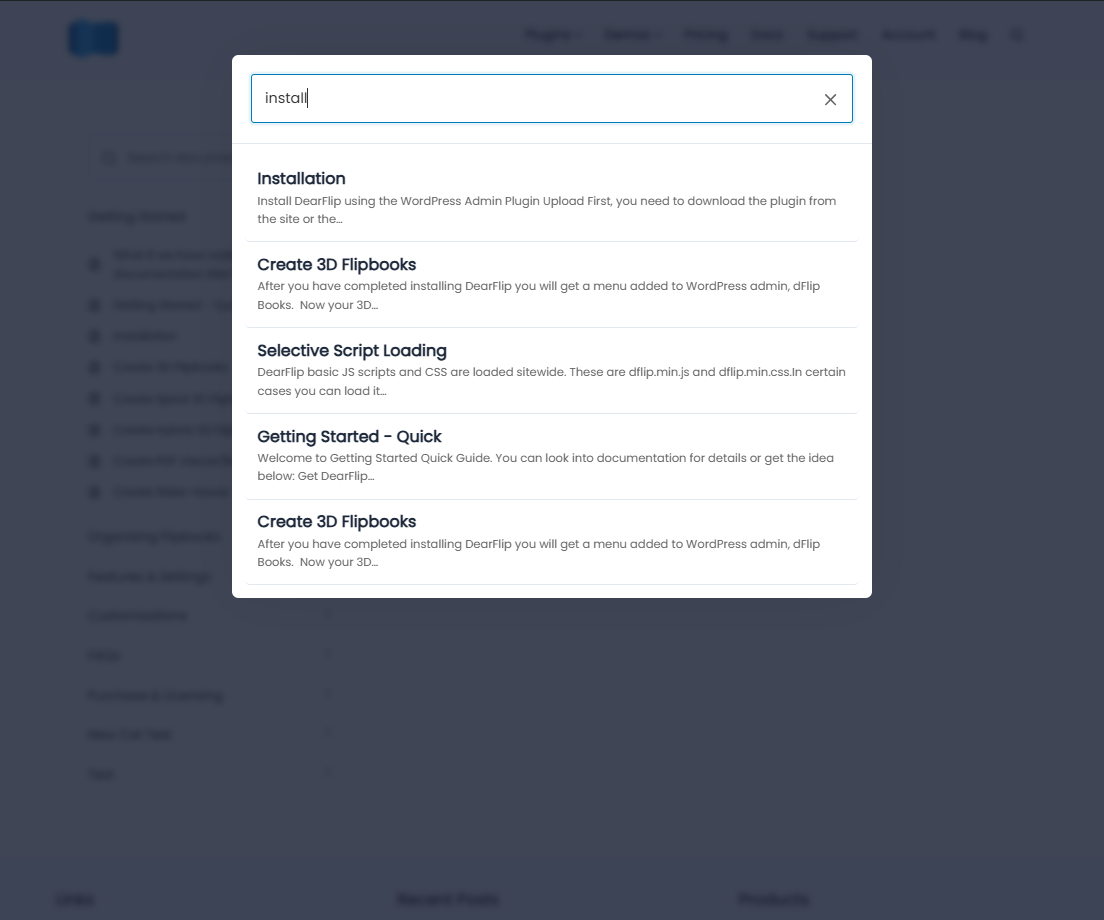
For developers
Is this your plugin? Show off the numbers.
Add a live badge to your site, docs or GitHub README. It updates on its own — no account needed.
Best DearDocs alternatives
All documentation plugins →





FAQ
DearDocs: quick answers
Straight answers, pulled from live WordPress.org data.
Live data from WordPress.org · checked Oct 2, 2026
Is DearDocs free?
Yes. DearDocs is free to download and use from the official WordPress.org plugin directory.
Is DearDocs safe to use in 2026?
DearDocs works, but test it on a staging site before relying on it in 2026. Is rated 5/5 and was last updated 9 months ago, and scores 43/100 on our health check.
How many websites use DearDocs?
DearDocs is active on <10 WordPress websites and has been downloaded 626 times since it launched in December 2025. It was downloaded 51 times in the last 30 days.
Does DearDocs work with WordPress 7.1?
DearDocs is officially tested up to WordPress 6.9.9, while the latest release is 7.1.2. It may still work, but try it on a staging site first.
What PHP version does DearDocs need?
DearDocs requires PHP 7.4 or higher. Most hosts run PHP 8.x today, so it works on any modern WordPress hosting.
When was DearDocs last updated?
The latest version, 1.0.25, was released on January 16, 2026 (9 months ago).
Who makes DearDocs?
DearDocs is developed and maintained by codersuraz.
What are the best alternatives to DearDocs?
The most popular alternatives to DearDocs are BetterDocs (30K+ installs), Echo Knowledge Base (10K+ installs) and WP Help (9K+ installs).
Powered by PageForge
Want thousands of pages that rank like these? Build them in an afternoon.
This directory runs on the same engine as PageForge. Turn any spreadsheet, CSV or API into thousands of fast, SEO-ready WordPress pages — with schema, internal links and AI-written copy baked in.
- CSV, Google Sheets & API data sources
- AI content, schema & internal links per page
- Works with Elementor, Gutenberg, Yoast & Rank Math
- Free on WordPress.org — no credit card


