



Dashboard Summary
Transform your WordPress admin dashboard with beautiful, modern gradient cards that display key metrics at a glance. Dashboard Summary provides a visually stunning way to monitor your WooCommerce store and blog…

Use with caution
Dashboard Summary works, but test it on a staging site before relying on it in 2026. It runs on 20+ sites and was last updated 6 months ago, and scores 46/100 on our health check.
- Small user base (20+ active installs)
- Very few reviews so far
How does it stack up?
Side-by-side on installs, updates, ratings & support



Daily downloads
Download spikes usually follow a new release — each site that auto-updates counts as a download.
Rankings
Where Dashboard Summary stands todayWordPress.org search rankings
Live position in the plugin search, top 100| Keyword | Position |
|---|---|
| admin | >100 |
| dashboard | >100 |
| stats | >100 |
| summary | #39 |
| woocommerce | >100 |
Version adoption
Share of active sites per release.
About Dashboard Summary
From the official readme · v1.1.5Description
Transform your WordPress admin dashboard with beautiful, modern gradient cards that display key metrics at a glance. Dashboard Summary provides a visually stunning way to monitor your WooCommerce store and blog performance without navigating away from your main admin area.
✨ Key Features
🎨 Beautiful Design
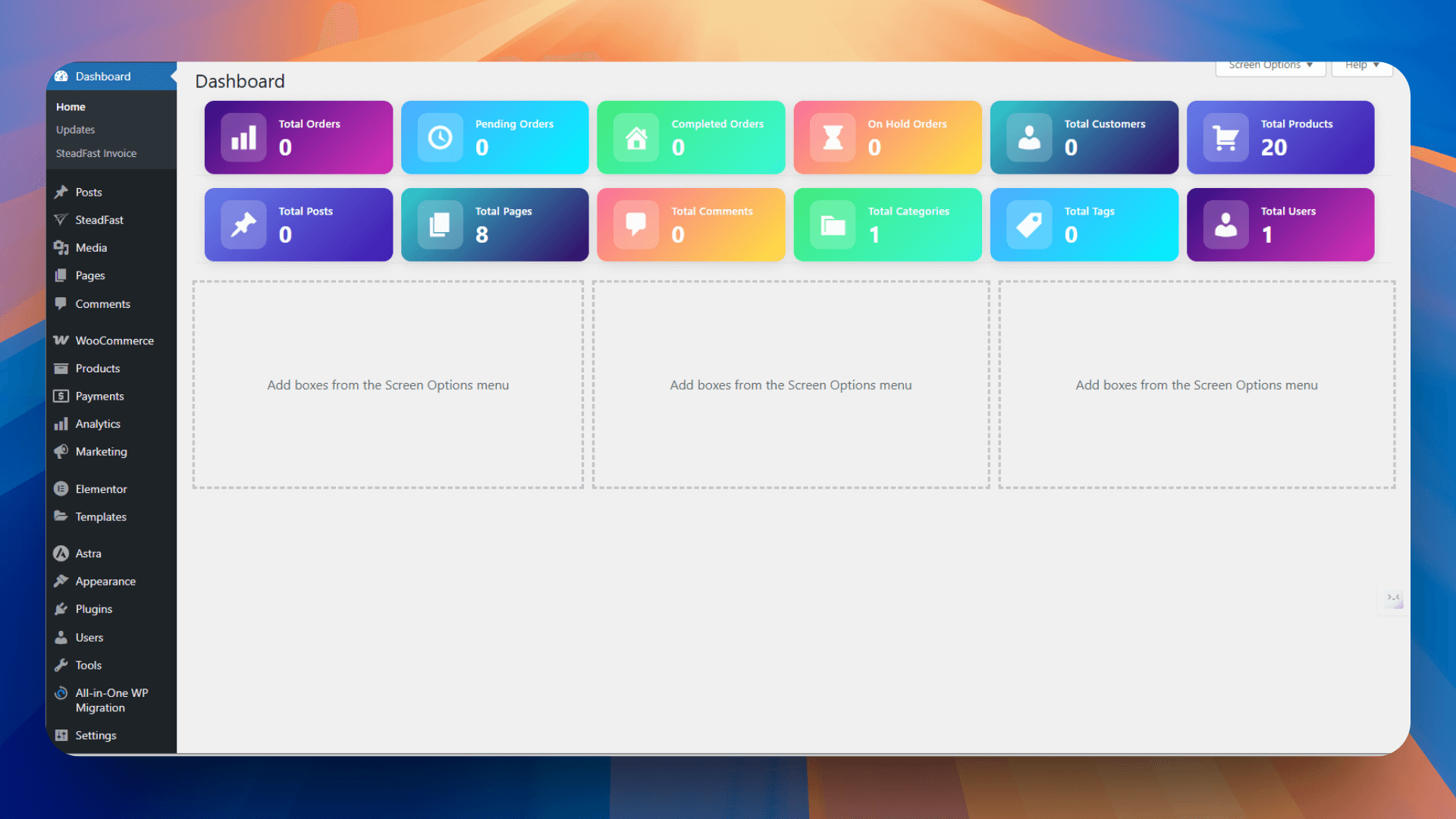
– Colorful Gradient Cards: Modern gradient backgrounds with 6 unique color schemes
– Customizable Colors: Full control over card gradient colors via settings page
– Professional Icons: Clean, modern icons with glassmorphism effects
– Smooth Animations: Hover effects and smooth transitions for better UX
📊 WooCommerce Statistics
– Total Orders with quick link to orders page
– Pending/Processing Orders tracking
– Completed Orders count
– On-Hold Orders monitoring
– Total Customers overview
– Product Count display
📝 Blog Statistics
– Total Posts published
– Total Pages created
– Comments count
– Categories overview
– Tags summary
– User count
⚙️ Advanced Settings
– Toggle WooCommerce and Blog summaries independently
– Professional toggle switches (iOS-style)
– Color picker for each card (start and end gradient colors)
– Live gradient preview
– Reverse color system: WooCommerce uses colors 1-6, Blog uses 6-1
📱 Fully Responsive
– Desktop: 6 cards per row (large screens), 4 cards per row (medium screens)
– Tablet: 3 cards per row with optimized spacing
– Mobile: 2 cards per row with compact design
– Adaptive font sizes and padding for all screen sizes
🔗 Smart Navigation
– All cards are clickable and link to relevant admin pages
– Direct access to orders, products, posts, pages, comments, etc.
– Seamless navigation without leaving dashboard context
🎯 Perfect For
- WooCommerce store owners who want quick insights
- Blog administrators monitoring content metrics
- Agency owners managing multiple sites
- Anyone who wants a beautiful, functional dashboard
🌐 Translation Ready
Fully localized with text domain ‘dashboard-summary’. Ready for translation into any language.
License
This plugin is free software; you can redistribute it and/or modify it under the terms of the GNU General Public License as published by the Free Software Foundation; either version 2 of the License, or (at your option) any later version.
Installation
Automatic Installation
- Go to WordPress admin panel → Plugins → Add New
- Search for “Dashboard Summary”
- Click “Install Now” and then “Activate”
- Navigate to Settings → Dashboard Summary to customize colors and options
Manual Installation
- Download the plugin zip file
- Upload the plugin files to the
/wp-content/plugins/dashboard-summarydirectory - Activate the plugin through the ‘Plugins’ screen in WordPress
- Go to Settings → Dashboard Summary to configure
After Installation
- Visit your WordPress dashboard to see the beautiful cards
- Customize card colors from Settings → Dashboard Summary
- Enable/disable WooCommerce or Blog summaries as needed
- (Optional) Ensure WooCommerce is active for store statistics
Frequently asked questions
Do I need WooCommerce for this plugin to work?
No! The Blog Summary works independently. WooCommerce Summary will only display if WooCommerce is installed and active.
How do I customize the card colors?
Go to Settings → Dashboard Summary. You’ll find color pickers for each of the 6 cards. Choose start and end colors for beautiful gradients. Changes apply immediately after saving.
Can I change the order of colors?
Yes! The plugin uses a smart reverse color system. WooCommerce cards use colors 1-6 in normal order, while Blog cards use colors 6-1 in reverse order for visual variety.
Are the cards clickable?
Absolutely! Each card is a clickable link that takes you directly to the relevant admin page (orders, products, posts, comments, etc.).
Is it mobile responsive?
Yes! The plugin is fully responsive: – Desktop: Up to 6 cards per row – Tablet: 3 cards per row – Mobile: 2 cards per row All with optimized font sizes and spacing.
Can I disable certain features?
Yes, use the toggle switches in Settings → Dashboard Summary to enable/disable WooCommerce and Blog summaries independently.
Will it slow down my dashboard?
No! The plugin is lightweight and optimized for performance. Statistics are loaded efficiently only when viewing the dashboard.
Can I translate it to my language?
Yes! The plugin is translation-ready with text domain ‘dashboard-summary’. Use any translation plugin like Loco Translate.
Does it work with my theme?
Yes! The plugin works with any WordPress theme as it’s added to the admin dashboard area.
Changelog
WooCommerce is no longer required — the plugin now works standalone on any WordPress site for blog statistics. WooCommerce features activate automatically when WooCommerce is installed. Also fixes WordPress Plugin Checker warnings.
1.1.5 – April 1, 2026
- ✨ WooCommerce is now optional — plugin works standalone for blog stats
- ✨ WooCommerce settings toggle only appears when WooCommerce is active
- 🔧 Fixed WordPress Plugin Checker warnings (prepared SQL, object caching, hook prefix)
- 🔧 Removed WooCommerce dependency requirement from plugin header
1.1.4 – March 31, 2026
- 🐛 Fixed order count issue – orders now display correctly regardless of quantity
- 🐛 Fixed customer count issue – all customers now counted correctly
- 🐛 Fixed WooCommerce HPOS compatibility – works with WooCommerce 7.1+
- ⚡ Performance optimization – orders and customers now load efficiently
- 🔧 Added transient caching for dashboard data (1 hour cache)
- 🔧 Added cache clearing on order/product/user/post/comment changes
- 🧪 Updated WordPress compatibility to 7.0
- ✨ WooCommerce is now optional — plugin works standalone for blog stats
- ✨ WooCommerce settings toggle only appears when WooCommerce is active
- ✨ Added HPOS compatibility declaration
1.1.0 – October 23, 2025
- 🎨 Added beautiful gradient backgrounds for all cards
- 🌈 Customizable gradient colors via settings (6 color schemes)
- 🎯 Live gradient preview in settings page
- 🔄 Smart reverse color system (WooCommerce: 1-6, Blog: 6-1)
- 📱 Fully responsive design for all devices
- 🔗 Made all cards clickable with direct navigation
- 💅 Modern glassmorphism icon backgrounds
- ✨ Smooth hover animations and transitions
- 🎚️ iOS-style toggle switches in settings
- 📏 Added spacing between WooCommerce and Blog sections
- 🎨 Professional settings page redesign
- 🔧 Improved mobile layout (2 cards per row)
- 📊 Better card layout with icon on left, content on right
- ⚡ Performance optimizations
- 🐛 Bug fixes and stability improvements
1.0.0 – Initial Release
- Initial release of the plugin
- Basic dashboard summaries for WooCommerce and blog
- Simple checkbox settings
Screenshots

For developers
Is this your plugin? Show off the numbers.
Add a live badge to your site, docs or GitHub README. It updates on its own — no account needed.
Best Dashboard Summary alternatives
All admin plugins →




FAQ
Dashboard Summary: quick answers
Straight answers, pulled from live WordPress.org data.
Live data from WordPress.org · checked Oct 3, 2026
Is Dashboard Summary free?
Yes. Dashboard Summary is free to download and use from the official WordPress.org plugin directory.
Is Dashboard Summary safe to use in 2026?
Dashboard Summary works, but test it on a staging site before relying on it in 2026. It runs on 20+ sites and was last updated 6 months ago, and scores 46/100 on our health check.
How many websites use Dashboard Summary?
Dashboard Summary is active on 20+ WordPress websites and has been downloaded 1,351 times since it launched in October 2024. It was downloaded 63 times in the last 30 days.
Does Dashboard Summary work with WordPress 7.1?
Dashboard Summary is officially tested up to WordPress 7.0.6, while the latest release is 7.1.2. It may still work, but try it on a staging site first.
What PHP version does Dashboard Summary need?
Dashboard Summary requires PHP 7.4 or higher. Most hosts run PHP 8.x today, so it works on any modern WordPress hosting.
When was Dashboard Summary last updated?
The latest version, 1.1.5, was released on April 1, 2026 (6 months ago).
Who makes Dashboard Summary?
Dashboard Summary is developed and maintained by Rejaul Alom Khan.
What are the best alternatives to Dashboard Summary?
The most popular alternatives to Dashboard Summary are Loginizer (1M+ installs), Redux Framework (900K+ installs) and Admin Menu Editor (300K+ installs).
Powered by PageForge
Want thousands of pages that rank like these? Build them in an afternoon.
This directory runs on the same engine as PageForge. Turn any spreadsheet, CSV or API into thousands of fast, SEO-ready WordPress pages — with schema, internal links and AI-written copy baked in.
- CSV, Google Sheets & API data sources
- AI content, schema & internal links per page
- Works with Elementor, Gutenberg, Yoast & Rank Math
- Free on WordPress.org — no credit card


