



Customize Admin
With this plugin you can use customize the appearance of the WordPress login page, dashboard and head section tags.

Solid choice
Customize Admin is a solid plugin choice in 2026, with a few things worth checking first. It runs on 3K+ sites, is rated 3.6/5 and was last updated 6 days ago, and scores 77/100 on our health check.
- Actively developed — last update 6 days ago
- Tested with the latest WordPress (7.1)
- Momentum — downloads up 276.1% vs the previous 30 days
How does it stack up?
Side-by-side on installs, updates, ratings & support



Daily downloads
Download spikes usually follow a new release — each site that auto-updates counts as a download.
Rankings
Where Customize Admin stands todayWordPress.org search rankings
Live position in the plugin search, top 100| Keyword | Position |
|---|---|
| css | >100 |
| custom | >100 |
| dashboard | >100 |
| login | >100 |
| logo | #88 |
Version adoption
Share of active sites per release.
Rating breakdown
★★★★★★★★★★ 3.6 from 5 reviews
About Customize Admin
From the official readme · v1.9.9Description
Customize Admin is a powerful WordPress plugin that puts you in control of your website’s login page and dashboard layout. With its intuitive features, you can effortlessly tailor the look and feel of your admin area to match your brand identity.
Key Features:
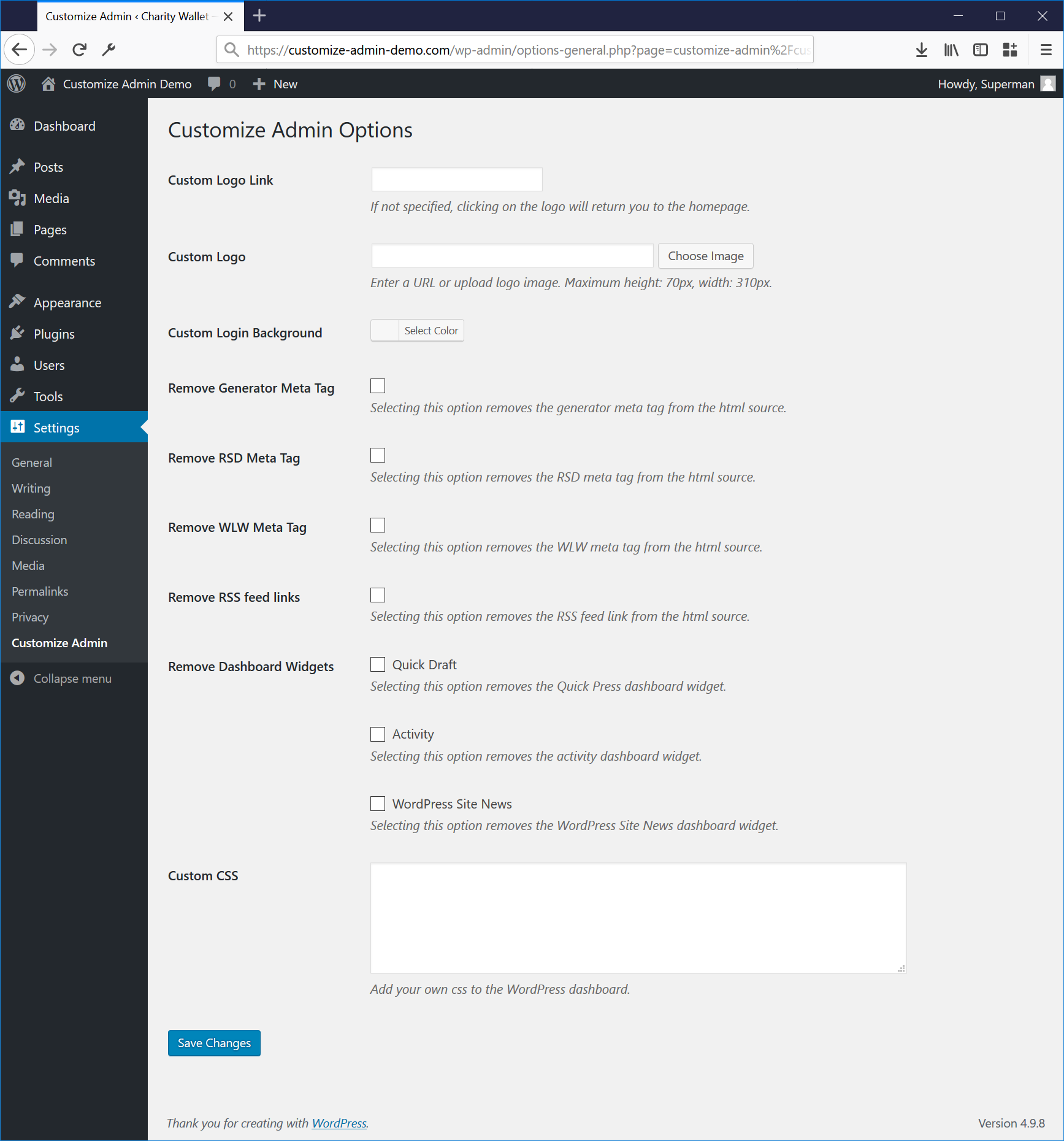
Personalized Login Screen: Easily upload your custom image or logo to the login screen and define the link associated with the logo. Take your brand identity to the forefront and leave a lasting impression on your users.
Streamlined HTML: Trim down and fine-tune your website’s HTML source code by selectively removing meta tags from the head section. Enjoy better control over your site’s code and optimize it for a cleaner, more efficient front-end experience.
Dashboard Widget Management: Take charge of your dashboard widgets! Customize Admin enables you to disable selected widgets, allowing you to declutter and streamline your WordPress dashboard environment.
Want to see the magic of Customize Admin in action? Check out the plugin homepage for more information and an enlightening overview.
Installation
- First you will have to upload the plugin to the
/wp-content/plugins/folder. - Then activate the plugin in the plugin panel.
If you have manage options rights you will see the new Custom Admin Settings menu. - Specify a clickthrough url for the logo if required.
- Specify the url for the custom logo. The path can be relative from the root or include the domain name.
- If you have not yet uploaded a logo, you can do so via the Upload Image button. Make sure you click ‘Insert into Post’. For the best result, use an image of maximum 67px height by 326px width.
- Click Save Changes.
Frequently asked questions
Why did you make another admin logo plugin?
There are already quite a few plugins that offer similar functionality, but the fact that my plugin uses the WordPress Media Library makes it super easy to upload and edit your own logo. I also am not aware of any other plugins that allow you to specify a clickthrough url for the logo. Finally, this plugin is ready to be localized. All you have to do is to use the POT file for translating.
Changelog
1.9.9
WordPress v7.1 compatibility tested.
1.9.8
WordPress v7.0 compatibility tested.
1.9.7
WordPress v6.9 compatibility tested.
1.9.6
WordPress v6.8 compatibility tested.
1.9.4
WordPress v6.7 compatibility tested.
1.9.3
WordPress v6.6 compatibility tested.
Screenshots
For developers
Is this your plugin? Show off the numbers.
Add a live badge to your site, docs or GitHub README. It updates on its own — no account needed.
Best Customize Admin alternatives
All css plugins →



FAQ
Customize Admin: quick answers
Straight answers, pulled from live WordPress.org data.
Live data from WordPress.org · checked Sep 28, 2026
Is Customize Admin free?
Yes. Customize Admin is free to download and use from the official WordPress.org plugin directory.
Is Customize Admin safe to use in 2026?
Customize Admin is a solid plugin choice in 2026, with a few things worth checking first. It runs on 3K+ sites, is rated 3.6/5 and was last updated 6 days ago, and scores 77/100 on our health check.
How many websites use Customize Admin?
Customize Admin is active on 3K+ WordPress websites and has been downloaded 130,290 times since it launched in December 2010. It was downloaded 2,362 times in the last 30 days.
Does Customize Admin work with WordPress 7.1?
Yes. The developer has tested Customize Admin up to WordPress 7.1.2, the latest release. It requires WordPress 3.5 or newer.
When was Customize Admin last updated?
The latest version, 1.9.9, was released on September 21, 2026 (6 days ago).
Who makes Customize Admin?
Customize Admin is developed and maintained by Johan van der Wijk.
What are the best alternatives to Customize Admin?
The most popular alternatives to Customize Admin are WPCode (3M+ installs), Code Snippets (1M+ installs) and Simple Custom CSS Plugin (100K+ installs).
Powered by PageForge
Want thousands of pages that rank like these? Build them in an afternoon.
This directory runs on the same engine as PageForge. Turn any spreadsheet, CSV or API into thousands of fast, SEO-ready WordPress pages — with schema, internal links and AI-written copy baked in.
- CSV, Google Sheets & API data sources
- AI content, schema & internal links per page
- Works with Elementor, Gutenberg, Yoast & Rank Math
- Free on WordPress.org — no credit card


