


Widget CSS Classes
Add custom classes and ids plus first, last, even, odd, and numbered classes to your widgets.

Use with caution
Widget CSS Classes works, but test it on a staging site before relying on it in 2026. It runs on 80K+ sites, is rated 4.9/5 and was last updated 2 years ago, and scores 52/100 on our health check.
- Proven at scale on 80K+ active sites
- Loved by users — 4.9/5 from 74 reviews
- No update in over a year
- Only tested up to WordPress 6.7 (latest is 7.1)
How does it stack up?
Side-by-side on installs, updates, ratings & support


Daily downloads
Download spikes usually follow a new release — each site that auto-updates counts as a download.
Rankings
Where Widget CSS Classes stands todayWordPress.org search rankings
Live position in the plugin search, top 100| Keyword | Position |
|---|---|
| classes | #4 |
| css | #57 |
| widget classes | #5 |
| widget css | #15 |
| widgets | >100 |
Version adoption
Share of active sites per release.
Rating breakdown
★★★★★★★★★★ 4.9 from 74 reviews
About Widget CSS Classes
From the official readme · v1.5.4.1Description
Widget CSS Classes gives you the ability to add custom classes and ids to your WordPress widgets
Please note that this plugin doesn’t enable you to enter custom CSS. You’ll need to edit your theme’s style.css or add another
plugin that allows you to input custom CSS.
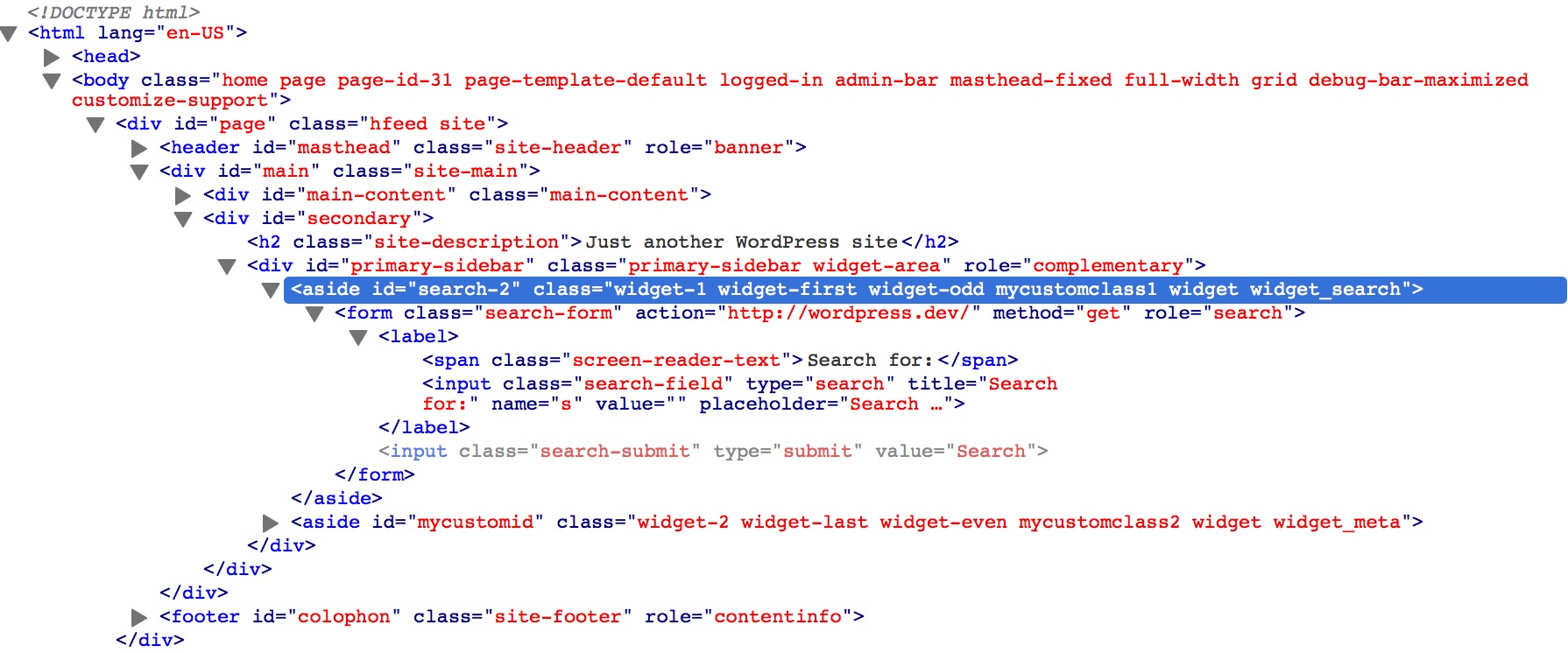
This plugin also adds additional classes to widgets to help you style them easier:
- widget-first: added to the first widget in a sidebar
- widget-last: added to the last widget in a sidebar
- widget-odd: added to odd numbered widgets in a sidebar
- widget-even: added to even numbered widgets in a sidebar
- widget-#: added to every widget, such as widget-1, widget-2
Features
- Adds a text field to a widget for defining a class
- You can specify multiple classes by putting a space between them
- Optionally adds checkboxes with predefined classes
- Optionally adds a text field to add an id to a widget
- Adds first and last classes to the first and last widget instances in a sidebar
- Adds even/odd classes to widgets
- Adds number classes to widgets
- Fully translatable
- Multi-site compatible
- Compatible with Widget Logic, Widget Context, and WP Page Widget plugins
- Has filters and hooks for customizing output including class names
Credits
- Adding Custom CSS Classes to WordPress Widgets
- Add .first & .last CSS Class Automatically To WordPress Widgets
- Widget Context compatibility fix provided by Joan Piedra
- Slovak translation by Branco WebHostingGeeks.com
- Polish translation added, Slovak translation files renamed by Tomasz Wesołowski
- Spanish translation by Maria Ramos at WebHostingHub
- Serbo-Croatian translation by Borisa Djuraskovic at WebHostingHub
- Dutch translation and predefined classes fix by Jory Hogeveen at Keraweb
- Russian translation by Наталия Завьялова
- Swedish translation by Olle Gustafsson
- Fix ids notice by Ricardo Lüders
- Brazilian Portuguese translation by Jonathan Xavier at Mealfan
Installation
- Upload the folder /widget-css-classes/ to the /wp-content/plugins/ directory
- Activate the plugin through the Plugins menu in WordPress
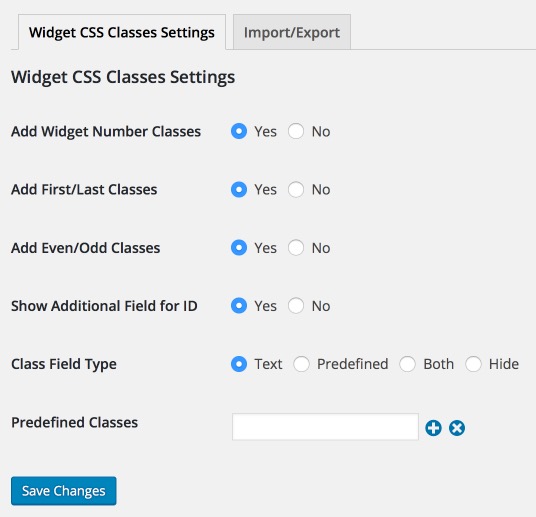
- Configure the settings under Settings > Widget CSS Classes
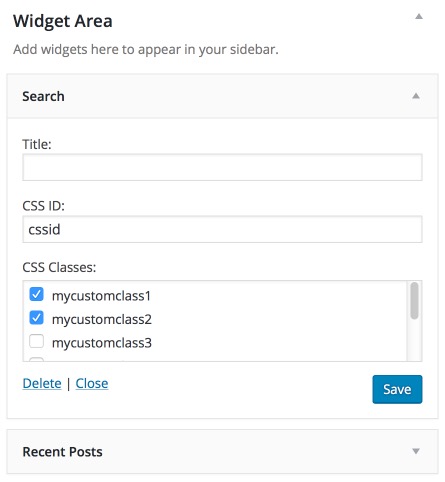
- Visit Appearance > Widgets to add or change the custom classes and ids for a widget.
- Expand the appropriate widget in the desired sidebar.
- You’ll see a field labeled CSS Class. Depending on your settings, this will be a text field and/or checkboxes.
- If you are using the text field you can enter multiple class names by separating them with a space.
- If you’ve enabled the id field, you will see a text field called CSS ID.
Frequently asked questions
Why aren’t the classes showing up in my widget?
You need to make sure you have an HTML element defined for before_widget and after_widget in your active theme’s register_sidebar functions, usually located in your theme’s functions.php (/wp-content/themes/yourtheme/functions.php). This HTML element must have class and id attributes. This plugin will not work if before_widget and after_widget are blank. Example: register_sidebar( array( 'name' => 'Sidebar', 'before_widget' => '', 'after_widget' => '', 'before_title' => '', 'after_title' => '' ) );
How do I add the CSS for my custom class?
There are two ways: Edit your theme’s style.css file (usually located in /wp-content/themes/yourtheme/). Use a plugin such as Simple Custom CSS.
How I export the Settings?
You can export the Settings from Settings > Widget CSS Classes > Import/Export.
What should I do if I find a bug?
Please file a bug report on GitHub.
Changelog
1.5.4.1
- Tested with WP 5.5.
- Update plugin owner.
1.5.4
- Compatibility: Fix for old single widgets (remove notice). #37 (props @westonruter)
- Tested with WP 5.2.
1.5.3
- Compatibility: dFactory Responsive Lightbox widget option. #33
- Tested with WP 5.0.
1.5.2.1
- i18n: Remove sv_SE translation from the plugin directory. It’s 95% on translate.wordpress.org and accepted as the better version. #23
- Documentation: Readme & Wiki. #31
- Compatibility: Tested with WordPress 4.9
Detailed info: PR on GitHub
1.5.2
- Enhancement: Make translations of core widget classes optional instead of default. #29
- Enhancement: Allow vertical resize of defined classes box for CSS3 compatible browsers.
Detailed info: PR on GitHub
1.5.1
- Fix: Widget Logic
widget_contentfilter compatibility. #27 - Enhancement: Make uninstall script compatible with network installations.
Screenshots

For developers
Is this your plugin? Show off the numbers.
Add a live badge to your site, docs or GitHub README. It updates on its own — no account needed.
Best Widget CSS Classes alternatives
All classes plugins →


FAQ
Widget CSS Classes: quick answers
Straight answers, pulled from live WordPress.org data.
Live data from WordPress.org · checked Sep 28, 2026
Is Widget CSS Classes free?
Yes. Widget CSS Classes is free to download and use from the official WordPress.org plugin directory.
Is Widget CSS Classes safe to use in 2026?
Widget CSS Classes works, but test it on a staging site before relying on it in 2026. It runs on 80K+ sites, is rated 4.9/5 and was last updated 2 years ago, and scores 52/100 on our health check.
How many websites use Widget CSS Classes?
Widget CSS Classes is active on 80K+ WordPress websites and has been downloaded 1,136,442 times since it launched in July 2012. It was downloaded 1,702 times in the last 30 days.
Does Widget CSS Classes work with WordPress 7.1?
Widget CSS Classes is officially tested up to WordPress 6.7.9, while the latest release is 7.1.2. It may still work, but try it on a staging site first.
What PHP version does Widget CSS Classes need?
Widget CSS Classes requires PHP 5.2.4 or higher. Most hosts run PHP 8.x today, so it works on any modern WordPress hosting.
When was Widget CSS Classes last updated?
The latest version, 1.5.4.1, was released on November 12, 2024 (2 years ago).
Who makes Widget CSS Classes?
Widget CSS Classes is developed and maintained by Jory Hogeveen.
What are the best alternatives to Widget CSS Classes?
The most popular alternatives to Widget CSS Classes are Custom Classes (2K+ installs), Widget Classes (1K+ installs) and Ambrosite Body Class Enhanc… (200+ installs).
Powered by PageForge
Want thousands of pages that rank like these? Build them in an afternoon.
This directory runs on the same engine as PageForge. Turn any spreadsheet, CSV or API into thousands of fast, SEO-ready WordPress pages — with schema, internal links and AI-written copy baked in.
- CSV, Google Sheets & API data sources
- AI content, schema & internal links per page
- Works with Elementor, Gutenberg, Yoast & Rank Math
- Free on WordPress.org — no credit card


