


CraftyWebbies Pillar & Cluster Manager
Organise your WordPress blog posts using the Pillar / Cluster content architecture — a proven SEO strategy for building topical authority.

Use with caution
CraftyWebbies Pillar & Cluster… works, but test it on a staging site before relying on it in 2026. Was last updated 3 months ago, and scores 55/100 on our health check.
- Small user base (<10 active installs)
- Very few reviews so far
How does it stack up?
Side-by-side on installs, updates, ratings & support


Daily downloads
Download spikes usually follow a new release — each site that auto-updates counts as a download.
Rankings
Where CraftyWebbies Pillar & Clus… stands todayWordPress.org search rankings
Live position in the plugin search, top 100| Keyword | Position |
|---|---|
| blog | >100 |
| cluster | #30 |
| content strategy | >100 |
| pillar | #6 |
| seo | >100 |
About CraftyWebbies Pillar & Cluster Manager
From the official readme · v1.0.0Description
CraftyWebbies Pillar & Cluster Manager brings a clean, structured way to manage your blog content directly inside the WordPress admin. Instead of a flat list of posts, you can organise every article into a topic hierarchy:
- Pillar post — the comprehensive, authoritative guide on a broad topic.
- Cluster posts — focused articles that go deep on a specific sub-topic and link back to the pillar.
This structure is recommended by SEO experts because it signals topical authority to search engines and creates a better reading experience for your audience.
Features
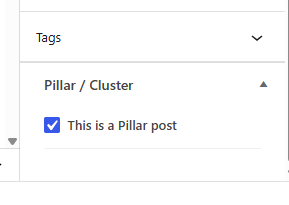
- Meta box on every post — tick a checkbox to mark a post as a Pillar, or select its parent Pillar from a dropdown to make it a Cluster.
- “Pillar Posts” submenu under Posts — a dedicated view that shows only your pillar content.
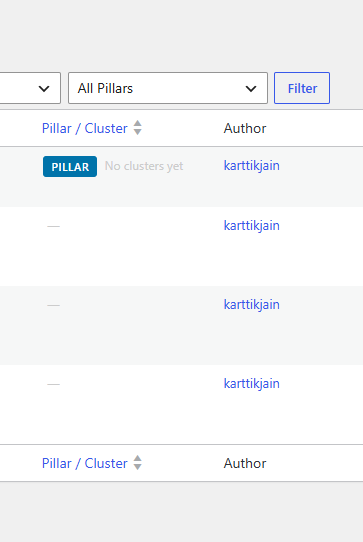
- Custom admin column on the Posts list — shows a PILLAR or CLUSTER badge, cluster count with a one-click filter, or the parent pillar name.
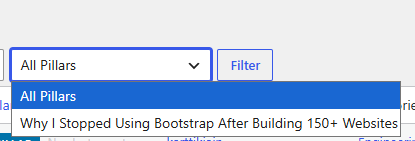
- Filter dropdown — quickly filter the Posts list to see all clusters for any pillar.
- REST API support — all meta fields are exposed via the REST API. A virtual
_cwpcm_pillar_urlfield lets you link a cluster by passing the pillar’s URL instead of its ID. - Template helper functions —
cwpcm_get_cluster_posts(),cwpcm_get_pillar_post(),cwpcm_is_pillar(),cwpcm_is_cluster(), andcwpcm_get_all_pillars()for use in your theme templates. - Translation-ready — fully internationalised with a
craftywebbies-pillar-cluster-managertext domain.
Template Helpers
Use these functions in your theme templates:
cwpcm_is_pillar( get_the_ID() ) — returns true if the current post is a Pillar.
cwpcm_is_cluster( get_the_ID() ) — returns true if the current post is a Cluster.
cwpcm_get_pillar_post( get_the_ID() ) — returns the parent WP_Post pillar object for a cluster.
cwpcm_get_cluster_posts( get_the_ID() ) — returns an array of published cluster WP_Post objects for a pillar.
cwpcm_get_all_pillars() — returns all published pillar posts.
Credits
Developed by Kartik Jain.
Installation
- Upload the
craftywebbies-pillar-cluster-managerfolder to/wp-content/plugins/. - Activate the plugin via Plugins → Installed Plugins.
- Open any post and look for the Pillar / Cluster meta box in the sidebar.
- Mark a post as a Pillar, then link other posts as Clusters of that Pillar.
Frequently asked questions
Does this work with custom post types?
Currently the plugin works with the built-in post post type. Support for custom post types is planned for a future release.
Will activating this plugin affect my existing posts?
No. The plugin only adds new meta fields. Existing posts are unaffected until you explicitly set them as Pillars or Clusters.
Can a post be both a Pillar and a Cluster?
No. If you mark a post as a Pillar, any existing cluster assignment is removed, and vice versa.
Is this compatible with the Block Editor (Gutenberg)?
Yes. The meta box appears in the sidebar of both the Classic Editor and the Block Editor.
Screenshots

For developers
Is this your plugin? Show off the numbers.
Add a live badge to your site, docs or GitHub README. It updates on its own — no account needed.
Best CraftyWebbies Pillar & Cluste… alternatives
All blog plugins →




FAQ
CraftyWebbies Pillar & Cluster Mana…: quick answers
Straight answers, pulled from live WordPress.org data.
Live data from WordPress.org · checked Sep 28, 2026
Is CraftyWebbies Pillar & Cluster… free?
Yes. CraftyWebbies Pillar & Cluster… is free to download and use from the official WordPress.org plugin directory.
Is CraftyWebbies Pillar & Cluster… safe to use in 2026?
CraftyWebbies Pillar & Cluster… works, but test it on a staging site before relying on it in 2026. Was last updated 3 months ago, and scores 55/100 on our health check.
How many websites use CraftyWebbies Pillar & Cluster…?
CraftyWebbies Pillar & Cluster… is active on <10 WordPress websites and has been downloaded 164 times since it launched in July 2026. It was downloaded 51 times in the last 30 days.
Does CraftyWebbies Pillar & Cluster… work with WordPress 7.1?
CraftyWebbies Pillar & Cluster… is officially tested up to WordPress 7.0.6, while the latest release is 7.1.2. It may still work, but try it on a staging site first.
What PHP version does CraftyWebbies Pillar & Cluster… need?
CraftyWebbies Pillar & Cluster… requires PHP 8.0 or higher. Most hosts run PHP 8.x today, so it works on any modern WordPress hosting.
When was CraftyWebbies Pillar & Cluster… last updated?
The latest version, 1.0.0, was released on July 10, 2026 (3 months ago).
Who makes CraftyWebbies Pillar & Cluster…?
CraftyWebbies Pillar & Cluster… is developed and maintained by Kartik Jain.
What are the best alternatives to CraftyWebbies Pillar & Cluster…?
The most popular alternatives to CraftyWebbies Pillar & Cluster… are SiteOrigin Widgets Bundle (400K+ installs), All In One Favicon (60K+ installs) and Gum Addon for Elementor (50K+ installs).
Powered by PageForge
Want thousands of pages that rank like these? Build them in an afternoon.
This directory runs on the same engine as PageForge. Turn any spreadsheet, CSV or API into thousands of fast, SEO-ready WordPress pages — with schema, internal links and AI-written copy baked in.
- CSV, Google Sheets & API data sources
- AI content, schema & internal links per page
- Works with Elementor, Gutenberg, Yoast & Rank Math
- Free on WordPress.org — no credit card


