


Conformitico Recesso 54-bis for WooCommerce
Right-of-withdrawal toolkit (Directive 2023/2673): form, checkout consents, model form, Article 16 exclusions. With or without WooCommerce.

Solid choice
Conformitico Recesso 54-bis for… is a solid plugin choice in 2026, with a few things worth checking first. It runs on 30+ sites, is rated 5/5 and was last updated 3 days ago, and scores 78/100 on our health check.
- Actively developed — last update 3 days ago
- Tested with the latest WordPress (7.1)
- Small user base (30+ active installs)
- Very few reviews so far
How does it stack up?
Side-by-side on installs, updates, ratings & support



Daily downloads
Download spikes usually follow a new release — each site that auto-updates counts as a download.
Rankings
Where Conformitico Recesso 54-bis… stands todayWordPress.org search rankings
Live position in the plugin search, top 100| Keyword | Position |
|---|---|
| compliance | >100 |
| consumer rights | #10 |
| GDPR | >100 |
| withdrawal | #42 |
| woocommerce | >100 |
Version adoption
Share of active sites per release.
Rating breakdown
★★★★★★★★★★ 5 from 1 reviews
About Conformitico Recesso 54-bis for WooComm…
From the official readme · v1.2.0Description
From 19 June 2026, EU Directive 2023/2673 requires every online retailer in the European Union to offer a digital withdrawal function that is at least as easy to use as the purchase flow. This plugin ships the complete set of building blocks an EU store needs to put that function in place — and works as a self-contained tool with or without WooCommerce.
It is built with Italian e-commerce in mind (the “diritto di recesso” rules of art. 52 ff. of the Codice del Consumo and the new art. 54-bis), but the interface is in English and the plugin is fully translation-ready, so a shop that also sells across the EU can deliver the same workflow in several languages.
Works out of the box, everything included. Activate, review the withdrawal page the plugin prepares for you, and you are live: no complex setup, no PRO version, no feature locked behind a paywall. Guest orders, configurable deadline, translations, audit log and GDPR tools are all part of the free plugin.
Multilingual by design
- Base UI in English, the source language, with a bundled Italian (it_IT) translation ready out of the box.
- Designed for Italian online shops that may also sell abroad: translation-ready for EN/FR/DE and any other locale.
- Compatible with WPML, Polylang and Loco Translate. Texts you enter in the settings (form intro, consent texts, excluded-notice texts, status-email bodies) are registered for translation through the bundled
wpml-config.xml, so multilingual sites can translate them per language. - Links generated by the plugin (withdrawal page button, printable Annex I.B form, excluded-product link, the
[r54b_link]shortcode) resolve to the correct page translation on WPML and Polylang sites.
Core features
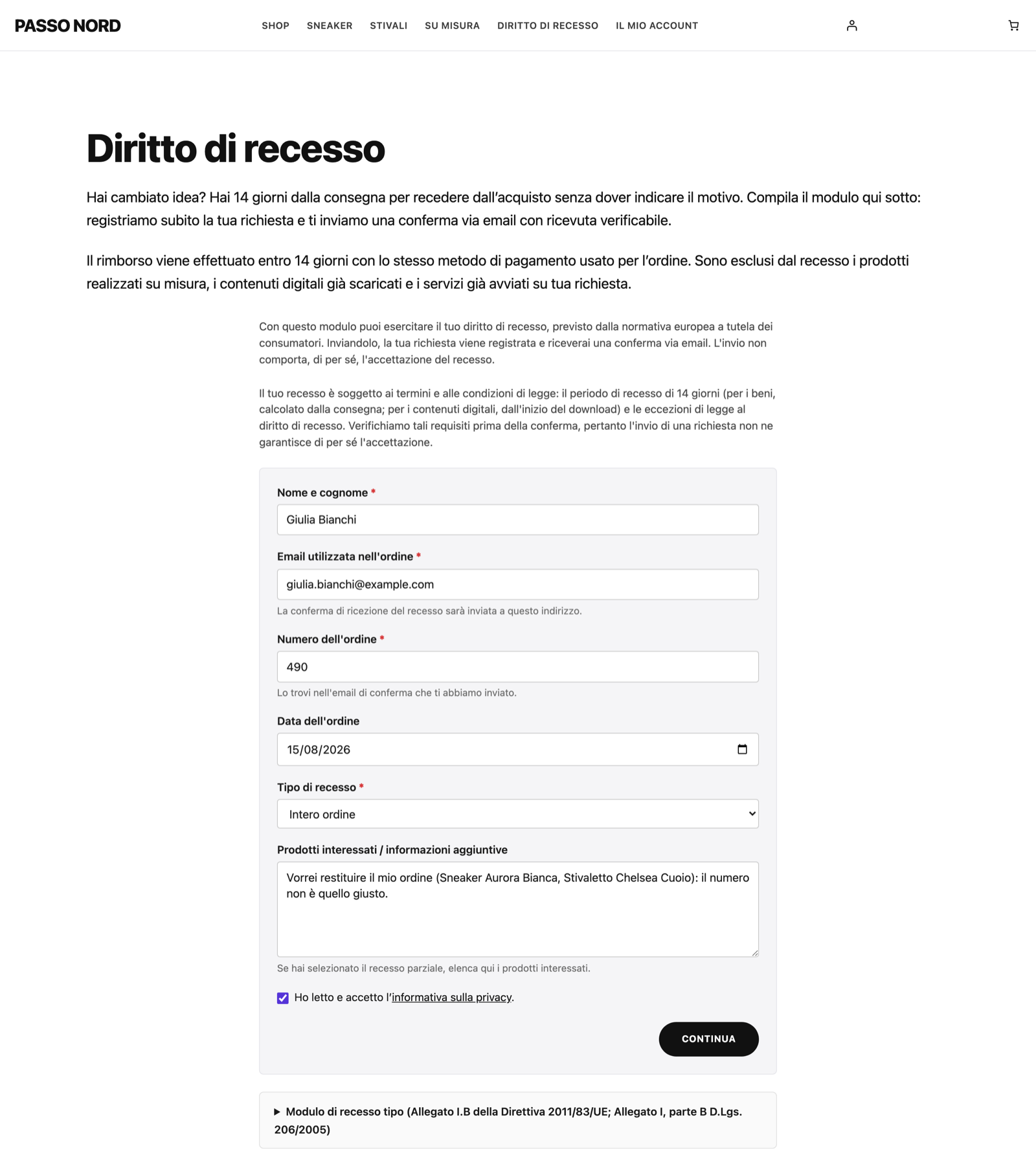
- Two-step confirmation flow (Art. 11a(3)): the public form leads to a read-only review screen with a dedicated “Confirm withdrawal” button. The request is registered only when that button is pressed, which avoids the unintended exercise of the right. The intermediate state is held server-side in a single-use token, so it also works without JavaScript.
- Durable-medium acknowledgement (Art. 11a(4)): the confirmation email reproduces the full content of the declaration (name, order, order date, scope, affected products) plus the exact date and time of submission, carrying a verifiable SHA-256 receipt hash as tamper-evident proof — recomputable from the stored fields if a dispute arises.
- Model withdrawal form (Annex I.B, Directive 2011/83/EU) generated dynamically from your shop data, shown as a collapsible block below the public form, with a printable view on the same URL. Helps meet the pre-contractual information obligation of Art. 6(1)(h).
- Checkout consent checkboxes for the two consents the directive expects when applying specific exceptions:
- Mandatory consent for digital content (Art. 16(m)) — blocks the place-order step until accepted.
- Optional consent for services started within the 14-day window (Art. 14(4)(a)) — enables pro-rated billing if the customer later withdraws.
Each consent is stored on the order with the exact text shown, accepted/declined state, timestamp, IP and user agent, as durable proof.
- Article 16 exclusions per product and per category with full subcategory inheritance, driven by a single “Withdrawal status” dropdown (Standard, Digital content, Service started early, Other Article 16 exception) that also sets the matching checkout consent.
- Configurable excluded-product notice, rendered between price and add-to-cart on single product pages, with separate title and body for digital content and for other Article 16 exceptions.
- Request log stored as a private custom post type with a status lifecycle (pending → accepted → rejected → completed), customer details, scope (full / partial), IP, user agent and UTC submission timestamp for legal traceability.
- Role-based access: choose which user roles, besides the administrator, may view and manage requests, because each request holds personal data.
- Status emails on a durable medium: an acknowledgement email on confirmation and a follow-up email on every status transition, with editable bodies and a configurable sender. A notification email is also sent to the shop admin, with reply-to set to the customer.
- Native GDPR integration: a suggested Privacy Policy snippet plus a personal-data exporter and eraser, keyed on the customer email — no second GDPR plugin required.
WooCommerce features (auto-enabled when WooCommerce is active)
- My Account → Right of withdrawal endpoint with a per-order “Withdraw” button while the order is in an eligible status, deep-linked to the form with the order pre-filled.
- Withdrawal notice injected into transactional emails (processing, completed, customer invoice) with a direct link to the pre-filled form. Eligible statuses are configurable; admin emails never receive the notice.
- Order/email verification: the request is matched to a real order and gated by the configured eligible statuses. The 14-day deadline is surfaced as an advisory flag for the admin rather than an automatic rejection, since the period legally runs from delivery.
- Private order notes added at every lifecycle step (received, accepted, rejected, completed), including any admin comment.
- HPOS support, declared via
FeaturesUtil::declare_compatibility().
Standalone mode
The form, shortcode, request log, email notifications, SHA-256 receipt hash, Annex I.B model and GDPR integration all run without WooCommerce. The plugin always lives under its own top-level Recesso 54-bis menu with a Settings submenu — the same path with or without WooCommerce. Activating WooCommerce later lights up the store features; deactivating it leaves the standalone features intact.
Shortcodes
[r54b_form]— embeds the withdrawal form anywhere.[r54b_link]— a permanent link to the withdrawal page for any footer, widget area or template part, helping meet the “clearly identifiable” requirement of Article 11a.[r54b_avviso_esclusione]— places the excluded-product notice with page builders (Divi, Elementor, Bricks, ShopLentor) that render their own product template and skip the standard WooCommerce hooks.
Built for production
- Conditional asset loading: CSS only loads on the withdrawal page, on single-product pages that actually show the excluded notice, and on the plugin admin screens.
- Escaped output, sanitized input, capability checks and nonces on every admin action; honeypot anti-spam and CSRF nonces on the public form.
- Documented filters and actions so developers and agencies can extend the plugin without forking.
- PHP 7.4+, WordPress 6.0+, WooCommerce 7.0+ (optional).
A note on legal compliance
This plugin is a technical tool, not legal advice. It provides building blocks to help you implement the right-of-withdrawal function, but it cannot guarantee compliance on its own: that depends on your business model, your catalogue and your jurisdiction. Review the texts and the workflow with a consumer-law advisor before relying on them.
About Conformitico
Recesso 54-bis is built and maintained by Conformitico, a team of lawyers and technicians specialised in e-commerce legal compliance. Beyond this free plugin, Conformitico offers professional review of the withdrawal texts the plugin generates and drafting of your store’s Terms & Conditions. Learn more at https://www.conformitico.it/. These services are entirely optional — the plugin is and remains free and fully functional on its own.
Credits
This plugin builds on the foundations of “EU Withdrawal Compliance” by Fernando Tellado, released under the GPLv2 or later. Recesso 54-bis is an independent, restructured and Italian-specialised work, distributed under the same licence in the spirit of the GPL.
Installation
- Upload the plugin folder to
/wp-content/plugins/, or install the ZIP from Plugins → Add New → Upload Plugin. - Activate the plugin from the Plugins screen.
- The “Withdraw from contract” button is live in My Account for orders in Processing and Completed status, and a “Right of withdrawal” page with the form and a sample legal template is created as a draft.
- Optional: run the two-step quick setup from the activation notice (or from Recesso 54-bis → Overview) to confirm the notification email and the eligible order statuses.
- Review the sample legal text of the withdrawal page, delete the exclusion sections that do not apply to your shop, publish it and link it from your menu or footer. An admin notice reminds you until the page is published.
Frequently asked questions
Do I need to configure anything after activation?
No — the plugin works right after activation with sensible defaults: the “Withdraw from contract” button appears for orders in Processing and Completed status (with WooCommerce), and a “Right of withdrawal” page is prepared as a draft for you to review and publish; notifications go to the site admin email. The optional two-step quick setup, reachable from the activation notice or from Recesso 54-bis → Overview, only lets you confirm the notification email and the eligible order statuses — everything else can be fine-tuned later under Settings, with no obligation to do so.
Does the form reject requests after the 14-day deadline?
No, not by default. The 14-day period legally starts when the goods are delivered (or, for digital content, when the download begins) — a date the shop cannot detect automatically — so auto-rejecting on the order or completion date could turn away customers who are still within their legal window. Instead the plugin flags requests that look past the approximate window in the admin notification and lets you check the real delivery date and decide. You can tune the advisory calculation (order date vs. completion date, plus grace days) under Recesso 54-bis → Settings. If your start date is…
How do I mark products excluded from the right of withdrawal (Article 16)?
Use the single Withdrawal status dropdown, available per category and per product: By category: edit a category under Products → Categories and pick a status — for example Other Article 16 exception for perishable or custom-made goods, or Digital content (Art. 16(m)) for sealed digital content. Every product in that category and its descendants inherits it. By product: edit the product, open the General tab and pick a status. The default is Inherit from category; pick any other value (including Standard) to override for that product only. When a request lands on an order with excluded items…
The excluded-product notice does not appear with my page builder. What can I do?
Page builders such as Divi, Elementor, Bricks or ShopLentor render their own single-product template and skip the standard WooCommerce hook where the notice is injected. Drop the [r54b_avviso_esclusione] shortcode into your product layout (most builders have a “Shortcode” element) and the notice will print for the current product whenever it is flagged as excluded. With no attributes it resolves the product being viewed; pass id="123" to target a specific product.
How do the checkout consent checkboxes work (Art. 16(m) and Art. 14(4)(a))?
When the cart contains flagged products, the plugin can inject two consent checkboxes at checkout: Mandatory (Art. 16(m)) for digital content: the customer must accept it to complete the order; without it recorded, the customer keeps the 14-day right even after accessing the content. Optional (Art. 14(4)(a)) for services started within the window: if accepted, the trader may charge a pro-rated amount on an early withdrawal; without it, an early withdrawal forces a full refund. Each checkbox appears only when the cart needs it, on both the classic checkout and the WooCommerce Checkout block…
I sell to businesses (B2B). Can I exclude them?
The right of withdrawal protects consumers (natural persons acting outside their trade or profession), not business buyers, but the plugin never decides that for you. Enable Consumer self-declaration under Recesso 54-bis → Settings and the form shows a required checkbox where the buyer declares they purchased as a consumer; a business that cannot declare it self-excludes, and the declaration is stored with the request as proof. It is off by default. The r54b_show_consumer_check filter lets you decide per order (VIES validation, a customer-type field, etc.).
Does it include the Annex I.B model withdrawal form?
Yes. It is generated dynamically from your shop name, address and contact email, with an optional trader phone from settings. It appears as a collapsible block below the public form and has a printable view on the same page. Providing this model is a pre-contractual information obligation under Art. 6(1)(h) of Directive 2011/83/EU; the online function added by Directive 2023/2673 complements but does not replace it.
What is the verification code in the customer email?
It is a SHA-256 hash computed from the request data (post ID, customer name, email, order reference, scope, order date and submission timestamp). The customer keeps the email as tamper-evident proof on a durable medium. If a dispute arises later, recompute the hash from the stored fields with the r54b_compute_receipt_hash() helper and confirm the original submission was not altered.
Where are requests stored and who can manage them?
Each request is a private custom post type entry (r54b_richiesta), not publicly accessible from the frontend, managed under the top-level Recesso 54-bis menu. Because each request holds personal data (name, email, IP), you choose under Recesso 54-bis → Settings → Permissions which roles, besides the administrator, may view and manage them. The administrator always has access.
Does it support HPOS (High-Performance Order Storage)?
Yes. The plugin declares HPOS compatibility on load.
Does the plugin work without WooCommerce?
Yes. The form, shortcode, request log, email notifications, SHA-256 receipt hash, Annex I.B model and GDPR integration all run as a standalone tool under their own Recesso 54-bis menu. When WooCommerce is active, the plugin adds order/email validation, the My Account endpoint, the email notice, private order notes and the Article 16 product/category exclusions on top.
Can I customise the emails?
Yes. Under Recesso 54-bis → Settings you can set the sender (“From name” and “From address”) and edit the body of the accepted, rejected and completed status emails; left empty, each falls back to the bundled default. All strings remain translatable through the text domain. Emails are sent in plain text.
How do I set the Privacy Policy link shown in the form?
The form uses the Privacy Policy page configured in WordPress itself, so there is no separate setting in the plugin. Go to Settings → Privacy, select your page (it must be published) and click Use This Page: the consent checkbox will link to it automatically. If no Privacy Policy page is set, the checkbox shows a plain confirmation without a link.
Which hooks does the plugin expose for developers?
Filters: r54b_grace_days — extra days added to the advisory deadline. r54b_allowed_statuses — order statuses (without the wc- prefix) for which the button and email notice are offered. r54b_email_ids — WooCommerce email IDs where the withdrawal notice is injected (return an empty array to remove it). r54b_allow_unverified_order — return true to accept submissions whose order number cannot be matched to a real order. r54b_pre_resolve_wc_order — short-circuit the order resolver (return a WC_Order, false, or null to fall through). r54b_resolve_wc_order — late filter receiving the resolved order…
Is this plugin enough to comply with EU Directive 2023/2673?
It covers the functional building blocks the directive imposes EU-wide from 19 June 2026: a discoverable digital withdrawal function, eligibility by order status with an advisory deadline flag, Article 16 exclusions with subcategory inheritance, durable-medium proof via the SHA-256 receipt hash, the Annex I.B model form and the checkout consent checkboxes for the Art. 16(m) and Art. 14(4)(a) exceptions, plus operational tooling such as the status lifecycle and native GDPR integration. Legal compliance ultimately depends on your business model, catalogue and jurisdiction; the plugin provides…
Can I get my withdrawal texts reviewed by a lawyer?
Yes. The plugin generates sample legal texts (the withdrawal page, Article 59 exclusion notices, checkout consents and emails) and reminds you to have them reviewed before publishing. Conformitico — the team behind this plugin, lawyers and technicians — offers professional review and tailoring of those texts, and drafts your Terms & Conditions to match. See Recesso 54-bis → Legal services in the admin. These are optional paid services; the plugin stays free and fully functional on its own.
Changelog
On new installs the withdrawal page is now created as a draft for you to review. Block-checkout consents show only when the cart needs them. Existing settings and requests are preserved.
1.2.0
- The withdrawal page is now created as a draft on first activation, so you can review the sample texts before it goes public. An admin notice reminds you to review and publish it, and emails and the [r54b_link] shortcode only link to the page once it is published. Existing sites are not changed.
- Block checkout: the consent checkboxes now appear only when the cart contains a product that needs them, and the mandatory digital-content consent no longer reads “(optional)”. This needs a WooCommerce version that supports conditional checkout-field rules; older versions keep the previous behaviour, still enforced on the server.
- Clearer explanation of the checkout consents in Settings, and an Overview suggestion when a consent is switched on but no product or category uses it.
- The confirmation shown after sending a withdrawal request is now a proper card with the next steps, instead of a short message on an otherwise empty page.
- The public form follows your theme’s accent colour, with an optional accent colour setting.
- The optional “Withdrawal form by Conformitico” credit can be switched on from the setup wizard (never enabled by default) and shows the Conformitico mark.
- Conformitico branding on the plugin’s admin pages (logo bar, menu icon, legal review callout). Links to Conformitico now carry UTM parameters. The plugin does not send any data anywhere.
- Fixed: the form block used on a page other than the configured withdrawal page loaded without its styles.
1.1.0
- Display name changed to “Conformitico Recesso 54-bis for WooCommerce” for clarity in search; the plugin slug, features and behaviour are unchanged, and it still runs with or without WooCommerce.
- Guided setup wizard reduced from five steps to two (“Essentials” and “You’re live”): only the notification email and the eligible order statuses are asked; everything else stays in Settings.
- Activation notice rewritten to lead with what already works (the live button/page and the eligible order statuses) before offering the now-optional quick setup.
- Overview checklist now separates required items from optional “Suggestions” and shows a clear “Everything required is configured” state.
- My Account → Orders shows a “Withdrawal: [status]” indicator for orders that already have a request.
- Italian translation thoroughly revised: consistent terminology (withdrawal page, model form, deadline modes, “Tipo di recesso”), clearer settings help texts, plain-Italian wording throughout.
- Refreshed WordPress.org icon, banners and screenshots.
- Readme rewritten for the zero-configuration onboarding flow.
1.0.0
- Initial public release.
- Public two-step withdrawal form (Art. 11a(3)): read-only summary and a dedicated confirmation step, honeypot anti-spam, standalone or WooCommerce-aware.
- Durable-medium customer acknowledgement email with SHA-256 receipt hash and an optional PDF receipt attachment.
- Public, login-less verifiable-receipt link (HMAC-signed) with a self-contained verification page.
- Annex I.B model withdrawal form rendered below the public form, with a printable view.
- Checkout consents captured on both the classic checkout and the WooCommerce Checkout block (Store API), including the mandatory digital-content consent (Art. 16(m)).
- Article 16 exclusions: per-product and per-category “Withdrawal status” with category inheritance and a product-page exclusion notice.
- WooCommerce order-detail withdrawal button, status notice and an informational “days left” countdown; My Account withdrawal endpoint; withdrawal block in order emails.
- Automatic refund recording from WooCommerce (Art. 56 reminder), surfaced on the request screen.
- Immutable, append-only audit log with a SHA-256 hash chain and an admin integrity check.
- Admin toolkit: requests log with status management, filters, bulk actions, overview KPIs, setup wizard, dashboard widget and CSV export (protected against formula injection).
- Native GDPR integration (personal-data export/erase) and full translation readiness (bundled Italian translation).
- HPOS compatible; standalone with optional WooCommerce integration.
Screenshots


For developers
Is this your plugin? Show off the numbers.
Add a live badge to your site, docs or GitHub README. It updates on its own — no account needed.
Best Conformitico Recesso 54-bis f… alternatives
All compliance plugins →





FAQ
Conformitico Recesso 54-bis for Woo…: quick answers
Straight answers, pulled from live WordPress.org data.
Live data from WordPress.org · checked Oct 1, 2026
Is Conformitico Recesso 54-bis for… free?
Yes. Conformitico Recesso 54-bis for… is free to download and use from the official WordPress.org plugin directory.
Is Conformitico Recesso 54-bis for… safe to use in 2026?
Conformitico Recesso 54-bis for… is a solid plugin choice in 2026, with a few things worth checking first. It runs on 30+ sites, is rated 5/5 and was last updated 3 days ago, and scores 78/100 on our health check.
How many websites use Conformitico Recesso 54-bis for…?
Conformitico Recesso 54-bis for… is active on 30+ WordPress websites and has been downloaded 299 times since it launched in September 2026. It was downloaded 304 times in the last 30 days.
Does Conformitico Recesso 54-bis for… work with WordPress 7.1?
Yes. The developer has tested Conformitico Recesso 54-bis for… up to WordPress 7.1.2, the latest release. It requires WordPress 6.0 or newer.
What PHP version does Conformitico Recesso 54-bis for… need?
Conformitico Recesso 54-bis for… requires PHP 7.4 or higher. Most hosts run PHP 8.x today, so it works on any modern WordPress hosting.
When was Conformitico Recesso 54-bis for… last updated?
The latest version, 1.2.0, was released on September 28, 2026 (3 days ago).
Who makes Conformitico Recesso 54-bis for…?
Conformitico Recesso 54-bis for… is developed and maintained by Conformitico.
What are the best alternatives to Conformitico Recesso 54-bis for…?
The most popular alternatives to Conformitico Recesso 54-bis for… are WP Consent API (200K+ installs), Cookiez (40K+ installs) and One Stop Shop for WooCommer… (10K+ installs).
Powered by PageForge
Want thousands of pages that rank like these? Build them in an afternoon.
This directory runs on the same engine as PageForge. Turn any spreadsheet, CSV or API into thousands of fast, SEO-ready WordPress pages — with schema, internal links and AI-written copy baked in.
- CSV, Google Sheets & API data sources
- AI content, schema & internal links per page
- Works with Elementor, Gutenberg, Yoast & Rank Math
- Free on WordPress.org — no credit card


