



Claudaborative Editing
Adds AI action controls to the Gutenberg editor for use with Claudaborative Cloud, or the Claudaborative Editing MCP server.

Solid choice
Claudaborative Editing is a solid plugin choice in 2026, with a few things worth checking first. Is rated 5/5 and was last updated 2 weeks ago, and scores 71/100 on our health check.
- Actively developed — last update 2 weeks ago
- Tested with the latest WordPress (7.1)
- Small user base (<10 active installs)
- Very few reviews so far
How does it stack up?
Side-by-side on installs, updates, ratings & support



Daily downloads
Download spikes usually follow a new release — each site that auto-updates counts as a download.
Rankings
Where Claudaborative Editing stands todayWordPress.org search rankings
Live position in the plugin search, top 100| Keyword | Position |
|---|---|
| AI | >100 |
| Claude | >100 |
| collaborative editing | #16 |
| gutenberg | >100 |
Rating breakdown
★★★★★★★★★★ 5 from 1 reviews
About Claudaborative Editing
From the official readme · v0.7.0Description
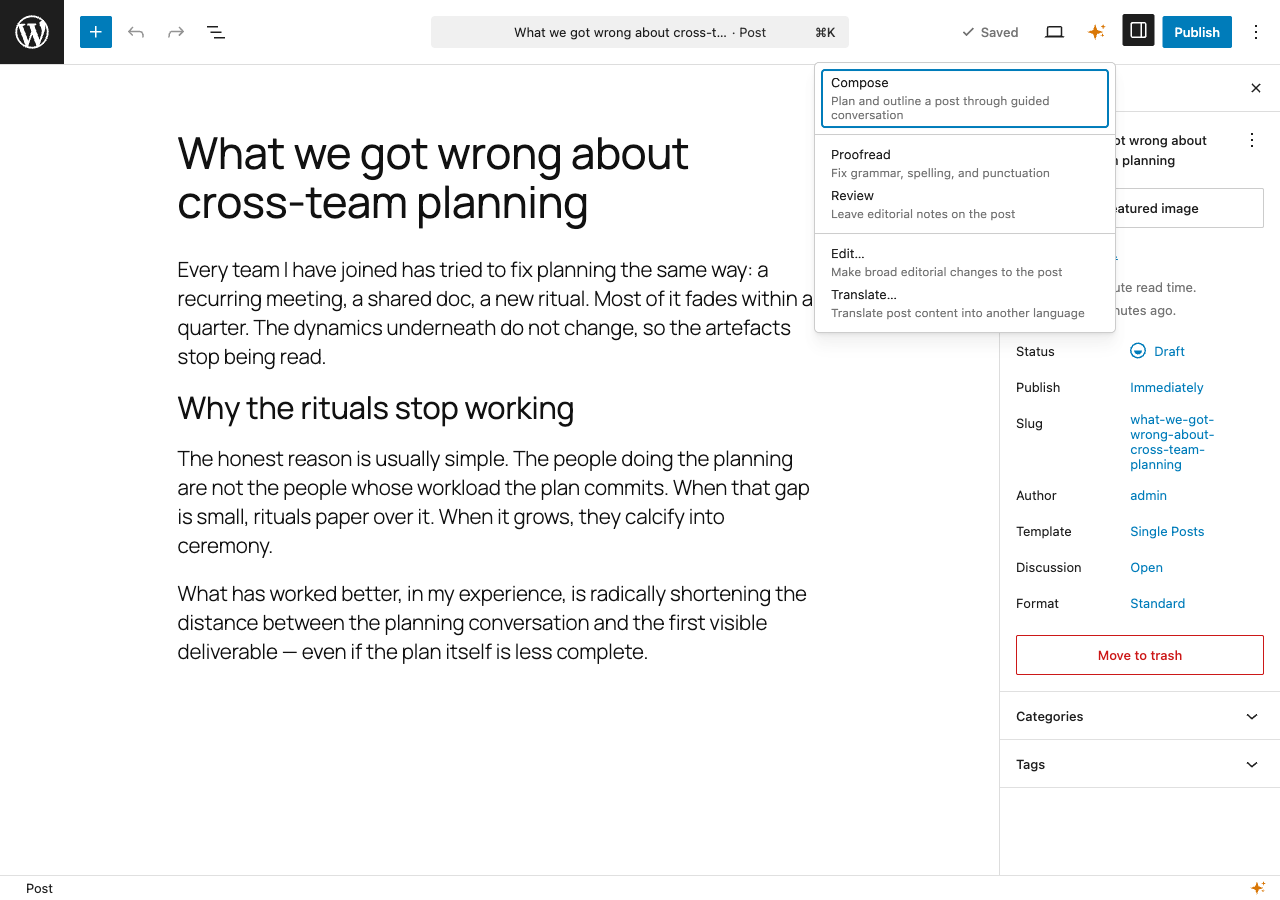
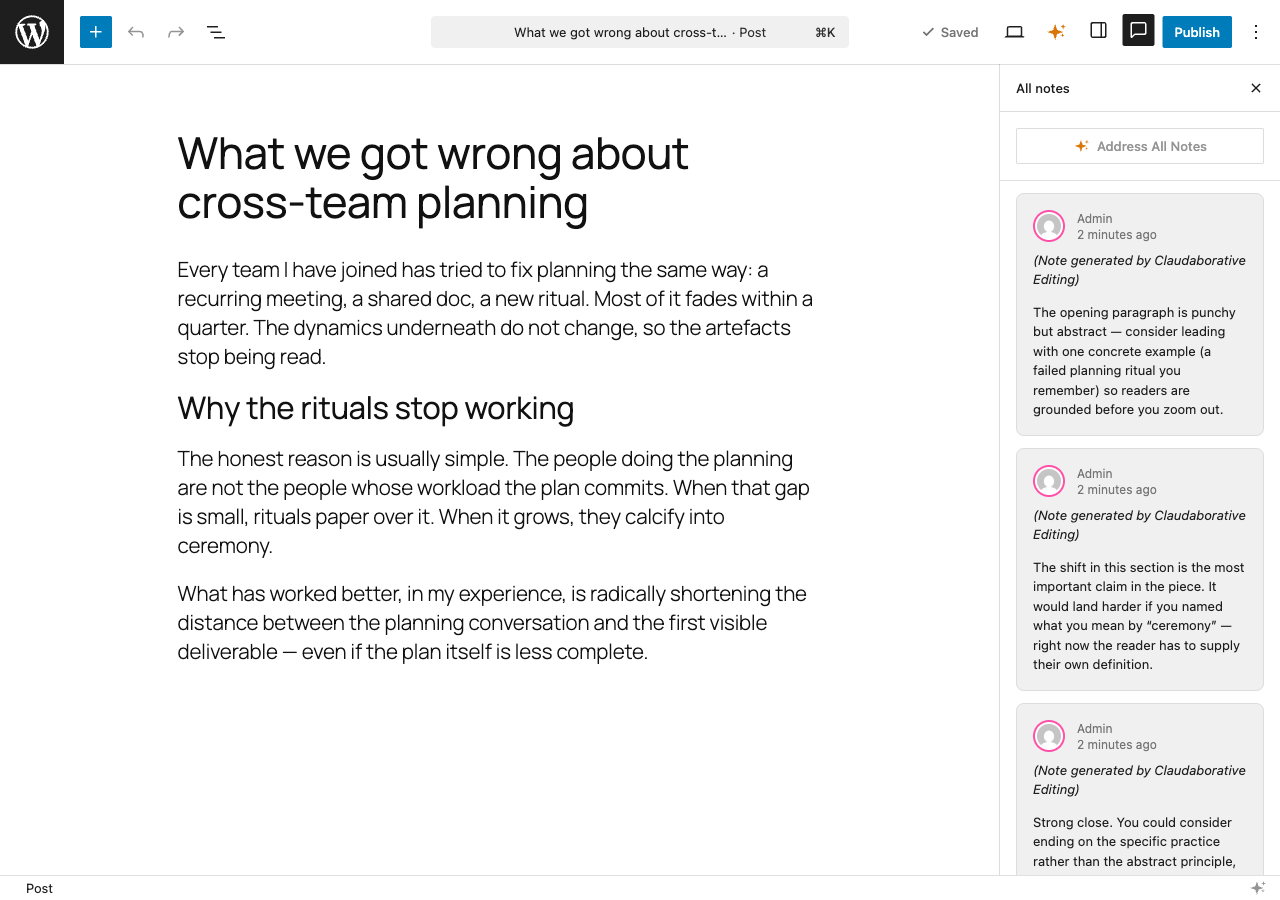
Claudaborative Editing adds controls to the WordPress block editor that let you trigger AI-powered actions, including proofreading, reviewing, translating, and more, directly from within WordPress.
It can be run for free with the Claudaborative Editing MCP server, which can be installed in your local copy of Claude Code.
For a complete seamless experience, we recommend a Claudaborative Cloud subscription, which does all of the hard work for you.
This plugin has no official affiliation with Anthropic or Claude.
Development
The source code is available on GitHub:
Claudaborative Editing on GitHub
Source files are in the wordpress-plugin/ directory. See the repository README.md for build instructions.
Frequently asked questions
Does this work without Claude Code?
The free version requires Claude Code. The plugin provides the browser-side UI, but all AI processing happens through a Claude Code session running the Claudaborative Editing MCP server. If you don’t want to use Claude Code, then a Claudaborative Cloud subscription is the way to go.
What version of WordPress is required?
WordPress 6.9 or later, plus the Gutenberg plugin 23.8 or later with the “Enable real-time collaboration” experiment turned on (Settings → Experiments). WordPress core does not currently ship real-time collaboration.
How do I set up the MCP server?
Install Claude Code if you haven’t already. Run the following command in your terminal: npx claudaborative-editing start This will configure and launch Claude Code with the Claudaborative Editing MCP server. The setup wizard will open your browser to authorize with your WordPress site on the first run. Alternatively, you can set up the credentials separately: npx claudaborative-editing setup Then start Claude Code with channels enabled: claude --dangerously-load-development-channels server:wpce --permission-mode acceptEdits
Changelog
0.7.0
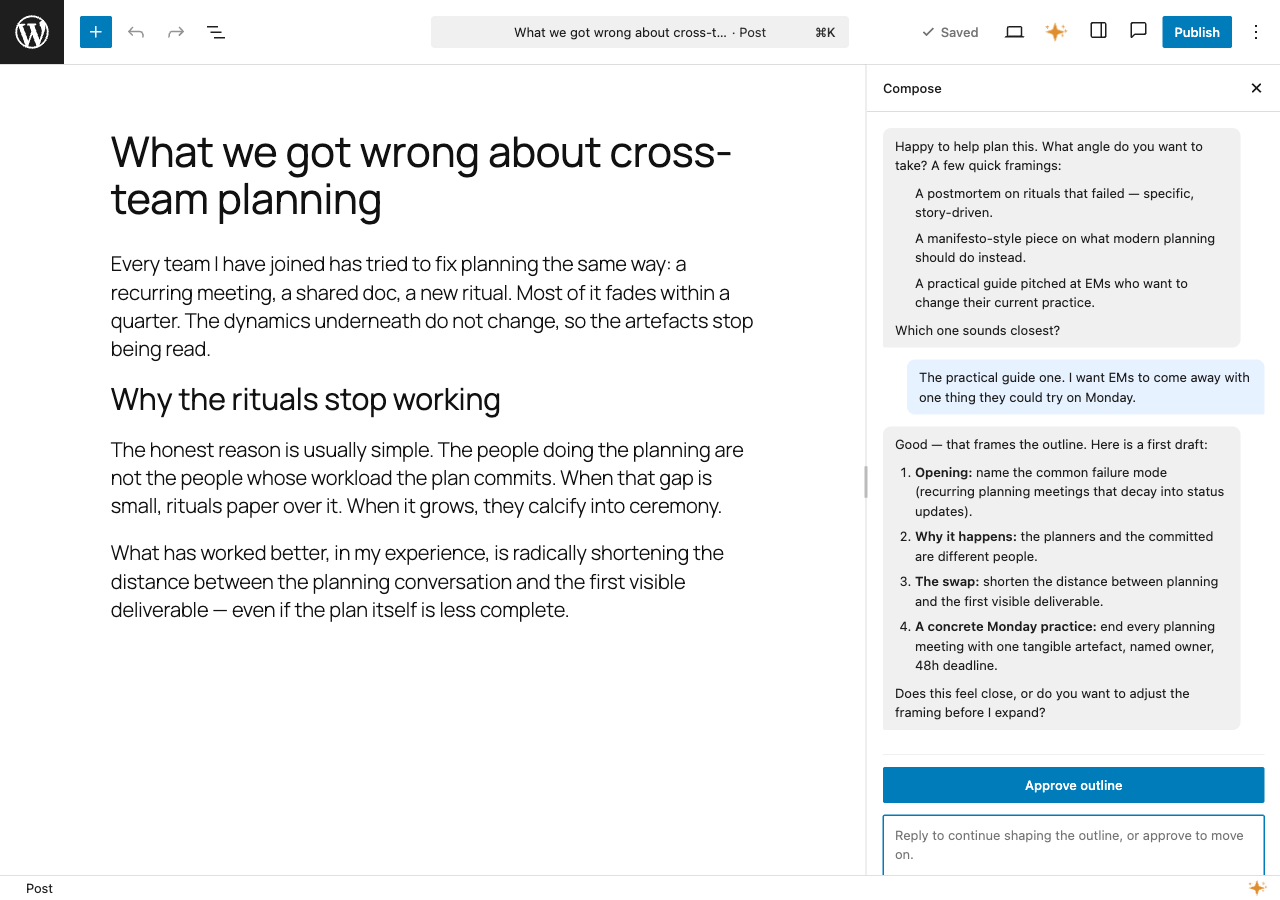
- Added the ability to resume in-progress Compose sessions.
- Fixed Compose sessions being lost when the conversation is accidentally closed.
0.6.0
- Updated minimum required WordPress version to 6.9 and Gutenberg plugin to 23.8.
0.5.2
- Added Claudaborative Cloud as a connection option, with onboarding help shown when disconnected.
- Added a resizable Compose sidebar so the conversation panel can be widened for longer drafts.
- Made prompts language-aware so translations and editorial actions respect the post’s language.
- Discover the WordPress REST API URL from the site instead of assuming
/wp-json, for compatibility with custom REST prefixes. - Fixed commands being clobbered when multiple ran concurrently by storing each under its own key.
0.4.1
- Added missing autoload handling.
0.4.0
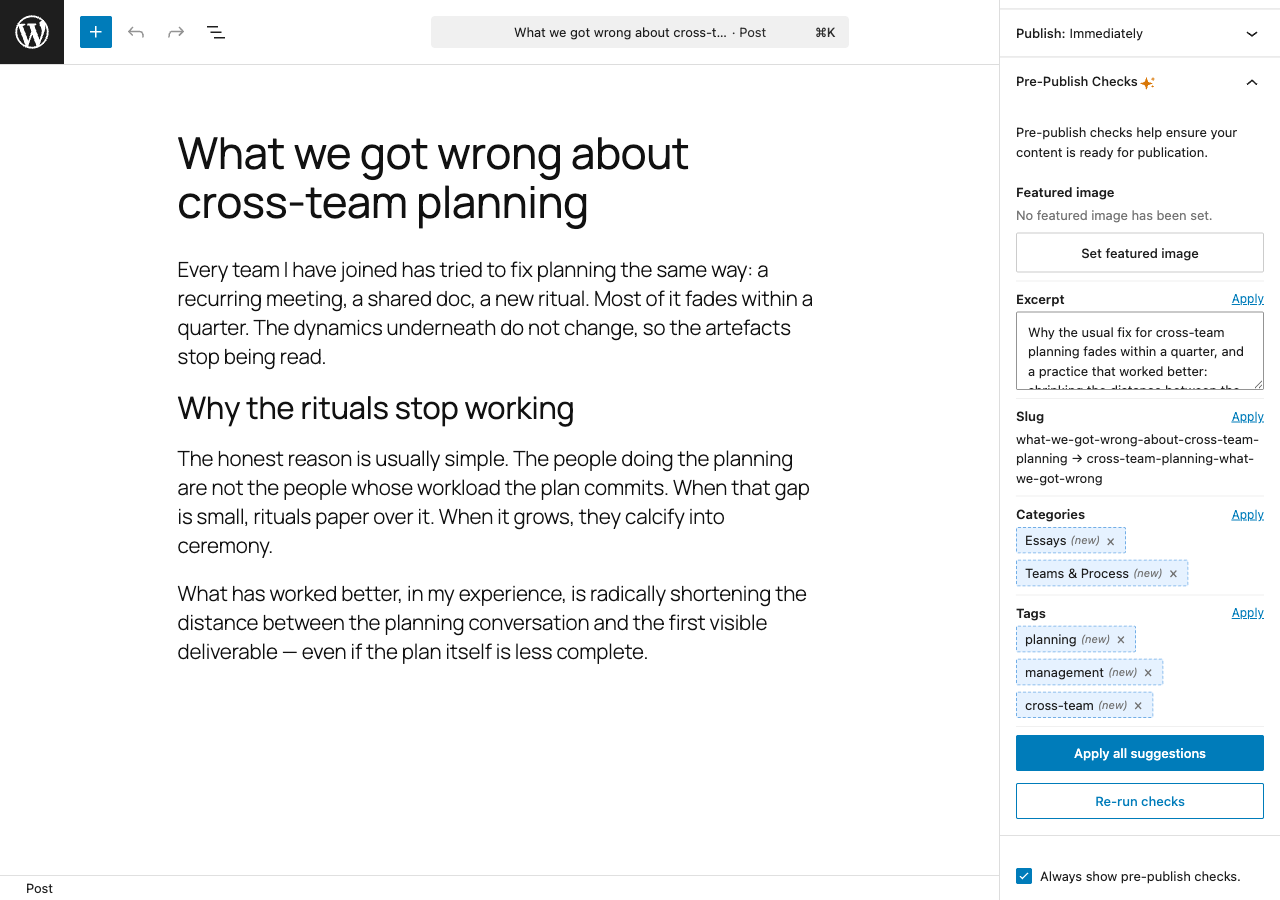
- Added pre-publish checks panel with AI-powered metadata suggestions (excerpt, categories, tags, slug).
- Added compose tool for interactive post planning and outlining with two-way conversation support.
- Simplified installer to Claude Code only, added
npx claudaborative-editing startcommand. - Pre-open posts and auto-claim commands on editor load for faster response times.
- Server-side MCP connection detection reduces sync handshake from ~10-15s to ~2-3s.
0.3.1
- Toolbar dropdown with Proofread and Review actions.
- Connection status indicator in the editor footer bar.
- Notes sidebar integration with per-note and address-all-notes buttons.
- Command queue via custom post type with REST API and SSE streaming.
- Real-time MCP connection status tracking.
Screenshots
For developers
Is this your plugin? Show off the numbers.
Add a live badge to your site, docs or GitHub README. It updates on its own — no account needed.
Best Claudaborative Editing alternatives
All AI plugins →





FAQ
Claudaborative Editing: quick answers
Straight answers, pulled from live WordPress.org data.
Live data from WordPress.org · checked Oct 6, 2026
Is Claudaborative Editing free?
Yes. Claudaborative Editing is free to download and use from the official WordPress.org plugin directory.
Is Claudaborative Editing safe to use in 2026?
Claudaborative Editing is a solid plugin choice in 2026, with a few things worth checking first. Is rated 5/5 and was last updated 2 weeks ago, and scores 71/100 on our health check.
How many websites use Claudaborative Editing?
Claudaborative Editing is active on <10 WordPress websites and has been downloaded 402 times since it launched in April 2026. It was downloaded 161 times in the last 30 days.
Does Claudaborative Editing work with WordPress 7.1?
Yes. The developer has tested Claudaborative Editing up to WordPress 7.1.3, the latest release. It requires WordPress 6.9 or newer.
What PHP version does Claudaborative Editing need?
Claudaborative Editing requires PHP 7.4 or higher. Most hosts run PHP 8.x today, so it works on any modern WordPress hosting.
When was Claudaborative Editing last updated?
The latest version, 0.7.0, was released on September 22, 2026 (2 weeks ago).
Who makes Claudaborative Editing?
Claudaborative Editing is developed and maintained by Gary Pendergast.
What are the best alternatives to Claudaborative Editing?
The most popular alternatives to Claudaborative Editing are Elementor Website Builder (10M+ installs), All in One SEO (2M+ installs) and AI Agent by SiteGround (1M+ installs).
Powered by PageForge
Want thousands of pages that rank like these? Build them in an afternoon.
This directory runs on the same engine as PageForge. Turn any spreadsheet, CSV or API into thousands of fast, SEO-ready WordPress pages — with schema, internal links and AI-written copy baked in.
- CSV, Google Sheets & API data sources
- AI content, schema & internal links per page
- Works with Elementor, Gutenberg, Yoast & Rank Math
- Free on WordPress.org — no credit card


