


Chatmello – Animated Chat Button
Replace your chat button with an animated character in your brand colors. Works with the chat tool you already use.

Solid choice
Chatmello – Animated Chat Button is a solid plugin choice in 2026, with a few things worth checking first. Was last updated 6 days ago, and scores 64/100 on our health check.
- Actively developed — last update 6 days ago
- Tested with the latest WordPress (7.1)
- Small user base (<10 active installs)
- Very few reviews so far
How does it stack up?
Side-by-side on installs, updates, ratings & support


Daily downloads
Download spikes usually follow a new release — each site that auto-updates counts as a download.
Rankings
Where Chatmello stands todayWordPress.org search rankings
Live position in the plugin search, top 100| Keyword | Position |
|---|---|
| chat button | >100 |
| Intercom | #54 |
| live chat | >100 |
| tidio | #22 |
| zendesk | #66 |
About Chatmello – Animated Chat Button
From the official readme · v1.2.0Description
Chatmello turns the plain chat bubble in the corner of your site into an animated character. It greets visitors with your message, reacts while they browse, and opens the chat tool you already use when they click it. Your inbox, bots and routing don’t change.
One-click setup. Pick a pet in Settings → Chatmello and click Connect. You sign in or create a free account on chatmello.com and come straight back, with your pet already live. No code to paste.
Everything in WordPress:
- A setup checklist: connected, published, seen on your site, chat tool found
- Pet views, clicks and chats from the last 7 days, on the settings page and in a Dashboard widget
- Finds the chat plugin you use (Tawk.to, Crisp, Tidio, HubSpot, LiveChat, Zendesk, Intercom, Smartsupp and more)
- Hide the pet for logged-in users, on the WooCommerce cart and checkout, or on any single page or post
- A “Chat with us” button for your pages: a block, or the
[chatmello_button]shortcode - Works with caching plugins: WP Rocket, LiteSpeed Cache, Autoptimize, Perfmatters and SiteGround Optimizer won’t delay the pet
- A Site Health check, a suggested privacy policy paragraph, and WP-CLI commands
- Never asks you for a review
What your pet can do (set in Chatmello):
- 85 characters in your brand colors, plus seasonal hats
- Works with Intercom, Zendesk, Tidio, Crisp, HubSpot, Tawk.to, LiveChat, Freshchat and more, and finds the chat tool on your page by itself
- A greeting message, and views, clicks and chats in your stats
- If your chat tool ever fails to load, your original chat button comes back
- About 12 KB, loads after your page, no cookies, never records what visitors type
Plans. The free plan has no time limit and covers one website, every character and every chat tool. The paid plans (Pro, yearly, and Lifetime, paid once; see https://www.chatmello.com/pricing) add:
- Up to 10 websites
- Smart greetings: per page and language, office hours, on scroll or when a visitor is about to leave, extra messages and a button in the greeting
- Test two greetings and see which one gets more clicks
- Your own picture or mascot as the pet
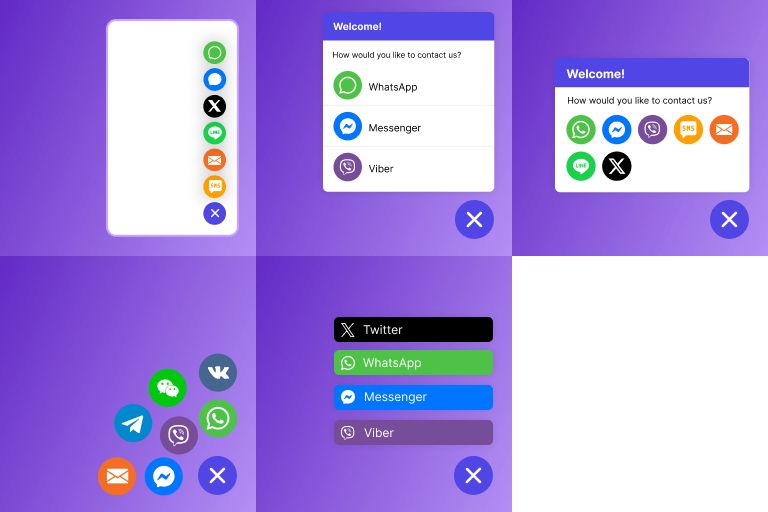
- Contact options when there’s no chat tool: WhatsApp, email, a phone call and more
Everything in this plugin itself works on the free plan.
External service
This plugin connects to Chatmello (https://www.chatmello.com). Nothing is sent and nothing is added to your public pages until you click Connect or paste a snippet.
- On your public pages: visitors’ browsers download the pet’s script and settings from chatmello.com. The script sends anonymous counts (the pet was shown, clicked or opened a chat) with the page path and your site’s address. No cookies are set and nothing visitors type is recorded.
- When you click Connect: you’re sent to chatmello.com with your site’s address, name and the return address of this settings page. WordPress then exchanges a one-time code for a site key.
- In your admin: with that key, the settings page, the Dashboard widget, Site Health and a twice-daily check ask Chatmello for your pet’s status and 7-day stats. Character pictures on the settings page load from chatmello.com.
- Terms of service: https://www.chatmello.com/terms
- Privacy policy: https://www.chatmello.com/privacy
Installation
- Install and activate the plugin.
- Go to Settings → Chatmello, pick a pet and click Connect Chatmello.
- Sign in or create a free account, then choose which pet goes on this site (or create a new one). You come back to WordPress with the pet live.
Keep your chat tool’s own plugin or code installed as it is: the pet finds it and opens it when visitors click.
Prefer to paste? Open “Already have a snippet? Paste it instead” on the settings page, or run wp chatmello set <snippet>.
Changelog
1.2.0
- New Chatmello logo on the settings page.
- The description now says which features need a paid Chatmello plan.
1.1.0
- One-click Connect: no code to paste, and a new site’s pet is published straight away.
- Pick a pet before connecting.
- Setup checklist, 7-day stats and a Dashboard widget.
- Chat plugin detection.
- Hide for logged-in users, on the WooCommerce cart and checkout, or per page.
- “Chatmello chat button” block and
[chatmello_button]shortcode. - Caching plugin compatibility, Site Health check, privacy policy text, WP-CLI commands.
1.0.0
- First release.
For developers
Is this your plugin? Show off the numbers.
Add a live badge to your site, docs or GitHub README. It updates on its own — no account needed.
Best Chatmello alternatives
All chat button plugins →




FAQ
Chatmello – Animated Chat Button: quick answers
Straight answers, pulled from live WordPress.org data.
Source: WordPress.org
Is Chatmello – Animated Chat Button free?
Yes. Chatmello – Animated Chat Button is free to download and use from the official WordPress.org plugin directory.
Is Chatmello – Animated Chat Button safe to use in 2026?
Chatmello – Animated Chat Button is a solid plugin choice in 2026, with a few things worth checking first. Was last updated 6 days ago, and scores 64/100 on our health check.
How many websites use Chatmello – Animated Chat Button?
Chatmello – Animated Chat Button is active on <10 WordPress websites and has been downloaded 178 times since it launched in November 2026. It was downloaded 174 times in the last 30 days.
Does Chatmello – Animated Chat Button work with WordPress 7.1?
Yes. The developer has tested Chatmello – Animated Chat Button up to WordPress 7.1.5, the latest release. It requires WordPress 6.3 or newer.
What PHP version does Chatmello – Animated Chat Button need?
Chatmello – Animated Chat Button requires PHP 7.4 or higher. Most hosts run PHP 8.x today, so it works on any modern WordPress hosting.
When was Chatmello – Animated Chat Button last updated?
The latest version, 1.2.0, was released on November 24, 2026 (6 days ago).
Who makes Chatmello – Animated Chat Button?
Chatmello – Animated Chat Button is developed and maintained by chatmello.
What are the best alternatives to Chatmello – Animated Chat Button?
The most popular alternatives to Chatmello – Animated Chat Button are Floating Chat Widget: Conta… (300K+ installs), Chat Button & Custom ChatGP… (20K+ installs) and Lead Generation Contact Wid… (10K+ installs).
Powered by PageForge
One template and a spreadsheet. A real page for every search.
PageForge turns each row of a CSV into a WordPress page with its own title, URL, SEO fields and schema, built on the layout you already designed. Free on WordPress.org.
- CSV and XLSX, plus Google Sheets on Professional and Enterprise
- Its own title, URL, SEO fields and schema for every page
- Works with the block editor, Elementor, Divi and Avada
- Free on WordPress.org, no credit card