



Caresort Animated Counters for Elementor
Two Elementor widgets: an animated number counter, and an animated progress bar — both with scroll-trigger animation and full color/font control.

Solid choice
Caresort Animated Counters for… is a solid plugin choice in 2026, with a few things worth checking first. Was last updated 1 day ago, and scores 64/100 on our health check.
- Actively developed — last update 1 day ago
- Tested with the latest WordPress (7.1)
- Small user base (<10 active installs)
- Very few reviews so far
How does it stack up?
Side-by-side on installs, updates, ratings & support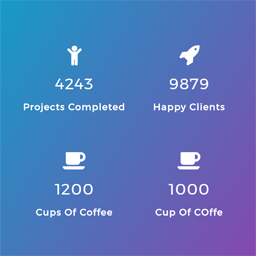



Daily downloads
Not enough data yet.
Download spikes usually follow a new release — each site that auto-updates counts as a download.
Rankings
Where Caresort Animated Counters… stands todayWordPress.org search rankings
Live position in the plugin search, top 100| Keyword | Position |
|---|---|
| Animated Counter | #74 |
| Counter | >100 |
| elementor | >100 |
| number counter | >100 |
| stats | >100 |
About Caresort Animated Counters for Elementor
From the official readme · v1.1.1Description
Caresort Animated Counters for Elementor, by Caresort Solutions, adds two widgets to Elementor — “Animated Counter” and “Animated Progress Bar” — fully compatible with the free version of Elementor (no Elementor Pro required).
Features
- A number that counts up from a starting value to an ending value, with an adjustable animation duration.
- Optional thousands separator, decimal places, and a custom prefix or suffix (e.g. “$”, “+”, “%”, “M”) — enough to display things like “1,250+” or “$1.2M”.
- An icon (from Elementor’s own icon library, or a custom SVG upload) above the number.
- A title label below the number (e.g. “Projects Completed”, “Happy Clients”).
- Scroll-trigger animation — the count-up only plays once the counter scrolls into view, so it replays the “wow” moment for every visitor instead of running once on page load.
- Full style controls: icon color and size, number color and typography, title color and typography, alignment, and spacing.
- Lightweight — the count-up animation is built with a small vanilla-JS easing function; no GSAP or other external animation library is loaded.
Requirements
- Elementor (free version) must be installed and activated.
Installation
- Upload the
caresort-animated-counters-for-elementorfolder to/wp-content/plugins/, or install via Plugins → Add New → Upload Plugin. - Activate the plugin.
- Make sure Elementor is installed and activated.
- Edit a page with Elementor, search for “Animated Counter” in the widget panel, and drag it onto your page.
- Set the starting and ending numbers, icon, title, and animation options from the Content tab.
Frequently asked questions
Does this work with the free version of Elementor?
Yes. Elementor Pro is not required.
Does this use GSAP?
No. The count-up animation uses a lightweight, dependency-free vanilla-JS easing function for a smooth, GSAP-like feel without loading an external library.
Can I show four counters in a row, like a stats section?
Yes — place four Animated Counter widgets inside an Elementor Container set to a 4-column layout.
Changelog
Initial release.
1.1.1
- Fixed the Animated Counter’s Left/Center/Right Alignment control — it was setting an invalid CSS value (align-items does not accept “left”/”right”), so clicking Left or Right had no visible effect. Alignment now works correctly.
1.1.0
- Added a second widget: Animated Progress Bar — a titled card with a horizontal gradient bar that fills from 0 to a set percentage, with the same scroll-trigger animation as the counter.
1.0.0
- Initial release: count-up animation, icon, title, scroll-trigger, prefix/suffix, decimal places, thousands separator, and full color/typography controls.
For developers
Is this your plugin? Show off the numbers.
Add a live badge to your site, docs or GitHub README. It updates on its own — no account needed.
Best Caresort Animated Counters fo… alternatives
All Animated Counter plugins →

FAQ
Caresort Animated Counters for Elem…: quick answers
Straight answers, pulled from live WordPress.org data.
Live data from WordPress.org · checked Oct 13, 2026
Is Caresort Animated Counters for… free?
Yes. Caresort Animated Counters for… is free to download and use from the official WordPress.org plugin directory.
Is Caresort Animated Counters for… safe to use in 2026?
Caresort Animated Counters for… is a solid plugin choice in 2026, with a few things worth checking first. Was last updated 1 day ago, and scores 64/100 on our health check.
How many websites use Caresort Animated Counters for…?
Caresort Animated Counters for… is active on <10 WordPress websites and has been downloaded 48 times since it launched in October 2026. It was downloaded 38 times in the last 30 days.
Does Caresort Animated Counters for… work with WordPress 7.1?
Yes. The developer has tested Caresort Animated Counters for… up to WordPress 7.1.3, the latest release. It requires WordPress 5.8 or newer.
What PHP version does Caresort Animated Counters for… need?
Caresort Animated Counters for… requires PHP 7.0 or higher. Most hosts run PHP 8.x today, so it works on any modern WordPress hosting.
When was Caresort Animated Counters for… last updated?
The latest version, 1.1.1, was released on October 12, 2026 (1 day ago).
Who makes Caresort Animated Counters for…?
Caresort Animated Counters for… is developed and maintained by caresortsolutions.
What are the best alternatives to Caresort Animated Counters for…?
The most popular alternatives to Caresort Animated Counters for… are Counter Number Showcase, Fu… (10K+ installs), Animated Number Counters (2K+ installs) and WP Counter Up (1K+ installs).
Powered by PageForge
Want thousands of pages that rank like these? Build them in an afternoon.
This directory runs on the same engine as PageForge. Turn any spreadsheet, CSV or API into thousands of fast, SEO-ready WordPress pages — with schema, internal links and AI-written copy baked in.
- CSV, Google Sheets & API data sources
- AI content, schema & internal links per page
- Works with Elementor, Gutenberg, Yoast & Rank Math
- Free on WordPress.org — no credit card


