


Cal.com
Embed Cal.com booking calendars in pages, posts, contact forms, LMS & membership pages.

Solid choice
Cal.com is a solid plugin choice in 2026, with a few things worth checking first. It runs on 2K+ sites, is rated 3.7/5 and was last updated 1 month ago, and scores 70/100 on our health check.
- Tested with the latest WordPress (7.1)
- Very few reviews so far
How does it stack up?
Side-by-side on installs, updates, ratings & support



Daily downloads
Download spikes usually follow a new release — each site that auto-updates counts as a download.
Rankings
Where Cal.com stands todayWordPress.org search rankings
Live position in the plugin search, top 100| Keyword | Position |
|---|---|
| appointment | #58 |
| appointment booking | #69 |
| appointment scheduling | #34 |
| booking calendar | #94 |
| calcom | #1 |
Version adoption
Share of active sites per release.
Rating breakdown
★★★★★★★★★★ 3.7 from 3 reviews
About Cal.com
From the official readme · v3.0.0Description
Cal.com is an open-source alternative to Calendly that allows easy appointment booking and meeting scheduling without back-and-forth emails.
This plugin enables you to:
- Embed your Cal.com booking calendar inline, as a popup, or as a floating widget.
- Customize UI with theme colors, layout, and event details visibility.
- Pre-fill user information and add UTM tracking parameters.
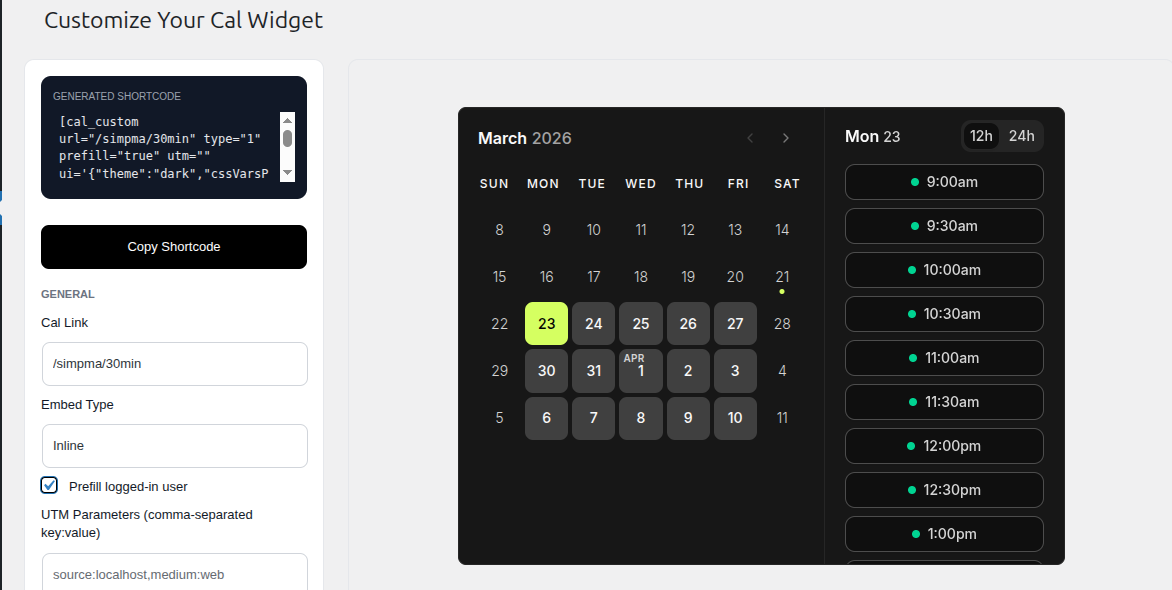
- Use the new admin widget customizer for styling your calendar with real-time previews.
- Trigger a Cal.com scheduling button directly inside contact form confirmation screens, LMS instructors profile, WooCommerce and membership profiles.
- Available integrations: Contact Form 7, Fluent Forms, WPForms, Learn Press, Tutor LMS, Ultimate Member, UsersWP, and WooCommerce.
Profile Integrations
The plugin supports per-user Cal.com booking URLs on the following platforms:
- Tutor LMS: Booking button appears on instructor profile pages.
- LearnPress: Booking button appears on single instructor pages.
- Ultimate Member: Booking button appears on member profile pages.
- UsersWP: Booking button appears on member profile pages.
To configure:
- Go to Users → All Users in the WordPress admin.
- Edit any user (instructor or member).
- Scroll to the “Cal.com Booking” section.
- Enter the Cal.com booking URL (e.g.,
https://cal.com/example/consultation). - Update the user.
Contact Form 7, Fluent Forms, WPForms Integration
Trigger a Cal.com scheduling button directly inside contact form confirmation screens.
To configure:
- Go to Cal.com > Integrations and enable the Contact Form 7 integration.
- Configure your Cal.com event URL (e.g.,
https://cal.com/example/30min). - When a visitor submits a form successfully, a scheduling prompt with a “Schedule a call instead” button will appear below the form, opening your Cal.com event in a modal popup.
WooCommerce Integration
Display a Cal.com scheduling prompt in order thank-you pages.
To configure:
- Go to Cal.com > Integrations and enable the WooCommerce integration.
- Go to Products > All Products > Edit or Products > Add New Products and configure your Cal.com event URL (e.g.,
https://cal.com/example/30min) per product. - After a successful product purchase, a scheduling section will appear in the order thank-you page.
Shortcodes
[cal url=”/username/meetingid” type=1]
Embed inline calendar.
[cal url=”/username/meetingid” type=2 text=”Schedule a call”]
Embed popup trigger button.
[cal_custom url=”/demo/30min” type=1 prefill=”true” utm=”source:localhost” ui='{“theme”:”dark”,”cssVarsPerTheme”:{“dark”:{“cal-brand”:”#a3ffcb”}},”hideEventTypeDetails”:true,”layout”:”week_view”}’ config='{“layout”:”week_view”,”useSlotsViewOnSmallScreen”:true,”disableMobileScroll”:true}’]
Embed customizable widget with full UI control, prefill, and UTM support.
Shortcode Attributes
- url: URL of the booking calendar.
- type: Embed type (1 = inline, 2 = popup, 3 = floating button for
[cal_custom]). - text: Button text for popup embeds.
- prefill: Set to
trueto prefill user info if available. - utm: Comma-separated UTM tracking parameters (e.g.,
source:newsletter, medium:email). - ui: JSON object for theme, layout, and visibility customization.
- config: JSON object for advanced widget configuration (slots view, scrolling, etc.).
CSS Customization
Customize popup/button text via CSS targeting #calcom-embed-link:
#calcom-embed-link, .calcom-embed-link {
    background-color: #222222;
    padding: 15px;
    color: #fff;
    font-size: 16px;
    text-align: center;
    cursor: pointer;
}<h3>Use of  3rd Party Software</h3>
This plugin relies on Cal.com embed. See their Privacy Policy and Terms of use.
Use Cases
The plugin can be used to add Cal.com scheduling to many types of WordPress websites, including:
- Appointment booking websites
- Consultant and coaching websites
- Freelancer websites
- Agency websites
- Business websites
- Sales and discovery calls
- Customer consultations
- Online courses and instructors
- Member profiles
- Personal websites
- Service businesses
- Contact and lead-generation forms
Installation
- Install via the WordPress dashboard or upload the ZIP.
- Activate the plugin.
- Use the
[cal]or[cal_custom]shortcode in any page, post, or widget. - To enable integrations, visit Cal.com > Integrations in the WordPress admin.
Changelog
3.0.0 – 12-10-2026
- Added LearnPress and Tutor LMS integrations
- Added Ultimate Member and UsersWP integrations
- Display a Cal.com scheduling prompt in instructors & users profile
- Added Contact Form 7, Fluent Forms, and WPForms integrations
- Display a Cal.com scheduling prompt after successful form submissions
- Added WooCommerce integration.
- Display a Cal.com scheduling prompt in order thank-you page
- Added Integrations admin page for enabling/disabling integrations
2.1.0 – 06-04-2026
- Script enqueue handle mismatch fix
2.0.0 – 21-03-2026
- Added widget customizer to admin page
- Introduced new shortcode [cal_custom]
- Support prefill with logged-in user info
- Support adding UTM parameters to shortcode
- Security improvements
- Ensured compatibility with lastest WordPress version
1.0.0 – 15-11-2022
- Initial release
- Supports inline & popup embed types
Screenshots


For developers
Is this your plugin? Show off the numbers.
Add a live badge to your site, docs or GitHub README. It updates on its own — no account needed.
Best Cal.com alternatives
All appointment plugins →





FAQ
Cal.com: quick answers
Straight answers, pulled from live WordPress.org data.
Source: WordPress.org
Is Cal.com free?
Yes. Cal.com is free to download and use from the official WordPress.org plugin directory.
Is Cal.com safe to use in 2026?
Cal.com is a solid plugin choice in 2026, with a few things worth checking first. It runs on 2K+ sites, is rated 3.7/5 and was last updated 1 month ago, and scores 70/100 on our health check.
How many websites use Cal.com?
Cal.com is active on 2K+ WordPress websites and has been downloaded 16,141 times since it launched in November 2022. It was downloaded 1,387 times in the last 30 days.
Does Cal.com work with WordPress 7.1?
Yes. The developer has tested Cal.com up to WordPress 7.1.5, the latest release. It requires WordPress 4.6 or newer.
What PHP version does Cal.com need?
Cal.com requires PHP 7.4 or higher. Most hosts run PHP 8.x today, so it works on any modern WordPress hosting.
When was Cal.com last updated?
The latest version, 3.0.0, was released on October 12, 2026 (1 month ago).
Who makes Cal.com?
Cal.com is developed and maintained by Cal.com.
What are the best alternatives to Cal.com?
The most popular alternatives to Cal.com are Easy Appointments (10K+ installs), Appointment Hour Booking (10K+ installs) and EMC (10K+ installs).
Powered by PageForge
One template and a spreadsheet. A real page for every search.
PageForge turns each row of a CSV into a WordPress page with its own title, URL, SEO fields and schema, built on the layout you already designed. Free on WordPress.org.
- CSV and XLSX, plus Google Sheets on Professional and Enterprise
- Its own title, URL, SEO fields and schema for every page
- Works with the block editor, Elementor, Divi and Avada
- Free on WordPress.org, no credit card