


Byteplant Phone Validator
With the Byteplant Phone Validator plugin you can easily verify if a phone number is really valid and callable (https://www.byteplant.

Solid choice
Byteplant Phone Validator is a solid plugin choice in 2026, with a few things worth checking first. It runs on 100+ sites, is rated 5/5 and was last updated 2 months ago, and scores 76/100 on our health check.
- Tested with the latest WordPress (7.1)
- Small user base (100+ active installs)
How does it stack up?
Side-by-side on installs, updates, ratings & support



Daily downloads
Download spikes usually follow a new release — each site that auto-updates counts as a download.
Rankings
Where Byteplant Phone Validator stands todayWordPress.org search rankings
Live position in the plugin search, top 100| Keyword | Position |
|---|---|
| contact form | >100 |
| contact form 7 | >100 |
| ninja forms | >100 |
| phone | #10 |
| validation | >100 |
Version adoption
Share of active sites per release.
Rating breakdown
★★★★★★★★★★ 5 from 6 reviews
About Byteplant Phone Validator
From the official readme · v4.6Description
This plugin uses the Byteplant Phone-Validator API (https://www.byteplant.com/phone-validator/) to check if a phone number is really valid and callable.
Supported Plugins / Compatible Forms
The plugin works seamlessly with:
* Contact Form 7
* Gravity Forms
* WPForms
* Ninja Forms
* WooCommerce
The plugin can also be easily integrated into any 3rd party form.
Key Features
How does it work?
The Phone-Validator real-time validation API provides detailed information for each phone number:
* Status: VALID/CONFIRMED, VALID/UNCONFIRMED or INVALID
* Line type: FIXED_LINE, MOBILE, VOIP etc.
* Geolocation: Region and city
* Phone number correction and re-formatting according to national and international standards
During the entire validation process, the phone number is not contacted in any way, nor will any phones connected to a line ring.
Data Protection and Privacy Policy
Please see the Frequently Asked Questions section.
Getting Started
The plugin requires an API Key. Please sign up for an account at
https://www.byteplant.com/phone-validator/free-trial-registration.html (no credit card required).
The trial account comes with 100 free credits.
Installation
- Unzip and upload the plugin to the ‘/wp-content/plugins/’ directory.
- Activate the plugin through the ‘Plugins’ menu in WordPress.
- Configure the plugin in the Settings section of the Administrator Dashboard.
- Register for an API key and get 100 free credits (no credit card required):
https://www.byteplant.com/phone-validator/free-trial-registration.html - Copy and paste your API key to the Settings section of the Administrator Dashboard.
If you need help, just send us a quick email to support@byteplant.com.
Frequently asked questions
Data Protection and Privacy Policy
We are committed to protect your data and your privacy when processing personal data. We do not process or store phone numbers for any purpose other than validation. We do not share any client data with any third party at any time. We keep all data supplied by clients for the purposes of validation as confidential, to not disclose data to anyone within our organization without a need to receive it for the specific purpose for which its is being disclosed to us, and to not disclose this data to any third party. Phone-Validator is a service operated by Byteplant, a company located in Germany…
Do you store validated phone numbers?
All data from API requests and batch/list processing will be automatically deleted within 14 days.
Is this plugin free?
This plugin is free, but to use our service and the API after the free trial you will need a paid account.
Screenshots
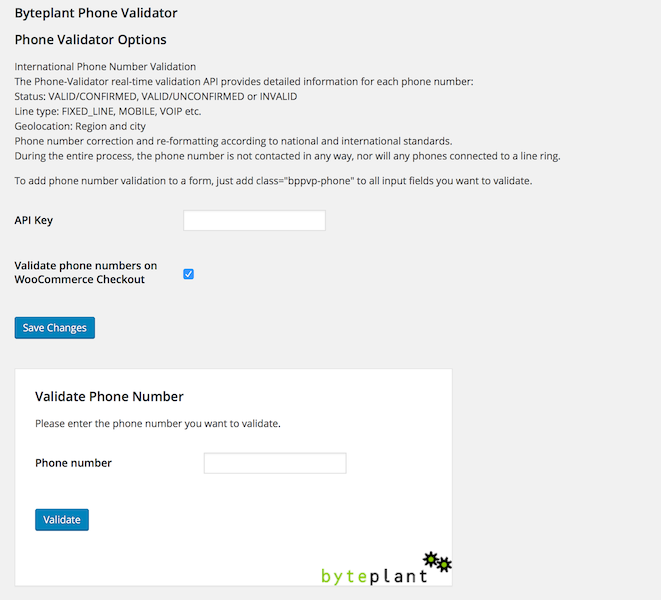
For developers
Is this your plugin? Show off the numbers.
Add a live badge to your site, docs or GitHub README. It updates on its own — no account needed.
Best Byteplant Phone Validator alternatives
All contact form plugins →





FAQ
Byteplant Phone Validator: quick answers
Straight answers, pulled from live WordPress.org data.
Live data from WordPress.org · checked Oct 5, 2026
Is Byteplant Phone Validator free?
Yes. Byteplant Phone Validator is free to download and use from the official WordPress.org plugin directory.
Is Byteplant Phone Validator safe to use in 2026?
Byteplant Phone Validator is a solid plugin choice in 2026, with a few things worth checking first. It runs on 100+ sites, is rated 5/5 and was last updated 2 months ago, and scores 76/100 on our health check.
How many websites use Byteplant Phone Validator?
Byteplant Phone Validator is active on 100+ WordPress websites and has been downloaded 9,980 times since it launched in April 2016. It was downloaded 150 times in the last 30 days.
Does Byteplant Phone Validator work with WordPress 7.1?
Yes. The developer has tested Byteplant Phone Validator up to WordPress 7.1.0, the latest release. It requires WordPress 3.0.1 or newer.
When was Byteplant Phone Validator last updated?
The latest version, 4.6, was released on August 19, 2026 (2 months ago).
Who makes Byteplant Phone Validator?
Byteplant Phone Validator is developed and maintained by byteplant.
What are the best alternatives to Byteplant Phone Validator?
The most popular alternatives to Byteplant Phone Validator are Contact Form 7 (10M+ installs), Akismet Anti-spam: Spam Pro… (5M+ installs) and WPForms (5M+ installs).
Powered by PageForge
Want thousands of pages that rank like these? Build them in an afternoon.
This directory runs on the same engine as PageForge. Turn any spreadsheet, CSV or API into thousands of fast, SEO-ready WordPress pages — with schema, internal links and AI-written copy baked in.
- CSV, Google Sheets & API data sources
- AI content, schema & internal links per page
- Works with Elementor, Gutenberg, Yoast & Rank Math
- Free on WordPress.org — no credit card


