



Buttons – Build Floating, Social Share & Print Buttons Easily
The Buttons for makes it simple to create and manage beautiful, interactive buttons. Whether you need standard call-to-action buttons, floating action buttons, social sharing buttons, or print buttons, this plugin gives…

Solid choice
Buttons is a solid plugin choice in 2026, with a few things worth checking first. It runs on 100+ sites and was last updated 1 month ago, and scores 64/100 on our health check.
- Tested with the latest WordPress (7.1)
- Small user base (100+ active installs)
- Very few reviews so far
How does it stack up?
Side-by-side on installs, updates, ratings & support


Daily downloads
Download spikes usually follow a new release — each site that auto-updates counts as a download.
Rankings
Where Buttons stands todayWordPress.org search rankings
Live position in the plugin search, top 100| Keyword | Position |
|---|---|
| action button | >100 |
| call to action | >100 |
| click to call | >100 |
| contact button | >100 |
| floating button | >100 |
Version adoption
Share of active sites per release.
About Buttons
From the official readme · v1.2Description
The Buttons for makes it simple to create and manage beautiful, interactive buttons. Whether you need standard call-to-action buttons, floating action buttons, social sharing buttons, or print buttons, this plugin gives you full control over design, placement, and functionality.
Customize your buttons with live preview, icons, and flexible styling. Place buttons anywhere — before/after content, inside posts with shortcodes, or fixed on the screen as floating buttons. Built-in social sharing and print features help you boost engagement, improve navigation, and make content more interactive.
Key Features
🎨 Design and Customization
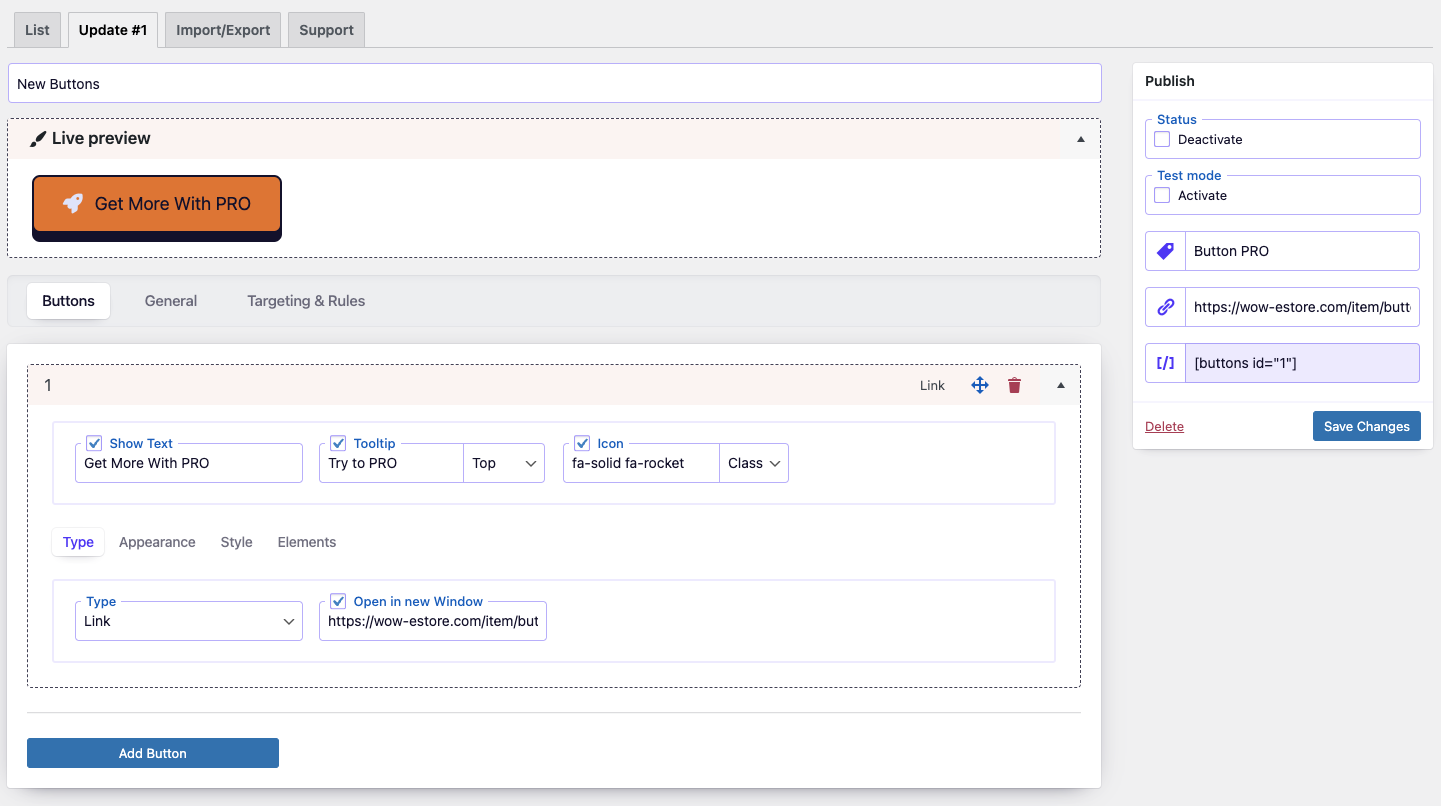
- Live Builder Interface: Design and preview buttons in real time with an intuitive builder.
- Comprehensive Styling: Adjust colors, size, text, backgrounds, borders, and effects.
- Icon Integration: Use Font Awesome 7 or add custom icons.
- Flexible Placement: Insert buttons via shortcode, before/after content, or fixed on screen.
⚡ Enhanced Button Functionality
- Unlimited Buttons: Create as many buttons as your site needs.
- Duplication Tool: Save time by cloning existing buttons.
- Targeted Linking: Add login, logout, registration, password reset, or custom links.
- Social Sharing Buttons: Share content across Facebook, Twitter, LinkedIn, Pinterest, WhatsApp, and more.
- Print Button: Allow visitors to instantly print your pages with one click.
- Email Share Button: Let users send page links via email.
- Floating Buttons: Keep key actions visible while scrolling.
- One-Click Enable/Disable: Manage button visibility with ease.
- Test Mode: Preview buttons privately before publishing.
- Open Links in New Window: Control how links behave on click.
- Organized Navigation: Use custom tags to group and find buttons quickly.
The Buttons is an all-in-one tool for creating engaging, functional buttons in WordPress. From call-to-action and floating buttons to social share and print buttons, it helps you drive interaction, boost clicks, and improve user experience.
Installation
In WordPress:
- Go to
Plugins>Add New> search forbuttons - Press
Install Nowfor the Button plugin - Press
Activate Plugin
Manual installation:
- Upload the
buttondirectory to the/wp-content/plugins/directory - Activate the plugin through the
Pluginsmenu in WordPress
Frequently asked questions
Can I Use the Plugin on a Multisite Network
Yes, you can, but you need to activate the plugin separately on each subsite.
How Do I Add Icons to My Buttons
The Buttons plugin seamlessly integrates with Font Awesome, allowing you to effortlessly add thousands of beautiful icons to your buttons. Simply search the Font Awesome library (Font Awesome: https://fontawesome.com/icons) and use the icon class to incorporate it into your button design.
Support
Please use WordPress support forum to ask any query.Please use WordPress support forum to ask any query.
Changelog
1.2
- Updated: Font Awesome library upgraded to version 7.1.
- Updated:
wp-color-picker-alphato version 3.0.4. - Fixed: minor bugs.
1.1
- Updated: Font Awesome library upgraded to version 7.0.0.
1.0.6
- Improved: Refactored AdminActions class for better performance and readability
- Improved: Reordered condition checks for better execution performance
- Updated: Added strict type hinting for method arguments in AdminActions
1.0.5
- Improved: Reorganized method order in DBManager class for better readability and maintenance
- Improved: Minor SQL formatting for consistency
- Cleaned: Minor code style improvements according to WordPress Coding Standards (WPCS)
1.0.4
- Fixed: class public/class-item-maker.php
1.0.3
- Fixed: Nonce verification logic for improved security.
Screenshots

For developers
Is this your plugin? Show off the numbers.
Add a live badge to your site, docs or GitHub README. It updates on its own — no account needed.
Best Buttons alternatives
All action button plugins →


FAQ
Buttons: quick answers
Straight answers, pulled from live WordPress.org data.
Live data from WordPress.org · checked Oct 4, 2026
Is Buttons free?
Yes. Buttons is free to download and use from the official WordPress.org plugin directory.
Is Buttons safe to use in 2026?
Buttons is a solid plugin choice in 2026, with a few things worth checking first. It runs on 100+ sites and was last updated 1 month ago, and scores 64/100 on our health check.
How many websites use Buttons?
Buttons is active on 100+ WordPress websites and has been downloaded 4,430 times since it launched in April 2024. It was downloaded 141 times in the last 30 days.
Does Buttons work with WordPress 7.1?
Yes. The developer has tested Buttons up to WordPress 7.1.2, the latest release. It requires WordPress 5.5 or newer.
What PHP version does Buttons need?
Buttons requires PHP 7.4 or higher. Most hosts run PHP 8.x today, so it works on any modern WordPress hosting.
When was Buttons last updated?
The latest version, 1.2, was released on August 25, 2026 (1 month ago).
Who makes Buttons?
Buttons is developed and maintained by Wow-Company.
What are the best alternatives to Buttons?
The most popular alternatives to Buttons are Buttonizer (70K+ installs), Sticky Buttons (10K+ installs) and chat-me-now (4K+ installs).
Powered by PageForge
Want thousands of pages that rank like these? Build them in an afternoon.
This directory runs on the same engine as PageForge. Turn any spreadsheet, CSV or API into thousands of fast, SEO-ready WordPress pages — with schema, internal links and AI-written copy baked in.
- CSV, Google Sheets & API data sources
- AI content, schema & internal links per page
- Works with Elementor, Gutenberg, Yoast & Rank Math
- Free on WordPress.org — no credit card


