


Block, Suspend, Report for BuddyPress
Block, Suspend, Report for BuddyPress provides enhanced moderation for your BuddyPress or BuddyBoss site.

Use with caution
Block, Suspend, Report for Budd… works, but test it on a staging site before relying on it in 2026. It runs on 500+ sites, is rated 4.6/5 and was last updated 5 months ago, and scores 47/100 on our health check.
- Small user base (500+ active installs)
- Only tested up to WordPress 6.9 (latest is 7.1)
How does it stack up?
Side-by-side on installs, updates, ratings & support



Daily downloads
Download spikes usually follow a new release — each site that auto-updates counts as a download.
Rankings
Where Block, Suspend, Report for… stands todayWordPress.org search rankings
Live position in the plugin search, top 100| Keyword | Position |
|---|---|
| block | >100 |
| buddypress | #30 |
| moderation | #44 |
| report | #25 |
| suspend | #1 |
Version adoption
Share of active sites per release.
Rating breakdown
★★★★★★★★★★ 4.6 from 18 reviews
About Block, Suspend, Report for BuddyPress
From the official readme · v3.6.5Description
Block, Suspend, Report for BuddyPress is a must-have plugin for EVERY BuddyPress installation.
For a full list of features, documentation, screenshots and videos, head to the plugin page.
Each tool is explained further below.
Block
The Block tool allows your members to block another member. They simply click on a ‘block’ button, either on another member’s profile, or on the member list. Once blocked, neither member can send a message to the other. Each member’s profile pages become inaccessible, and display a simple message. Neither can view each other’s activity updates, or replies, and neither can send a friend request to one another.
- A simple solution to deal with disputes between members.
- Prevents escalation of abusive or unacceptable conduct between your members.
- Lets your members deal with disputes by themselves, saving you time.
Suspend
The Suspend tool allows you, as an administrator, to suspend a member. Available only to administrators is a ‘suspend’ button on your member’s profiles, the member directory, and the admin users screen. Once clicked by you, all of that member’s sessions are terminated, and they will be unable to log back in, instead seeing a custom message explaining the situation.
- Quickly deals with members who have breached your acceptable standards policies.
- Allows you to disable an account – until now, you would have to delete the account, or mark them as a spammer.
- Keeps their profile, uploads, messages and other assets ready, should you decide they can return to the site.
- See all your suspended members from the back end.
Report
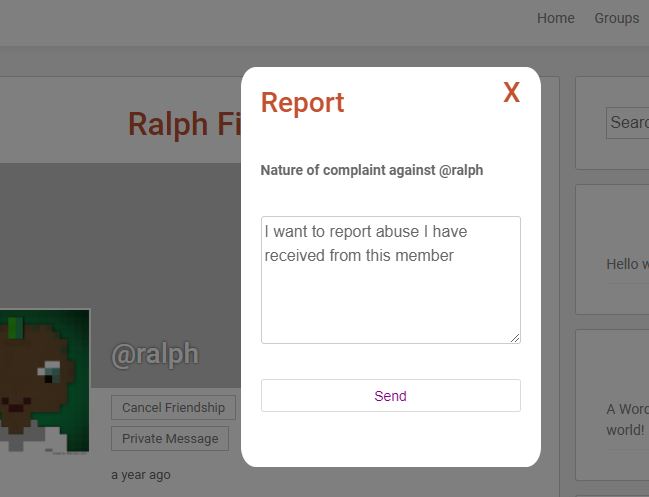
Flag inappropriate, abusive, or otherwise unacceptable behaviour to the site administrator. Each member’s profile now incorporates a ‘report’ button. This creates a new report, which administrators can see in the backend. You can specify a report type, similar to social media networks such as Facebook, to designate that report as ‘spam’ or ‘abusive’ and so on. You can set Block, Suspend, Report to email you when a new report is received.
- Gives your members peace of mind that the site is open to moderation.
- Allows you to deal with any report in your own time, without having to respond to internal messages or other notifications.
- Set a threshold to automatically suspend a user when a number of reports are received.
- Mark new reports as read/unread
- Mark reports as unsubstantiated
- See number of unread reports from the menu or the dashboard
Block, Suspend, Report for BuddyPress Premium Editions
The Premium editions adds the following features:
- Pre-approval system for new activities and group posts
- A ‘Latest Reports’ box in the dashboard
- A ‘Most Blocked’ box, showing your site’s worst offenders
- Integration with Paid Memberships Pro – enable blocking and reporting for certain levels only.
- Assign a role to a suspended user
- Automatically receive new features as they are built
- Ability to add custom CSS to match your theme’s styling perfectly
- Premium email support
Plus, a super-charged report system:
- You can allow a huge range of content to be reported and moderated, not just members themselves:
WordPress Comments
Activity Updates
Activity Comments
Groups
Private Messages
Forum Topics
Forum Replies
rtMedia Uploads
- Create your own report types, or edit the default ones.
- Add your own reports from the backend, ideal for when your members flag content directly to you via a private message or similar.
- Whitelist any user roles that cannot be reported
- Blacklist members so they can’t send reports (ideal for malicious complaints)
- Quickly moderate (hide) any activity from the dashboard
- Add your own moderators who have front-end access to the reporting system
- Let your moderators deal with reports, suspensions, activity moderation
Fully Tested With
- Beehive Theme
- BP Better Messages
Not compatible with
- Vikinger Theme
Installation
Method 1:
- Go to WordPress Dashboard->Plugins->Add New
- Search for Block, Suspend, Report for BuddyPress using search option
- Find the plugin and click Install Now button
- After installation, click on Activate Plugin link to activate the plugin.
Method 2:
- Download the plugin bp-toolkit.zip
- Unpack the bp-toolkit.zip file and extract the bp-toolkit folder
- Upload the plugin folder to your /wp-content/plugins/ directory
- Go to WordPress dashboard, click on Plugins from the menu
- Locate the bp-toolkit plugin and click on Activate link to activate the plugin.
Method 3:
- Download the plugin bp-toolkit.zip
- Go to WordPress Dashboard-Plugins-Add New
- Click on Upload Plugin link from top
- Upload the downloaded bp-toolkit.zip file and click on Install Now
- After installation, click on Activate Plugin link to activate the plugin.
Frequently asked questions
Where can I find answers to any questions?
We keep a fully updated FAQs on our website. Please check there first. If your question still isn’t answered, feel free to open a support ticket from the ‘Support’ link above. Or, send us an email via our website.
Changelog
3.6.5
- Various bugfixes
- Tested with WordPress 6.9.
- Upgrade Freemius
3.6.4
*Upgrade Freemius
3.6.3
- Fix call to a removed BuddyPress function
- Upgrade Freemius
3.6.2
- Upgrade Freemius
- Testing with WP 6.7
3.6.1
- Upgrade Freemius
- Testing with WP 6.2
3.6.0
- Fix bug affecting sites with large number of users
- Bump WordPress version
- Bump Freemius version
Screenshots


For developers
Is this your plugin? Show off the numbers.
Add a live badge to your site, docs or GitHub README. It updates on its own — no account needed.
Best Block, Suspend, Report for Bu… alternatives
All block plugins →





FAQ
Block, Suspend, Report for BuddyPre…: quick answers
Straight answers, pulled from live WordPress.org data.
Live data from WordPress.org · checked Oct 1, 2026
Is Block, Suspend, Report for Budd… free?
Yes. Block, Suspend, Report for Budd… is free to download and use from the official WordPress.org plugin directory.
Is Block, Suspend, Report for Budd… safe to use in 2026?
Block, Suspend, Report for Budd… works, but test it on a staging site before relying on it in 2026. It runs on 500+ sites, is rated 4.6/5 and was last updated 5 months ago, and scores 47/100 on our health check.
How many websites use Block, Suspend, Report for Budd…?
Block, Suspend, Report for Budd… is active on 500+ WordPress websites and has been downloaded 52,434 times since it launched in April 2019. It was downloaded 372 times in the last 30 days.
Does Block, Suspend, Report for Budd… work with WordPress 7.1?
Block, Suspend, Report for Budd… is officially tested up to WordPress 6.9.9, while the latest release is 7.1.2. It may still work, but try it on a staging site first.
What PHP version does Block, Suspend, Report for Budd… need?
Block, Suspend, Report for Budd… requires PHP 7.0 or higher. Most hosts run PHP 8.x today, so it works on any modern WordPress hosting.
When was Block, Suspend, Report for Budd… last updated?
The latest version, 3.6.5, was released on May 5, 2026 (5 months ago).
Who makes Block, Suspend, Report for Budd…?
Block, Suspend, Report for Budd… is developed and maintained by Ben Roberts.
What are the best alternatives to Block, Suspend, Report for Budd…?
The most popular alternatives to Block, Suspend, Report for Budd… are Spectra Legacy (1M+ installs), Breadcrumb NavXT (800K+ installs) and PDF Embedder (300K+ installs).
Powered by PageForge
Want thousands of pages that rank like these? Build them in an afternoon.
This directory runs on the same engine as PageForge. Turn any spreadsheet, CSV or API into thousands of fast, SEO-ready WordPress pages — with schema, internal links and AI-written copy baked in.
- CSV, Google Sheets & API data sources
- AI content, schema & internal links per page
- Works with Elementor, Gutenberg, Yoast & Rank Math
- Free on WordPress.org — no credit card


