



Blogtome
Turns the posts of a WordPress category into a print-ready book PDF – with support for TablePress and Spectra.

Use with caution
Blogtome works, but test it on a staging site before relying on it in 2026. Was last updated 2 months ago, and scores 55/100 on our health check.
- Small user base (<10 active installs)
- Very few reviews so far
How does it stack up?
Side-by-side on installs, updates, ratings & support



Daily downloads
Download spikes usually follow a new release — each site that auto-updates counts as a download.
Rankings
Where Blogtome stands todayWordPress.org search rankings
Live position in the plugin search, top 100| Keyword | Position |
|---|---|
| book | >100 |
| ebook | >100 |
| gutenberg | >100 |
| >100 | |
| >100 |
About Blogtome
From the official readme · v1.9.5Description
Blogtome automatically turns the published posts of a WordPress category into a print-ready PDF book – sorted chronologically, chapter by chapter. Ideal for travel blogs, journals, or project documentation you want to turn into a printed book or ebook.
Good to know
Because blog content can be built very differently depending on the blocks and plugins used, a perfect print result can’t be guaranteed 100% for every possible combination – for unusual or highly individual content, it’s worth checking the generated PDF before sending it to print.
Chapters & layout
- Uses all published posts of a category as individual chapters, sorted chronologically – individual posts can be excluded, e.g. to leave out posts already included in a previous volume
- Optional, automatically generated table of contents with clickable links and a freely editable heading
- Two output profiles: Screen/Standard (A4, display-resolution images) or Print/HighRes (A4, full-resolution images) for sharper results when actually printing
- One- or two-column layout, automatically switches to one column for chapters containing tables
- Optional header with book title/subtitle, continuous or per-chapter page numbering
- Freely choosable background and text colors for the title page and content
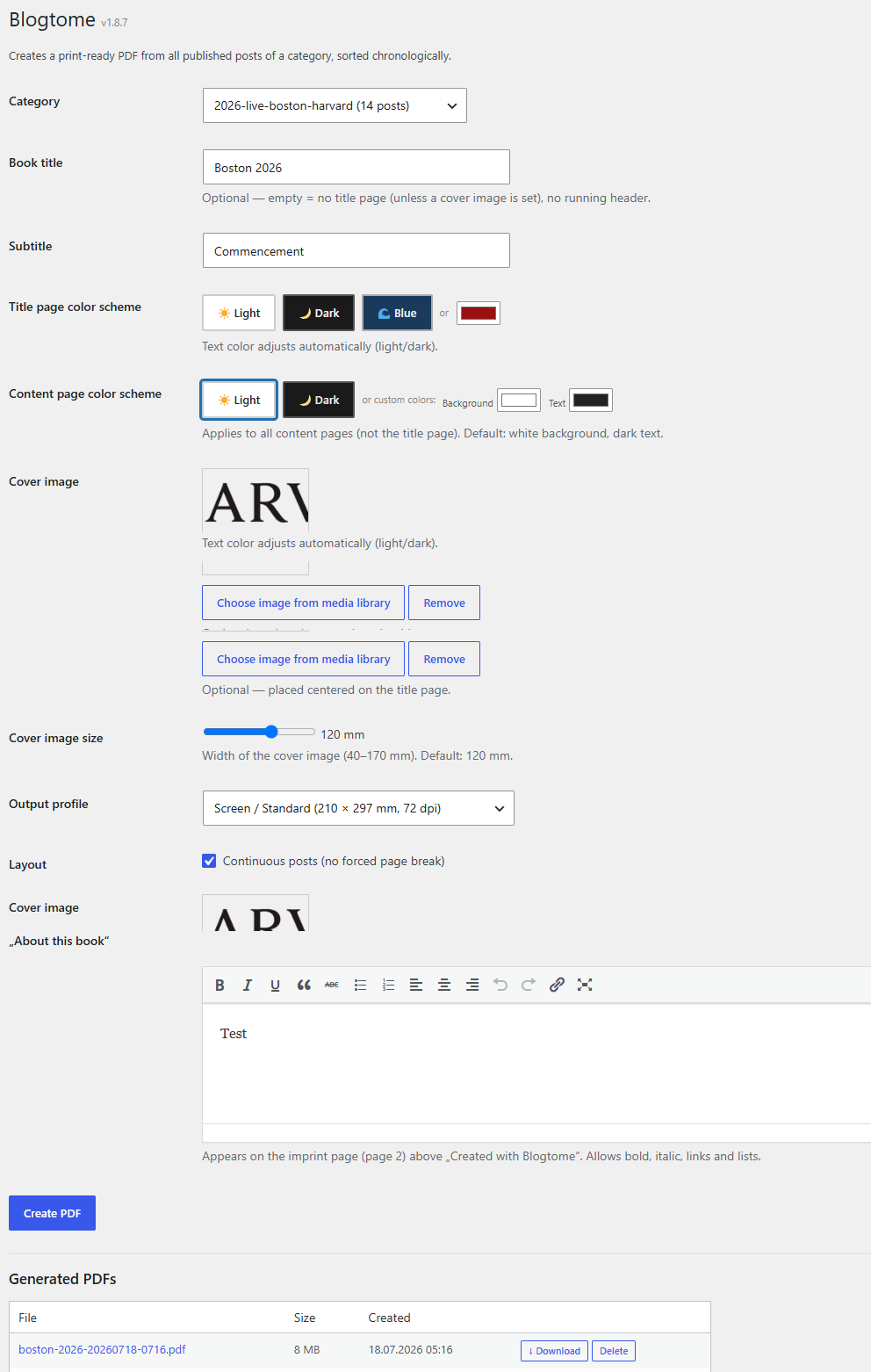
- Optional cover image with adjustable size, plus a freely editable “About this book” text block
Supported block editor content
- TablePress: embedded TablePress tables – including those inserted via shortcode – are recognized and automatically formatted for print
- Spectra (formerly Ultimate Addons for Gutenberg / UAGB): image galleries, single images with captions, and container blocks are natively supported
- Classic Gutenberg images with captions stay together with their caption across page breaks
- Embedded videos are automatically replaced in the PDF with a QR code linking to the original video
Management
- Generated PDFs are saved and can be downloaded or deleted directly from the admin area
- The most recently used settings are remembered automatically
Why this plugin?
Blogtome started out of simple curiosity: how do you turn the posts of a travel blog into an actual, printed book without a huge amount of effort? That question gradually turned into a plugin that now reliably produces print-ready PDFs – even from categories with lots of images, tables, and galleries.
If Blogtome is useful to you and has saved you time, I’d appreciate a coffee: Buy Me a Coffee.
Installation
- In the WordPress admin area, go to “Plugins > Add New”, search for “Blogtome” and install it
- Activate the plugin
- Go to “Tools > Blogtome”, select a category and configure the book
Requirements
- PHP 8.0 or higher
- For TablePress support: the TablePress plugin must be installed and active
- For Spectra block support: the Spectra plugin (formerly Ultimate Addons for Gutenberg) must be installed and active
Frequently asked questions
Do I need TablePress or Spectra for Blogtome to work?
No. Blogtome works with regular Gutenberg posts without any additional plugins. TablePress and Spectra are supported in addition, if you use them – their content is then automatically formatted correctly for print.
Can I order the PDF directly from a print service?
The “Print / HighRes” profile embeds full-resolution images instead of the smaller versions used for on-screen viewing, and produces a regular A4 PDF that most print-on-demand services accept directly, with no special bleed or trim format required. Please still check the exact requirements of your chosen print service before ordering.
Where do I find the generated PDFs?
All generated books are listed in the admin area under “Tools > Blogtome”, where they can be downloaded or deleted.
Changelog
This version requires PHP 8.0 or higher. Please check your hosting's PHP version before updating.
1.9.5
- Added an optional, automatically generated table of contents with clickable links and a freely editable heading (default: “Inhaltsverzeichnis”)
- Individual posts within a category can now be excluded from the generated book, e.g. to leave out posts already included in a previous volume
- Line breaks in the “About this book” text field are now correctly carried over into the generated PDF
- Print/HighRes profile now embeds full-resolution images for every image, not just those inside image galleries
- Simplified page format: removed the special 3 mm bleed / mirrored-margin page format previously tailored to one specific print-on-demand provider – Print/HighRes now uses the same A4 format as Screen/Standard, since most current print services accept a regular PDF directly
- Fixed header/footer sometimes missing on individual pages depending on chapter count and page parity
- Fixed video/link QR-code placeholders occasionally being split across a page or column break
1.9.4
- Fixed excessive PDF size/page count introduced by the 1.9.2/1.9.3 gallery fix: images in detected native galleries now respect the selected profile (Screen/Standard uses the moderate size WordPress already serves, Print/HighRes uses the original resolution) instead of always embedding the largest available image
1.9.3
- Fixed the 1.9.2 gallery detection: page builders like Elementor don’t store an enclosing gallery wrapper in the post content (only in their live front-end rendering), so galleries were still not recognized in some cases. Detection no longer depends on that wrapper.
1.9.2
- Image galleries built with page builders that reuse WordPress’s native gallery markup (e.g. Elementor’s Image Gallery widget) are now recognized and rendered with proper spacing in the PDF, instead of images sticking together with no gap
1.9.1
- Added the German (de_DE) translation, prepared for 1.9.0 but accidentally left out of that build
1.9.0
- Internationalization: all visible strings in the admin interface (and in the generated PDF, e.g. the imprint line and video placeholders) are now translation-ready, using the
blogtometext domain - Translations can now be contributed via the official WordPress.org translation platform (https://translate.wordpress.org/projects/wp-plugins/blogtome/)
Screenshots
For developers
Is this your plugin? Show off the numbers.
Add a live badge to your site, docs or GitHub README. It updates on its own — no account needed.
Best Blogtome alternatives
All book plugins →




FAQ
Blogtome: quick answers
Straight answers, pulled from live WordPress.org data.
Live data from WordPress.org · checked Oct 3, 2026
Is Blogtome free?
Yes. Blogtome is free to download and use from the official WordPress.org plugin directory.
Is Blogtome safe to use in 2026?
Blogtome works, but test it on a staging site before relying on it in 2026. Was last updated 2 months ago, and scores 55/100 on our health check.
How many websites use Blogtome?
Blogtome is active on <10 WordPress websites and has been downloaded 331 times since it launched in July 2026. It was downloaded 74 times in the last 30 days.
Does Blogtome work with WordPress 7.1?
Blogtome is officially tested up to WordPress 7.0.6, while the latest release is 7.1.2. It may still work, but try it on a staging site first.
What PHP version does Blogtome need?
Blogtome requires PHP 8.0 or higher. Most hosts run PHP 8.x today, so it works on any modern WordPress hosting.
When was Blogtome last updated?
The latest version, 1.9.5, was released on July 31, 2026 (2 months ago).
Who makes Blogtome?
Blogtome is developed and maintained by Uwe Grunewald.
What are the best alternatives to Blogtome?
The most popular alternatives to Blogtome are MyBookTable Bookstore by St… (1K+ installs), Book Previewer for Woocomme… (1K+ installs) and Mooberry Book Manager (1K+ installs).
Powered by PageForge
Want thousands of pages that rank like these? Build them in an afternoon.
This directory runs on the same engine as PageForge. Turn any spreadsheet, CSV or API into thousands of fast, SEO-ready WordPress pages — with schema, internal links and AI-written copy baked in.
- CSV, Google Sheets & API data sources
- AI content, schema & internal links per page
- Works with Elementor, Gutenberg, Yoast & Rank Math
- Free on WordPress.org — no credit card


