



Blocks Scanner
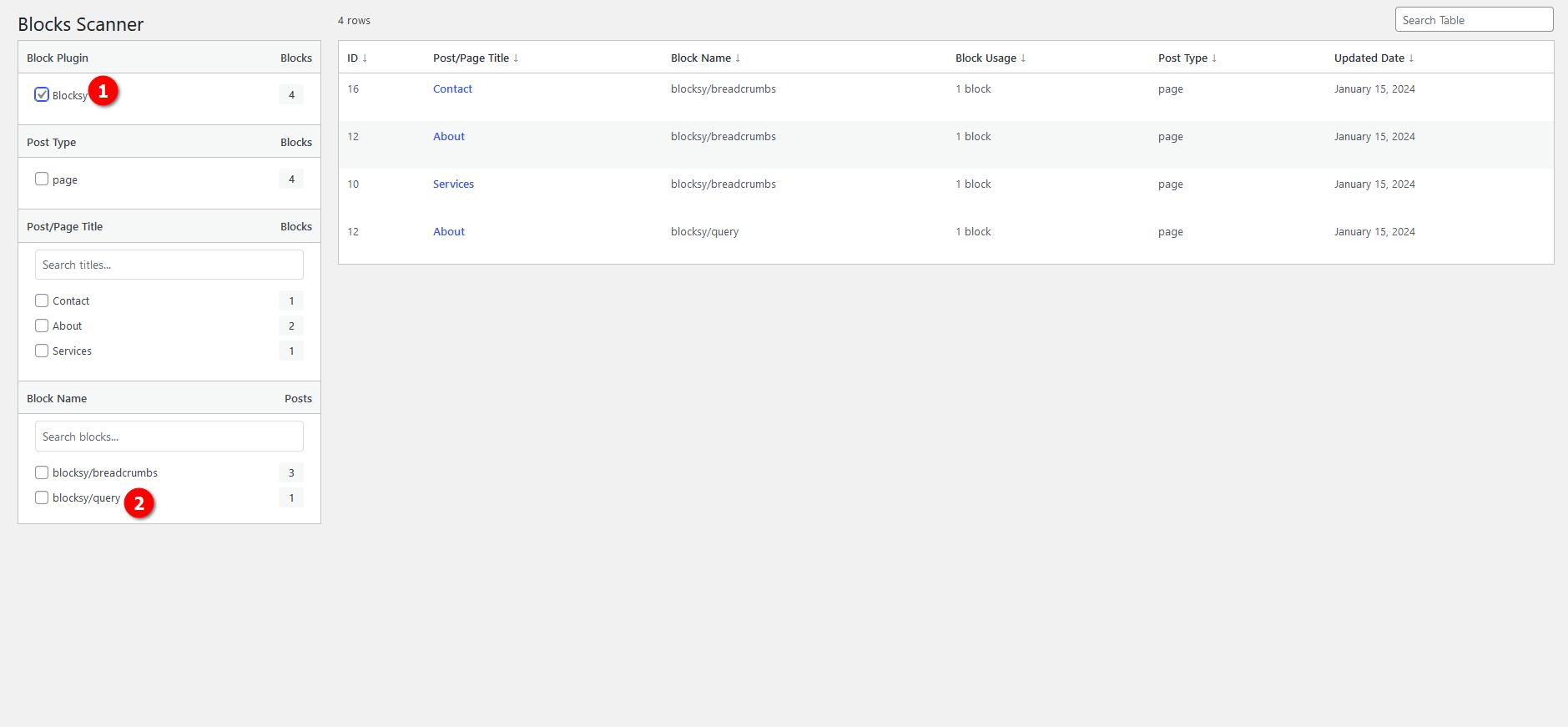
Easily scan and list the Gutenberg blocks used on your site. Quickly edit or view the posts that use the blocks.

Use with caution
Blocks Scanner works, but test it on a staging site before relying on it in 2026. It runs on 60+ sites, is rated 5/5 and was last updated 5 months ago, and scores 60/100 on our health check.
- Small user base (60+ active installs)
- Very few reviews so far
How does it stack up?
Side-by-side on installs, updates, ratings & support



Daily downloads
Download spikes usually follow a new release — each site that auto-updates counts as a download.
Rankings
Where Blocks Scanner stands todayWordPress.org search rankings
Live position in the plugin search, top 100| Keyword | Position |
|---|---|
| blocks | >100 |
| editor | >100 |
| find | >100 |
| gutenberg | >100 |
| scan | #64 |
Version adoption
Share of active sites per release.
Rating breakdown
★★★★★★★★★★ 5 from 1 reviews
About Blocks Scanner
From the official readme · v1.0.4Description
Blocks Scanner is a WordPress plugin that allows you to easily scan and list the Gutenberg blocks used on your site. With Blocks Scanner, you can quickly edit or view the posts that use specific blocks, streamlining your editing workflow.
Features
- Scan and list Gutenberg blocks used on your WordPress site.
- Quickly edit or view the posts that contain specific blocks.
- Streamline your editing workflow by easily identifying and managing blocks.
Usage
- Once activated, navigate to Tools > Blocks Scanner in your WordPress admin panel.
- The plugin will automatically scan all posts, pages, and custom post types and patterns.
- You can then view the list of posts that utilize blocks on your site and take appropriate actions quickly.
Support
For support, bug reports, or feature requests, please visit the GitHub repository and create an issue.
Frequently asked questions
How do I scan Gutenberg blocks on my site?
After activating the Blocks Scanner plugin, navigate to Tools > Blocks Scanner in your WordPress admin panel. The plugin will automatically scan all posts, pages, and custom post types to list the Gutenberg blocks used on your site.
Can I edit or view posts containing specific blocks?
Yes, Blocks Scanner allows you to quickly edit or view the posts that contain specific blocks. Once you’ve scanned your site, you can easily identify and manage blocks from the plugin’s interface.
What if I encounter any issues or have feature requests?
If you encounter any issues, have feature requests, or need support, please visit the GitHub repository and create an issue. Our team will be happy to assist you.
What about compatibility with other plugins/themes?
Blocks Scanner is designed to work smoothly with most WordPress themes and plugins. However, if you experience any compatibility issues, please let us know by creating an issue on the GitHub repository.
How often does Blocks Scanner update its block list?
Blocks Scanner updates its block list in real-time as you scan your site. This ensures that you always have the most up-to-date information about the Gutenberg blocks used on your WordPress site.
Is Blocks Scanner compatible with multisite installations?
Yes, Blocks Scanner is compatible with multisite installations of WordPress. You can activate the plugin network-wide and use it to scan and manage Gutenberg blocks across all sites in your network.
Changelog
1.0.4
- Tested up to WordPress 7.0
1.0
- New: Added more filters to better management
- New: Filters are updated via the posts/pages current table
- New: JS has been rewritten from scratch, now even faster
- Improvement: UI changes for better management
0.9.1
- Fix: If the first word of the blocks set is WP, add the second word
- Fix: Separated variables
0.9
- Improvement: Dynamically generate tabs and block lists based on Blocks set/plugin
0.8
- Improvement: Improved unique slug nonce check
- Improvement: Improved unique function names
0.7.2
- Improvement: Added better nonce check
Screenshots


For developers
Is this your plugin? Show off the numbers.
Add a live badge to your site, docs or GitHub README. It updates on its own — no account needed.
Best Blocks Scanner alternatives
All blocks plugins →





FAQ
Blocks Scanner: quick answers
Straight answers, pulled from live WordPress.org data.
Live data from WordPress.org · checked Sep 27, 2026
Is Blocks Scanner free?
Yes. Blocks Scanner is free to download and use from the official WordPress.org plugin directory.
Is Blocks Scanner safe to use in 2026?
Blocks Scanner works, but test it on a staging site before relying on it in 2026. It runs on 60+ sites, is rated 5/5 and was last updated 5 months ago, and scores 60/100 on our health check.
How many websites use Blocks Scanner?
Blocks Scanner is active on 60+ WordPress websites and has been downloaded 3,055 times since it launched in May 2024. It was downloaded 176 times in the last 30 days.
Does Blocks Scanner work with WordPress 7.1?
Blocks Scanner is officially tested up to WordPress 7.0.6, while the latest release is 7.1.2. It may still work, but try it on a staging site first.
What PHP version does Blocks Scanner need?
Blocks Scanner requires PHP 7.2 or higher. Most hosts run PHP 8.x today, so it works on any modern WordPress hosting.
When was Blocks Scanner last updated?
The latest version, 1.0.4, was released on April 29, 2026 (5 months ago).
Who makes Blocks Scanner?
Blocks Scanner is developed and maintained by taha.tr.
What are the best alternatives to Blocks Scanner?
The most popular alternatives to Blocks Scanner are Spectra Legacy (1M+ installs), Kadence Blocks (600K+ installs) and Extendify (500K+ installs).
Powered by PageForge
Want thousands of pages that rank like these? Build them in an afternoon.
This directory runs on the same engine as PageForge. Turn any spreadsheet, CSV or API into thousands of fast, SEO-ready WordPress pages — with schema, internal links and AI-written copy baked in.
- CSV, Google Sheets & API data sources
- AI content, schema & internal links per page
- Works with Elementor, Gutenberg, Yoast & Rank Math
- Free on WordPress.org — no credit card


