



Gutenberg Block for WooCommerce Product Table
Note: Since building this block plugin, we have added an interactive table builder to the main WooCommerce Product Table plugin. This makes it easy to create product tables and insert them into the block editor or any…

Consider an alternative
Gutenberg Block for WooCommerce… shows warning signs in 2026 — compare the alternatives below before installing. It runs on 3K+ sites, is rated 3.3/5 and was last updated 2 years ago, and scores 33/100 on our health check.
- Low rating so far — 3.3/5 from only 4 reviews
- No update in over a year
- Only tested up to WordPress 6.7 (latest is 7.1)
How does it stack up?
Side-by-side on installs, updates, ratings & support



Daily downloads
Download spikes usually follow a new release — each site that auto-updates counts as a download.
Rankings
Where Gutenberg Block for WooComm… stands todayWordPress.org search rankings
Live position in the plugin search, top 100| Keyword | Position |
|---|---|
| block | >100 |
| blocks | >100 |
| Gutenberg block | >100 |
| order form | >100 |
| product table | >100 |
Version adoption
Share of active sites per release.
Rating breakdown
★★★★★★★★★★ 3.3 from 4 reviews
About Gutenberg Block for WooCommerce Product…
From the official readme · v1.0.11Description
Note: Since building this block plugin, we have added an interactive table builder to the main WooCommerce Product Table plugin. This makes it easy to create product tables and insert them into the block editor or any page builder. While you can still use the block plugin, it is no longer actively being developed and we recommend using the built-in table builder instead, which has more features.
Gutenberg Block for WooCommerce Product Table adds a user-friendly editor block to the WooCommerce Product Table plugin by Barn2, providing an easier way for Gutenberg users to create product tables. It requires WooCommerce Product Table (available separately) to work.
WooCommerce Product Table lists products in a quick order form layout designed to increase your sales and average order value. Instead of having to visit a separate page for each product, customers can select products, quantities and variations from the product table and quickly add them to the cart.
WooCommerce Product Table is highly flexible and you can choose which products to include, a wide range of column options, filters, instant AJAX search, add to cart button styles, and more.
Gutenberg Block for WooCommerce Product Table makes it easy to insert product tables anywhere on your site using the Gutenberg editor. This gives you full control over your product tables.
BLOCK OPTIONS
You can use the WooCommerce Product Table editor block to add as many product tables as you like. You can even add multiple tables to the same page.
By default, each product table will inherit the global options from the WooCommerce Product Table plugin settings page. You can override the following options for each individual block:
-
Select your product table columns:
- Choose from SKU, ID, product name, description, short description, date published, categories, tags, reviews/star rating, stock, weight, dimensions, price, add to cart, button, attribute, custom field, and custom taxonomy
- Change the order of columns
- Rename columns
-
Select which products to include in the table:
- List all products, or select specific products based on category, tag, custom field, custom taxonomy, attribute, year, month, day, status, ID, or list previously ordered products by the current user.
- Exclude specific products or categories.
-
Add to cart column settings:
- Add to cart button – choose from button, checkbox, or both.
- Quantity picker.
- Variations – display as dropdowns, list each variation on its own row of the table, or link to the single product page.
-
Product filters – Add filter dropdowns above the table so that customers can refine the list by category, tag, attribute, or custom taxonomy.
- Additional options – You can also use any of the other 50+ options that are available in the WooCommerce Product Table plugin.
HOW TO USE THE BLOCK
- First make sure WooCommerce, Gutenberg Block for WooCommerce Product Table and WooCommerce Product Table are all installed.
- Next, go to any page or post that uses the Block (Gutenberg) editor and click the + icon to add a new block.
- Navigate to the ‘WooCommerce’ section and find the block called ‘WooCommerce Product Table’, or type ‘WooCommerce Product Table’ into the search box. This will insert the WooCommerce Product Table block into the editor.
- By default, the block will list all your products and will inherit the global options from the WooCommerce Product Table plugin settings page. You can override these by setting options directly in the Gutenberg block:
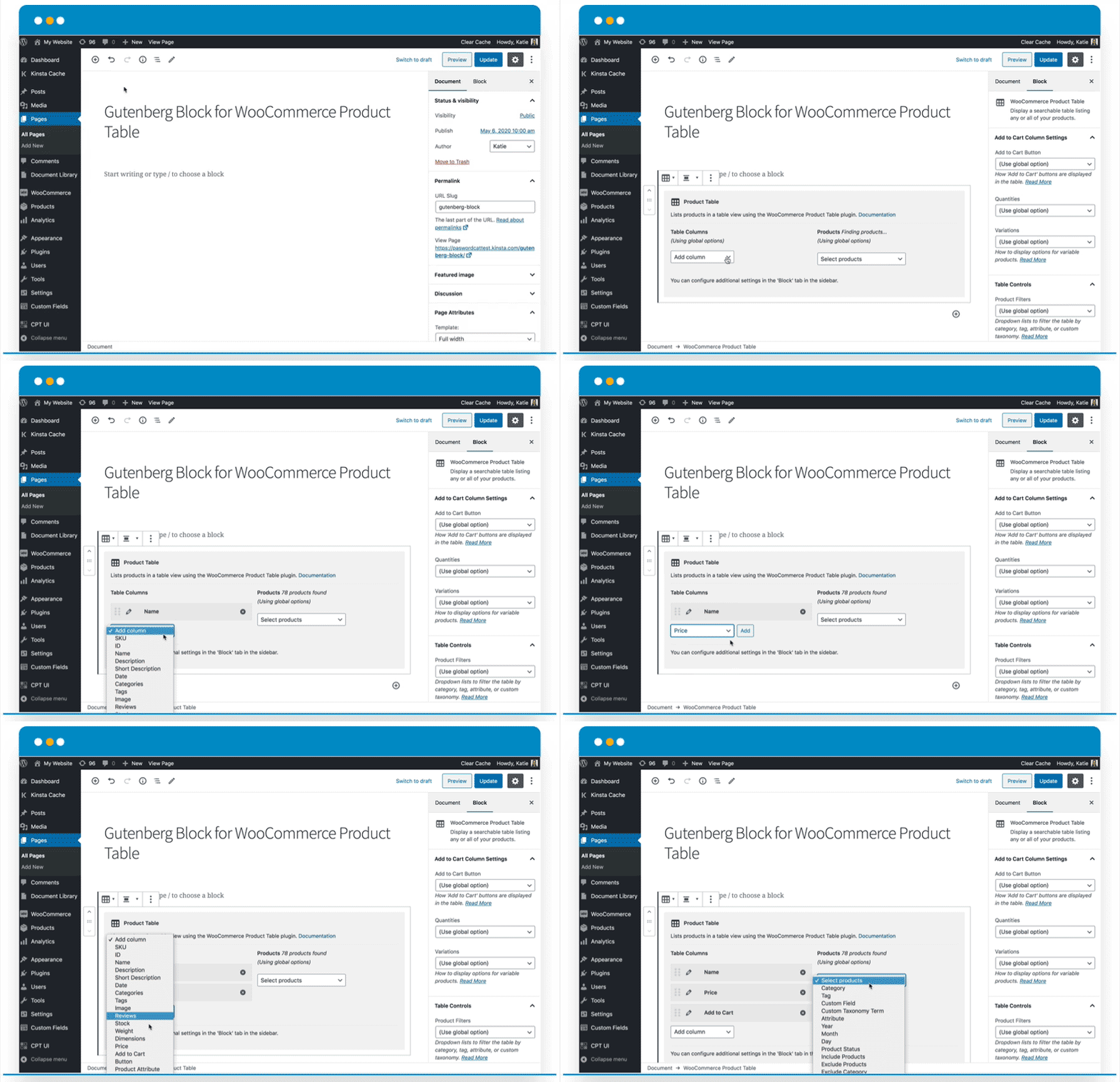
- Table Columns – Use the ‘Add column’ dropdown to select which columns to include in the WooCommerce Product Table. You can re-order columns using drag and drop, and rename columns by clicking the pencil icon. Read more about the product table columns.
- Products – Use the ‘Select products’ dropdown to list specific products in the table. For example, you can select products by ID, category, tag, attribute, custom field value, custom taxonomy term, date, status, and more. There are also options to exclude products from the table based on category or ID. Read more about listing specific products.
- You will find additional block settings in the ‘Block’ tab of the Editor sidebar. Use these to configure the add to cart column of the table; add filter dropdowns above the table; and to use any of the additional options available in WooCommerce Product Table.
- Finally, update or Preview the page to view the product table on the front end of your website.
- Repeat steps 2-5 to add more product tables.
Installation
- Upload the plugin files to the
/wp-content/plugins/block-for-woocommerce-product-tabledirectory, or install the plugin through the WordPress plugins screen directly. - Activate the plugin through the ‘Plugins’ screen in WordPress.
- Add your block to any page
Frequently asked questions
Can I add more than one product table?
Yes, you can create as many product tables as you like. Simply add the ‘WooCommerce Product Table’ block wherever you wish to insert a table. You can add multiple tables to the same page. Tip: If you are adding several product tables to the same page then we recommend enabling the lazy load option on the WooCommerce Product Table plugin settings page. This will prevent any performance problems from listing large numbers of products on one page.
What if I don’t have WooCommerce Product Table?
Gutenberg Block for WooCommerce Product Table is an add-on for WooCommerce Product Table and is not designed to be used separately. It only works with the premium WooCommerce Product Table plugin by Barn2, and not other plugins with similar names. Sign up for a free trial.
Can I create product tables if I’m not using Gutenberg?
Yes, WooCommerce Product Table comes with a built-in table builder which works with all WordPress editors and page builders. Simply install WooCommerce Product Table and go to Products > Product Tables > Add New to create tables. The final page of the table builder provides a shortcode which you can use to insert the table anywhere on your site. You can also enable tables automatically on your main shop page templates, without having to use a block or shortcode.
Changelog
This is the initial release version
1.0.11
- Tested with the latest version of WordPress and WooCommerce
- Added the integration with PHP 8.3
- Integrated with the latest version of WooCommerce Product Table
1.0.10
- Updated the Screenshots
- Tested up to WordPress 6.5.2 and WooCommerce 8.8.2
1.0.9
- Declare HPOS compatibility
- Tested up to WordPress 6.2.2 and WooCommerce 7.8.2
1.0.8
- Compatibility update with WC 7.4.1
1.0.7
- Compatibility update with WP 6.1.1 and WC 7.1.0
1.0.6
- Compatibility update with WP 6.0 and WC 6.5
- Improved options of column select box
Screenshots


For developers
Is this your plugin? Show off the numbers.
Add a live badge to your site, docs or GitHub README. It updates on its own — no account needed.
Best Gutenberg Block for WooCommer… alternatives
All block plugins →





FAQ
Gutenberg Block for WooCommerce Pro…: quick answers
Straight answers, pulled from live WordPress.org data.
Live data from WordPress.org · checked Sep 26, 2026
Is Gutenberg Block for WooCommerce… free?
Yes. Gutenberg Block for WooCommerce… is free to download and use from the official WordPress.org plugin directory.
Is Gutenberg Block for WooCommerce… safe to use in 2026?
Gutenberg Block for WooCommerce… shows warning signs in 2026 — compare the alternatives below before installing. It runs on 3K+ sites, is rated 3.3/5 and was last updated 2 years ago, and scores 33/100 on our health check.
How many websites use Gutenberg Block for WooCommerce…?
Gutenberg Block for WooCommerce… is active on 3K+ WordPress websites and has been downloaded 60,897 times since it launched in May 2020. It was downloaded 449 times in the last 30 days.
Does Gutenberg Block for WooCommerce… work with WordPress 7.1?
Gutenberg Block for WooCommerce… is officially tested up to WordPress 6.7.9, while the latest release is 7.1.2. It may still work, but try it on a staging site first.
What PHP version does Gutenberg Block for WooCommerce… need?
Gutenberg Block for WooCommerce… requires PHP 7.4 or higher. Most hosts run PHP 8.x today, so it works on any modern WordPress hosting.
When was Gutenberg Block for WooCommerce… last updated?
The latest version, 1.0.11, was released on November 13, 2024 (2 years ago).
Who makes Gutenberg Block for WooCommerce…?
Gutenberg Block for WooCommerce… is developed and maintained by Barn2 Plugins.
What are the best alternatives to Gutenberg Block for WooCommerce…?
The most popular alternatives to Gutenberg Block for WooCommerce… are Spectra Legacy (1M+ installs), Breadcrumb NavXT (800K+ installs) and PDF Embedder (300K+ installs).
Powered by PageForge
Want thousands of pages that rank like these? Build them in an afternoon.
This directory runs on the same engine as PageForge. Turn any spreadsheet, CSV or API into thousands of fast, SEO-ready WordPress pages — with schema, internal links and AI-written copy baked in.
- CSV, Google Sheets & API data sources
- AI content, schema & internal links per page
- Works with Elementor, Gutenberg, Yoast & Rank Math
- Free on WordPress.org — no credit card


