


Block Enhancements – Extended styling for the Block Editor
Add icon, responsive spacing, typography, alignment, shadow, transform, transition, color, hover style to blocks. Lightweight, fast, and clean.

Solid choice
Block Enhancements is a solid plugin choice in 2026, with a few things worth checking first. It runs on 800+ sites, is rated 5/5 and was last updated 1 month ago, and scores 78/100 on our health check.
- Tested with the latest WordPress (7.1)
- Small user base (800+ active installs)
How does it stack up?
Side-by-side on installs, updates, ratings & support



Daily downloads
Download spikes usually follow a new release — each site that auto-updates counts as a download.
Rankings
Where Block Enhancements stands todayWordPress.org search rankings
Live position in the plugin search, top 100| Keyword | Position |
|---|---|
| blocks | >100 |
| button | >100 |
| hover | #61 |
| icon | >100 |
| responsive | >100 |
Version adoption
Share of active sites per release.
Rating breakdown
★★★★★★★★★★ 5 from 8 reviews
About Block Enhancements
From the official readme · v1.2.12Description
Block Enhancements adds powerful design options to core Gutenberg blocks, so you don’t need to install heavy custom block libraries.
It’s the easiest way to make your existing blocks more flexible and responsive while keeping your site fast and clean. All dynamic styles are rendered in the document head instead of inline styles. If you deactivate the plugin, all customized styles are removed, and no leftover styles will affect your site.
Unlike other similar plugins, this plugin is lightweight. It only loads what you need. You can enable or disable individual features per block type from the plugin’s settings page.
It works with all Gutenberg-ready themes, however, the with-icon feature uses the CSS pseudo ::before to add icons with the mask-image CSS property. It may conflict with other plugins or themes that use the same technique.
Key Features
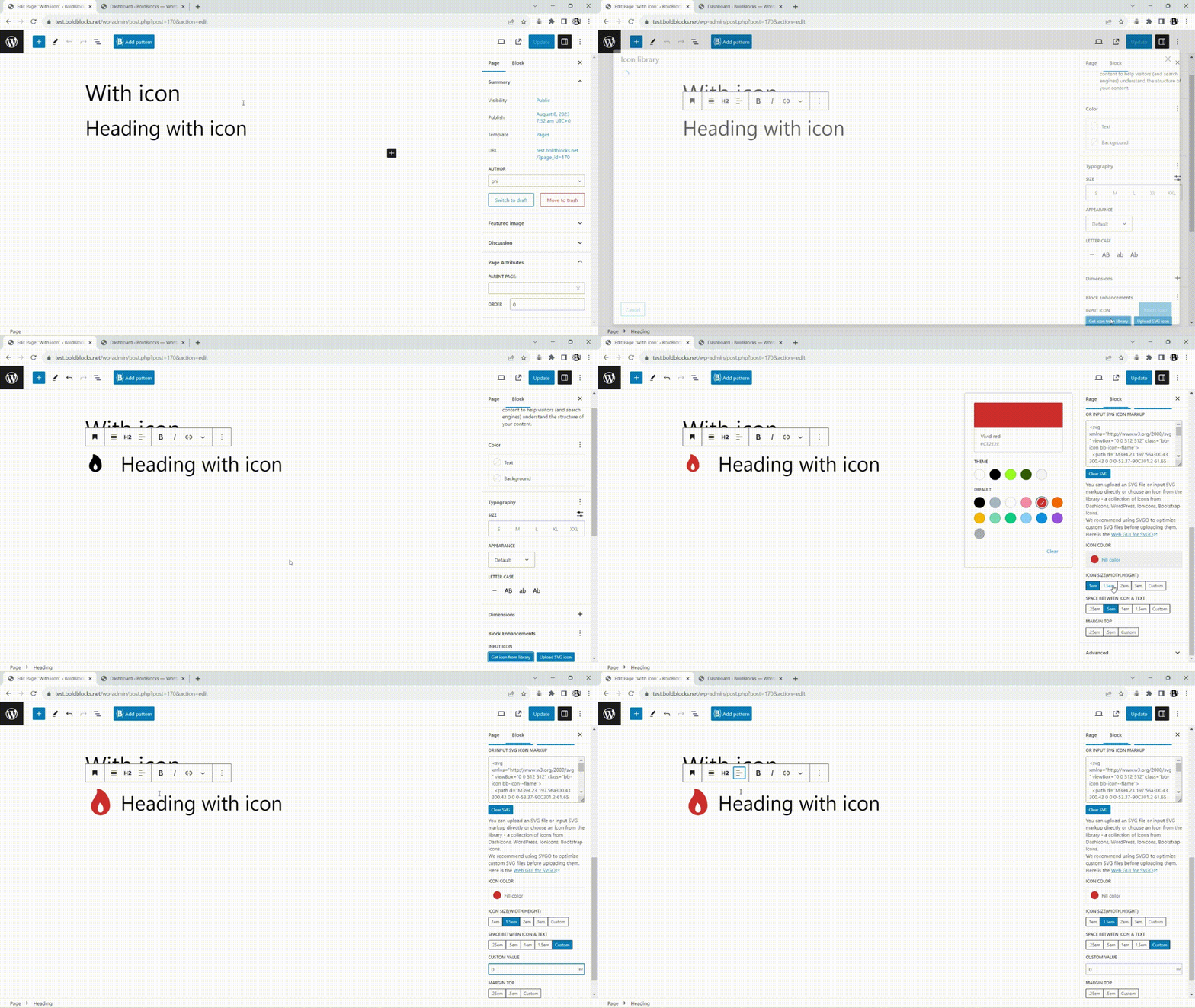
- Add icons to buttons, headings, lists, navigation blocks (built-in 3000+ icon library or custom SVGs).
- Set responsive dimensions: padding, margin, and block spacing per device.
- Adjust responsive typography: font size, weight, line height, letter spacing per device.
- Apply 2D transforms (translate, rotate, skew, scale) per device with hover styles.
- Add box-shadow and text-shadow with hover state styles.
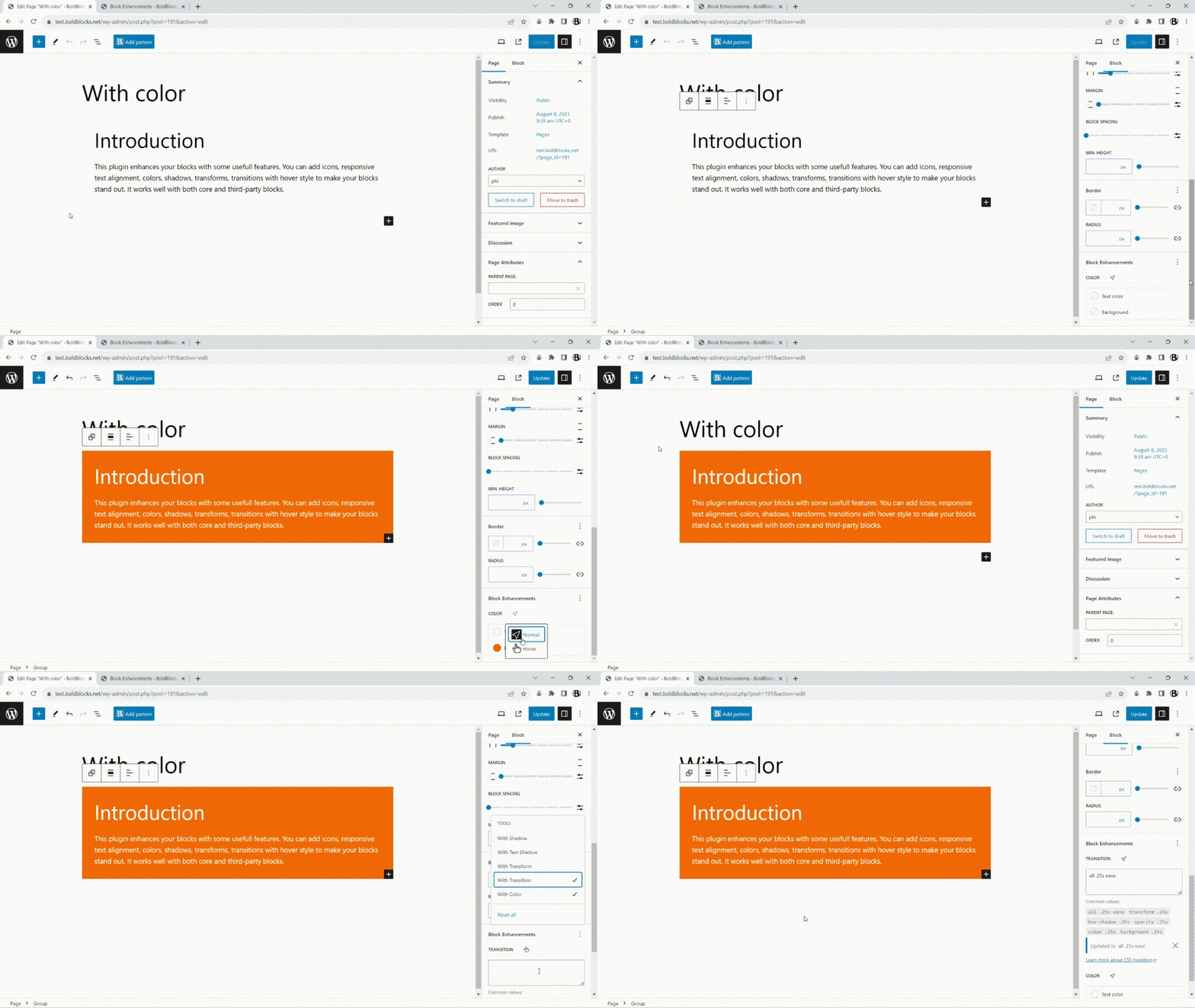
- Customize text and background colors with hover styles.
- Control responsive text alignment for Group, Columns, and Column blocks.
- Use transitions for smooth hover style changes.
- Define responsive CSS positions (relative, absolute, sticky, static) with custom offsets.
How responsive styles work
Responsive styles are applied per device mode: Desktop, Tablet, and Mobile. When you edit a style for a block for the first time, the current device mode becomes the source, and the other modes will automatically inherit those styles.
For example, if you set styles in Desktop mode first, Tablet and Mobile will inherit the Desktop styles by default. If you want different styles for Tablet or Mobile, switch to that mode and adjust the settings there. The same behavior applies if you start editing in Tablet or Mobile mode. Each device mode can be customized independently once it has been edited.
By default, the breakpoints are:
- Desktop: 1024px
- Tablet: 768px
If your theme or another plugin uses different breakpoints, you can change the defaults using the following filter:
    apply_filters( 'block_enhancements_get_breakpoints', [
      'sm' => [
        'breakpoint' => '576px',
        'mediaQuery' => '',
      ],
      'md' => [
        'breakpoint' => '768px',
        'mediaQuery' => '@media (min-width: 768px){##CONTENT##}',
      ],
      'lg' => [
        'breakpoint' => '1024px',
        'mediaQuery' => '@media (min-width: 1024px){##CONTENT##}',
      ],
    ] );
This allows you to align responsive behavior with your theme’s breakpoint system.
Common use cases
- Add icons to blocks (button, heading, list, navigation).
- Change spacing (padding, margin, block spacing) per device for button, group, row, grid, columns, gallery blocks.
- Change typography (font size, font weight, line-height, letter spacing) per device.
- Change text-alignment for group blocks per device. For example text-align center on mobile but text-align left on the desktop.
- Add 2D transforms (translate, scale, rotate, skew) hover effect for buttons, images, heading, group, etc.
- Add box-shadow, text-shadow with hover styles.
- Change text color, background color on mouse hover.
How to use a feature
- Select the block in the Block Editor.
- Choose the Styles tab from the inspector settings.
- Click on the plus (+) icon of the Block Enhancements panel to choose a feature and input its settings.
- You can make a feature visible by default in the Block Enhancements panel from Settings → Block Enhancements → Manage Features.
- If a feature does not appear, go to Settings → Block Enhancements → Manage Features and enable that feature for your block type.
- For responsive features, switch between device modes (Desktop, Tablet, and Mobile) to input settings for each screen size.
- The responsive text alignment settings are available in the block toolbar, not in the inspector settings.
- See the video tutorials and the screenshots for more details.
Video tutorials
How to customize a core button in Gutenberg:
Please help this plugin grow by reporting issues and giving suggestions.
If this plugin is useful for you, please do a quick review and rate it on WordPress.org to help us spread the word. I would very much appreciate it.
Please check out my other plugins if you’re interested:
- Content Blocks Builder – Build custom layouts and blocks visually in the Block Editor without needing a code editor, using only core blocks and native Gutenberg features.
- Meta Field Block – A single block to display custom fields in the Block Editor without coding. It supports ACF, MetaBox, WooCommerce, meta, rest field, shortcode and more. Works everywhere: in the Site Editor (FSE), the Block Editor, inside Query Loop, WooCommerce Product Collection, Term Query blocks, and even in template files.
- SVG Block – A block to display SVG images as blocks. Useful for images, icons, dividers, and buttons. It allows you to upload SVG images and load them into the icon library.
- Icon separator – A tiny block just like the core/separator block but with the ability to add an icon.
- Breadcrumb Block – A simple breadcrumb trail block that supports JSON-LD structured data and is compatible with WooCommerce.
- Counting Number Block – A block to display numbers with a counting effect
- Better YouTube Embed Block – A block to solve the performance issue with embedded YouTube videos. It can also embed multiple videos and playlists.
The plugin is developed using @wordpress/scripts. The source code is available in the trunk branch.
Installation
- Upload the plugin files to the
/wp-content/pluginsdirectory, or install the plugin through the WordPress plugins screen directly. - Activate the plugin through the ‘Plugins’ screen in WordPress
Frequently asked questions
What problem does this plugin solve?
It adds advanced styling controls to Gutenberg core blocks, so you can customize existing core blocks further without heavy block libraries.
When should I use this plugin?
When you want more advanced features on core blocks, without installing new ones.
Does it affect performance?
No. Each feature loads only when used, keeping your site fast, light, and clean.
Who can use it?
Anyone — designers, developers, or content creators familiar with the Block Editor.
Is it compatible with Full Site Editing?
Yes. It works perfectly in the Site Editor and with all block themes.
Does it support my theme?
It supports any Gutenberg-ready theme.
Why does the text of the block break when I add an icon to it?
It is probably because you added an inline element such as bold, italic, highlight, etc. in the text. To fix it, there is a toggle setting named ‘Wrap a around the text to keep it on a single line.’ in the ‘With icon’ panel. Just turn it on to make the text work properly.
Changelog
1.2.12
Release Date – 14 May 2026
- Improved – Updated inspector control styles
- Improved – Added a visualizer for padding and margin
- Added – New settings to choose which features are displayed by default in the Block Enhancements panel
1.2.11
Release Date – 19 January 2026
- Improved – Added a setting to wrap list item text in a span to prevent it from breaking into multiple lines.
1.2.10
Release Date – 12 January 2026
- Improved – Added sanitize_callback to setttings field registration
- Added – Removed settings fields on uninstall
1.2.9
Release Date – 22 November 2025
- Fixed – Missing styles for classic/hybrid themes that include template files (e.g., templates/index.html), which caused WordPress to detect them as block themes.
- Fixed – Removed the box-shadow from wp-block-button so it only applies to wp-block-button__link.
- Improved – Allowed loading more SVGs from the media library via a hook
1.2.8
Release Date – 15 October 2025
- Added – responsive padding, margin, and block spacing options to blocks for better tablet/mobile design control.
1.2.7
Release Date – 11 August 2025
- Added – The new with-position feature. Thanks to @hozefasmile for the suggestion.
- Fixed – Issue where the icon on the left for the core “Read More” block was not working.
- Improved – Added the ‘block_enhancements_get_breakpoints’ hook to change the breakpoints beside getting the value from the Content Blocks Builder plugin.
Screenshots



For developers
Is this your plugin? Show off the numbers.
Add a live badge to your site, docs or GitHub README. It updates on its own — no account needed.
Best Block Enhancements alternatives
All blocks plugins →





FAQ
Block Enhancements: quick answers
Straight answers, pulled from live WordPress.org data.
Live data from WordPress.org · checked Sep 27, 2026
Is Block Enhancements free?
Yes. Block Enhancements is free to download and use from the official WordPress.org plugin directory.
Is Block Enhancements safe to use in 2026?
Block Enhancements is a solid plugin choice in 2026, with a few things worth checking first. It runs on 800+ sites, is rated 5/5 and was last updated 1 month ago, and scores 78/100 on our health check.
How many websites use Block Enhancements?
Block Enhancements is active on 800+ WordPress websites and has been downloaded 13,225 times since it launched in April 2022. It was downloaded 256 times in the last 30 days.
Does Block Enhancements work with WordPress 7.1?
Yes. The developer has tested Block Enhancements up to WordPress 7.1.2, the latest release. It requires WordPress 6.5 or newer.
What PHP version does Block Enhancements need?
Block Enhancements requires PHP 7.0 or higher. Most hosts run PHP 8.x today, so it works on any modern WordPress hosting.
When was Block Enhancements last updated?
The latest version, 1.2.12, was released on August 16, 2026 (1 month ago).
Who makes Block Enhancements?
Block Enhancements is developed and maintained by Phi Phan.
What are the best alternatives to Block Enhancements?
The most popular alternatives to Block Enhancements are Spectra Legacy (1M+ installs), Kadence Blocks (600K+ installs) and Extendify (500K+ installs).
Powered by PageForge
Want thousands of pages that rank like these? Build them in an afternoon.
This directory runs on the same engine as PageForge. Turn any spreadsheet, CSV or API into thousands of fast, SEO-ready WordPress pages — with schema, internal links and AI-written copy baked in.
- CSV, Google Sheets & API data sources
- AI content, schema & internal links per page
- Works with Elementor, Gutenberg, Yoast & Rank Math
- Free on WordPress.org — no credit card


