



Block AI Crawlers
Adds robots.txt rules blocking AI crawlers and AI bots.

Solid choice
Block AI Crawlers is a solid plugin choice in 2026, with a few things worth checking first. It runs on 1K+ sites, is rated 4.4/5 and was last updated 1 month ago, and scores 76/100 on our health check.
- Tested with the latest WordPress (7.1)
- Needs PHP 8.2 or newer
How does it stack up?
Side-by-side on installs, updates, ratings & support



Daily downloads
Download spikes usually follow a new release — each site that auto-updates counts as a download.
Rankings
Where Block AI Crawlers stands todayWordPress.org search rankings
Live position in the plugin search, top 100| Keyword | Position |
|---|---|
| AI | #77 |
| ChatGPT | #83 |
| crawlers | #5 |
| robots.txt | #17 |
Version adoption
Share of active sites per release.
Rating breakdown
★★★★★★★★★★ 4.4 from 8 reviews
About Block AI Crawlers
From the official readme · v1.6.2Description
Protect Your Content from AI Scraping
This plugin tells AI companies not to crawl your site for their products via standard robots.txt rules.
Features
Blocks AI Bots and Crawlers
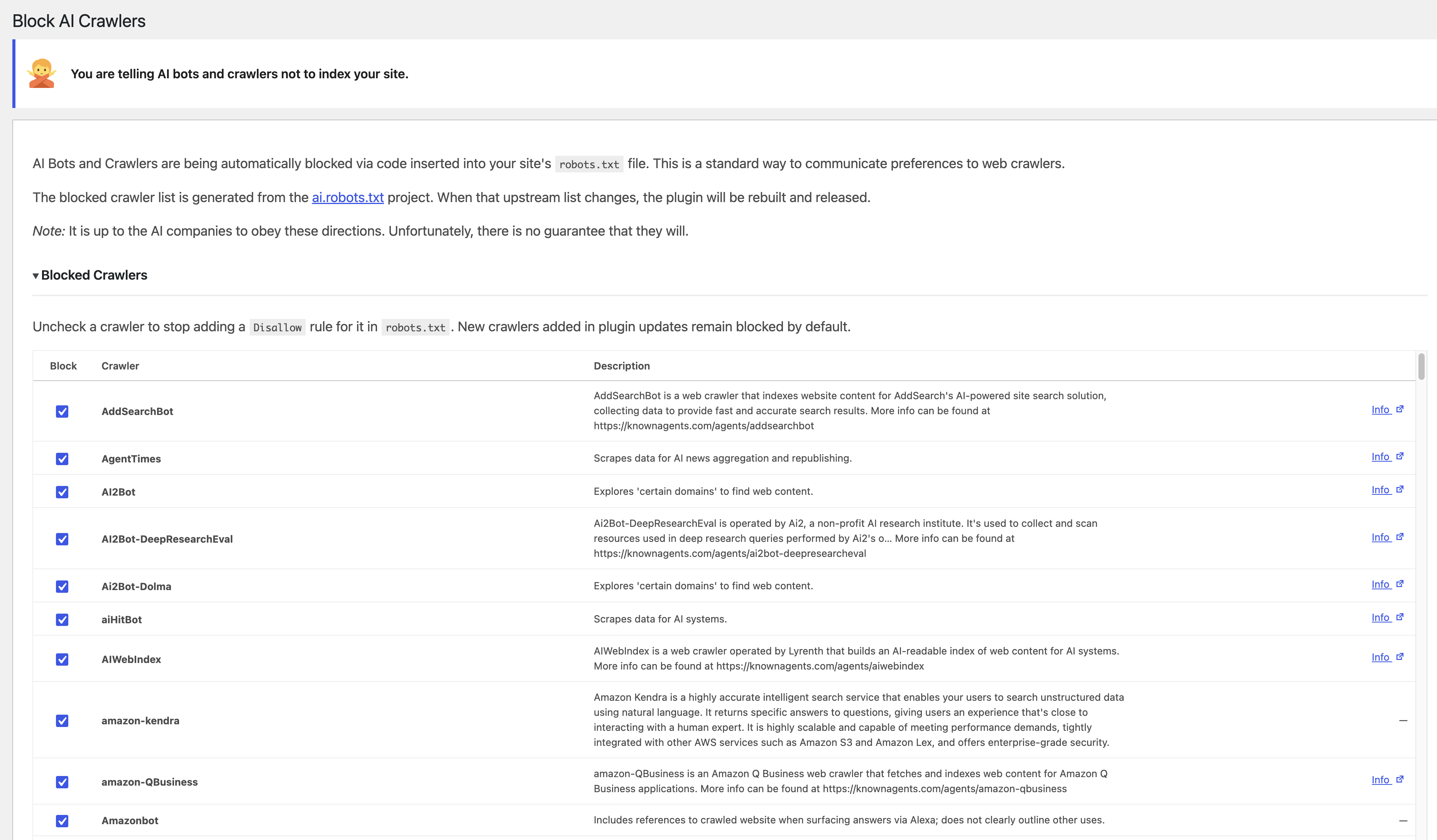
The plugin blocks dozens of AI bots via your site’s robots.txt file. You can toggle the blocks for each individual crawler.
Blocked crawlers include:
- OpenAI – Blocks crawlers used for ChatGPT
- Google – Blocks crawlers used by Google’s Gemini AI products
- Meta – Blocks FacebookBot and Meta training crawlers
- Anthropic – Blocks crawlers used by Claude
- Perplexity – Blocks crawlers used by Perplexity
- Apple – Blocks Applebot-Extended
- Amazon – Blocks Amazonbot
- …and 150+ more via ai.robots.txt
The blocked crawler list is generated at build time from ai.robots.txt (robots.json, MIT). See the plugin’s README.md for license attribution.
Experimental Meta Tags
The plugin adds the experimental “noai, noimageai” directive to your site’s meta tags. You can toggle this on and off as needed.
Custom robots.txt Rules
Have custom entries for your robots.txt file? You can now add them directly through the plugin!
Usage
After activation, the plugin will automatically update your robots.txt and add the necessary meta tags. No further configuration is required, but you can check the settings page for a full list of blocked crawlers.
Limitations
While this plugin aims to block specified crawlers, it cannot guarantee complete protection against all forms of scraping, as some bots may disregard robots.txt directives.
Support
For questions or support, please post on the forums.
Installation
- Download the plugin zip file.
- Go to your WordPress admin panel.
- Navigate to Plugins > Add New > Upload Plugin.
- Choose the zip file and click “Install Now.”
- Activate the plugin.1. Activate the plugin through the ‘Plugins’ menu in WordPress
- Once installed the plugin is automatically activated. There are no user configured settings
- You can view more about what crawlers are being blocked at “Settings > Block AI Crawlers”. You can also toggle blocking of individual crawlers.
Frequently asked questions
Will this remove my site from existing data sets?
No. It tells bots and crawlers that your site shouldn’t be used for future training and new datasets. However, it is up to the AI companies to resepect this.
How does this work?
The plugin adds directives to the robots.txt file to tell AI crawlers that they shouldn’t index your site. It also adds the noai meta tag to your site’s header to do the same.
How often is this updated?
The block list is generated from the ai.robots.txt project. When that upstream list changes, a GitHub Action opens an issue so the plugin can be rebuilt and released.
What if I already have a `robots.txt` file on my web server?
If you have a physical robots.txt file on your web server, you won’t be able to activate this plugin. The plugin only works when using WordPress’ built-in virtual robots.txt.
Will this work with other plugins that modify the virtual `robots.txt`?
It should in theory. It just appends the directives to the robots.txt file.
Will this prevent my site from being indexed by search engines?
No. Search engines follow different robots.txt rules.
My `robots.txt` isn’t updated after toggling blocks!
The robots.txt file can be cached via your web server, a plugin, or CDN (for example, Cloudflare). Once the cache period expires, the updated robots.txt will be served. You can test by running the following on the command line: curl -sSL 'https://example.com/robots.txt' && echo
Changelog
1.6.2
- Tested up to WordPress 7.1.
1.6.1 – 08/01/2026
- Add: Sync blocked crawler list from ai.robots.txt (remove IbouBot)
- Update: Replace screenshot
1.6.0 – 07/24/2026
- New: Per-crawler toggles to opt individual bots out of robots.txt blocking
- New: Optional toggle for the experimental
noai, noimageaimeta tag - Enhancement: Sticky header on the blocked crawlers settings table
1.5.8 – 07/15/2026
- Enhancement: Generate blocked crawler list from ai.robots.txt robots.json at build time
- Enhancement: Sync admin settings crawler table with the same generated list
- New: Monitor upstream robots.json and open a GitHub issue when it changes
1.5.7 – 07/04/2026
- New: Indicate WordPress v7.0 compatibility
1.5.6 – 02/15/2026
- Fix: Update Claude blocking
- New: Block MistralAI-user
- New: Block LinerBot
- New: Block Google-CloudVertexBot
- New: Block VelenPublicWebCrawler
Screenshots
For developers
Is this your plugin? Show off the numbers.
Add a live badge to your site, docs or GitHub README. It updates on its own — no account needed.
Best Block AI Crawlers alternatives
All AI plugins →





FAQ
Block AI Crawlers: quick answers
Straight answers, pulled from live WordPress.org data.
Live data from WordPress.org · checked Oct 9, 2026
Is Block AI Crawlers free?
Yes. Block AI Crawlers is free to download and use from the official WordPress.org plugin directory.
Is Block AI Crawlers safe to use in 2026?
Block AI Crawlers is a solid plugin choice in 2026, with a few things worth checking first. It runs on 1K+ sites, is rated 4.4/5 and was last updated 1 month ago, and scores 76/100 on our health check.
How many websites use Block AI Crawlers?
Block AI Crawlers is active on 1K+ WordPress websites and has been downloaded 24,650 times since it launched in March 2024. It was downloaded 1,524 times in the last 30 days.
Does Block AI Crawlers work with WordPress 7.1?
Yes. The developer has tested Block AI Crawlers up to WordPress 7.1.3, the latest release. It requires WordPress 6.9 or newer.
What PHP version does Block AI Crawlers need?
Block AI Crawlers requires PHP 8.2 or higher. Most hosts run PHP 8.x today, so it works on any modern WordPress hosting.
When was Block AI Crawlers last updated?
The latest version, 1.6.2, was released on August 30, 2026 (1 month ago).
Who makes Block AI Crawlers?
Block AI Crawlers is developed and maintained by lastsplash (a11n).
What are the best alternatives to Block AI Crawlers?
The most popular alternatives to Block AI Crawlers are Elementor Website Builder (10M+ installs), All in One SEO (2M+ installs) and AI Agent by SiteGround (1M+ installs).
Powered by PageForge
Want thousands of pages that rank like these? Build them in an afternoon.
This directory runs on the same engine as PageForge. Turn any spreadsheet, CSV or API into thousands of fast, SEO-ready WordPress pages — with schema, internal links and AI-written copy baked in.
- CSV, Google Sheets & API data sources
- AI content, schema & internal links per page
- Works with Elementor, Gutenberg, Yoast & Rank Math
- Free on WordPress.org — no credit card


