



Bit CRM: Sales CRM Manage Lead, Contact, Deal, Invoice, Client Portal & Collect Payment
WordPress CRM to manage contacts, leads, deals, invoices, products, client Portal, companies and collect payment via WooCommerce from one dashboard.

Safe pick
Yes — Bit CRM: Sales CRM Manage Lead,… is a safe, well-maintained plugin to use in 2026. It runs on 200+ sites, is rated 5/5 and was last updated 6 days ago, and scores 80/100 on our health check.
- Actively developed — last update 6 days ago
- Tested with the latest WordPress (7.1)
- Momentum — downloads up 24.2% vs the previous 30 days
- Small user base (200+ active installs)
- Very few reviews so far
- Needs PHP 8.2 or newer
How does it stack up?
Side-by-side on installs, updates, ratings & support



Daily downloads
Download spikes usually follow a new release — each site that auto-updates counts as a download.
Rankings
Where Bit CRM: Sales CRM Manage L… stands todayWordPress.org search rankings
Live position in the plugin search, top 100| Keyword | Position |
|---|---|
| crm | #16 |
| invoice | #39 |
| lead management | #27 |
| sales pipeline | #2 |
| woocommerce-sync | >100 |
Version adoption
Share of active sites per release.
Rating breakdown
★★★★★★★★★★ 5 from 4 reviews
About Bit CRM: Sales CRM Manage Lead, Contact…
From the official readme · v1.3.0Description
Bit CRM is a advance Sales CRM for WordPress. It manages the full path from first enquiry to paid invoice: leads, contacts, companies, deals, a visual sales pipeline, invoicing and WooCommerce customer sync, all inside from one dashboard.
👉 Website | 📚 Documentation | 💬 Community forum | 🧑💻 GitHub
How Bit CRM works
A lead arrives from your website form or your store. You qualify it, then convert it into a contact and a company in one click. You open a deal, price it with line items, and move it across your pipeline stages. When the deal is won, you raise the invoice, apply taxes and discounts, and email the PDF. Every call, meeting, task and note stays attached to the record, so the full history is there when you need it.
Why choose Bit CRM for WordPress?
- All-in-one CRM – Contacts, leads, companies, deals and invoices work together in one plugin.
- Self-hosted and private – Your CRM records stay in your own WordPress database.
- Built for sales – A visual pipeline, deals and invoicing help you close and bill faster.
- WooCommerce ready – Connect your store customers, orders and products.
- Easy to start – Import your existing data from CSV and begin in minutes.
Core CRM modules
- Lead management – Capture leads, track activity, add notes, then convert them into contacts, companies and deals, single or in bulk.
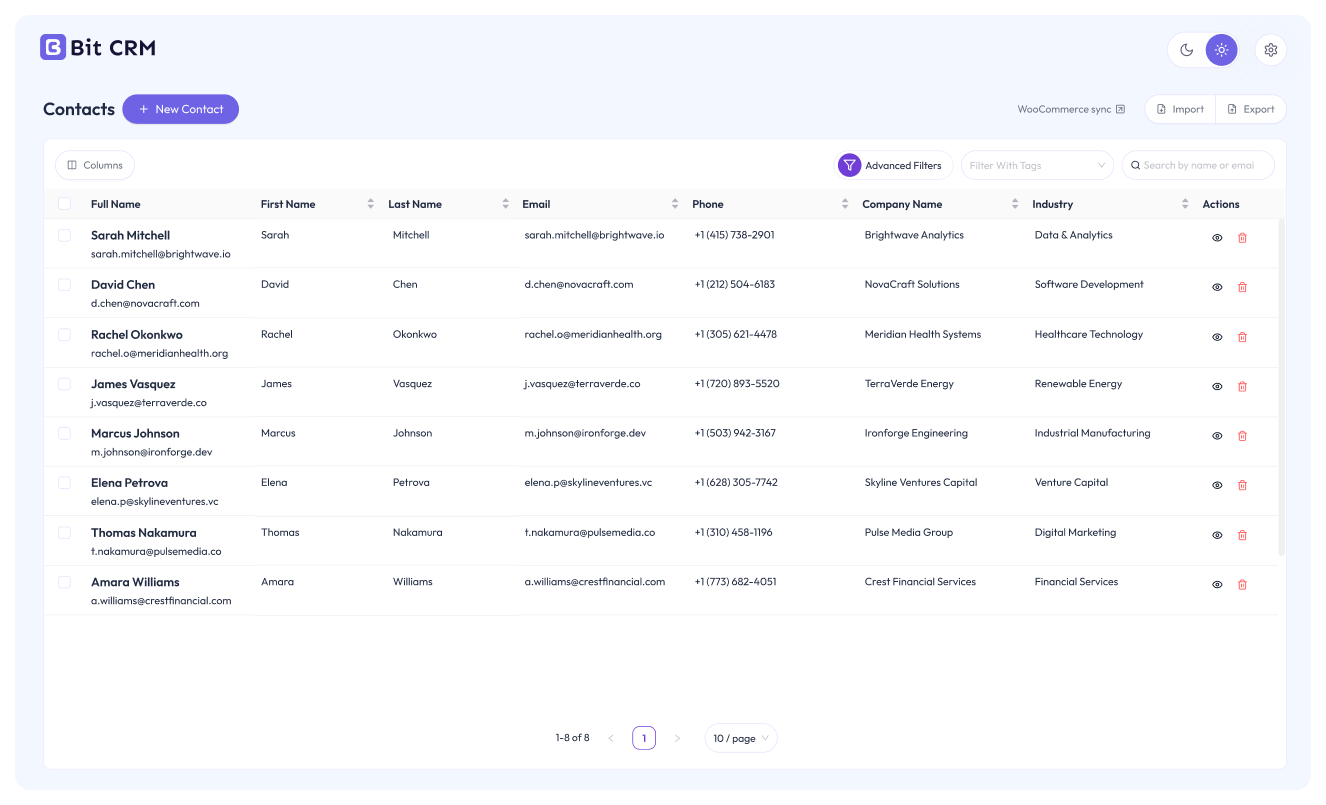
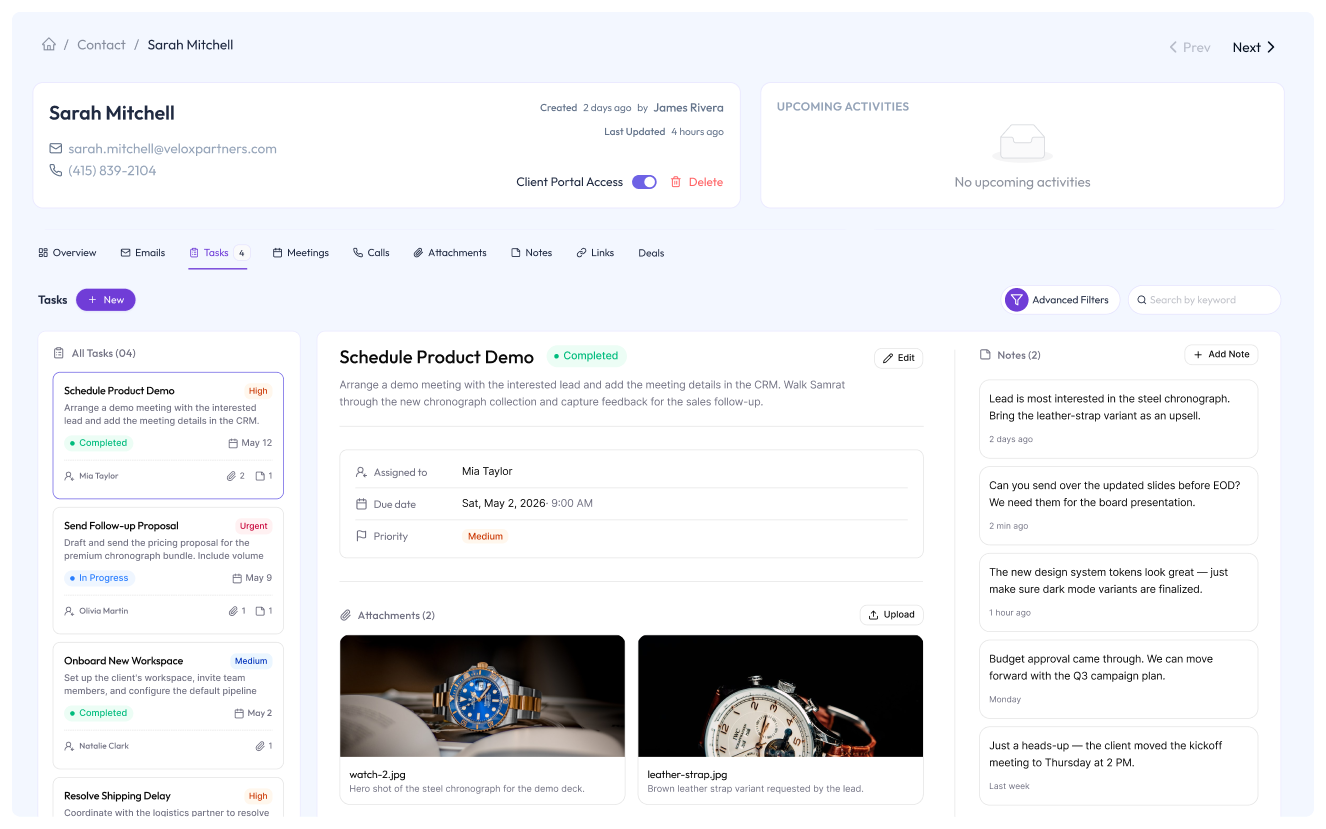
- Contact management – Store and organize customer records with tags, filters, notes, attachments and related activities.
- Company management – Group contacts under the companies they belong to, and link deals to the account for B2B work.
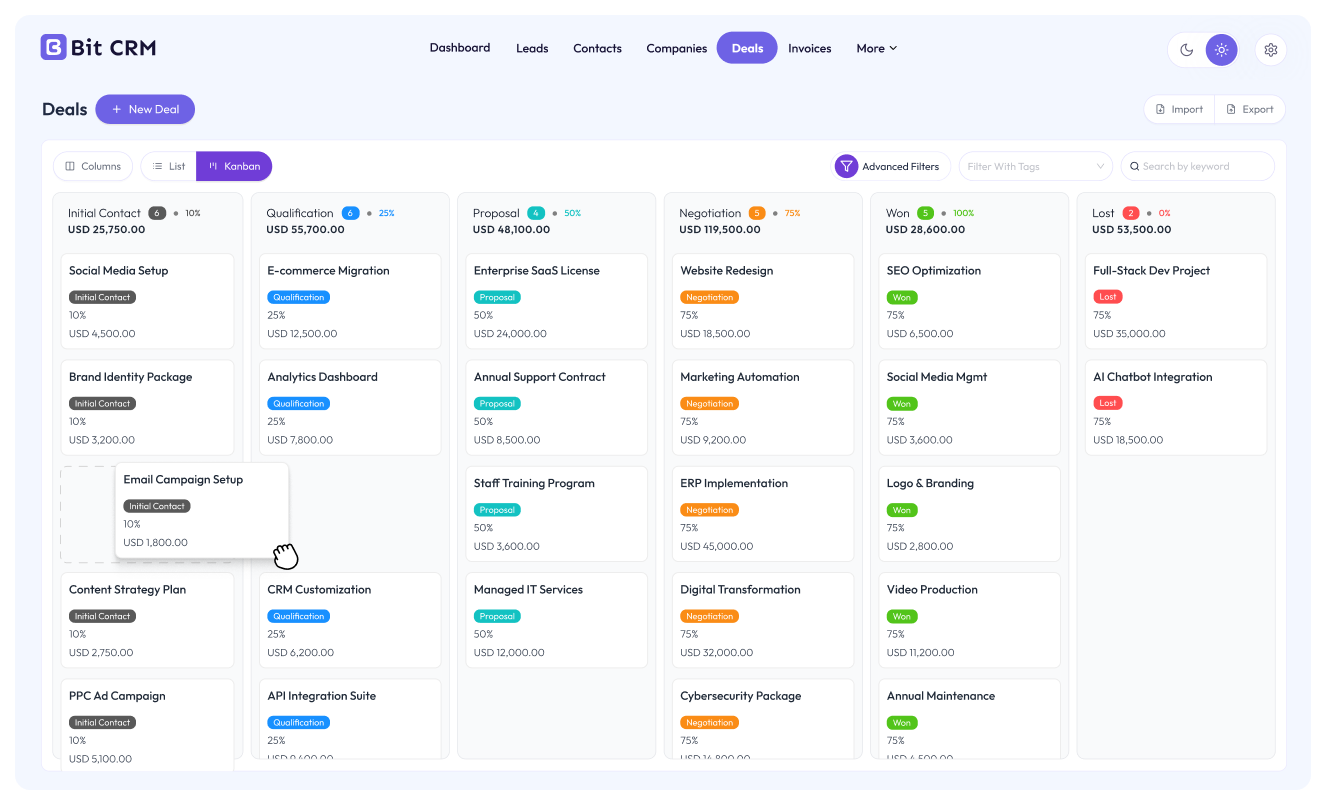
- Sales pipeline and deals – Move deals across stages you create, reorder and archive, in Kanban or table view, then itemize each deal with quantity, discount and tax so the value stays accurate.
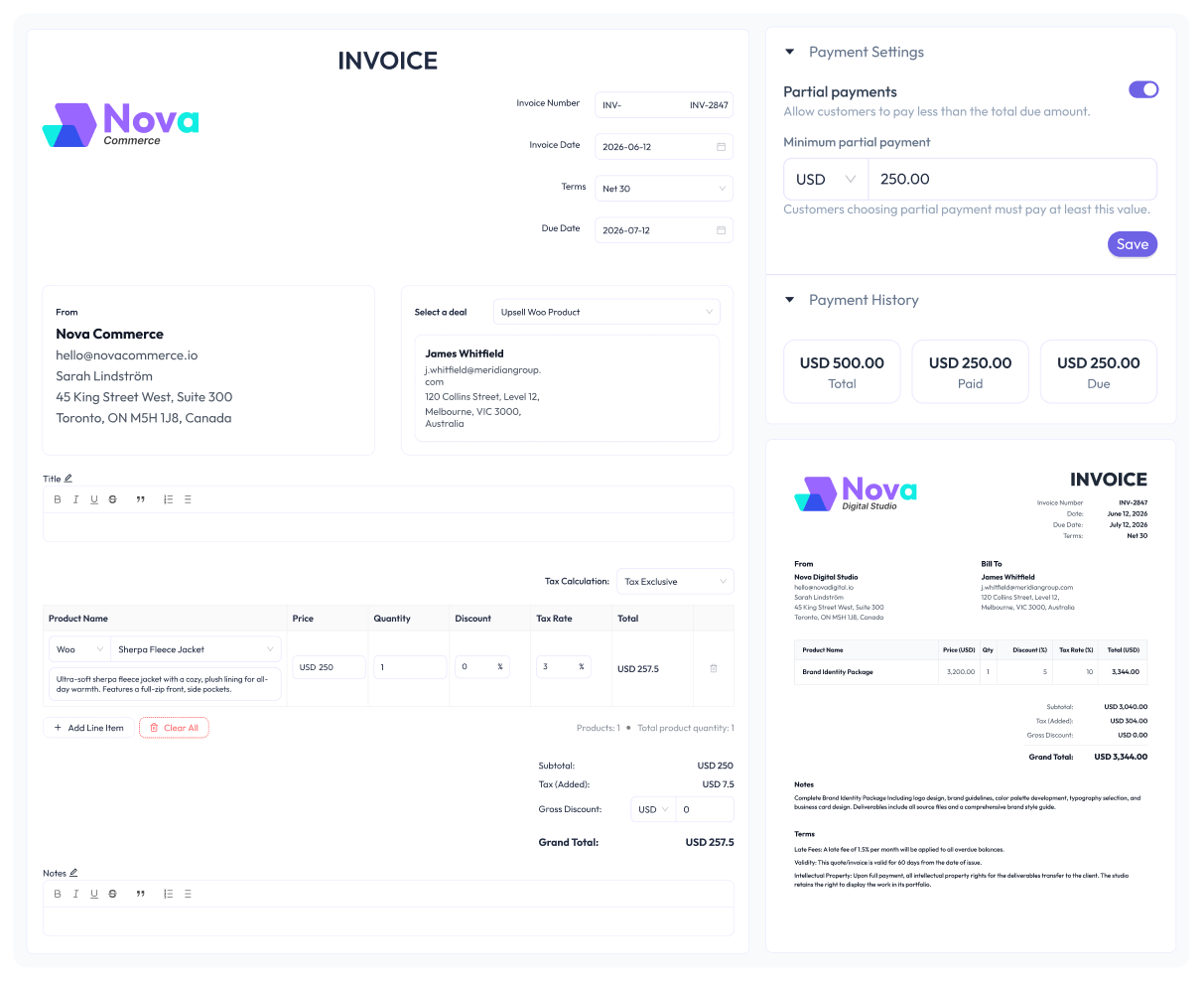
- Invoicing – Build invoices from line items, apply taxes, discounts, terms and due dates, track status, then download the PDF or email it to the customer.
Activities and follow-up
Inside every lead, contact, company and deal you get a full set of engagement tools.
- Tasks – Set owners, due dates, priorities and status, then filter what is coming up.
- Meetings and calls – Log every interaction with owners, dates and status.
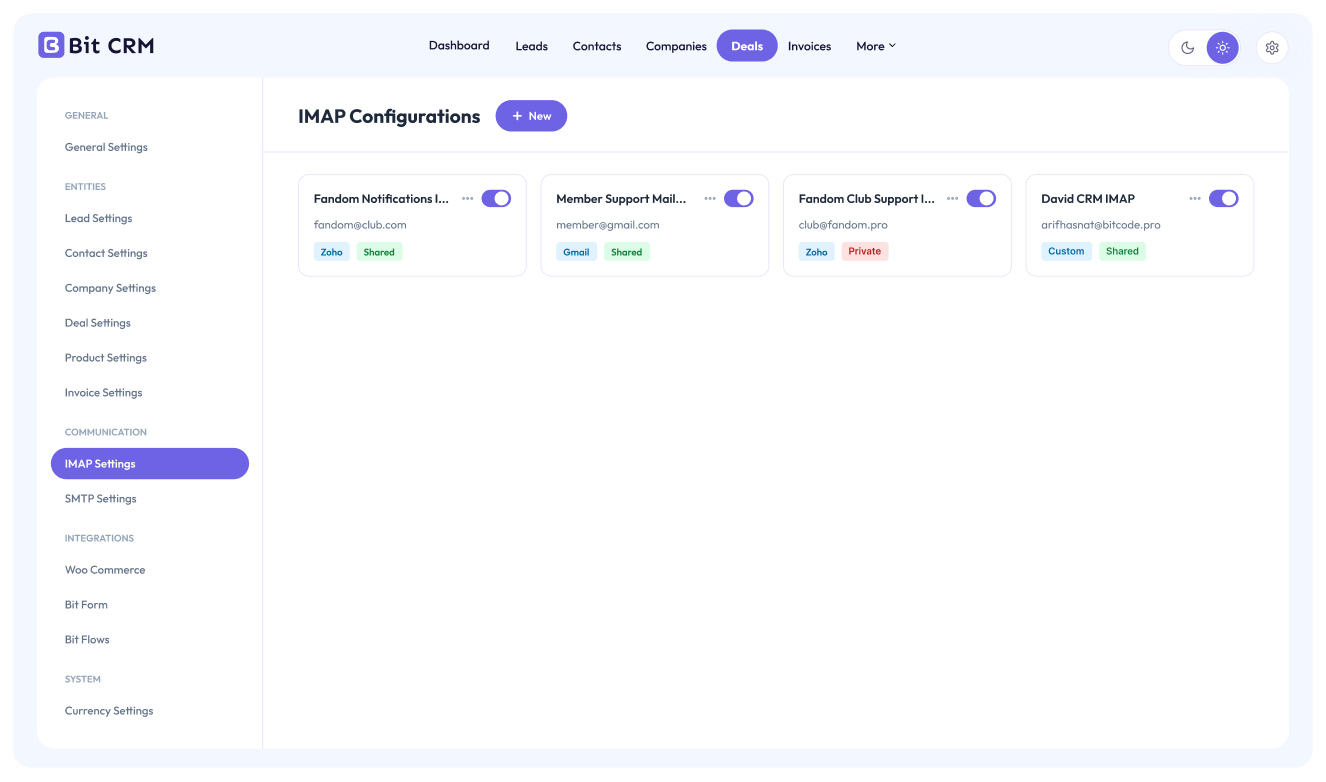
- Email, SMTP and IMAP – Send email from the CRM, configure SMTP for delivery, and connect a Gmail, Zoho or custom mailbox so conversations sync back into the record.
- Notes, attachments and links – Keep internal context, files and external references in one place.
WooCommerce and eCommerce sync
- Every WooCommerce buyer becomes a contact automatically, and each new order keeps that contact current.
- Contacts are auto-tagged by purchased product and coupon code, with optional tag prefixes.
- WooCommerce products can be inserted as line items into any deal or invoice.
- Customers, product also sync from FluentCart.
How the WooCommerce integration works
Lead capture and automation connections
Bit Form turns any form submission into a CRM lead, starting from a ready-made template if you prefer. Beyond that, Bit CRM works as both a trigger and an action in Bit Integrations and Bit Flows, so CRM also connect with 380+ platforms.
Data, filtering and everyday tools
- Tags – Segment records across every module, single or in bulk, then filter by tag.
- Advanced filters – Build grouped AND and OR conditions on any list.
- CSV import – Bring leads, contacts, companies and deals in from a CSV file.
- Recycle bin – Restore deleted records, or empty the trash when you are ready.
- Dashboard – Totals, month-over-month trends, pipeline value by stage, lead sources, invoice status and pending activities.
- External API – Endpoints for records, tags, notes, activities, activity logs and invoices, including share links.
- Background processing – Imports, bulk conversions, IMAP fetching and store syncing run as background jobs, so your admin screen never blocks.
- Translation ready – Ships with Arabic, French, German, Spanish and Brazilian Portuguese, and the interface mirrors fully for RTL locales.
What you can use Bit CRM as
- A sales pipeline and deal tracker for WordPress
- A WooCommerce CRM that keeps store customers and orders connected to your sales records
- An invoice plugin for WordPress, with PDF download and email delivery
- A lead management and lead capture tool for your website
- A B2B contact and company manager
Who uses Bit CRM
Freelancers, agencies, startups, WooCommerce store owners, course creators, B2B teams and small sales teams who sell through conversations rather than pure self-checkout.
What experts say about Bit CRM
- WP Roads reviews Bit CRM
- Tobi Salami reviews Bit CRM
- WP Simple Hacks reviews Bit CRM
- SaaS Master reviews Bit CRM
Bit CRM Pro
Everything above is in this plugin, with no cap on records or users. These modules are part of Bit CRM Pro.
- Workflow automation – Visual builder with triggers on record create or update, tag changes and deal stage changes, plus branching, delays, webhooks and execution logs.
- Client portal – A white-labelled portal where clients sign in to view invoices, deals and shared meetings, calls and notes.
- AI assistant – A chat assistant on every screen that reads and updates your records, using your own Claude, OpenAI or Gemini API key.
- Recurring invoices – Bill on a repeating schedule, with reminder emails and cancellation from either side.
- Calendar – See tasks, meetings and calls in month, week and day views.
- Invoice payment links – Clients pay through WooCommerce checkout, with full or partial payments and per-invoice payment history.
- Product catalog – Build your own products inside the CRM instead of relying on WooCommerce.
- Custom fields – Nine field types across leads, contacts, companies, deals and products, with one or two column layouts.
- Team access – Assign module and action capabilities to your WordPress users.
- Multi-currency – Add currencies beyond your home currency and set exchange rates.
- CSV export, activity log and history, and data management for import, export and workflow logs.
- MCP server – Connect AI clients such as Claude and ChatGPT to approved CRM tools through an OAuth consent flow, with access limited to the approving user and revocable at any time.
Sales Orders are on the roadmap for a future Pro release.
Source code
Bit CRM source code is available on GitHub.
External Services
Bit CRM stores your CRM records in your own WordPress database. The connections below are the only points where data leaves your site, and each one is described here.
Google Fonts
Bit CRM loads the “Outfit” font from Google Fonts (fonts.googleapis.com and fonts.gstatic.com) on its admin pages and on the visitor-facing pages it serves — the shared public invoice page and the client portal — sending the viewer’s IP address, user-agent and request data, but no CRM records. See Google’s Terms and Privacy Policy.
Email and IMAP providers
An administrator can connect Gmail (imap.gmail.com), Zoho Mail (imappro.zoho.com), or a custom IMAP server. On email history or sync, Bit CRM sends the saved mailbox username, app password, connection settings and IMAP commands to that provider, and retrieves matching message data. Gmail is governed by Google’s Terms and Privacy Policy; Zoho by its Terms and Privacy Policy; a custom server by its provider’s policies.
When a user sends an email or invoice, Bit CRM passes its recipient, subject, body, headers and attachments to WordPress’s wp_mail, which uses the site owner’s configured mail service and the recipient’s mail server. Those providers’ terms and privacy policies apply. Bit CRM does not select a mail provider.
Privacy and Usage Data
Bit CRM respects your privacy. Usage tracking is disabled by default and only enabled when an administrator opts in. If enabled, Bit CRM may send anonymous usage and environment information to Bit Apps to help improve the plugin.
No CRM records or personal customer data are collected. For more details about data handling, please review our:
Installation
From your WordPress dashboard
- Go to Plugins > Add New.
- Search for Bit CRM, or click Upload Plugin to upload the plugin zip file.
- Click Install Now, then Activate.
- Open the Bit CRM menu in your WordPress dashboard.
Initial setup
- On first launch, Bit CRM opens a setup wizard. Enter your business name and email, or use Skip to add them later.
- The next step offers Bit Form, Bit SMTP and Bit Integrations as optional companion plugins. They are selected by default, so deselect any plugin you do not want installed.
- Click Let’s get started to finish onboarding and open the dashboard.
- Go to Settings > Currencies and review your home currency before creating any financial records.
- Use Settings to configure business details, deal stages, entity fields, invoice preferences, email and integrations.
- Open Leads, Contacts, Companies or Deals and use the add button to create your first record, or use Import to upload existing CSV data.
All core CRM features work inside WordPress. Optional integrations only need configuration when you choose to use them. Step-by-step guides are in the Bit CRM documentation.
Frequently asked questions
Is Bit CRM a complete CRM for WordPress?
Yes. Bit CRM lets you manage contacts, leads, companies, deals and invoices from a single dashboard, so you can run your whole customer relationship workflow inside WordPress.
Are there limits on how many contacts or invoices I can create?
No. Bit CRM has no record or user caps. The only limits are the ones your own hosting applies, such as database size.
What is included in this plugin, and what needs Bit CRM Pro?
This plugin includes leads, contacts, companies, deals, invoicing, tasks, meetings, calls, notes, attachments, links, email with SMTP and IMAP, tags, advanced filters, CSV import, recycle bin, the dashboard, the external API and WooCommerce sync. Workflow automation, the client portal, the AI assistant, recurring invoices, the calendar, invoice payment links, the CRM product catalog, custom fields, team access, multi-currency, CSV export, activity history and the MCP server are in Bit CRM Pro.
Where is my CRM data stored?
In your own WordPress database, on your own hosting. Nothing is held in a third-party CRM service.
Can I manage a sales pipeline with Bit CRM?
Yes. Create deals and move them through pipeline stages you define, either as a sortable table or a drag-and-drop Kanban board that shows deal count and total value per stage.
Can I create and send invoices?
Yes. Build invoices with line items and terms, apply taxes and discounts, track status through draft, sent, paid and overdue, then download the PDF or email it. Online payment links are a Pro feature.
Can I add products to deals and invoices?
Yes. Add WooCommerce products as line items with their own quantity, discount and tax. A CRM-native product catalog is available in Bit CRM Pro.
Can I use this as a WooCommerce CRM?
Yes. Store customers and order history sync into contacts, contacts are auto-tagged by product and coupon, and WooCommerce products can be used as deal and invoice line items.
Which other plugins does Bit CRM work with?
WooCommerce, FluentCart, SureCart, LearnDash and Tutor LMS for customer sync, Bit Form for lead capture, Bit SMTP for email delivery, and Bit Integrations and Bit Flows for connecting to other apps.
Can I connect my email to Bit CRM?
Yes. Send emails to contacts from the CRM, set up SMTP for reliable delivery, and connect a Gmail, Zoho or custom IMAP mailbox to keep conversations in sync.
Can I import my existing contacts?
Yes. Use the built-in Import tool to bring contacts, leads, companies and deals in from a CSV file. Most other CRMs can export to CSV, so migrating is straightforward.
Will I lose data if I delete a record by mistake?
No. Deleted records go to the recycle bin, where you can restore them or permanently remove them when you choose.
Does Bit CRM support GDPR data requests?
Yes. Bit CRM plugs into the built-in WordPress privacy tools. Use Tools → Export Personal Data to hand someone a copy of every lead, contact, deal, invoice, note, activity, attachment, link and stored email tied to their email address, and Tools → Erase Personal Data to remove it: leads and contacts are permanently deleted (bypassing the recycle bin), stored emails are removed, and contacts with deals are anonymized in place so deals and invoices stay intact as business records. Suggested wording for your privacy policy appears under Settings → Privacy → Policy Guide.
Will Bit CRM slow down my site?
No. Bit CRM only runs in the WordPress admin, and heavy operations such as imports, bulk conversions, IMAP fetching and store syncing run as background jobs rather than during page loads.
Does it work with my theme and page builder?
Yes. Because Bit CRM works in the admin area, it does not affect how your site looks or loads.
Is Bit CRM available in other languages?
Yes. It ships with Arabic, French, German, Spanish and Brazilian Portuguese translations, and the interface mirrors fully for right-to-left locales.
Where can I get help?
Read the documentation, post in the WordPress.org support forum, or join the community forum.
Changelog
Adds SureCart sync and products, CRM roles and a custom portal URL prefix in Pro, plus recorded invoice payments and mobile layouts. Requires WordPress 6.5 or later.
1.3.0 (September 29, 2026)
- Features:
- SureCart (Pro): SureCart buyers now sync as CRM contacts as purchases come in, with product and coupon tags, optional tag prefixes and a background backfill of earlier purchases, and SureCart products can be added as deal and invoice line items from a new SureCart settings page.
- Invoices: Mark as Paid now records the payment with its date, reference and note, and the payment history and paid and due totals show on the invoice page and the shared invoice page without Pro.
- Invoices: Choosing a deal on a new invoice now copies its line items, tax setting and discounts, and asks before replacing any edits you already made.
- CRM roles (Pro): Users can be given a built-in role such as Sales Manager, Lead Manager or Invoice Manager, or a custom role you create, with extra capabilities added on top.
- Client portal (Pro): The bit-crm part of client portal and shared invoice links can now be changed under Portal Settings.
- Usage tracking: Usage statistics can be shared by opting in during onboarding, from a notice or on the Support page, and are off by default.
- Improvements:
- Mobile and tablet responsive: The whole CRM, the client portal and the shared invoice page are now fully responsive on phones and tablets, with a mobile menu, a settings page picker and invoice previews that fit the screen.
- External API: Added endpoints for reading the fields of leads, contacts, companies and deals, and for recording and listing invoice payments.
- Security:
- Permissions: Field lists for leads, contacts, companies and deals now require access to Bit CRM, and AI assistant and MCP server settings (Pro) follow their own capabilities instead of the integration settings one.
- Fixed:
- Lists: Record counts and pagination no longer show zero when a custom field shares its name with a built-in field such as Description.
- Line items: A selected WooCommerce or FluentCart product variant no longer appears twice in the product picker when editing a deal or invoice.
1.2.0 (September 13, 2026)
- Features:
- Privacy: Bit CRM now works with the WordPress privacy tools. Export Personal Data returns every lead, contact, deal, invoice, note, activity, attachment, link and stored email tied to an email address, Erase Personal Data permanently deletes those leads, contacts and emails and anonymizes contacts that have deals so deals and invoices stay intact, and suggested wording appears in the Privacy Policy Guide.
- Privacy (Pro): Exports also include invoice payments, and erasure also removes custom field values, workflow logs and the client portal login.
- Sample data: New installs are asked whether to start from scratch or import sample companies, contacts, leads, deals, tasks, meetings, calls, notes and links, and a dashboard notice removes the sample data in one click.
- Uninstall: Deleting the plugin now keeps your data unless “Erase all plugin data on deletion” is switched on under Settings, Data Management, which then removes every table and option.
- MCP server (Pro): AI clients can look up each module’s fields, options, deal stages and custom fields, read and write custom field values, update only the fields they pass, set a deal’s currency and create or update invoices exactly as the invoice form does.
- Improvements:
- Emails: Links inside an opened email open in a new tab.
- Security:
- Emails: The body of a synced email is sanitized before it is stored and shown, the same way a composed message is.
- Fixed:
- Public pages: The shared invoice page and the client portal no longer break when a page builder or theme injects its own styles, as only the plugin’s own styles and scripts are loaded there and the admin bar is hidden on the invoice page.
- Deals: Choosing a contact now sets the deal currency from the contact’s company, falling back to the contact’s own currency.
- Lists: Owner, company and parent company columns show names instead of ids, the deals list links its company again and blank dates are shown empty instead of a zero date.
- Workflows (Pro): The workflow editor no longer breaks on a step with an unrecognised type.
1.1.0 (August 31, 2026)
- Features:
- Emails: Cc and Bcc can be added when composing, and emails can be replied to from the email view, threaded under the original with the earlier message quoted below.
- AI assistant (Pro): An AI Summary button on record pages, replies that stream in with a Stop button, and any OpenAI-compatible provider such as xAI, DeepSeek or OpenRouter can now be used alongside Claude, OpenAI and Gemini.
- Fields: Any field can now be hidden, removing it from forms, lists, filters and the client portal while keeping its saved values.
- Text editor: Text and background colors can now be chosen and are kept when saved.
- Translations: Added Italian and Dutch.
- Improvements:
- Dates: Date pickers and date columns now follow the date and time format set in WordPress.
- Activities: Tasks, meetings and calls open on the first item, move to a neighbour after a delete and switch between items without a loading flash.
- Security:
- Permissions: Attachment downloads, related-record lookups, invoice term options and sample CSV downloads now check the right capability, and portal sign-up no longer reveals whether an email belongs to a contact.
- CSV export: Values that begin with a formula character are escaped so spreadsheets do not run them.
- Fixed:
- Emails: Synced emails now show their real sender and recipients, including Cc and Bcc.
- Invoices: Line items must have a product name and unit price, the prefix defaults to INV when none is saved and the invoice date defaults to today.
- Currency: Records created with a blank currency now use the home currency.
1.0.9 (August 24, 2026)
- Features:
- FluentCart customer sync (Pro): FluentCart buyers now become CRM contacts as orders come in, with automatic product and coupon tags, optional tag prefixes, and a background backfill of orders placed before sync was switched on.
- FluentCart products (Pro): FluentCart products and their variants can now be added as deal and invoice line items, with price and tax taken from the store.
- Settings: A new FluentCart page under Settings, where customer sync and FluentCart line items are switched on or off.
- Fixed:
- Line items: Blank line items are no longer saved with an invoice.
1.0.8 (August 19, 2026)
- Features:
- Recurring invoices (Pro): Invoices can now bill on a repeating schedule, with reminder emails and cancellation from either side.
- Calendar (Pro): Tasks, meetings and calls now appear on a calendar in month, week and day views.
- AI assistant (Pro): A chat assistant on every screen reads and updates your records, using your own Claude, OpenAI or Gemini key.
- Invoices: Invoice lists and the client portal now mark recurring invoices and show every invoice in a series.
- Improvements:
- Activities: Activity lists resolve their linked records with far fewer database queries.
- Dates: Calendars and date pickers now start the week on the day set in WordPress.
- Fixed:
- Deals: Filtering the deals board by owner now works on sites with a custom database table prefix.
1.0.7 (August 12, 2026)
- Features:
- Translations: Added French (fr_FR) translations.
- Improvements:
- Invoice PDF: Improved font and locale handling for more accurate invoice rendering.
- Fixed:
- Invoice PDF: Fixed a formatting error in invoice totals text.
Screenshots

For developers
Is this your plugin? Show off the numbers.
Add a live badge to your site, docs or GitHub README. It updates on its own — no account needed.
Best Bit CRM: Sales CRM Manage Lea… alternatives
All crm plugins →





FAQ
Bit CRM: Sales CRM Manage Lead, Con…: quick answers
Straight answers, pulled from live WordPress.org data.
Live data from WordPress.org · checked Oct 5, 2026
Is Bit CRM: Sales CRM Manage Lead,… free?
Yes. Bit CRM: Sales CRM Manage Lead,… is free to download and use from the official WordPress.org plugin directory.
Is Bit CRM: Sales CRM Manage Lead,… safe to use in 2026?
Yes — Bit CRM: Sales CRM Manage Lead,… is a safe, well-maintained plugin to use in 2026. It runs on 200+ sites, is rated 5/5 and was last updated 6 days ago, and scores 80/100 on our health check.
How many websites use Bit CRM: Sales CRM Manage Lead,…?
Bit CRM: Sales CRM Manage Lead,… is active on 200+ WordPress websites and has been downloaded 2,396 times since it launched in August 2026. It was downloaded 1,325 times in the last 30 days.
Does Bit CRM: Sales CRM Manage Lead,… work with WordPress 7.1?
Yes. The developer has tested Bit CRM: Sales CRM Manage Lead,… up to WordPress 7.1.2, the latest release. It requires WordPress 6.5 or newer.
What PHP version does Bit CRM: Sales CRM Manage Lead,… need?
Bit CRM: Sales CRM Manage Lead,… requires PHP 8.2 or higher. Most hosts run PHP 8.x today, so it works on any modern WordPress hosting.
When was Bit CRM: Sales CRM Manage Lead,… last updated?
The latest version, 1.3.0, was released on September 29, 2026 (6 days ago).
Who makes Bit CRM: Sales CRM Manage Lead,…?
Bit CRM: Sales CRM Manage Lead,… is developed and maintained by Bit Apps.
What are the best alternatives to Bit CRM: Sales CRM Manage Lead,…?
The most popular alternatives to Bit CRM: Sales CRM Manage Lead,… are Flamingo (800K+ installs), HubSpot All-In-One Marketing (200K+ installs) and FluentCRM (80K+ installs).
Powered by PageForge
Want thousands of pages that rank like these? Build them in an afternoon.
This directory runs on the same engine as PageForge. Turn any spreadsheet, CSV or API into thousands of fast, SEO-ready WordPress pages — with schema, internal links and AI-written copy baked in.
- CSV, Google Sheets & API data sources
- AI content, schema & internal links per page
- Works with Elementor, Gutenberg, Yoast & Rank Math
- Free on WordPress.org — no credit card


