


BatchPilot
Bulk delete, edit, and duplicate WordPress content with preview, undo, and full audit history.

Use with caution
BatchPilot works, but test it on a staging site before relying on it in 2026. Was last updated 3 months ago, and scores 55/100 on our health check.
- Small user base (<10 active installs)
- Very few reviews so far
How does it stack up?
Side-by-side on installs, updates, ratings & support



Daily downloads
Download spikes usually follow a new release — each site that auto-updates counts as a download.
Rankings
Where BatchPilot stands todayWordPress.org search rankings
Live position in the plugin search, top 100| Keyword | Position |
|---|---|
| bulk delete | >100 |
| bulk edit | >100 |
| bulk operations | >100 |
| duplicate posts | >100 |
| undo | >100 |
About BatchPilot
From the official readme · v1.0.0Description
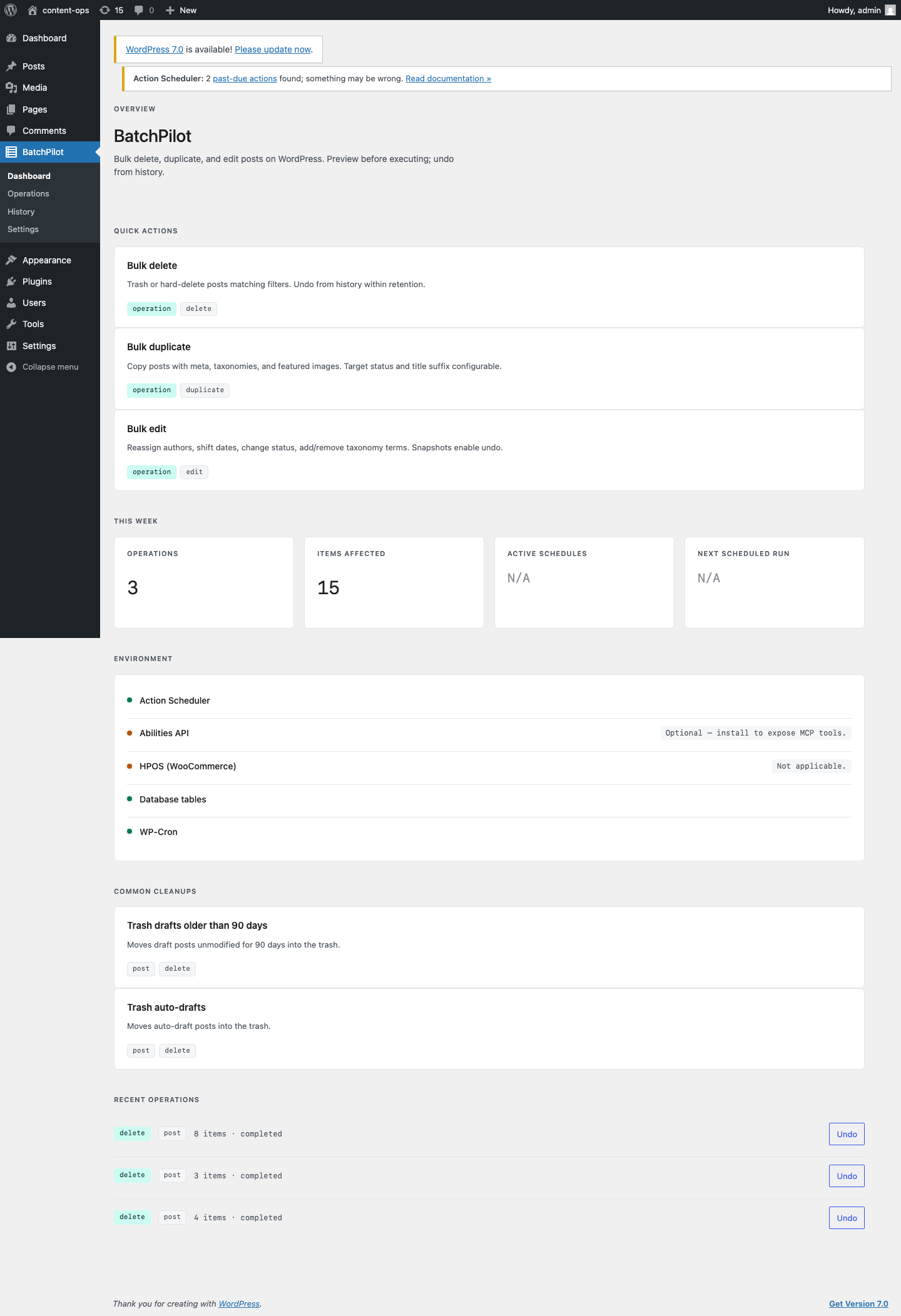
BatchPilot is a single plugin that replaces the usual stack of bulk-delete, bulk-edit, and duplicate-post plugins. Every action is previewed before it runs, can be undone, and is recorded in a history log you can re-run.
Three operations on posts, pages, and any registered public post type:
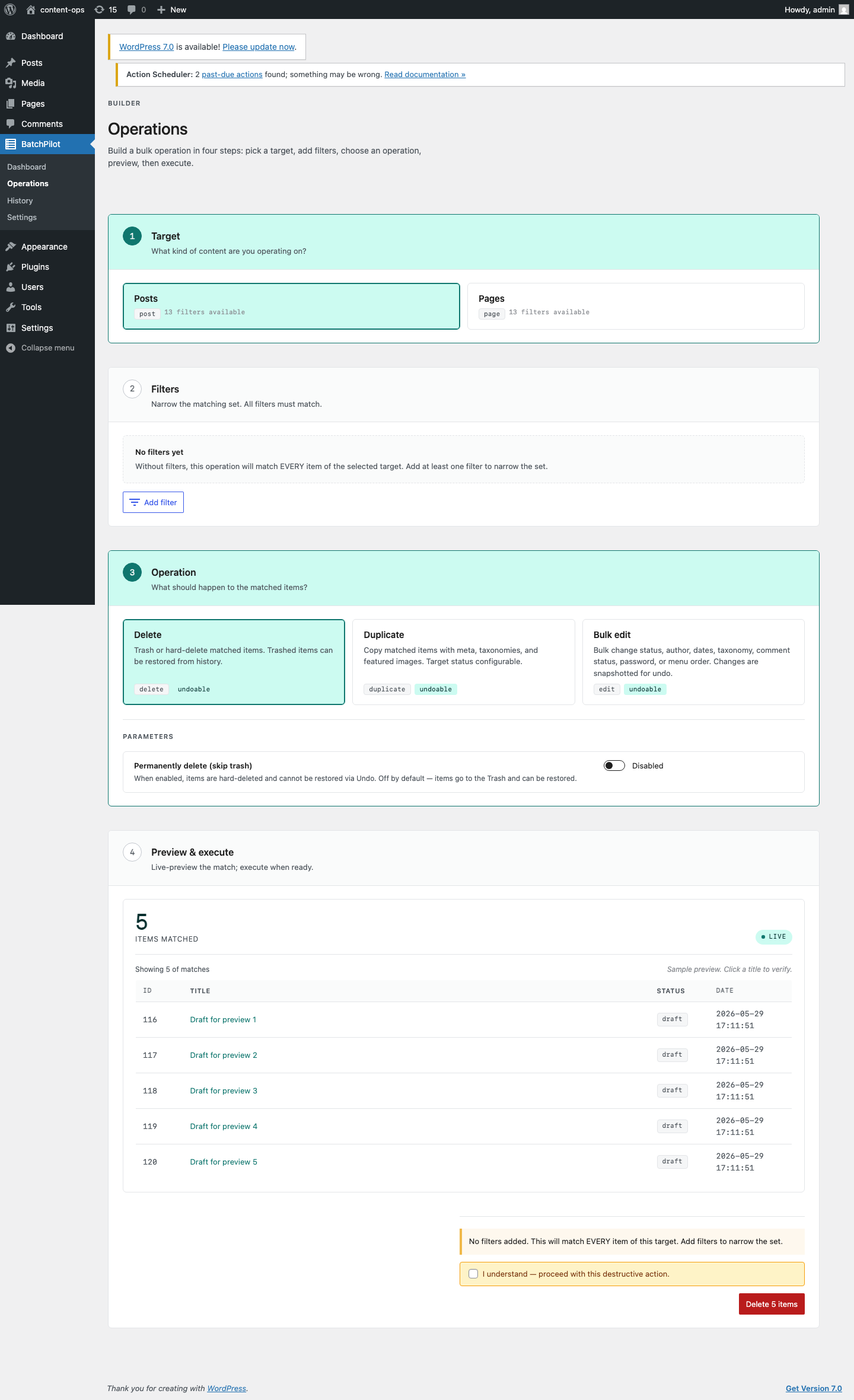
- Delete. Trash by default, with a separate permanent option.
- Duplicate. Copies meta, taxonomies, featured image, and optionally child posts.
- Bulk edit. Change status, author, publish dates, taxonomies, password, comment status, or menu order.
Twelve filters narrow the matching set: post type, status, author, date ranges (modified, published), taxonomy terms, has comments, has featured image, parent, children.
Four ways to drive it:
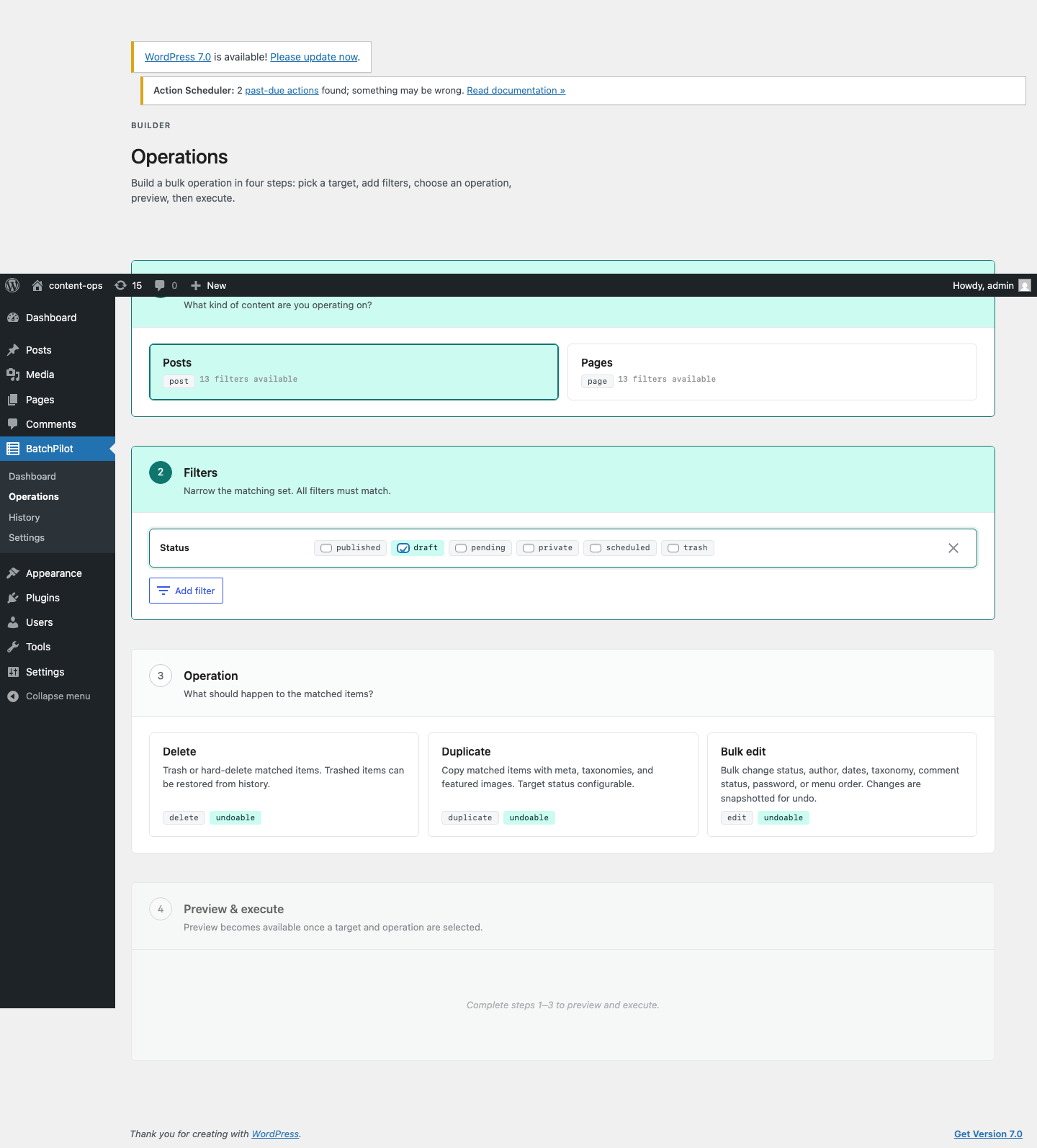
- Admin UI. Stepper-driven Operations Builder with live preview.
- WP-CLI.
wp batchpilot delete,duplicate,edit,history,undo,doctor. - REST API.
/wp-json/batchpilot/v1/*endpoints with capability-gated permissions. - WordPress Abilities API. Each Target × Operation pair is exposed as a registered ability so AI agents and other clients can drive operations.
Safety features:
- Every operation is previewed (count plus sample rows) before it runs.
- Preview tokens (HMAC-signed, 5-minute TTL) prevent stale state from being executed.
- Snapshots are written before mutation so Undo restores the previous state.
- Operations over a configurable threshold (default 100 items) run in the background via Action Scheduler.
- Per-operation capabilities:
batchpilot_delete,batchpilot_edit,batchpilot_duplicate,batchpilot_move,batchpilot_schedule. Grant per-role or per-user.
Use cases:
- Trash old drafts, auto-drafts, or revisions on a schedule.
- Re-attribute posts from a departing author.
- Shift publish dates on a backlog.
- Add or remove taxonomy terms across a content set.
- Duplicate templates or landing pages.
Development
Source code, including the un-minified JavaScript sources for the admin app, lives at https://github.com/jgalea/batchpilot
The compiled assets in assets/build/ are generated with @wordpress/scripts from the sources in assets/src/. To rebuild:
npm install && npm run build
PHP dependencies are managed with Composer (composer install).
Installation
- Upload BatchPilot to
/wp-content/plugins/batchpilot/or install via the Plugins screen. - Activate the plugin.
- Open BatchPilot → Operations from the admin sidebar.
Frequently asked questions
Is everything undoable?
Yes, except a permanent delete (which you have to enable explicitly). Trash, bulk edits, and duplicates all write before-state snapshots and can be reversed from the History screen.
How long is the history kept?
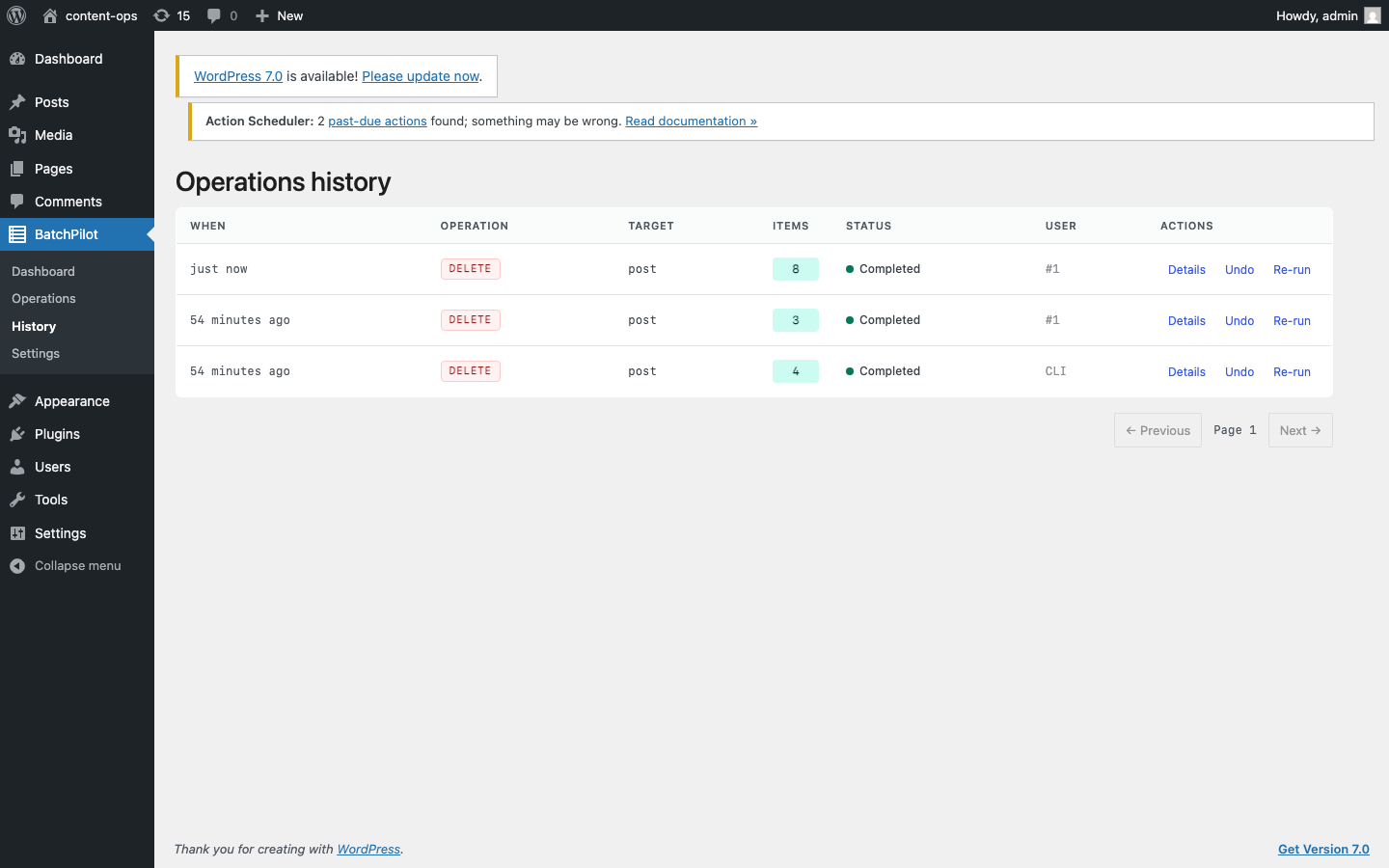
Configurable in Settings. Default is 90 days. Snapshots older than the retention window are pruned on a daily cron.
Will it work on a large site?
Operations exceeding the async threshold (default 100 items) run in the background via Action Scheduler, batched at 50 items per chunk. The plugin defers to WooCommerce’s bundled Action Scheduler when present.
Can AI agents use it?
Yes. With the WordPress Abilities API installed, each Target × Operation pair is registered as an ability under the batchpilot category. Agents can query the catalog, preview, execute, and undo via the standard abilities surface.
Does it work with WooCommerce?
WooCommerce HPOS is detected (see the Doctor screen). Direct Woo product/order operations are on the roadmap; current release covers posts, pages, and any registered public post type.
How do I uninstall cleanly?
By default, uninstall leaves your operation history in place. To drop everything on uninstall, enable Settings → Delete data on uninstall before removing the plugin.
Changelog
Initial release.
1.0.0
Initial release.
- Three operations on posts, pages, and any registered public post type: Delete (trash or permanent), Duplicate (meta, taxonomies, featured image, optional child posts), Bulk Edit (status, author, dates, taxonomies, password, comment status, menu order).
- Thirteen filters: specific IDs, post type, status, author, modified before/after, published before/after, taxonomy term, has comments, has featured image, post parent, has children.
- Stepper-driven Operations Builder with live preview, smart widgets per param type, and a destructive-action confirmation guard for unfiltered or large deletes.
- Snapshot-based undo for every operation except permanent deletes. Full audit history with one-click re-run.
- Preview tokens (HMAC-signed, 5-minute TTL) prevent stale state from being executed.
- Async execution via Action Scheduler when matched count exceeds the configurable threshold.
- Surfaces: admin UI, WP-CLI (
wp batchpilot), REST API (/wp-json/batchpilot/v1/*), WordPress Abilities API. - Post-list integration: row action (“Duplicate with BatchPilot”) and bulk actions deep-link into the Operations Builder pre-filled with the selected IDs.
- Per-operation capability gates:
batchpilot_delete,batchpilot_edit,batchpilot_duplicate,batchpilot_move,batchpilot_schedule. - Doctor screen and
wp batchpilot doctorfor environment checks.
Screenshots
For developers
Is this your plugin? Show off the numbers.
Add a live badge to your site, docs or GitHub README. It updates on its own — no account needed.
Best BatchPilot alternatives
All bulk delete plugins →





FAQ
BatchPilot: quick answers
Straight answers, pulled from live WordPress.org data.
Live data from WordPress.org · checked Sep 29, 2026
Is BatchPilot free?
Yes. BatchPilot is free to download and use from the official WordPress.org plugin directory.
Is BatchPilot safe to use in 2026?
BatchPilot works, but test it on a staging site before relying on it in 2026. Was last updated 3 months ago, and scores 55/100 on our health check.
How many websites use BatchPilot?
BatchPilot is active on <10 WordPress websites and has been downloaded 197 times since it launched in July 2026. It was downloaded 62 times in the last 30 days.
Does BatchPilot work with WordPress 7.1?
BatchPilot is officially tested up to WordPress 7.0.6, while the latest release is 7.1.2. It may still work, but try it on a staging site first.
What PHP version does BatchPilot need?
BatchPilot requires PHP 7.4 or higher. Most hosts run PHP 8.x today, so it works on any modern WordPress hosting.
When was BatchPilot last updated?
The latest version, 1.0.0, was released on July 14, 2026 (3 months ago).
Who makes BatchPilot?
BatchPilot is developed and maintained by Jean Galea.
What are the best alternatives to BatchPilot?
The most popular alternatives to BatchPilot are WP Bulk Delete (90K+ installs), BEAR (30K+ installs) and Bulk Delete (30K+ installs).
Powered by PageForge
Want thousands of pages that rank like these? Build them in an afternoon.
This directory runs on the same engine as PageForge. Turn any spreadsheet, CSV or API into thousands of fast, SEO-ready WordPress pages — with schema, internal links and AI-written copy baked in.
- CSV, Google Sheets & API data sources
- AI content, schema & internal links per page
- Works with Elementor, Gutenberg, Yoast & Rank Math
- Free on WordPress.org — no credit card


