



Autocomplete Search
The Autocomplete Search Plugin enhances your WordPress search experience by providing an intuitive, fast, and responsive autocomplete feature. It searches across: – Posts – Pages – WooCommerce Products – Custom Posts

Use with caution
Autocomplete Search works, but test it on a staging site before relying on it in 2026. It runs on 20+ sites, is rated 5/5 and was last updated 10 months ago, and scores 46/100 on our health check.
- Small user base (20+ active installs)
- Very few reviews so far
- Only tested up to WordPress 6.9 (latest is 7.1)
How does it stack up?
Side-by-side on installs, updates, ratings & support



Daily downloads
Download spikes usually follow a new release — each site that auto-updates counts as a download.
Rankings
Where Autocomplete Search stands todayWordPress.org search rankings
Live position in the plugin search, top 100| Keyword | Position |
|---|---|
| ajax search | >100 |
| autocomplete | #81 |
| pages | >100 |
| posts | >100 |
| products | >100 |
Version adoption
Share of active sites per release.
Rating breakdown
★★★★★★★★★★ 5 from 1 reviews
About Autocomplete Search
From the official readme · v1.2.0Description
The Autocomplete Search Plugin enhances your WordPress search experience by providing an intuitive, fast, and responsive autocomplete feature. It searches across:
– Posts
– Pages
– WooCommerce Products
– Custom Posts
Features
- Real-time Autocomplete Search
- Supports Multiple Post Types
- Enable search onlu for specific post type or only for products
- AJAX-Powered Search
- Customizable Search Box
- Shortcode Implementation
- User-friendly and Accessible
- Custom Post Type Support
Developers
The plugin provides filters to allow theme and plugin developers to customize output:
atcl_autocomplete_search_placeholder– Filter the search input placeholder text.atcl_autocomplete_search_wrapper_class– Filter the wrapper CSS classes.atcl_autocomplete_search_input_class– Filter the input field CSS classes.
Shortcode attributes:
* class – Add a custom CSS class to the search wrapper.
Example:
[atcl_autocomplete_search class=”header-search”]
Installation
-
Download the Plugin
Download the plugin zip file from the WordPress Plugin Repository or your provided source. -
Upload the Plugin
- Go to your WordPress Admin Dashboard.
- Navigate to Plugins > Add New.
- Click the Upload Plugin button at the top of the screen.
- Select the downloaded .zip file and click Install Now.
-
Activate the Plugin
Once the installation is complete, click Activate Plugin to enable the autocomplete search functionality. -
Add the Search Box
Use the [atcl_autocomplete_search] shortcode to display the search box on any post, page, or widget area.
You can also pass a custom CSS class to style the search box differently in your theme:
[atcl_autocomplete_search class=”header-search”]
This allows full control over the appearance using your theme’s CSS.
Frequently asked questions
A question that someone might have
Yes, the plugin fully supports WooCommerce and can search products, including their titles, and price.
Can I limit the search to specific post types?
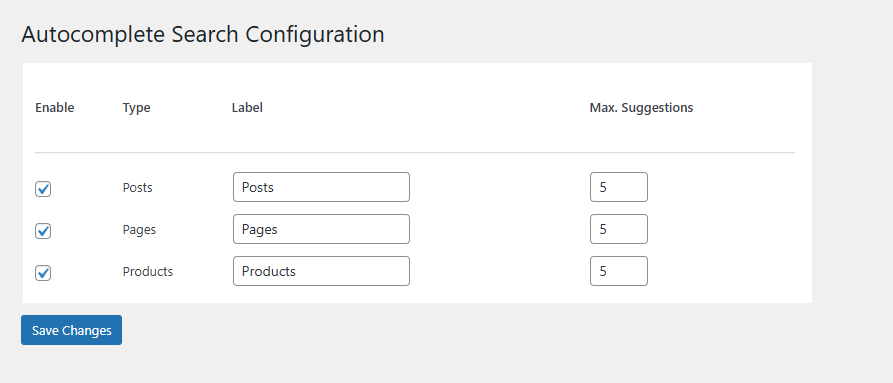
Absolutely! You can Enable the post types to search by using the backend setting
Is this plugin compatible with all themes?
Yes, the plugin is designed to work with most WordPress themes. If you encounter style conflicts, you can adjust them with custom CSS.
Does the plugin work on mobile devices?
Yes, the autocomplete feature is fully responsive and works seamlessly on all devices, including desktops, tablets, and smartphones.
Can I add the search box to a widget area?
Yes! Simply use the [atcl_autocomplete_search] shortcode in a text widget.
How do I style the search box?
You can style the search box using your theme’s custom CSS or by adding your custom styles to the site’s stylesheet.
Is the plugin compatible with multilingual sites?
Yes, the plugin is compatible with multilingual sites and can work alongside popular translation plugins like Polylang and WPML.
Can I display search results on a custom page?
At this time, the plugin only provides autocomplete suggestions in the dropdown. However, you can customize your search experience using additional hooks or filters.
Changelog
1.0.0
- Initial release.
- AJAX-powered autocomplete search for posts, pages, WooCommerce products and custom posts
- Shortcode support for easy implementation: [atcl_autocomplete_search].
- Support for multiple post types, including custom post types.
- Fully responsive and works across all devices.
- WooCommerce integration for product search.
- Lightweight and optimized for fast performance.
- Currently supports English language only.
1.1.0
- Added multilingual compatibility (tested with Polylang and WPML).
- Enhanced shortcode output with better markup and accessibility improvements.
- Improved AJAX search performance and response time.
- Added text domain for full translation support.
- Fixed “Updating failed. The response is not a valid JSON response” issue in block editor.
- Updated settings page UI for better usability.
- Minor bug fixes and code optimizations.
1.2.0
- Added theme-level control for search box styling via filters and CSS classes.
- Added filter to customize the search input placeholder text.
- Added support for custom wrapper and input field CSS classes.
- Added shortcode attribute to allow custom CSS classes per search instance.
- Minor code refactoring and performance optimizations.
Screenshots


For developers
Is this your plugin? Show off the numbers.
Add a live badge to your site, docs or GitHub README. It updates on its own — no account needed.
Best Autocomplete Search alternatives
All ajax search plugins →





FAQ
Autocomplete Search: quick answers
Straight answers, pulled from live WordPress.org data.
Live data from WordPress.org · checked Oct 9, 2026
Is Autocomplete Search free?
Yes. Autocomplete Search is free to download and use from the official WordPress.org plugin directory.
Is Autocomplete Search safe to use in 2026?
Autocomplete Search works, but test it on a staging site before relying on it in 2026. It runs on 20+ sites, is rated 5/5 and was last updated 10 months ago, and scores 46/100 on our health check.
How many websites use Autocomplete Search?
Autocomplete Search is active on 20+ WordPress websites and has been downloaded 1,458 times since it launched in December 2024. It was downloaded 72 times in the last 30 days.
Does Autocomplete Search work with WordPress 7.1?
Autocomplete Search is officially tested up to WordPress 6.9.10, while the latest release is 7.1.3. It may still work, but try it on a staging site first.
What PHP version does Autocomplete Search need?
Autocomplete Search requires PHP 7.2 or higher. Most hosts run PHP 8.x today, so it works on any modern WordPress hosting.
When was Autocomplete Search last updated?
The latest version, 1.2.0, was released on December 15, 2025 (10 months ago).
Who makes Autocomplete Search?
Autocomplete Search is developed and maintained by Aarti Chauhan.
What are the best alternatives to Autocomplete Search?
The most popular alternatives to Autocomplete Search are FiboSearch (100K+ installs), Ivory Search (90K+ installs) and Advance Product Search- Voi… (9K+ installs).
Powered by PageForge
Want thousands of pages that rank like these? Build them in an afternoon.
This directory runs on the same engine as PageForge. Turn any spreadsheet, CSV or API into thousands of fast, SEO-ready WordPress pages — with schema, internal links and AI-written copy baked in.
- CSV, Google Sheets & API data sources
- AI content, schema & internal links per page
- Works with Elementor, Gutenberg, Yoast & Rank Math
- Free on WordPress.org — no credit card


