



All-in-one Chat Button by anychat.one
Free wordpress widget for live chat via WhatsApp, Facebook Messenger, Telegram and other chat apps.

Use with caution
All-in-one Chat Button by anych… works, but test it on a staging site before relying on it in 2026. It runs on 900+ sites, is rated 5/5 and was last updated 12 months ago, and scores 49/100 on our health check.
- Small user base (900+ active installs)
- Very few reviews so far
- Only tested up to WordPress 6.8 (latest is 7.1)
How does it stack up?
Side-by-side on installs, updates, ratings & support



Daily downloads
Download spikes usually follow a new release — each site that auto-updates counts as a download.
Rankings
Where All-in-one Chat Button by a… stands todayWordPress.org search rankings
Live position in the plugin search, top 100| Keyword | Position |
|---|---|
| chatbot | >100 |
| livechat | #21 |
| messenger | #65 |
| omnichannel | #11 |
| >100 |
Version adoption
Share of active sites per release.
Rating breakdown
★★★★★★★★★★ 5 from 3 reviews
About All-in-one Chat Button by anychat.one
From the official readme · v1.0.5Description
AnyChat displays a multi-tool contact button on every page of your site and provides as many contact methods as you want, so customers can easily contact you with their favorite messaging app. You can choose which contact methods you want to display on desktop and mobile versions of your site separately. Also that way you can set different links for the desktop and mobile versions of your site.
Why should I use AnyChat button?
Key Benefits
- all-in-one multi-tool support button
- two integration types – multi-tool button or LiveChat button
- automated prompt messages
- all major messenger apps are supported
- built-in real-time live chat
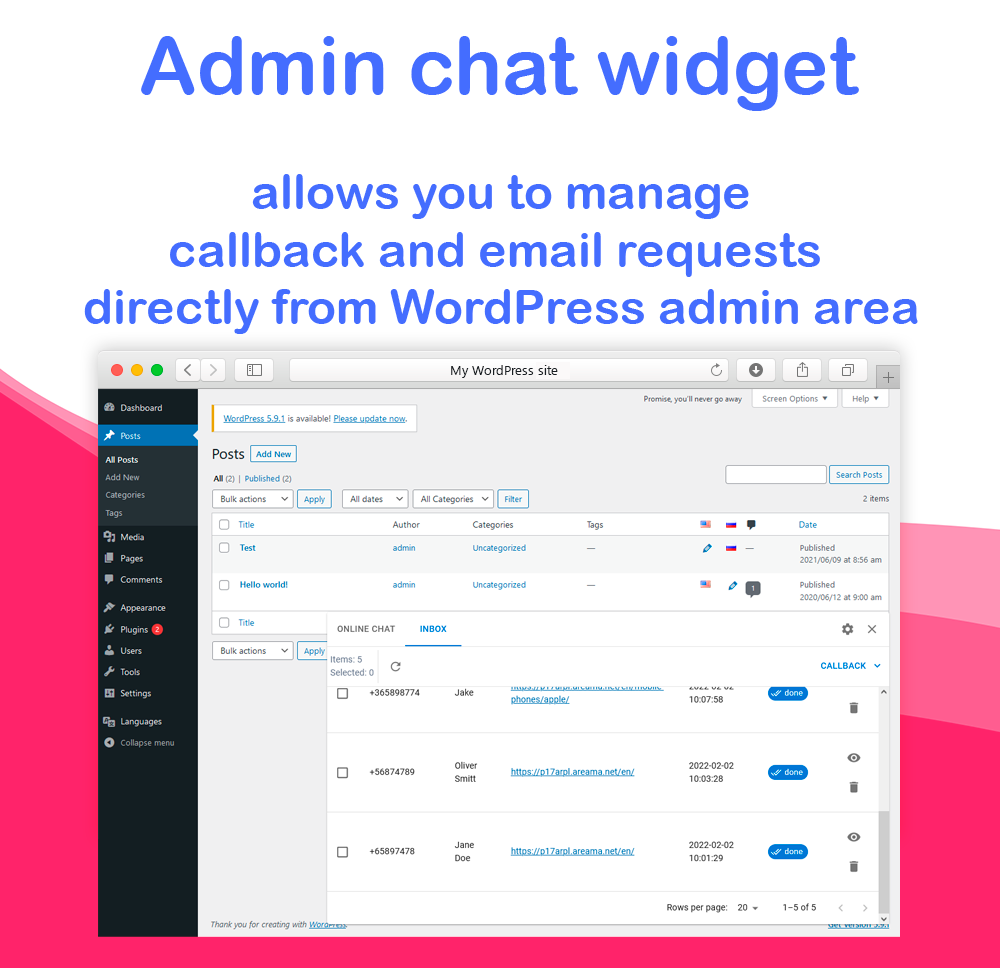
- answer to LiveChat messages instantly from the WordPress admin area
- manage form requests directly from the WordPress admin area
- built-in form builder to create or customize forms (callback, direct email, etc…)
- receive notifications when the form is submitted
- a lot of customization of button, menu appearance and menu items
Amazing features
- Easy to install: Less than 2 minutes to install the widget.
- Any browser is compatible: Works on any browser and any operating system.
- Customizable: You can configure the widget for desktop and mobile browsers separately.
- Messaging Apps: Supports Facebook Messenger, Telegram, WhatsApp, Viber, Snapchat, Line, WeChat, Skype, Click to call, etc…
- Built-in live chat widget: Add a full-featured live chat to your site.
- Built-in form builder: Add callback request form, direct email request, or any other form to your site.
- Attractive prompt messages: Proactive greeting messages increases chats.
- Several widget menu layout: Use layout you like with unlimited customizations.
- Very fast and lightweight: Buttons’ SVG icons are super-lightweight and pixel-perfect at any display resolution.
Free Widget
In the free version, you can:
- Add up to three menu items.
- Customize main button: size, color, icon, position, titles etc…
- Use built-in SVG icons for main button.
- Change the order of menu items.
- Use built-in SVG icons for each menu item.
- Choose menu style.
- Track clicks in Google Analytics.
- Choose where to use the widget: on mobile, on desktop, or everywhere.
- Use callback request form.
- Use email request form.
- Use offline form for livechat (for offline mode).
- Receive email notifications about form submissions.
- Manage all livechat messages directly from WordPress admin area.
- Manage inbox messages directly from WordPress admin area.
Pro Widget
Get more chats and sales with PRO features:
- All features from Free +
- Enable and cofigure the Prompt messages.
- Remove the branding (‘AnyChat’ link).
- Add unlimited menu items.
- Use scheduler for each menu item.
- Use custom image for main button.
- Use custom image for each menu item.
- Use Twilio integration to receive SMS as a form submission notification.
- Use Telegram integration to receive Telegram notifications about form submission.
- Use OneSignal integration to receive WebPush notifications about form submission.
- Use PerfexCRM integration to send leads to your PrefexCRM.
- Send webhook on form submission.
- Use you own mail server to send notifications.
- Change mail templates.
- Integrate with tawk.to to use tawk.to livechat on your site.
- Integrate with Facebook Customer Chat to use Facebook Customer Chat on your site.
- Integrate with Crisp to use Crisp livechat on your site.
Multisite Widget
Multisite plan features:
- All features from Pro +
- Create as many widgets as you want to use them on different sites.
Support
AnyChat offers 24×7 support, send us an email at support@anychat.one.
Don’t have an AnyChat account? Create one for free here!
Arbitrary section
Installation
Adding AnyChat Chat Button to your WordPress site is really easy, follow these steps :
- Install and activate the AnyChat Plugin through the ‘Plugins’ menu in WordPress.
- After installation, click the Settings/AnyChat section in the left toolbar.
- Create account or sign-in at anychat.one.
- Walk through the Quick setup dialog.
- At the last step copy the Widget ID and API key to the WordPress plugin settings.
- Save changes WordPress plugin settings.
- Done!
For the full feature list and additional information check https://anychat.one
Changelog
WordPress 6.4.1 support
1.0.5
- Settings issue fix
1.0.4
- Added Unified Widget
- WordPress 6.8.3 support
1.0.3
- WordPress 6.4.1 support
1.0.2
- Pass current location to the widget param
- Fix default config
1.0.1
- API key bug fix
1.0.0
- First version of the plugin.
Screenshots


For developers
Is this your plugin? Show off the numbers.
Add a live badge to your site, docs or GitHub README. It updates on its own — no account needed.
Best All-in-one Chat Button by any… alternatives
All chatbot plugins →





FAQ
All-in-one Chat Button by anychat.o…: quick answers
Straight answers, pulled from live WordPress.org data.
Live data from WordPress.org · checked Oct 2, 2026
Is All-in-one Chat Button by anych… free?
Yes. All-in-one Chat Button by anych… is free to download and use from the official WordPress.org plugin directory.
Is All-in-one Chat Button by anych… safe to use in 2026?
All-in-one Chat Button by anych… works, but test it on a staging site before relying on it in 2026. It runs on 900+ sites, is rated 5/5 and was last updated 12 months ago, and scores 49/100 on our health check.
How many websites use All-in-one Chat Button by anych…?
All-in-one Chat Button by anych… is active on 900+ WordPress websites and has been downloaded 9,232 times since it launched in February 2022. It was downloaded 232 times in the last 30 days.
Does All-in-one Chat Button by anych… work with WordPress 7.1?
All-in-one Chat Button by anych… is officially tested up to WordPress 6.8.10, while the latest release is 7.1.2. It may still work, but try it on a staging site first.
What PHP version does All-in-one Chat Button by anych… need?
All-in-one Chat Button by anych… requires PHP 5.6 or higher. Most hosts run PHP 8.x today, so it works on any modern WordPress hosting.
When was All-in-one Chat Button by anych… last updated?
The latest version, 1.0.5, was released on October 2, 2025 (12 months ago).
Who makes All-in-one Chat Button by anych…?
All-in-one Chat Button by anych… is developed and maintained by AnyChat.
What are the best alternatives to All-in-one Chat Button by anych…?
The most popular alternatives to All-in-one Chat Button by anych… are AI Agent by SiteGround (1M+ installs), AI Engine (90K+ installs) and Tidio (70K+ installs).
Powered by PageForge
Want thousands of pages that rank like these? Build them in an afternoon.
This directory runs on the same engine as PageForge. Turn any spreadsheet, CSV or API into thousands of fast, SEO-ready WordPress pages — with schema, internal links and AI-written copy baked in.
- CSV, Google Sheets & API data sources
- AI content, schema & internal links per page
- Works with Elementor, Gutenberg, Yoast & Rank Math
- Free on WordPress.org — no credit card


