


AnimFolio – Animated Portfolio & Resume Builder
Animated portfolio & resume builder. Fill it with AI, import in 1 click. 15 pro formats, dark/light, contact form, QR vCard. 100% free.

Use with caution
AnimFolio works, but test it on a staging site before relying on it in 2026. Was last updated 3 months ago, and scores 49/100 on our health check.
- Small user base (<10 active installs)
- Very few reviews so far
How does it stack up?
Side-by-side on installs, updates, ratings & support



Daily downloads
Download spikes usually follow a new release — each site that auto-updates counts as a download.
Rankings
Where AnimFolio stands todayWordPress.org search rankings
Live position in the plugin search, top 100| Keyword | Position |
|---|---|
| animation | >100 |
| cv | #52 |
| one page website | >100 |
| portfolio | >100 |
| resume | >100 |
About AnimFolio
From the official readme · v1.0.0Description
Build an animated portfolio that actually stands out — in minutes, for free. AnimFolio turns your name, work, and skills into a polished one-page site using 15 profession-specific formats, from a terminal-style developer portfolio to an RPG-gamified quest log. Pick a format, load demo content, edit it to be yours, and publish. No page builder, no theme lock-in, no code required.
👉 Live demo — try all 15 formats: https://rahulmahadik.com/animfolio
One-minute setup with AI + 1-click import. Export a ready-made JSON prompt, let ChatGPT or Claude fill it from your résumé or LinkedIn, then import it back in a single click — your entire portfolio populated instantly, with zero manual data entry.
Most portfolio plugins hand you a generic image grid. AnimFolio gives you a designed experience built for who you actually are — each format has its own layout, typography, motion, and color identity.
Perfect for: developers, designers, UI/UX and product people, photographers, writers, data scientists, founders, consultants, freelancers, students, and anyone who wants a fast, animated personal site or link-in-bio.
It’s not only a portfolio and resume builder. With the Custom HTML section — which accepts rich HTML and WordPress shortcodes — you can stack sections to assemble a complete animated single-page website for almost anything: a product or app landing page, a SaaS / startup site, a personal or small-business mini-site, a link-in-bio, an event or launch page, and more. Many people start with a portfolio and grow it into their main site — same animations, same admin, no theme lock-in.
What makes AnimFolio unique:
- 1-Minute Setup with AI + JSON Import — Export a ready-made JSON prompt, let ChatGPT or Claude fill it from your résumé or LinkedIn, then import it back in one click. Your entire portfolio is populated instantly — no manual data entry.
- 15 Role-Specific Formats — Not generic image grids. Developer, Designer, Freelancer, Agency, Photographer, Writer, Data Scientist, Product Manager, Startup Founder, Consultant, Student, Creative, Minimalist, Gamified RPG, and CLI Terminal.
- Built-in Scroll Animations — 12 lightweight animation modules (fade, parallax, typed text, counters, tilt, magnetic, custom cursor) built on IntersectionObserver + CSS. No animation framework or jQuery — fast and dependency-light.
- Gamified RPG Portfolio — Character sheet, skill tree, quest log, achievement badges, and XP bars for a playful, game-inspired portfolio.
- CLI Terminal Portfolio — Full command-prompt aesthetic with ASCII art, skill bars, and command output tables.
- One-Page Website Builder — The Custom HTML section accepts rich HTML and WordPress shortcodes, so you can build a full animated single-page site, not just a resume.
- Rich Projects — Embed YouTube/Vimeo videos (via WordPress oEmbed), multi-image galleries with a lightbox, and expandable case-study modals on each project.
- Resume Download — Add a downloadable resume/CV button to your hero (link to a PDF or any file).
- Skill Constellation — Display skills as an animated orbit/constellation (or bars, tags, dots).
- Blog Load More — The Blog section pulls your latest posts with a “Load More” button.
- QR Code + vCard — Client-side QR generation for business cards and print resumes.
- Dark/Light Mode — Smooth toggle with system preference detection.
- Complete Admin Panel — React-powered dashboard with drag-and-drop section builder, live preview customizer, format gallery, and contact submissions manager.
- 100% Free — No upsells, no premium version, no nag screens.
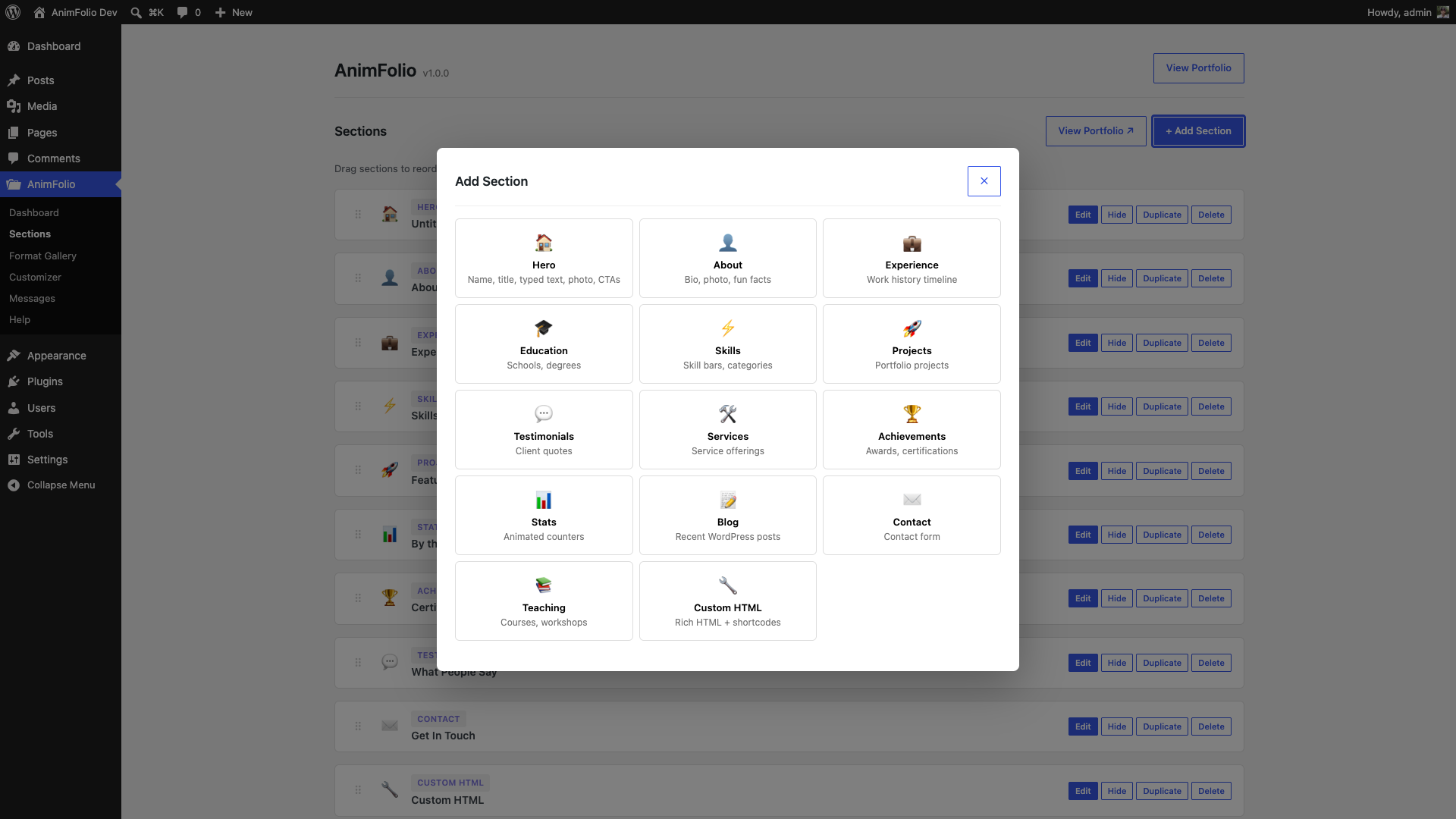
14 Section Types:
- Hero (name, title, typed text, CTAs)
- About (bio, photo, fun facts)
- Experience (timeline)
- Education (timeline)
- Skills (bar charts, categories)
- Projects (cards with tech stack, video embeds, image gallery + lightbox, case-study modals)
- Testimonials (quotes)
- Services (offerings, pricing)
- Achievements (badges, certifications)
- Stats (animated counters)
- Blog (auto-pulls WordPress posts)
- Contact (form with spam protection)
- Teaching (courses, workshops)
- Custom HTML
Admin Panel Features:
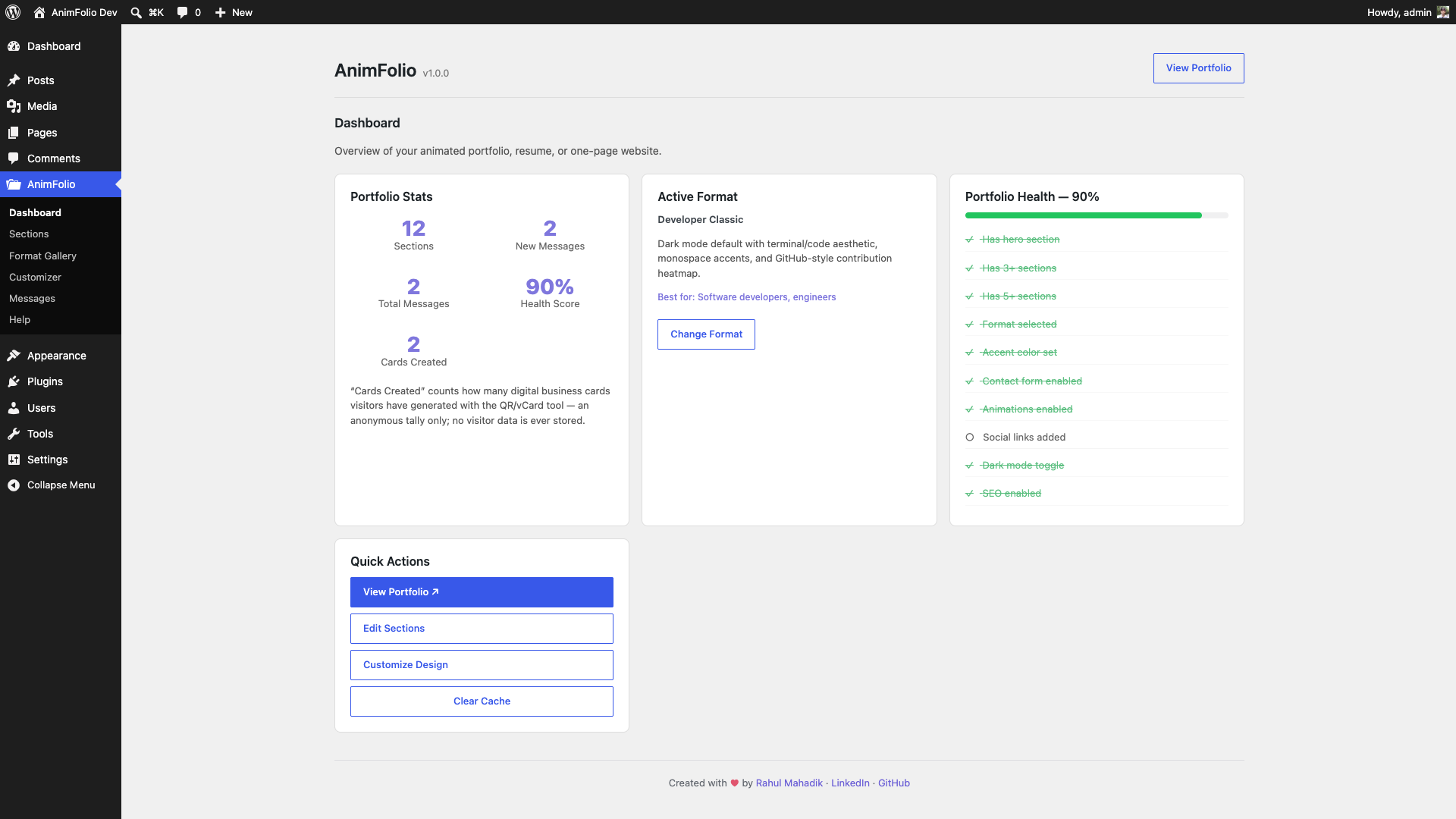
- Dashboard with portfolio health score
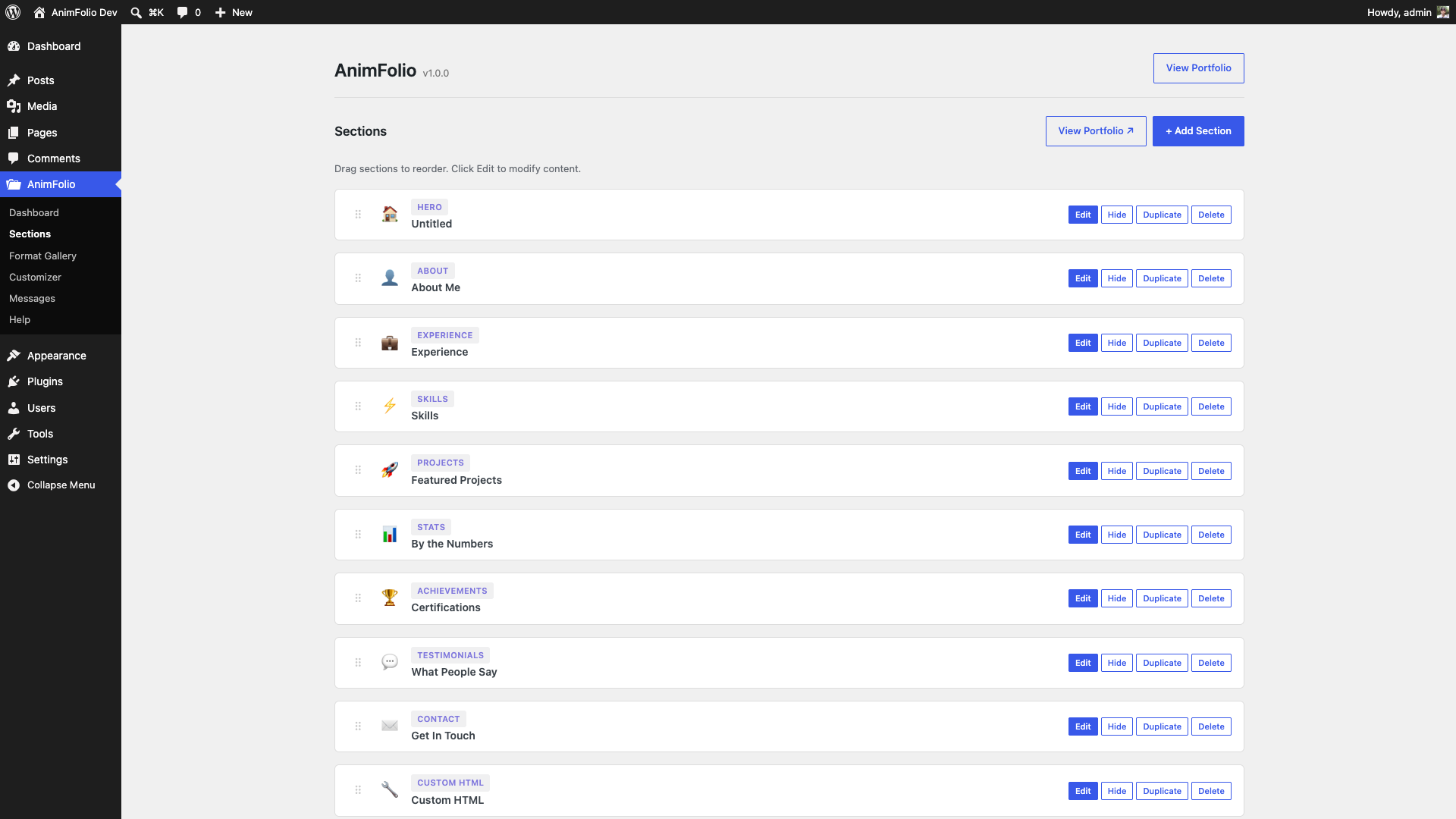
- Drag-and-drop section builder
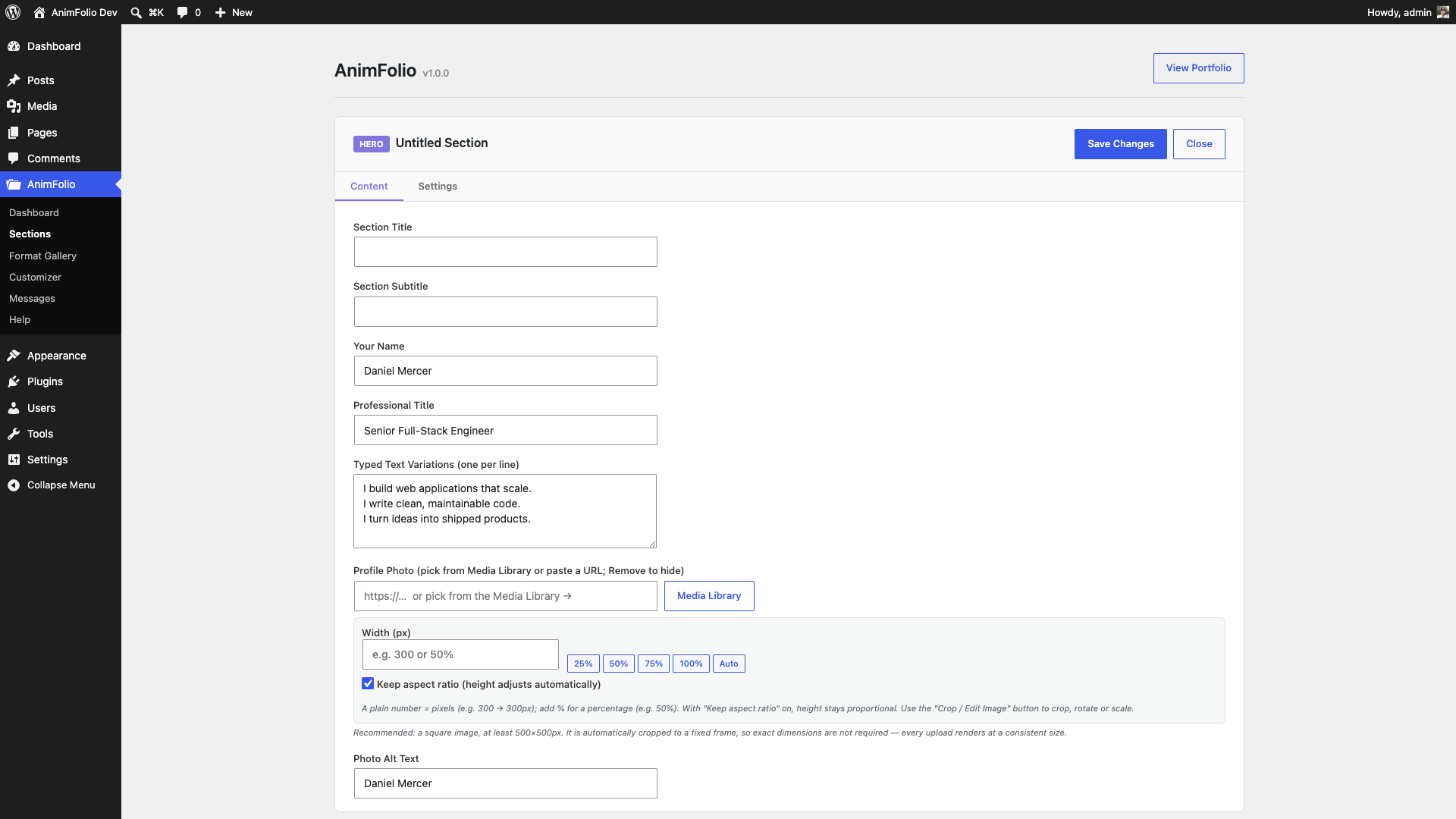
- Per-section content editor with type-specific fields
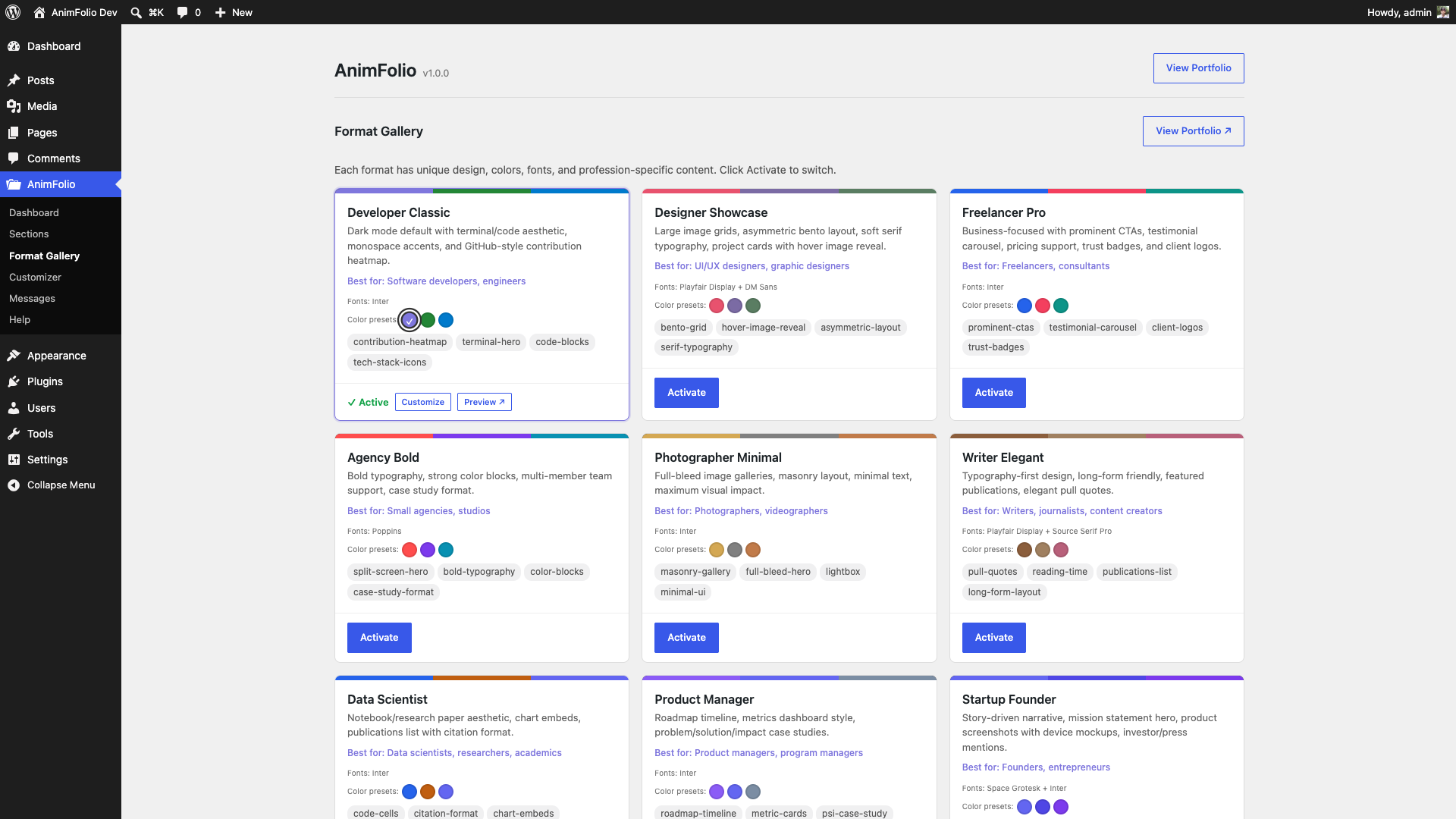
- Format Gallery with 15 formats and one-click switching
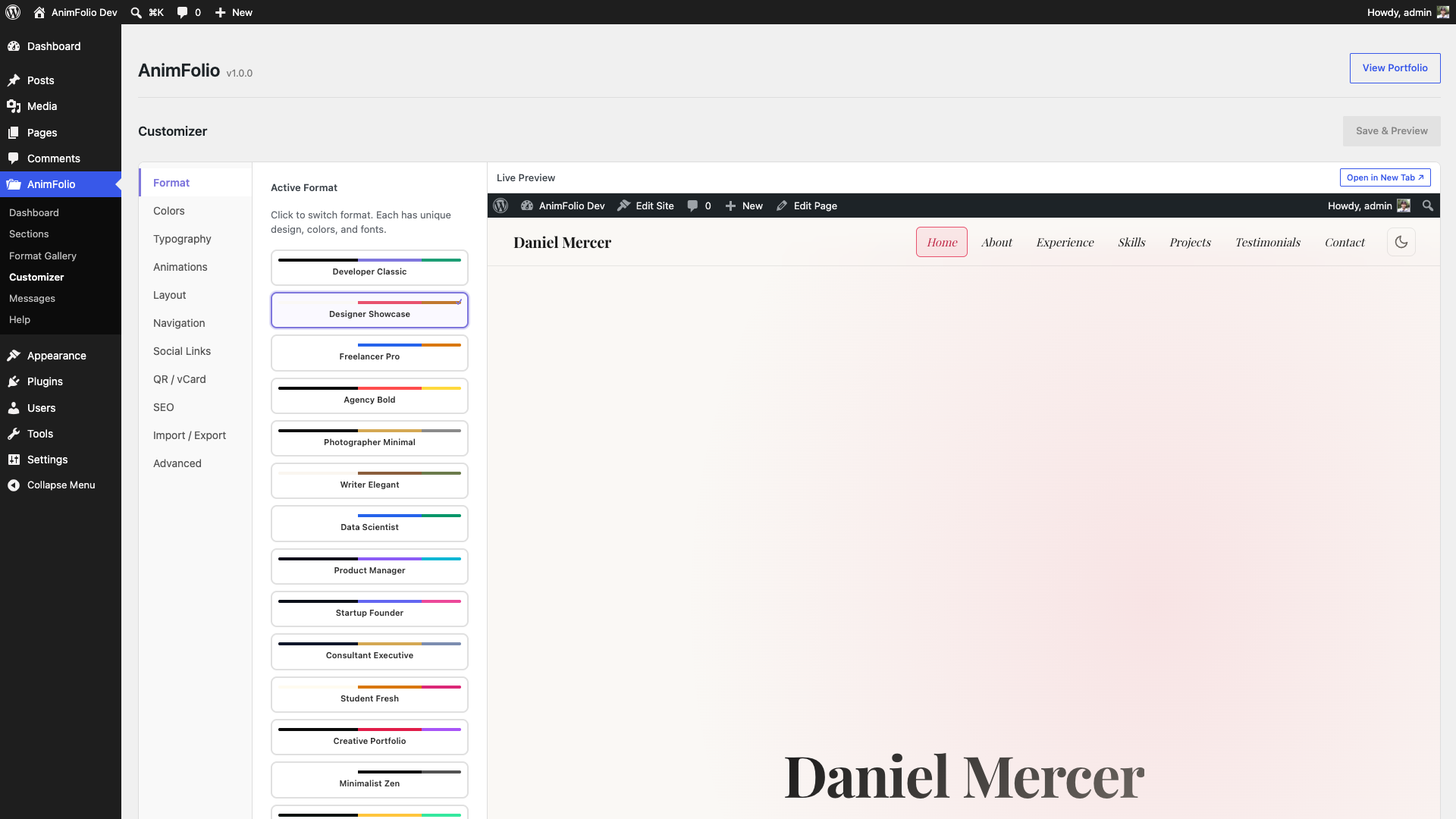
- Customizer with 11 tabs (Format, Colors, Typography, Animations, Layout, Navigation, Social Links, QR / vCard, SEO, Import / Export, Advanced)
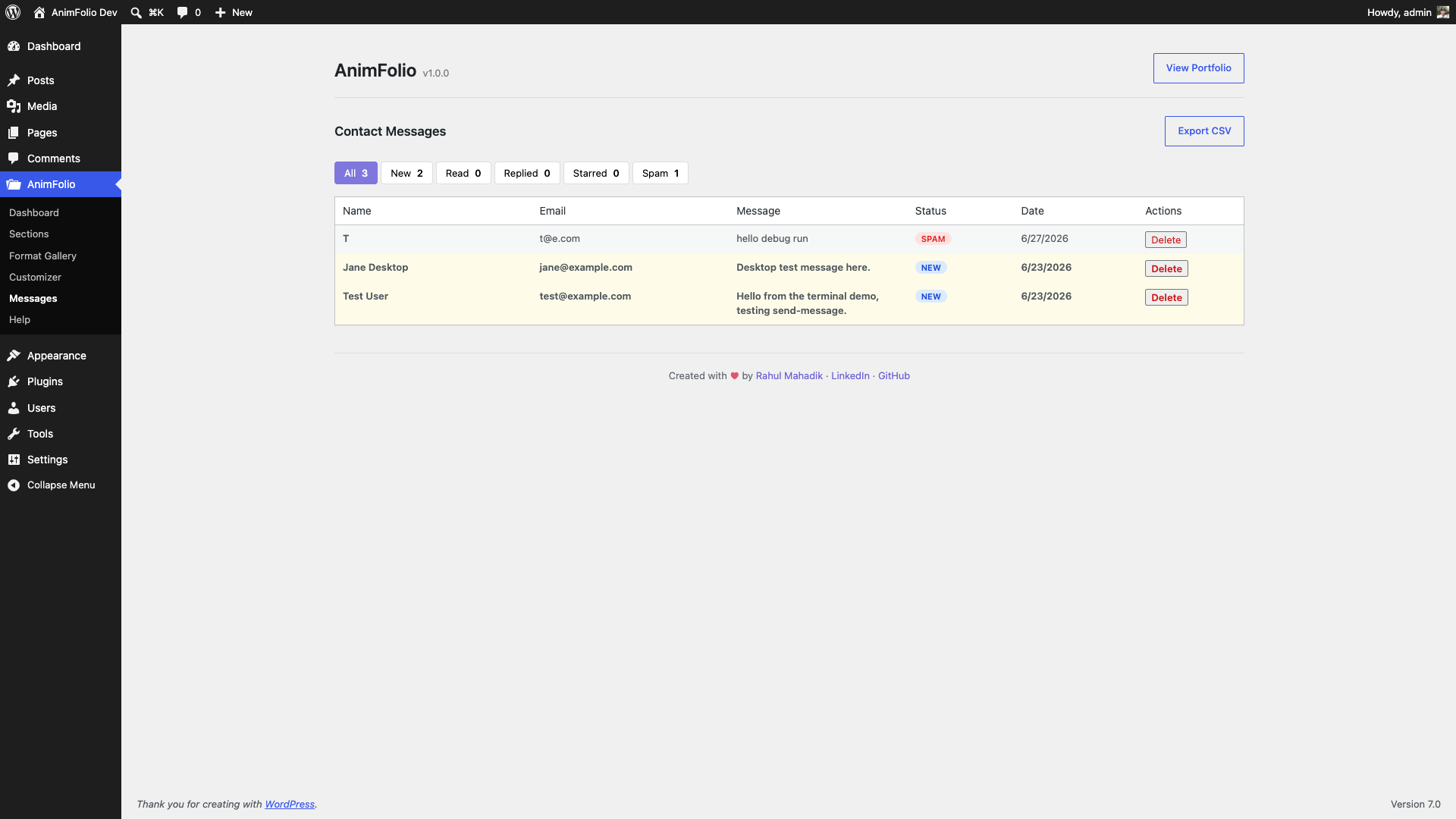
- Contact submissions viewer with detail modal, status management, CSV export
- Backup and restore system
- JSON import/export
External services
AnimFolio is self-contained and, by default, makes no external requests — all fonts, scripts, and styles are bundled locally and there is no tracking, analytics, or “phone home”. One optional integration can connect to a third-party service, and only when you explicitly enable it:
Google Fonts (optional, off by default)
When you set Customizer → Typography → Font Loading to “Google”, the visitor’s browser requests font stylesheets from fonts.googleapis.com and font files from fonts.gstatic.com so the chosen Google-hosted font can render. This happens only on pages that use such a font and only after you opt in; with the default “Local” setting no request is made. The request includes the requested font family names and the standard data any web request carries (IP address, user agent). See the Google Fonts FAQ (https://developers.google.com/fonts/faq) and Google Privacy Policy (https://policies.google.com/privacy).
Note: when you add a video URL to a Project, AnimFolio uses WordPress core’s built-in oEmbed (wp_oembed_get) to fetch the embed markup from the video provider you chose (e.g. YouTube/Vimeo); the result is cached locally so it is fetched at most once per URL. This uses WordPress core, not a service AnimFolio bundles.
Installation
Install (from the WordPress.org directory — recommended)
- In wp-admin go to Plugins > Add New and search for “AnimFolio”.
- Click Install Now on the AnimFolio card, then click Activate.
Install (manual upload — alternative)
- Download the AnimFolio ZIP, then in wp-admin go to Plugins > Add New > Upload Plugin, choose the
animfolio.zipfile, and click Install Now. (Or upload the unzippedanimfoliofolder to/wp-content/plugins/via FTP.) - Click Activate.
On activation AnimFolio adds an “AnimFolio” menu and auto-creates a Portfolio page.
Set up (2 minutes)
- Go to AnimFolio > Format Gallery and click Activate on the format that fits you (Developer, Designer, Photographer, Gamified, CLI Terminal, etc.). Colors and fonts switch to match automatically.
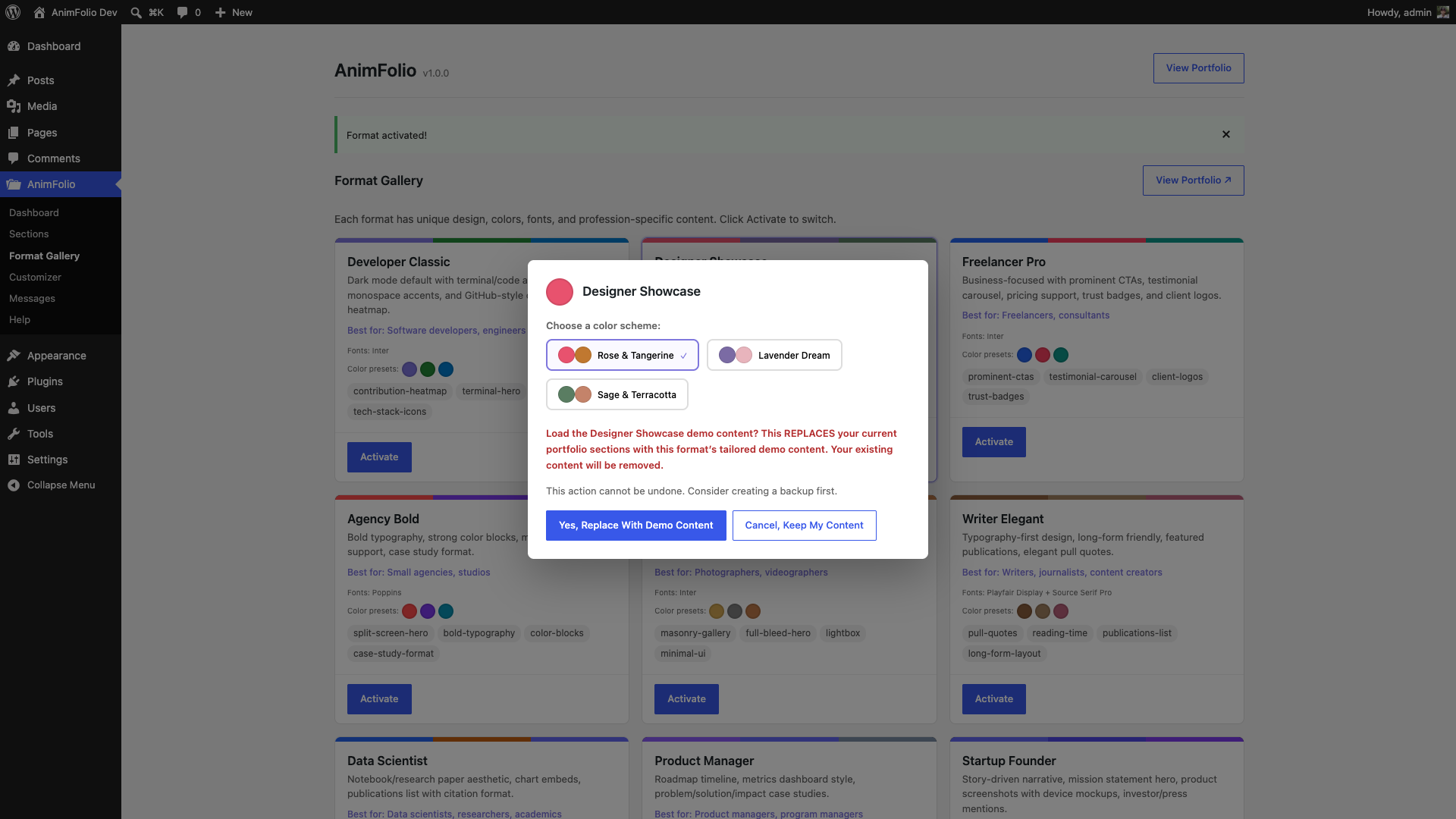
- In the pop-up, optionally pick a color scheme, then either keep your content or click “Yes, Replace With Demo Content” to load that format’s ready-made example sections (see the demo FAQ below).
- Go to AnimFolio > Sections to edit your real content — your name, bio, experience, skills, projects, etc. Drag to reorder; each section has a type-specific editor.
Customize
- Open AnimFolio > Customizer to fine-tune everything across 11 tabs: Format (switch format + one-click color presets), Colors (accent/secondary or a preset), Typography (fonts/sizes), Animations (intensity + per-effect toggles), Layout (spacing, card style, radius), Navigation, Social Links, QR / vCard, SEO, Import / Export (JSON backup/restore), and Advanced (display options). Changes apply to your live portfolio.
- Click “View Portfolio” (top of any AnimFolio screen) to see the result. The portfolio also lives at the auto-created Portfolio page, or embed it anywhere with the
[animfolio]shortcode.
A short “Tips & Best Practices” guide is built into AnimFolio > Help.
Frequently asked questions
How do I load the demo content into my own portfolio?
Go to AnimFolio > Format Gallery and click Activate on any format. A pop-up appears with a “Yes, Replace With Demo Content” button — clicking it fills your portfolio with that format’s tailored example sections (hero, projects, skills, etc.) so you can see a complete, realistic layout and then edit it into your own. Each of the 15 formats has its own demo content. Note: loading demo content REPLACES your current sections, so create a backup first (Customizer > Import / Export > Backup) if you already added content. Prefer to start empty instead? Just click “Cancel, Keep My Content” and add…
Can I fill my whole portfolio quickly with AI?
Yes — there’s a fast path in Customizer > Import / Export. Click “Export Portfolio (JSON)” to download the exact data structure, paste it into an AI assistant (ChatGPT, Claude, etc.) along with your LinkedIn data export, resume, or any details about you, and ask it to fill in your real content while keeping the JSON keys and structure unchanged. Save the result as a .json file and import it — one click and every section is populated. Both the importer and the server validate the JSON structure and sanitize all values, and a backup is created automatically before anything is replaced, so the…
Does it work with any theme?
Yes! AnimFolio works with any WordPress theme. The portfolio page uses its own full-page template. You can also embed it on any page using the [animfolio] shortcode.
How do I switch formats?
Go to AnimFolio > Format Gallery and click Activate on any format. Your content is preserved — only the visual design changes. Colors and fonts auto-update to match the format.
Does it work without JavaScript?
Yes. If a visitor’s browser has JavaScript disabled, a CSS @media (scripting: none) fallback reveals all content immediately (just without the scroll animations) — nothing stays hidden. Separately, you can switch on CSS-only mode in Customizer > Advanced to drop the heavier JS interaction effects (custom cursor, magnetic buttons, tilt, parallax) while keeping the lightweight reveal engine.
Is it accessible?
AnimFolio respects prefers-reduced-motion, uses semantic HTML, ARIA labels, and proper heading hierarchy. Its built-in color schemes and per-format palettes are designed to meet WCAG 2.1 AA contrast (custom colors you pick yourself aren’t auto-checked).
Can I override templates?
Copy any file from the plugin’s templates/ or public/partials/ folder into your theme’s animfolio/ directory. Theme overrides take priority.
Is it SEO friendly?
Yes. AnimFolio auto-generates a meta description, canonical link, Open Graph tags, Twitter Cards, and JSON-LD Person structured data for the portfolio page. If Yoast SEO or Rank Math is active, AnimFolio steps aside and lets your SEO plugin own the meta tags — so you never get duplicates. You can set your own title/description/image in Customizer > SEO.
Does it work with caching and optimization plugins (WP Rocket, LiteSpeed, W3TC)?
Yes. All CSS and JavaScript is registered through standard wp_enqueue_* with versioned URLs, so minify/combine/defer features can process AnimFolio’s assets like any other plugin. Assets are loaded only on the portfolio page (not site-wide), images are lazy-loaded, fonts are bundled locally by default (an optional Google Fonts mode is opt-in), and there is no jQuery or animation framework dependency — which keeps Lighthouse / PageSpeed scores high and avoids conflicts with page-cache plugins. A built-in inline failsafe also guarantees your content is revealed even if a cache/optimization…
Can I build a full one-page website, not just a portfolio?
Yes. In addition to the 14 built-in section types, the Custom HTML section accepts rich HTML and WordPress shortcodes. Add several Custom HTML sections (and reorder them by dragging), optionally mixed with Hero, Contact, and Stats sections, to build a complete animated one-page site. For security the markup is sanitized on save (via wp_kses_post()), so it does not run scripts — use the built-in sections (Projects video embeds, Contact form, Stats counters, etc.) for interactive features.
Do WordPress and plugin shortcodes work?
Yes. Anything in a Custom HTML section is run through do_shortcode(), so shortcodes from WordPress core or other plugins work — for example [contact-form-7 id="123"], [gallery], or any shortcode your plugins register.
How do I add custom CSS?
Use WordPress’ built-in Appearance → Customize → Additional CSS, or a child theme stylesheet — both apply to your portfolio page. For security, AnimFolio itself has no custom-CSS or custom-JavaScript field, and the Custom HTML section sanitizes its markup so it does not run scripts.
How do I embed on existing pages?
Two ways. In the block editor, add the AnimFolio Portfolio block (search “AnimFolio”) — its sidebar has optional Format-override and Sections fields. Or use the shortcode [animfolio] on any page or post ([animfolio sections="hero,skills,projects"] to show specific sections, [animfolio format="format-14-gamified"] to override the format). Either way the portfolio renders within your existing theme layout.
How do I make my portfolio the site’s home page?
Go to Settings → Reading, set “Your homepage displays” to A static page, choose your Portfolio page as the Homepage, and Save Changes. Your portfolio will now load at your site’s root URL. The Portfolio page uses a full-screen template, so it works great as a standalone homepage. If you’d rather keep your theme’s header/footer on the home page, instead add the AnimFolio Portfolio block (or the [animfolio] shortcode) to your existing front page. There’s also a step-by-step “Use AnimFolio as Your Home Page” card under AnimFolio → Help.
Can I show live demos of every format?
Yes. The shortcode’s format attribute renders a specific format independently of your active one — so you can publish a separate demo page per format and link to them all. Create a page containing [animfolio format="format-14-gamified"] (use any format folder slug, e.g. format-05-photographer), publish it, and the page loads that format’s full template, styles, and scripts — even though your site keeps a single active format on its main portfolio page. Your brand colors come from the Customizer; each format also brings its own characteristic styling.
How do I show a QR code or vCard?
The QR vCard is on by default. Fill in your contact details in Customizer → QR / vCard and set the Position (Hero, Contact, Both, or Footer) — the QR then appears automatically in that location (or turn it off there). You can also embed it anywhere with the [animfolio_qr] shortcode (attributes: size in pixels, default 200; caption, optional text below the code). The QR is generated entirely in the browser — no data leaves the visitor’s device.
Can visitors create their own digital business card?
Yes. Turn on the Visitor Card creator (Customizer → QR / vCard) and a small form lets visitors enter their own details and download a vCard (.vcf) + QR — handy at events or meetups. It’s anonymous: nothing a visitor enters is stored on your site (only an optional, privacy-safe “cards created” tally).
Does AnimFolio add a “Built with AnimFolio” credit?
No — it is off by default. If you would like to show a small “Built with AnimFolio” credit in the footer, go to Customizer → Advanced and toggle on “Show Built with AnimFolio”. It is appreciated but never required — AnimFolio is 100% free with no upsells.
Can I change a section’s alignment or add a custom CSS class?
Yes. Open any section in the Sections builder → Settings tab. “Text Alignment” (left / center / right) aligns that section’s heading and standalone text (cards, forms, and grids keep their own internal alignment by design), and “CSS Class” adds a custom class to the section wrapper so you can target it with your own CSS.
Can I have dark and light mode?
Yes! Set the color scheme in Customizer > Colors. When the navigation bar and the Dark/Light Mode Toggle are enabled (both on by default), a toggle button appears in the nav — visitors can switch modes and their preference is saved.
Changelog
1.0.0
- Initial release
- 15 portfolio format templates (Developer, Designer, Freelancer, Agency, Photographer, Writer, Data Scientist, Product Manager, Startup Founder, Consultant, Student, Creative, Minimalist, Gamified RPG, CLI Terminal)
- 14 section types with drag-and-drop builder
- 12 animation modules (IntersectionObserver + CSS, no animation framework)
- React admin panel with live preview customizer
- Block editor block (“AnimFolio Portfolio”) plus the [animfolio] shortcode
- WordPress privacy tools integration — contact submissions are included in the personal-data export and erase tools, with suggested privacy-policy text
- Pre-minified CSS/JS assets (toggle in Customizer) for fast page loads
- Contact form with honeypot, time-check, JS-check, and always-on IP rate-limiting spam protection
- QR code / vCard generation (client-side, no external API)
- Dark/light mode with system preference detection and localStorage persistence
- SEO meta tags (Open Graph, Twitter Cards, JSON-LD Person schema)
- Import/export (JSON) + backup/restore system
- Social media links management (GitHub, LinkedIn, Twitter, Dribbble, Behance, Instagram, YouTube, etc.)
- Full REST API (10 controllers, 25+ endpoints)
- Mobile responsive with hamburger navigation
- Scroll progress bar and back-to-top button
- Custom HTML section type (sanitized HTML + WordPress shortcodes)
- WP.org compliant — all plugin assets bundled locally; no tracking, no CDN dependencies. The only outbound calls are optional and user-initiated: WordPress core oEmbed when you add a video URL to a project (the result is cached locally), and Google Fonts only if you explicitly opt in. Proper sanitization, escaping, and nonces throughout.
- Bundles one third-party JavaScript library: qrcode-generator (MIT license) for client-side QR code generation — no external API or service is called.
Screenshots
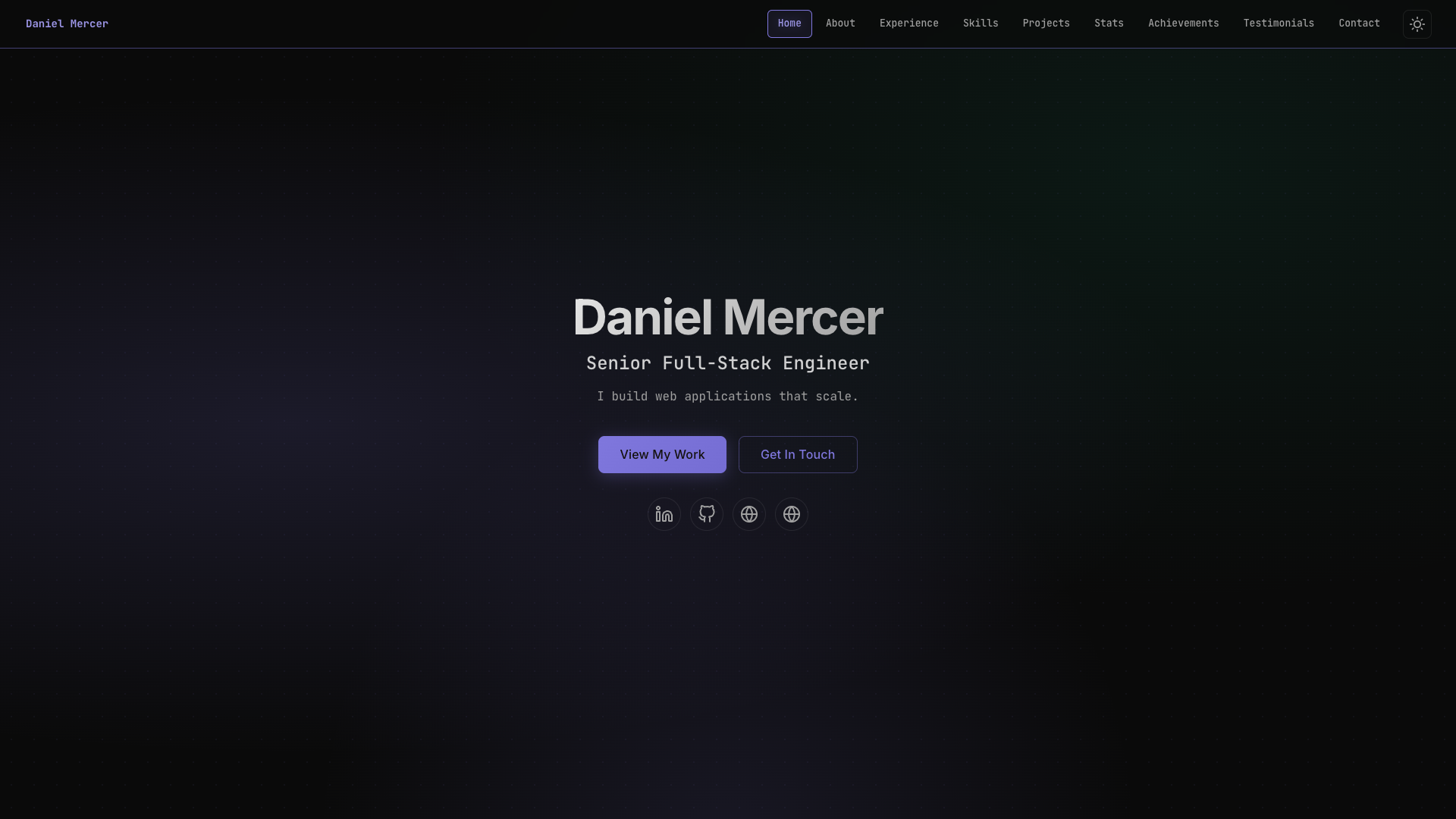
For developers
Is this your plugin? Show off the numbers.
Add a live badge to your site, docs or GitHub README. It updates on its own — no account needed.
Best AnimFolio alternatives
All animation plugins →





FAQ
AnimFolio: quick answers
Straight answers, pulled from live WordPress.org data.
Live data from WordPress.org · checked Sep 30, 2026
Is AnimFolio free?
Yes. AnimFolio is free to download and use from the official WordPress.org plugin directory.
Is AnimFolio safe to use in 2026?
AnimFolio works, but test it on a staging site before relying on it in 2026. Was last updated 3 months ago, and scores 49/100 on our health check.
How many websites use AnimFolio?
AnimFolio is active on <10 WordPress websites and has been downloaded 284 times since it launched in June 2026. It was downloaded 78 times in the last 30 days.
Does AnimFolio work with WordPress 7.1?
AnimFolio is officially tested up to WordPress 7.0.6, while the latest release is 7.1.2. It may still work, but try it on a staging site first.
What PHP version does AnimFolio need?
AnimFolio requires PHP 8.0 or higher. Most hosts run PHP 8.x today, so it works on any modern WordPress hosting.
When was AnimFolio last updated?
The latest version, 1.0.0, was released on June 28, 2026 (3 months ago).
Who makes AnimFolio?
AnimFolio is developed and maintained by Rahul Mahadik.
What are the best alternatives to AnimFolio?
The most popular alternatives to AnimFolio are Blocks Animation: CSS Anima… (90K+ installs), Greenshift (70K+ installs) and UiCore Animate (40K+ installs).
Powered by PageForge
Want thousands of pages that rank like these? Build them in an afternoon.
This directory runs on the same engine as PageForge. Turn any spreadsheet, CSV or API into thousands of fast, SEO-ready WordPress pages — with schema, internal links and AI-written copy baked in.
- CSV, Google Sheets & API data sources
- AI content, schema & internal links per page
- Works with Elementor, Gutenberg, Yoast & Rank Math
- Free on WordPress.org — no credit card


