


AnimateGL Animations for WordPress – Elementor & Gutenberg Blocks Animations
CSS & WebGL Animations for Elementor & Gutenberg Blocks Animations, animations from CSS class, scroll animations, lock to scrollbar.

Use with caution
AnimateGL Animations for WordPr… works, but test it on a staging site before relying on it in 2026. It runs on 3K+ sites, is rated 5/5 and was last updated 1 year ago, and scores 43/100 on our health check.
- Loved by users — 5/5 from 22 reviews
- No update in over a year
- Only tested up to WordPress 6.8 (latest is 7.1)
How does it stack up?
Side-by-side on installs, updates, ratings & support


Daily downloads
Download spikes usually follow a new release — each site that auto-updates counts as a download.
Rankings
Where AnimateGL Animations for Wo… stands todayWordPress.org search rankings
Live position in the plugin search, top 100| Keyword | Position |
|---|---|
| animate | #30 |
| animation | #37 |
| block animations | #36 |
| elementor animations | #69 |
| gutenberg animations | #27 |
Version adoption
Share of active sites per release.
Rating breakdown
★★★★★★★★★★ 5 from 22 reviews
About AnimateGL Animations for WordPress
From the official readme · v1.4.24Description
Demo | Documentation | Support
Add CSS and WebGL animations easily to any element on the website with AnimateGL plugin.
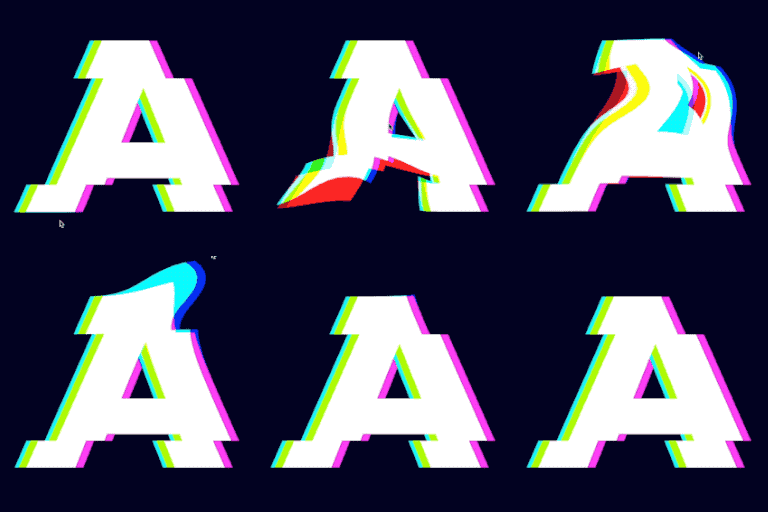
Add CSS and WebGL animations in Elementor, Block editor or any other builder. Customize direction, duration, delay and easing for each animation. Choose simple CSS animations like fade, slide, zoom and wipe or creative WebGL animations like bend, flip, stretch or directional fade. Create custom entrance animation with visual editor. AnimateGL is lightweight, fast, and easy to use, making it the perfect choice for web designers looking to enhance their website’s visual appeal.
Features
- Add Entrance animation to any element or block
- CSS Entrance animations Fade, Zoom In, Zoom out, Wipe, Slide Reveal
- WebGL Entrance animations Bend, Flip, Peel, Wipe, Zoom, Directional Fade
- Fully customizable animation direction, duration, delay, easing
- Gutenberg Blocks animations
- Elementor animations
- CSS class animations
- Nested animations
- Lock to scrollbar
- Repeat or play once on first enter the viewport
- Live editor for creating custom animation
- Preset animations
- Scroll triggered Entrance animations
- Easy to use
- Lightweight
- Great performance
CSS animations
CSS entrance animations are GPU accelerated and animate CSS properties opacity, transform and clip path in different combinations. CSS animations can be added to any element or block. Available CSS animations are Fade, Zoom In, Zoom Out, Wipe and Slide with settings for direction, distance, duration, delay and easing. With combination of fade, zoom, direction, easing and delay you can create unlimited number of creative elegant animations. More CSS animations coming soon.
CSS Entrance animations:
- Fade
- Zoom In
- Zoom Out
- Wipe
- Slide
WebGL animations
WebGL animations convert any element to image with html2canvas.js, then apply effects to image with custom GLSL shaders. Best use is for simple elements like heading, button or image. With WebGL we can create effects that are not possible with CSS, like 3D distortions or gradient fade, and add those effects to any element on the page.
WebGL Entrance animations:
- Fade
- Slide
- Stretch
- Bend
- Flip
- Zoom
- Peel
Lightweight
Only 35kb for CSS animations, additional 45kb if WebGL animations are used.
Elementor animations
Add Entrance animation to any element in Elementor. Select animation type, direction, distance, delay, duration and easing in the Element Advanced tab.
Gutenberg Blocks animations
Add Entrance animation to any Gutenberg block. Select animation type, direction, distance, delay, duration and easing in the block inspector controls.
Entrance Animations via CSS class
If you don’t use Elementor or Gutenberg blocks, you can still use AnimateGL via CSS classes. Add one of preset entrance animations or custom entrance animation to any element on the page by adding the animation CSS class.
More animations available with Entrance pack:
- Circle (CSS)
- Square (CSS)
- Line (CSS)
Customize direction, duration, easing and delay for each animations
Customize animation properties via CSS class:
- Fade – with options for directional fade and threshold
- Translate – with options for x, y, and z direction
- Rotation – with options for x, y, and z axis
- Corners Distortion – for added animation variety
- Duration – customize the length of the animation
- Delay – customize the start time of the animation
- Easing – customize the speed and flow of the animation
Repeat
By default, entrance animation will play when element enters the viewport for the first time. With option repeat enabled, the animation will play each time element enters the viewport.
Lock to scrollbar
Instead of fixed duration entrance animation, we can make the animation progress depend on the scroll position of the element. If the element is below the viewport, the animation progress will be 0. As we scroll the page down, and element is moving towards the middle of the viewport, the animation progresses. The end of animation is when element reches the middle of the viewport. Lock to scrollbar option can be enabled for any animation.
Mouse Effects
AnimateGL also offers mouse-driven distortion effects, including:
- Pull – with options for strength, size, RGB shift, and ease
Scroll triggered animations
Entrance animation is played when when the element enters the viewport, when it becomes visible on the screen.
Viewport entrance threshold
By default, entrance animation start to play when 70% or 200px of the element enters the viewport.
Live Editor
Use live editor to create your custom entrance animation.
Enhance the visual appeal of your website with AnimateGL, the most powerful and advanced WebGL animation plugin for WordPress. With its lightweight 33kb gzipped size and no dependencies, AnimateGL is fast, easy to use, and the perfect choice for web designers looking to add unique animations to their website.
Use with any page builder
AnimateGL can be used with any page buidler: Elementor and Gutenberg blocks editor, Visual composer and others, because animations can be added simply by adding a CSS class. Add unique animations in Elementor, Visual Composer or Guteberg blocks editor with AnimateGL.
Help us improve
If you have any problem or feature request for this plugin, please feel free to open a ticket!
Frequently asked questions
How to add AnimateGL animations to any block in Gutenberg?
Open Image block options > Advanced > AnimateGL, and select animation. Alternatively you can add animations via CSS class with Advanced > Additional CSS class, add the CSS class of the AnimateGL animation.
Where is the list of CSS classes for Entrance animations?
Available Entrance animations are listed on the plugin admin page.
How to add AnimateGL animations to any element in Elementor?
Open Image settings > Advanced > Layout > CSS Classes, add the CSS class of the AnimateGL animation.
What are the limitations of WebGL animations?
WebGL animatinos are best to use for simple elements like headings, buttons or images. For more complex elements like sections it is better to use CSS animatinos.
Changelog
1.4.23
- Fix: CSS animation repeat
1.4.22
- Fix: WebGL animation not working before scroll
1.4.21
- Improvement: Performance improvements
1.4.20
- Improvement: Performance improvements
1.4.19
- Improvement: Better performance for Lock to scrollbar animations
1.4.18
- Fix: Updated Freemius SDK to 2.5.10 to fix a volnurability in Freemius SDK <= 2.5.9
Screenshots


For developers
Is this your plugin? Show off the numbers.
Add a live badge to your site, docs or GitHub README. It updates on its own — no account needed.
Best AnimateGL Animations for Word… alternatives
All animate plugins →





FAQ
AnimateGL Animations for WordPress: quick answers
Straight answers, pulled from live WordPress.org data.
Live data from WordPress.org · checked Sep 27, 2026
Is AnimateGL Animations for WordPr… free?
Yes. AnimateGL Animations for WordPr… is free to download and use from the official WordPress.org plugin directory.
Is AnimateGL Animations for WordPr… safe to use in 2026?
AnimateGL Animations for WordPr… works, but test it on a staging site before relying on it in 2026. It runs on 3K+ sites, is rated 5/5 and was last updated 1 year ago, and scores 43/100 on our health check.
How many websites use AnimateGL Animations for WordPr…?
AnimateGL Animations for WordPr… is active on 3K+ WordPress websites and has been downloaded 25,928 times since it launched in January 2023. It was downloaded 348 times in the last 30 days.
Does AnimateGL Animations for WordPr… work with WordPress 7.1?
AnimateGL Animations for WordPr… is officially tested up to WordPress 6.8.10, while the latest release is 7.1.2. It may still work, but try it on a staging site first.
What PHP version does AnimateGL Animations for WordPr… need?
AnimateGL Animations for WordPr… requires PHP 5.4 or higher. Most hosts run PHP 8.x today, so it works on any modern WordPress hosting.
When was AnimateGL Animations for WordPr… last updated?
The latest version, 1.4.24, was released on May 8, 2025 (1 year ago).
Who makes AnimateGL Animations for WordPr…?
AnimateGL Animations for WordPr… is developed and maintained by creativeinteractivemedia.
What are the best alternatives to AnimateGL Animations for WordPr…?
The most popular alternatives to AnimateGL Animations for WordPr… are Animations for Blocks (10K+ installs), Animate on Scroll (4K+ installs) and Easy Textillate (1K+ installs).
Powered by PageForge
Want thousands of pages that rank like these? Build them in an afternoon.
This directory runs on the same engine as PageForge. Turn any spreadsheet, CSV or API into thousands of fast, SEO-ready WordPress pages — with schema, internal links and AI-written copy baked in.
- CSV, Google Sheets & API data sources
- AI content, schema & internal links per page
- Works with Elementor, Gutenberg, Yoast & Rank Math
- Free on WordPress.org — no credit card


