



Animate In View
Fade and slide in your blocks with style as they enter into the user's view.

Solid choice
Animate In View is a solid plugin choice in 2026, with a few things worth checking first. It runs on 1K+ sites, is rated 4.5/5 and was last updated 1 month ago, and scores 72/100 on our health check.
- Tested with the latest WordPress (7.1)
- Very few reviews so far
How does it stack up?
Side-by-side on installs, updates, ratings & support


Daily downloads
Download spikes usually follow a new release — each site that auto-updates counts as a download.
Rankings
Where Animate In View stands todayWordPress.org search rankings
Live position in the plugin search, top 100| Keyword | Position |
|---|---|
| animate | #2 |
| block | >100 |
| fade | #17 |
| screen | #56 |
| slide-in | #8 |
Version adoption
Share of active sites per release.
Rating breakdown
★★★★★★★★★★ 4.5 from 2 reviews
About Animate In View
From the official readme · v1.2.4Description
Using a fast, simple, native technique, the Animate In View block will watch over inner blocks you add within it and when they come into the user’s view, it will simply fade and optionally slide in.
Trigger simple, smooth, modern animations as the content enters the screen.
- Follow @kevinbatdorf on Twitter
- View on GitHub
Features
- Both lightweight and fast, and only does one thing.
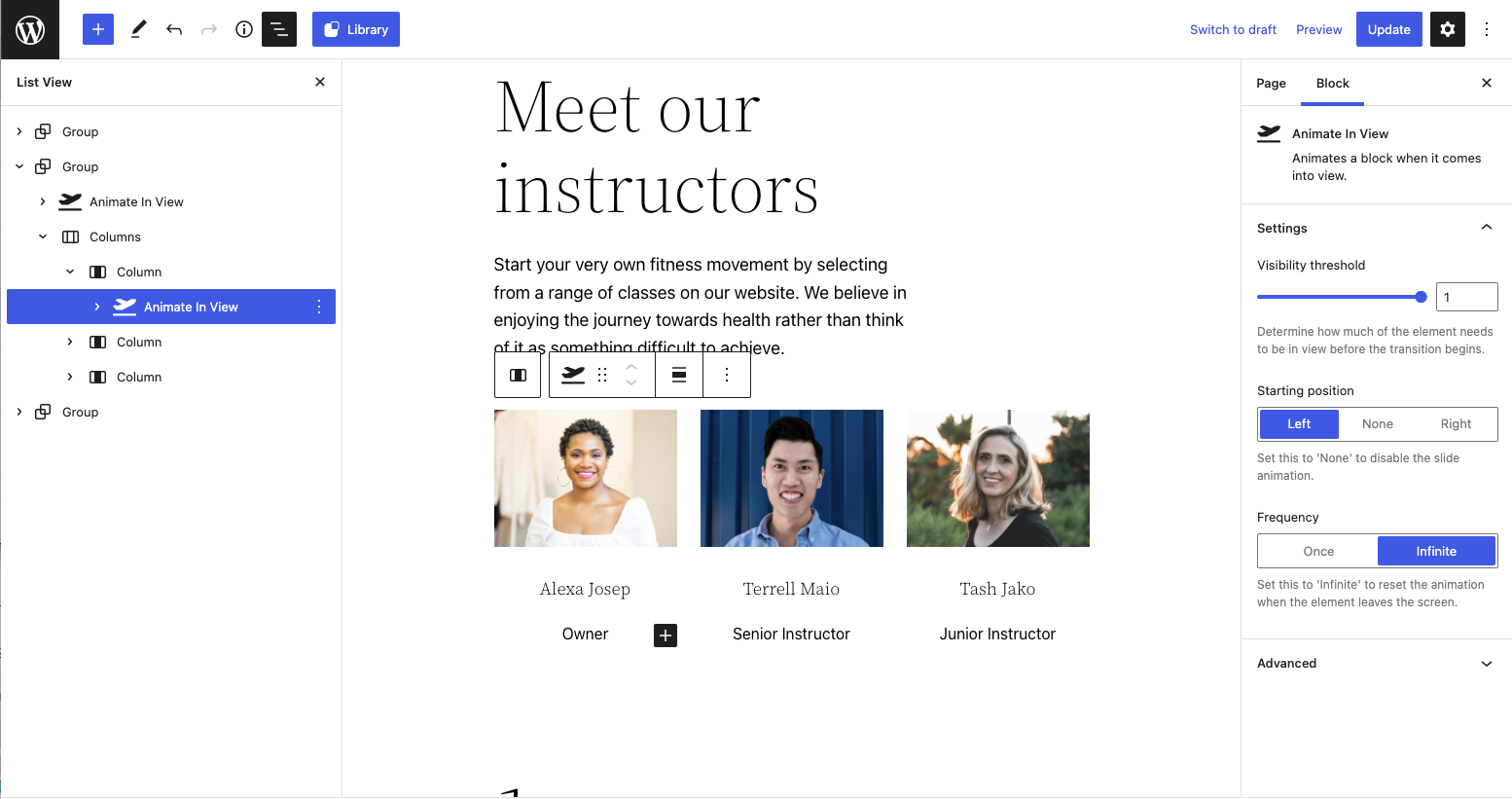
- Set a threshold for when the block starts to animate.
- Run only once, or each time it comes in/out of view.
- Wrap any existing block with the Animate In block with the push of a button.
- Transition in left, right, or neither (fade only).
- Fade only mode: Set the starting position to “none”
- Change the class name used to add your own custom animations.
General Tips & Tricks
- You can wrap the currently selected block with an Animate In View block by pressing the icon toward the end of the toolbar.
- You may need to place the block within a group block to ensure content styling is consistent. Some themes may require a group block be at the top level. Alternatively, the Animate In View block has alignment controls enabled just in case.
- You may need to tweak things if your layouts have custom classes or styles applied. Try copy/pasting the classes, or try to nest the blocks in a way that doesn’t affect the theme styling.
- Nest blocks to stagger animations. The animations won’t start until all are in view, then one by one. But make sure you don’t use an area too large for the viewport.
- The Animate In View block comes with a single nested group block by default, but you may use others as well.
- Use the list view to drag and drop blocks into the Animate In View block.
- Open an issue if you need an assist. I’m happy to take a look.
Installation
- Activate the plugin through the ‘Plugins’ screen in WordPress
Frequently asked questions
Can I wrap any block?
Some blocks that require a specific parent block aren’t supported. For example, buttons inside a button group, or images within an image gallery. For these you will need to remove them from their container and position them using the column or group blocks first.
Why a block and not just extend all blocks?
This keeps block functionality composable. This block is very lightweight and does the minimum it needs to keep track of the blocks on screen and just animate them in. I want to avoid adding bulk to the front end of the site, so this plugin will remain feature minimum.
What happens when I deactivate the plugin?
Because the block wraps other blocks, deactivating the plugin will confuse WordPress and the editor will ask you to either re-install or attempt to recover the block as html. If you must uninstall this plugin, I recommend you drag the inner blocks out of the Animate In View block before deactivating. Open an issue on GitHub if you want to discuss this further.
Changelog
1.2.4
- Update block to API version 3 for iframed editor compatibility
1.2.3
- Chore: Modernize tooling – swap ESLint/Prettier to Biome, add Playwright + WP Playground tests, update npm packages, update CI workflows
- Tested up to WordPress 7.1
1.2.2
- Chore: Update npm packages + test for WP 6.2
1.2.1
- Remove package-lock file to lower download size
1.2.0
- Add enable/disable button
- Return function instead of component from filter
1.1.0
- Switch to only showing once by default
Screenshots

For developers
Is this your plugin? Show off the numbers.
Add a live badge to your site, docs or GitHub README. It updates on its own — no account needed.
Best Animate In View alternatives
All animate plugins →





FAQ
Animate In View: quick answers
Straight answers, pulled from live WordPress.org data.
Live data from WordPress.org · checked Sep 28, 2026
Is Animate In View free?
Yes. Animate In View is free to download and use from the official WordPress.org plugin directory.
Is Animate In View safe to use in 2026?
Animate In View is a solid plugin choice in 2026, with a few things worth checking first. It runs on 1K+ sites, is rated 4.5/5 and was last updated 1 month ago, and scores 72/100 on our health check.
How many websites use Animate In View?
Animate In View is active on 1K+ WordPress websites and has been downloaded 15,998 times since it launched in April 2022. It was downloaded 407 times in the last 30 days.
Does Animate In View work with WordPress 7.1?
Yes. The developer has tested Animate In View up to WordPress 7.1.2, the latest release. It requires WordPress 5.9 or newer.
What PHP version does Animate In View need?
Animate In View requires PHP 7.0 or higher. Most hosts run PHP 8.x today, so it works on any modern WordPress hosting.
When was Animate In View last updated?
The latest version, 1.2.4, was released on August 17, 2026 (1 month ago).
Who makes Animate In View?
Animate In View is developed and maintained by Kevin Batdorf.
What are the best alternatives to Animate In View?
The most popular alternatives to Animate In View are Animations for Blocks (10K+ installs), Animate on Scroll (4K+ installs) and AnimateGL Animations for Wo… (3K+ installs).
Powered by PageForge
Want thousands of pages that rank like these? Build them in an afternoon.
This directory runs on the same engine as PageForge. Turn any spreadsheet, CSV or API into thousands of fast, SEO-ready WordPress pages — with schema, internal links and AI-written copy baked in.
- CSV, Google Sheets & API data sources
- AI content, schema & internal links per page
- Works with Elementor, Gutenberg, Yoast & Rank Math
- Free on WordPress.org — no credit card


