



Anbarak Inventory Management & Profit Reports for WooCommerce
Track WooCommerce inventory, operational expenses, sales progress, income, orders, profit reports, and XLSX exports from one admin dashboard.

Solid choice
Anbarak Inventory Management &… is a solid plugin choice in 2026, with a few things worth checking first. It runs on 50+ sites and was last updated 1 month ago, and scores 64/100 on our health check.
- Tested with the latest WordPress (7.1)
- Small user base (50+ active installs)
- Very few reviews so far
How does it stack up?
Side-by-side on installs, updates, ratings & support



Daily downloads
Download spikes usually follow a new release — each site that auto-updates counts as a download.
Rankings
Where Anbarak Inventory Managemen… stands todayWordPress.org search rankings
Live position in the plugin search, top 100| Keyword | Position |
|---|---|
| inventory | >100 |
| inventory manager | #46 |
| product catalog | >100 |
| stock management | >100 |
| woocommerce | >100 |
Version adoption
Share of active sites per release.
About Anbarak Inventory Management & Profit R…
From the official readme · v1.0.4Description
This is the first version of Anbarak, Please help up improve by submitting a review and support us by giving a ⭐⭐⭐⭐⭐
Anbarak Inventory & Profit Reports for WooCommerce adds an inventory and financial operations dashboard to WooCommerce. It helps store managers review stock, update quantities, track buy costs, record in-person sales, submit day-to-day operational expenses, and understand store progress without leaving WordPress admin.
The plugin is built for WooCommerce stores that need a practical back-office view of products, orders, income, costs, profit, expenses, and reports. It supports both RTL and LTR admin interfaces and includes Jalali date support for Persian-language stores.
Who this plugin is for
Anbarak is useful for WooCommerce stores that need more operational visibility than the default product and order screens provide. It is especially helpful when you need to check inventory often, keep product cost data close to orders, record shop-floor sales, follow sales progression, submit operational expenses, or export store data for review.
Common use cases
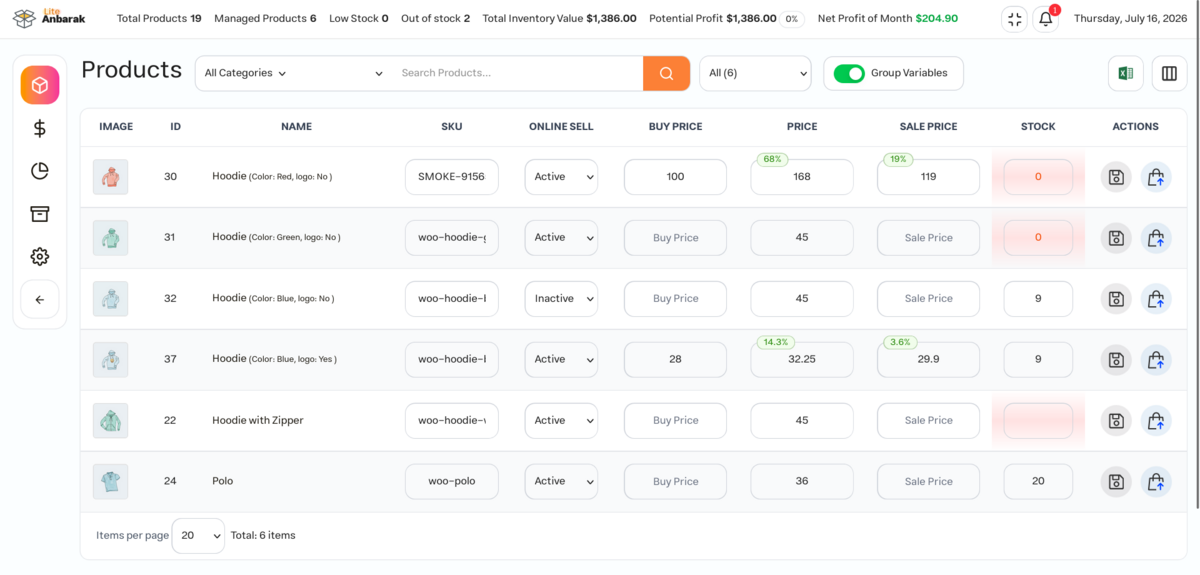
- Review WooCommerce products, variations, SKUs, stock quantities, sale prices, and buy costs in one inventory table
- Update stock quantities while keeping WooCommerce inventory data in sync
- Track product buy costs so profit reports can compare sales against costs
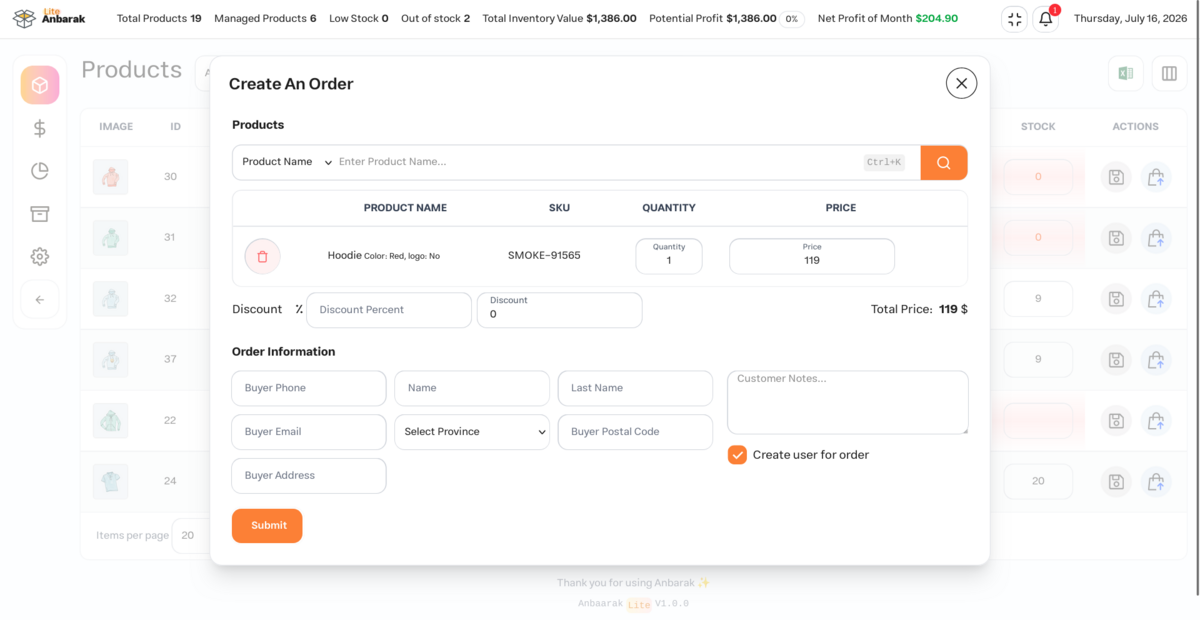
- Record in-person sales for stores that sell both online and offline
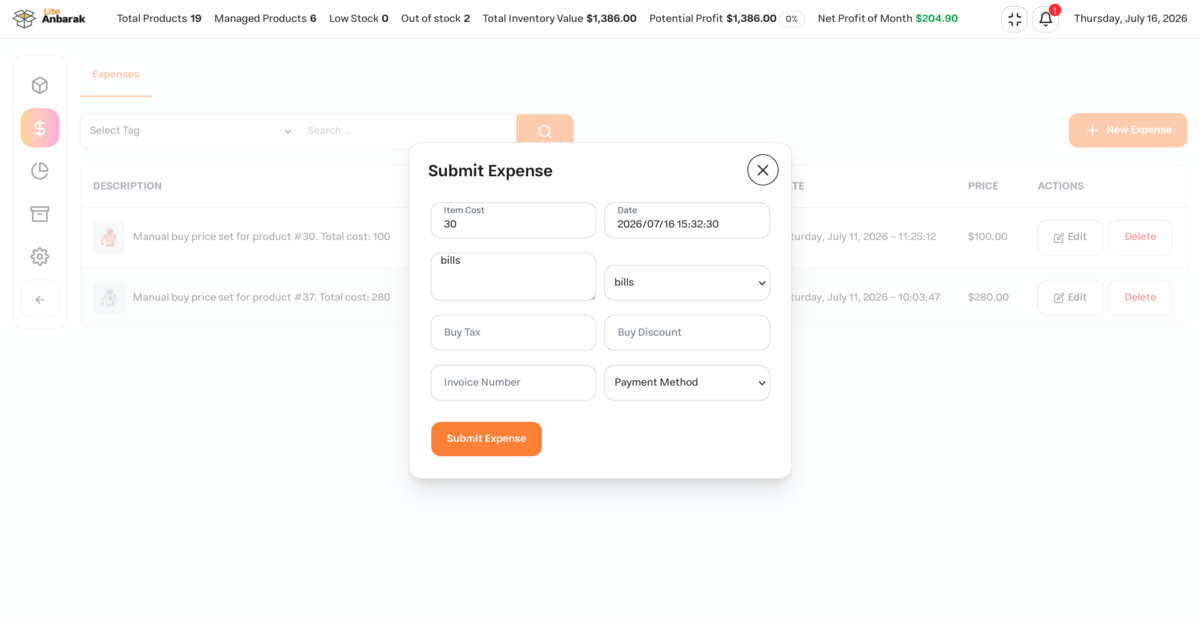
- Submit day-to-day expenses such as packaging, operations, shipping-related costs, or other store costs
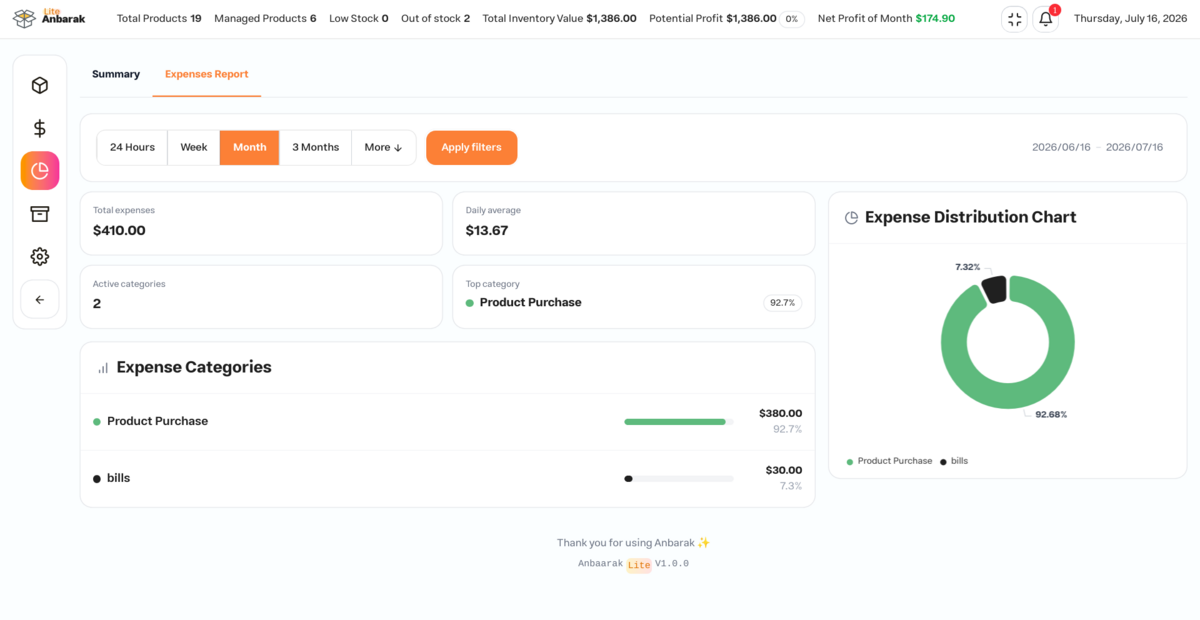
- Review expense distribution by category to understand where store costs are going
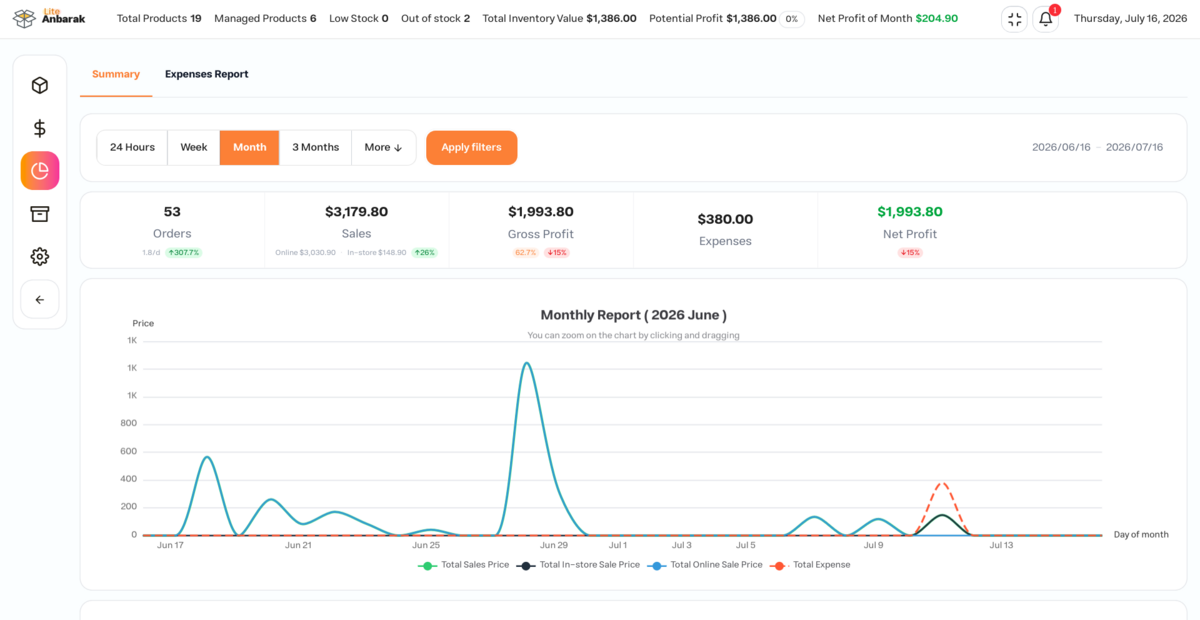
- Compare sales, income, orders, expenses, gross profit, and net profit from inside WordPress admin
- Track sales progression over time with useful operational reports
- Use simple reports for basic accounting review and day-to-day store decisions
- Export inventory, order, expense, and report data to XLSX files for basic accounting or operational review
- Review inventory, sales, expenses, and reports from a single WooCommerce admin area
Main features
- Inventory table for WooCommerce products and variations
- Stock quantity management with WooCommerce stock sync
- Buy price and sale price visibility
- Customizable product columns
- Low-stock and out-of-stock visibility
- Demand-based low-stock and out-of-stock notifications
- Order profit calculation based on product costs
- In-person sales recording alongside online WooCommerce orders
- Expense tracking with categories and tags
- Sales, expense, and profit reports
- XLSX exports for operational and accounting review
- Full RTL/LTR admin support And Jalali Date.
- Dark mode support.
- WooCommerce High-Performance Order Storage (HPOS) compatibility
Inventory management
Use Anbarak to review products, stock levels, SKUs, prices, and costs in one place. The inventory screen is designed for day-to-day product operations and helps store teams keep WooCommerce stock data up to date.
Demand notifications highlight high-demand products with low or no stock.
Orders and sales
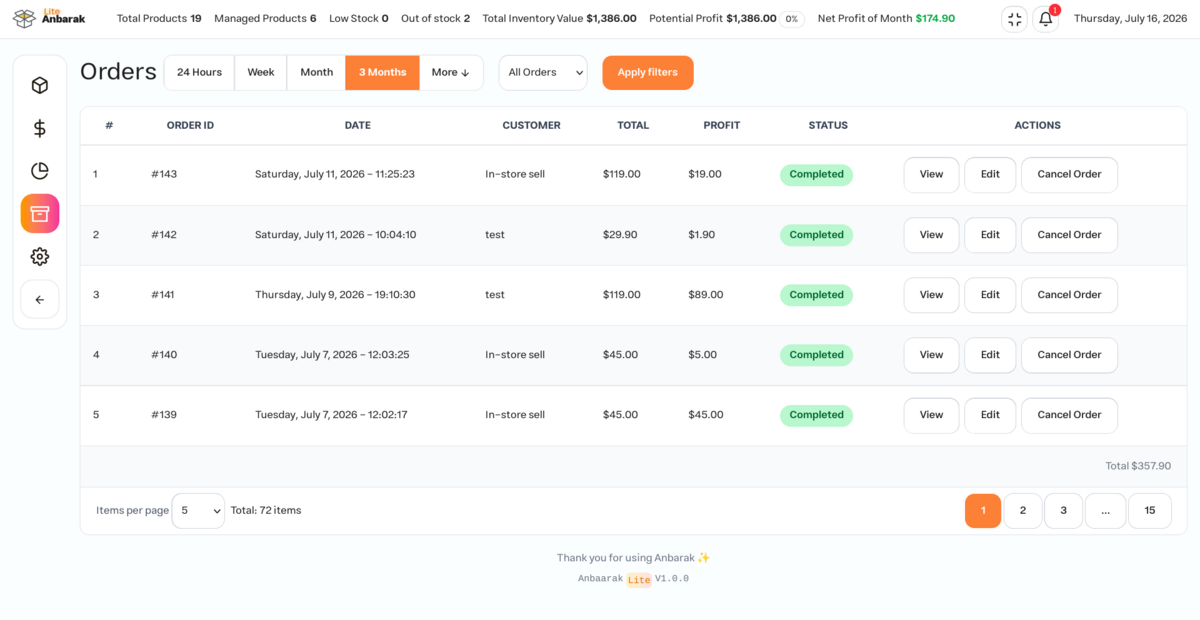
Anbarak can show profit information for orders by comparing sell prices with stored buy costs. It also includes an in-person sales workflow for shops that sell through both WooCommerce and offline channels.
Expenses and reports
Record day-to-day business expenses, group them with tags, and review expense distribution by category. Reports help you compare sales, income, order activity, costs, gross profit, net profit, and store performance over time, making Anbarak useful for basic accounting review and tracking sales progression inside WordPress.
Admin workflow
Anbarak keeps inventory, sales, expenses, and reports inside the WordPress admin area so store owners can review daily operations without switching between separate spreadsheets or tools.
RTL, LTR, and Jalali dates
Anbarak supports right-to-left and left-to-right admin layouts. Persian stores can use Jalali dates throughout the plugin’s admin workflows.
👑 PRO Version Features
- Multi-warehouse stock management with default warehouse support and designated warehouse operators
- Multi-location product support
- Branch management and branch salesperson definition
- Accurate stock management using FIFO
- Comprehensive accounting features including bank accounts, loans, payment schedules, installments, and more
- Advanced manual order creation dialog
- Advanced reporting with summary KPIs, cash flow, expense tracking, sales channel analysis, and more
- Product serial number and barcode support
- Product expiry tracking
- Customer and party management with custom party types and roles
- Best-selling product reports
- Top customer ranking reports
- Export to Excel
- Customizable order receipt print settings and barcode scanning
- Role-based access control with separate login dashboards for inventory, orders, warehouses, parties, finance, reports, and settings
- And many more…
Installation
From WordPress admin
- Make sure WooCommerce is installed and activated.
- Go to
Plugins > Add Newin your WordPress dashboard. - Search for
Anbarak Inventory & Profit Reports for WooCommerce. - Install the plugin when it appears.
- Activate the plugin from the Plugins screen.
- Go to “After activation” below.
Manually
- Download the plugin ZIP file.
- Go to
Plugins > Add New > Upload Plugin. - Upload the ZIP file and click
Install Now. - Activate the plugin from the Plugins screen.
- Go to “After activation” below.
Manual FTP upload
- Make sure WooCommerce is installed and activated.
- Upload the
anbarakfolder to/wp-content/plugins/. - Activate the plugin through the
Pluginsmenu in WordPress. - Go to “After activation” below.
After activation
- Open the Anbarak menu in WordPress admin.
- Review the inventory table and make sure your WooCommerce products are visible.
- Add or review product buy costs if you want profit reports to be accurate.
- Review the settings before using the plugin for daily store operations.
- Use the reports and export screens as needed for operational review.
Frequently asked questions
Does the plugin require WooCommerce?
Yes. Anbarak is a WooCommerce extension and requires WooCommerce to be installed and active.
Is Anbarak compatible with WooCommerce HPOS?
Yes. Anbarak declares compatibility with WooCommerce High-Performance Order Storage and uses HPOS-compatible order metadata helpers.
Can I manage variable products?
Yes. The inventory workflow supports WooCommerce products and variations.
Can I record in-person sales?
Yes. Anbarak includes an in-person sales workflow so you can record offline sales beside your online WooCommerce orders.
How does profit calculation work?
Anbarak compares order sales values with product buy costs stored in the plugin. Profit reports depend on accurate product cost data.
Can I export data?
Yes. Anbarak includes XLSX exports for reviewing inventory, orders, expenses, and reports outside WordPress.
Does Anbarak support Persian stores?
Yes. The plugin supports RTL layouts and Jalali/Persian dates.
Does Anbarak send store data to an external service?
No. Anbarak is designed to run inside your WordPress admin and does not send inventory, order, or expense data to an external service.
Is there a Pro version?
Yes. Anbarak Pro is full feature plugin for managing your store (ERP). Pro version includes additional features such as multi-warehouse and multi-location, advanced reports, barcode workflows, and accounting tools and more.
Changelog
Initial release.
1.0.0
- Initial release.
- Added WooCommerce inventory and stock management.
- Added product cost and order profit tools.
- Added in-person sales recording.
- Added expense tracking with tags.
- Added sales, expense, and profit reports.
- Added XLSX exports.
- Added plugin settings.
- Added RTL/LTR support and Jalali dates.
- Added WooCommerce HPOS compatibility.
- Added low-stock notifications
Screenshots
For developers
Is this your plugin? Show off the numbers.
Add a live badge to your site, docs or GitHub README. It updates on its own — no account needed.
Best Anbarak Inventory Management… alternatives
All inventory plugins →





FAQ
Anbarak Inventory Management & Prof…: quick answers
Straight answers, pulled from live WordPress.org data.
Live data from WordPress.org · checked Oct 10, 2026
Is Anbarak Inventory Management &… free?
Yes. Anbarak Inventory Management &… is free to download and use from the official WordPress.org plugin directory.
Is Anbarak Inventory Management &… safe to use in 2026?
Anbarak Inventory Management &… is a solid plugin choice in 2026, with a few things worth checking first. It runs on 50+ sites and was last updated 1 month ago, and scores 64/100 on our health check.
How many websites use Anbarak Inventory Management &…?
Anbarak Inventory Management &… is active on 50+ WordPress websites and has been downloaded 558 times since it launched in July 2026. It was downloaded 183 times in the last 30 days.
Does Anbarak Inventory Management &… work with WordPress 7.1?
Yes. The developer has tested Anbarak Inventory Management &… up to WordPress 7.1.3, the latest release. It requires WordPress 6.0 or newer.
What PHP version does Anbarak Inventory Management &… need?
Anbarak Inventory Management &… requires PHP 7.4 or higher. Most hosts run PHP 8.x today, so it works on any modern WordPress hosting.
When was Anbarak Inventory Management &… last updated?
The latest version, 1.0.4, was released on August 26, 2026 (1 month ago).
Who makes Anbarak Inventory Management &…?
Anbarak Inventory Management &… is developed and maintained by Reza Ramezanpour.
What are the best alternatives to Anbarak Inventory Management &…?
The most popular alternatives to Anbarak Inventory Management &… are Smart Manager (10K+ installs), WCPOS (5K+ installs) and PayPal POS for WooCommerce (4K+ installs).
Powered by PageForge
Want thousands of pages that rank like these? Build them in an afternoon.
This directory runs on the same engine as PageForge. Turn any spreadsheet, CSV or API into thousands of fast, SEO-ready WordPress pages — with schema, internal links and AI-written copy baked in.
- CSV, Google Sheets & API data sources
- AI content, schema & internal links per page
- Works with Elementor, Gutenberg, Yoast & Rank Math
- Free on WordPress.org — no credit card


