


Amazon Search
This plugin allows you to link directly to items in your posts using a special tag of the form:

Consider an alternative
Amazon Search shows warning signs in 2026 — compare the alternatives below before installing. It runs on 10+ sites, is rated 5/5 and was last updated 18 years ago, and scores 30/100 on our health check.
- Small user base (10+ active installs)
- Very few reviews so far
- No update in 17 years
- Only tested up to WordPress 2.7 (latest is 7.1)
How does it stack up?
Side-by-side on installs, updates, ratings & support



Daily downloads
Download spikes usually follow a new release — each site that auto-updates counts as a download.
Rankings
Where Amazon Search stands todayWordPress.org search rankings
Live position in the plugin search, top 100| Keyword | Position |
|---|---|
| amazon | >100 |
| Amazon Associate | >100 |
| Amazon Links | >100 |
| Amazon shortcode | >100 |
| books | >100 |
Version adoption
Share of active sites per release.
Rating breakdown
★★★★★★★★★★ 5 from 1 reviews
About Amazon Search
From the official readme · v1.2.0Description
This plugin allows you to link directly to items in your
posts using a special tag of the form:
[amazon ASIN=0123456789]Fancy Title[/amazon]
The plugin lets you set associate IDs for each international amazon server and set one server
as the default for your site.
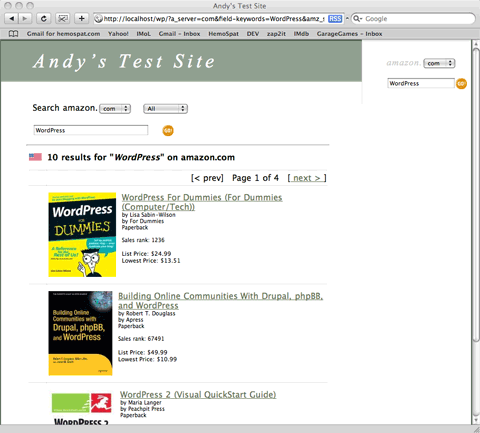
It also includes an Amazon Search widget which will search any of the amazon servers
and produce search results with direct links to products.
It also provides an XSLT file for the amazon server to access, which processes it together with the XML results of
the search, and then returns HTML. This saves your server from having to process the XML itself.
It uses css to format the search widget and the search results. It will look in its css dir for theme-specific css files
too, so if you have one in there called your-theme-name.css, it will include it after default.css. This way you may
customize search results for a given theme by dropping in a new css file. So if you allow your users to switch themes, you can include
a css file for each one and the search will look correct when it is switched.
Version History
-
v1.2.0 [23 March 2009]
- [fix] fixes for potential installation problems on WordPress 2.7
- [new] add buttons to the TinyMCE and QuickTag editors to make the Amazon markup easier [code from Stephanie Leary – thanks Stephanie!]
- [new] new editor buttons are optional [They are on by default but may be turned off in the preferences.]
- [new] made the search part of the plugin optional [If you just want to use the text links, search may be completely disabled in the preferences.]
- [other] code reorganization and cleanup
-
v1.1.3 [20 July 2008]
- [fix] fix dumbness introduced in 1.1.2
-
v1.1.2 [20 July 2008]
- [new] code refactoring of the ipNation stuff for some future work
- [new] check if the ip2Nation database is installed when displaying options on the admin page
-
v1.1.1 [23 May 2008]
- [fix] fix for PHP 4.x
- [fix] better integration with Silver Light theme
-
v1.1.0 [26 Apr 2008]
- [new] added ability to specify a text link in posts by using a special tag: [amazon asin=0123456789]link text[/amazon]
- [new] new text links will use ip2Nation database to do simple geo-location
-
v1.0.2 [02 Apr 2008]
- [fix] fix default XSL path
-
v1.0.1 [22 Mar 2008]
- [new] add CSS for Silver Light theme
- [fix] fix incorrect paths due to last-minute name change
-
v1.0.0 [08 Jan 2008]
- initial version
Configuring The Plugin
In the Admin section, under Settings -> Amazon Search you may configure the following:
Associate IDs
In this section, fill in any associate IDs you have. You may also select one of the servers to be the
default for your users. If you live in France, you might choose the amazon.fr server, for example.
Any IDs left blank will be filled in with mine.
Development Contribution
Ah, here’s the hook! I’ve set it up so that every ‘N’ searches [or page displays if you are using the text links],
the links which are produced use my
associate IDs. You can choose a value for ‘N’ here. No need to go hacking if you don’t want to support
development – just set it to 0 and it won’t ever substitute my associate IDs.
Text Links
If Use Text Links is on, the plugin will process your posts looking for a special markup and convert them to links.
To add a text link to an Amazon product, simply use the following format:
[amazon ASIN=0743279794]Fancy Title[/amazon]
ISBN may be used in place of ASIN – they are effectively the same thing. It is a case-insensitive match, so ‘asin’ is the same as ‘ASIN’.
This tag will be converted to a link of the form:
<a href=”http://www.amazon.com/dp/0743279794/?tag=yourTag-20″>Fancy Title</a>
If you have Use ip2Nation checked and the ip2Nation database is installed, it may be used to locate the best Amazon site for the visitor. Any country not handled specially will
use your default Amazon server. If you have the Development Contribution set in your prefs, a page load will count as a ‘search’.
NOTE: The handling of which Amazon site is best per country is incomplete at best. I would appreciate any feedback or additions/corrections
to the list [which is found in the getAmazonServerFromIP() function in amz-search.php].
Add Editor Buttons allows you to turn off the additional buttons in the editors which provide a quick way to enter an amazon link.
Searching
Use Searching allows you to turn off the search capability completely in case you just want to use the text links.
Default Category is the one that will be used when the user searches from the widget. When they
get the results, they will be able to change the category on the search page.
Default Search Term is what is used if the user doesn’t enter a search term. Right now it defaults
to ‘WordPress’. You will probably want to change it to something appropriate to your site.
You may specify an XSLT file that will be sent to the amazon servers for processing. This file must be publicly
accessible because the amazon servers will be reading it to provide formatting.
If you don’t know what this means, you better leave it alone. The XSLT file may be edited if you want to
customise the results produced by the search. I am certainly not an XSLT expert, so if you have any suggestions,
please contact me.
You may also set the size of the images that are to be returned in the search or ‘None’ to turn them off.
Watch out if you set this to ‘Large’!
Installation
- Upload the whole amazon-search directory to your /wp-content/plugins/ directory [it must be called amazon-search]
- Activate the plugin through the ‘Plugins’ menu in WordPress
- Configure it using the Settings -> Amazon Search page in WordPress
- Go to the Appearance -> Widgets page and drag the Amazon Search widget into a sidebar.
Screenshots


For developers
Is this your plugin? Show off the numbers.
Add a live badge to your site, docs or GitHub README. It updates on its own — no account needed.


Best Amazon Search alternatives
All amazon plugins →





FAQ
Amazon Search: quick answers
Straight answers, pulled from live WordPress.org data.
Live data from WordPress.org · checked Nov 16, 2026
Is Amazon Search free?
Yes. Amazon Search is free to download and use from the official WordPress.org plugin directory.
Is Amazon Search safe to use in 2026?
Amazon Search shows warning signs in 2026 — compare the alternatives below before installing. It runs on 10+ sites, is rated 5/5 and was last updated 18 years ago, and scores 30/100 on our health check.
How many websites use Amazon Search?
Amazon Search is active on 10+ WordPress websites and has been downloaded 8,204 times since it launched in March 2008. It was downloaded 43 times in the last 30 days.
Does Amazon Search work with WordPress 7.1?
Amazon Search is officially tested up to WordPress 2.7.1, while the latest release is 7.1.4. It may still work, but try it on a staging site first.
When was Amazon Search last updated?
The latest version, 1.2.0, was released on March 26, 2009 (18 years ago).
Who makes Amazon Search?
Amazon Search is developed and maintained by asmaloney.
What are the best alternatives to Amazon Search?
The most popular alternatives to Amazon Search are WP Offload Media Lite for A… (30K+ installs), Amazon Pay for WooCommerce (10K+ installs) and Media Cloud for Bunny CDN,… (7K+ installs).
Powered by PageForge
Want thousands of pages that rank like these? Build them in an afternoon.
This directory runs on the same engine as PageForge. Turn any spreadsheet, CSV or API into thousands of fast, SEO-ready WordPress pages — with schema, internal links and AI-written copy baked in.
- CSV, Google Sheets & API data sources
- AI content, schema & internal links per page
- Works with Elementor, Gutenberg, Yoast & Rank Math
- Free on WordPress.org — no credit card


