


Shop Page WP
Create an affiliate shop page on your website. Simple to setup and add products to start making money from affiliate links on your blog.

Solid choice
Shop Page WP is a solid plugin choice in 2026, with a few things worth checking first. It runs on 2K+ sites, is rated 5/5 and was last updated 2 months ago, and scores 79/100 on our health check.
- Loved by users — 5/5 from 22 reviews
How does it stack up?
Side-by-side on installs, updates, ratings & support


Daily downloads
Download spikes usually follow a new release — each site that auto-updates counts as a download.
Rankings
Where Shop Page WP stands todayWordPress.org search rankings
Live position in the plugin search, top 100| Keyword | Position |
|---|---|
| affiliate | #74 |
| amazon | #45 |
| Amazon affiliates | #14 |
| shop | #4 |
| store | >100 |
Version adoption
Share of active sites per release.
Rating breakdown
★★★★★★★★★★ 5 from 22 reviews
About Shop Page WP
From the official readme · v1.3.3Description
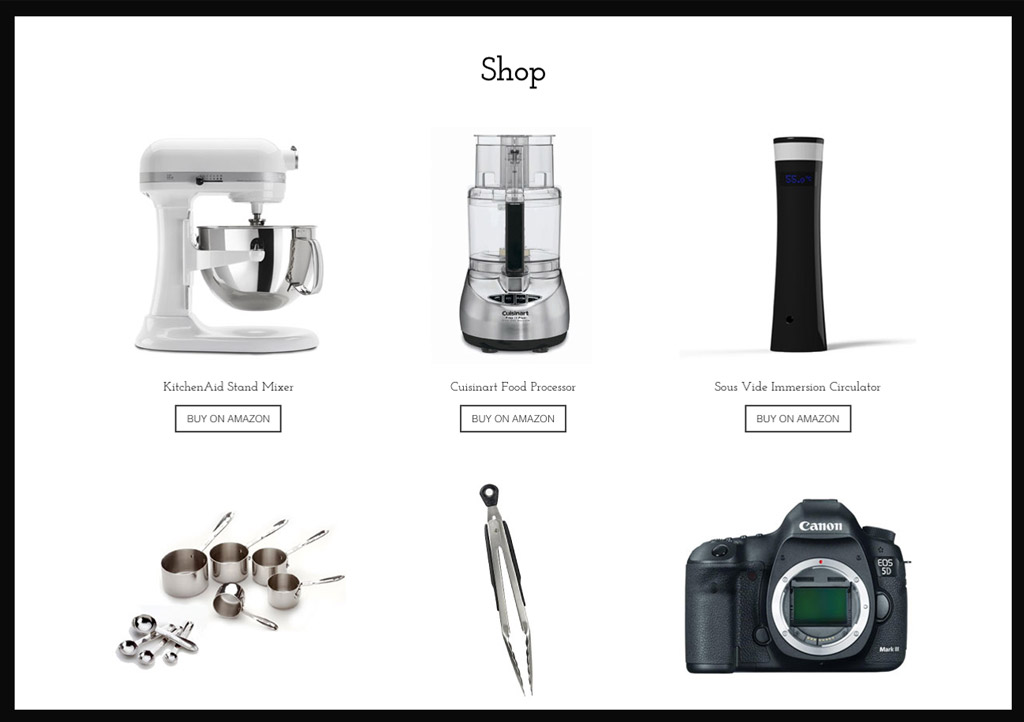
Shop Page WP is the affiliate shop page plugin for your WordPress website that everyone can easily setup and use. It’s super easy to create a shop page and start adding products immediately. No technical or special skills required. Output a beautiful grid of products and place it on a shop page, or insert specific products to a blog post.
Have you ever wanted to add a shop page to your website but didn’t want to build it manually or use a plugin that is overkill for what you are trying to do? Shop Page WP is the simple solution for creating an affiliate shop page on your blog.
Features
- Create a simple shop page on your website with a grid of products.
- Simple fields: Just add the product title, optional description, affiliate link, upload a product image as the featured image and specify a category.
- The plugin will automatically resize and or crop your product images to a specified size.
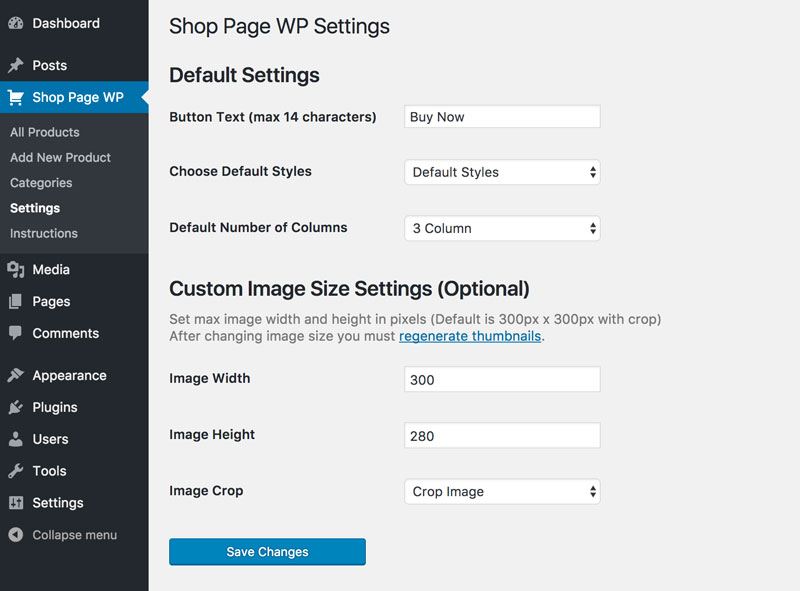
- Choose between a 1, 2, 3 or 4 column product grid.
- Customize the ‘Buy Now’ button text for individual products.
- Categorize Products.
- Add affiliate products to your page, post or sidebar by category or product ID.
- Add affiliate products to your page or sidebar by category
- Use any affiliate link (Amazon, ShareASale, RewardStyle, Ebay, CJ, etc.).
- Product links open in a new tab and are set as rel=nofollow.
- Customize the product image size in the plugin settings.
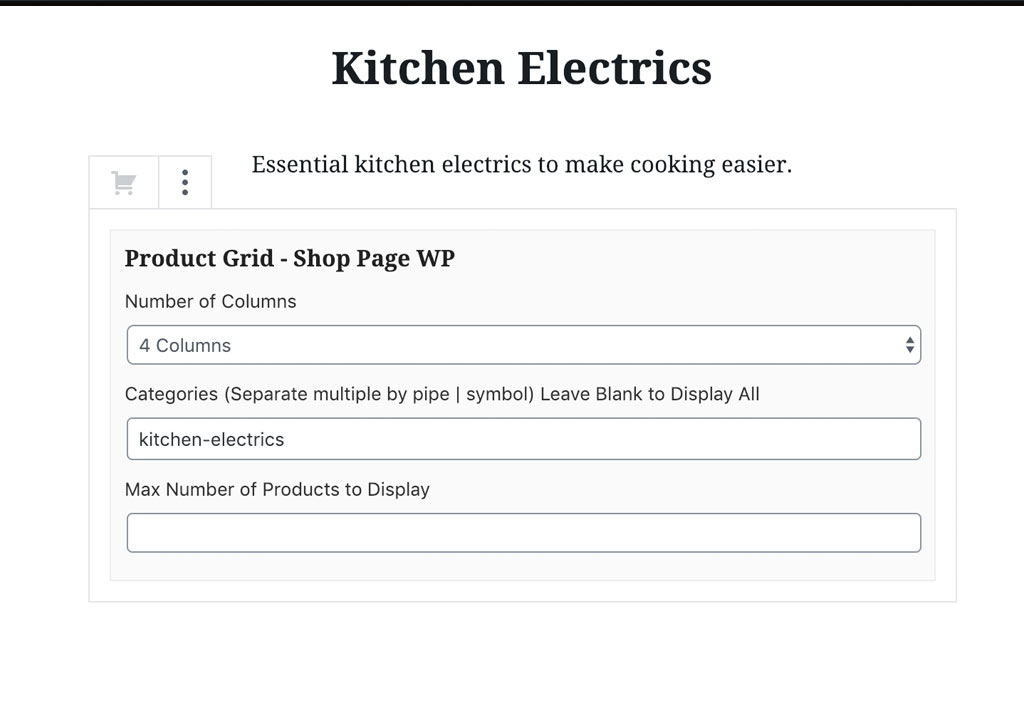
- Gutenberg block for adding a product grid to pages and posts with the ability to specify categories, columns, and maximum number of products to display or even specific products.
- Simple shortcodes available for adding the affiliate product shop to any page or post on your website.
- Custom shortcodes for adding specific categories or products to a shop page section.
- Option to remove CSS styling if you wish to style it yourself.
- Responsive and mobile friendly.
Insert Products with Gutenberg
From the Gutenberg editor; click Add Block then either search for Shop Page WP or scroll to the Widgets category and click “Shop Page WP.”
Insert Products by Shortcode
Default Shortcode
[shop-page-wp]
Specify Product Category
[shop-page-wp category='food']
Specify Multiple Categories (separated by comma)
[shop-page-wp category='food,electronics']
Specify Product ID (will override categories)
[shop-page-wp id='17']
Specify Multiple IDs (separated by comma)
[shop-page-wp id='17,18']
Specify Grid Size (will override default settings)
[shop-page-wp grid='3']
Changing Image Sizes
This plugin sets a custom image size of 300 x 300 pixels. After installing this plugin (or after changing the image size in settings) you must regenerate thumbnails to create appropriately sized thumbnails for each of your product images. This will not be necessary for new images you upload while the plugin is installed and active.
*** if you are using already uploaded images, you will need to regenerate thumbnails
This plugin is in active development. Feel free to contact us with any feature requests or ideas.
Installation
Automatic installation
Automatic installation is the quickest and least technical way to get Shop Page WP installed.
Go to your WordPress admin area and select Plugins -> Add new from the menu.
Search for “Shop Page WP”.
Click “Install Now”.
Click “Activate”.
Manual installation
Manually installing the Shop Page WP plugin requires that you download the zip file from the WordPress
Unzip the plugin archive on your computer.
Upload shop-page-wp directory to the /wp-content/plugins/ directory via FTP.
Activate the plugin through the ‘Plugins’ menu in WordPress
Go to Shop Page WP in your WordPress dashboard to begin adding products.
Frequently asked questions
Where can I find setup instructions and documentation?
You can view all the documentation on the plugin’s website, at shoppagewp.com/documentation.
What kind of affiliate links can I use?
You can use any link you wish, it doesn’t even have to be an affiliate link.
Where can I get support?
You can submit questions on the plugin’s support page on WordPress.org, or you can read more documentation on shoppagewp.com.
Will Shop Page WP slow my site down?
Shop Page WP is lightweight will not slow your site down like WooCommerce or other heavy plugins.
How do I add product images?
Product images are added as the “featured image” within the product post. How you source your images is up to you.
Are product links No Follow?
Yes. All product links are set to rel=nofollow.
Where can I find the product ID for inserting specific products?
From the WordPress Admin, navigate to Shop Page WP > All products. The product post ID is displayed as a column and can be copied and pasted into the shortcode or Gutenberg block.
Changelog
Update to fix bug with undefined index for settings dropdown
1.3.3
- Update to fix bug with undefined index for settings dropdown
1.3.2
- Update to check compatibility with WordPress 6.7.2
1.3.1
- Update to check compatibility with WordPress 6.4.1
1.3.0
- Fixed no follow missing in some links.
1.2.9
- Widget bug fix.
1.2.8
- Fixed security issue and misc bug fixes.
Screenshots

For developers
Is this your plugin? Show off the numbers.
Add a live badge to your site, docs or GitHub README. It updates on its own — no account needed.
Best Shop Page WP alternatives
All affiliate plugins →





FAQ
Shop Page WP: quick answers
Straight answers, pulled from live WordPress.org data.
Live data from WordPress.org · checked Sep 26, 2026
Is Shop Page WP free?
Yes. Shop Page WP is free to download and use from the official WordPress.org plugin directory.
Is Shop Page WP safe to use in 2026?
Shop Page WP is a solid plugin choice in 2026, with a few things worth checking first. It runs on 2K+ sites, is rated 5/5 and was last updated 2 months ago, and scores 79/100 on our health check.
How many websites use Shop Page WP?
Shop Page WP is active on 2K+ WordPress websites and has been downloaded 124,546 times since it launched in March 2017. It was downloaded 669 times in the last 30 days.
Does Shop Page WP work with WordPress 7.1?
Shop Page WP is officially tested up to WordPress 7.0.6, while the latest release is 7.1.2. It may still work, but try it on a staging site first.
When was Shop Page WP last updated?
The latest version, 1.3.3, was released on August 4, 2026 (2 months ago).
Who makes Shop Page WP?
Shop Page WP is developed and maintained by leonmagee.
What are the best alternatives to Shop Page WP?
The most popular alternatives to Shop Page WP are Advanced Ads (100K+ installs), Pochipp (30K+ installs) and Meks Easy Ads Widget (10K+ installs).
Powered by PageForge
Want thousands of pages that rank like these? Build them in an afternoon.
This directory runs on the same engine as PageForge. Turn any spreadsheet, CSV or API into thousands of fast, SEO-ready WordPress pages — with schema, internal links and AI-written copy baked in.
- CSV, Google Sheets & API data sources
- AI content, schema & internal links per page
- Works with Elementor, Gutenberg, Yoast & Rank Math
- Free on WordPress.org — no credit card


