


AltoScribe – AI Product Descriptions for WooCommerce
Write accurate WooCommerce product descriptions with AI. No API key, we host the AI. Review before saving; existing copy is never overwritten.

Solid choice
AltoScribe is a solid plugin choice in 2026, with a few things worth checking first. Was last updated 2 days ago, and scores 64/100 on our health check.
- Actively developed — last update 2 days ago
- Tested with the latest WordPress (7.1)
- Small user base (<10 active installs)
- Very few reviews so far
How does it stack up?
Side-by-side on installs, updates, ratings & support



Daily downloads
Download spikes usually follow a new release — each site that auto-updates counts as a download.
Rankings
Where AltoScribe stands todayWordPress.org search rankings
Live position in the plugin search, top 100| Keyword | Position |
|---|---|
| AI | >100 |
| ecommerce | >100 |
| product descriptions | >100 |
| seo | >100 |
| woocommerce | >100 |
About AltoScribe
From the official readme · v1.0.15Description
No API key. No account. No setup. Unlike almost every other AI product-description plugin, which makes you sign up for OpenAI or Anthropic and paste in your own paid API key, AltoScribe runs the AI on our hosted service, so there is nothing to configure. You generate each description with one click from the product screen, with 10 free every month. Paid plans add higher monthly allowances for larger catalogues, plus one-off credit top-ups for big imports.
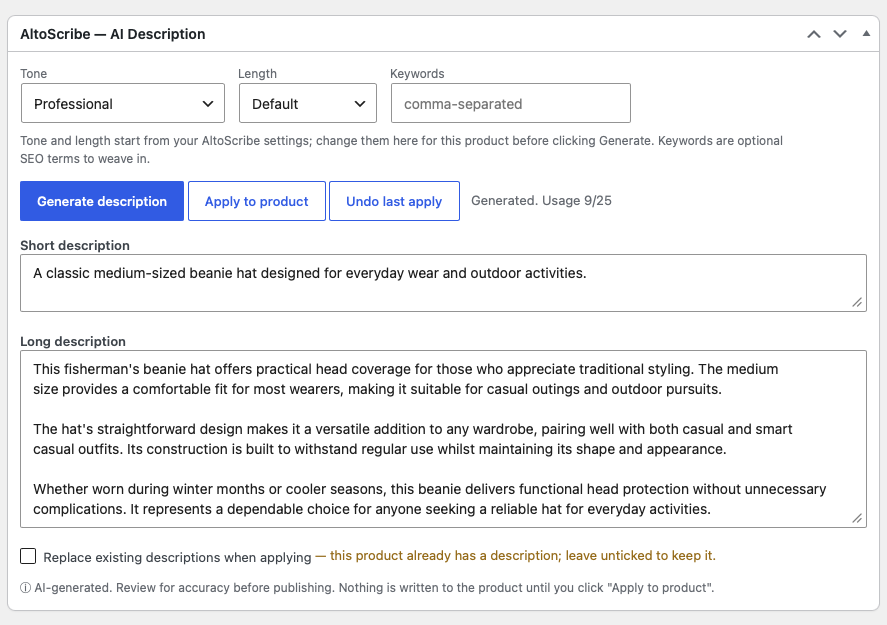
AltoScribe reads a product’s own name, attributes and categories and writes a short description plus a long description for it. You review and edit before anything is saved, and AltoScribe never overwrites an existing description unless you tick “Replace” so it is safe to run across a live store.
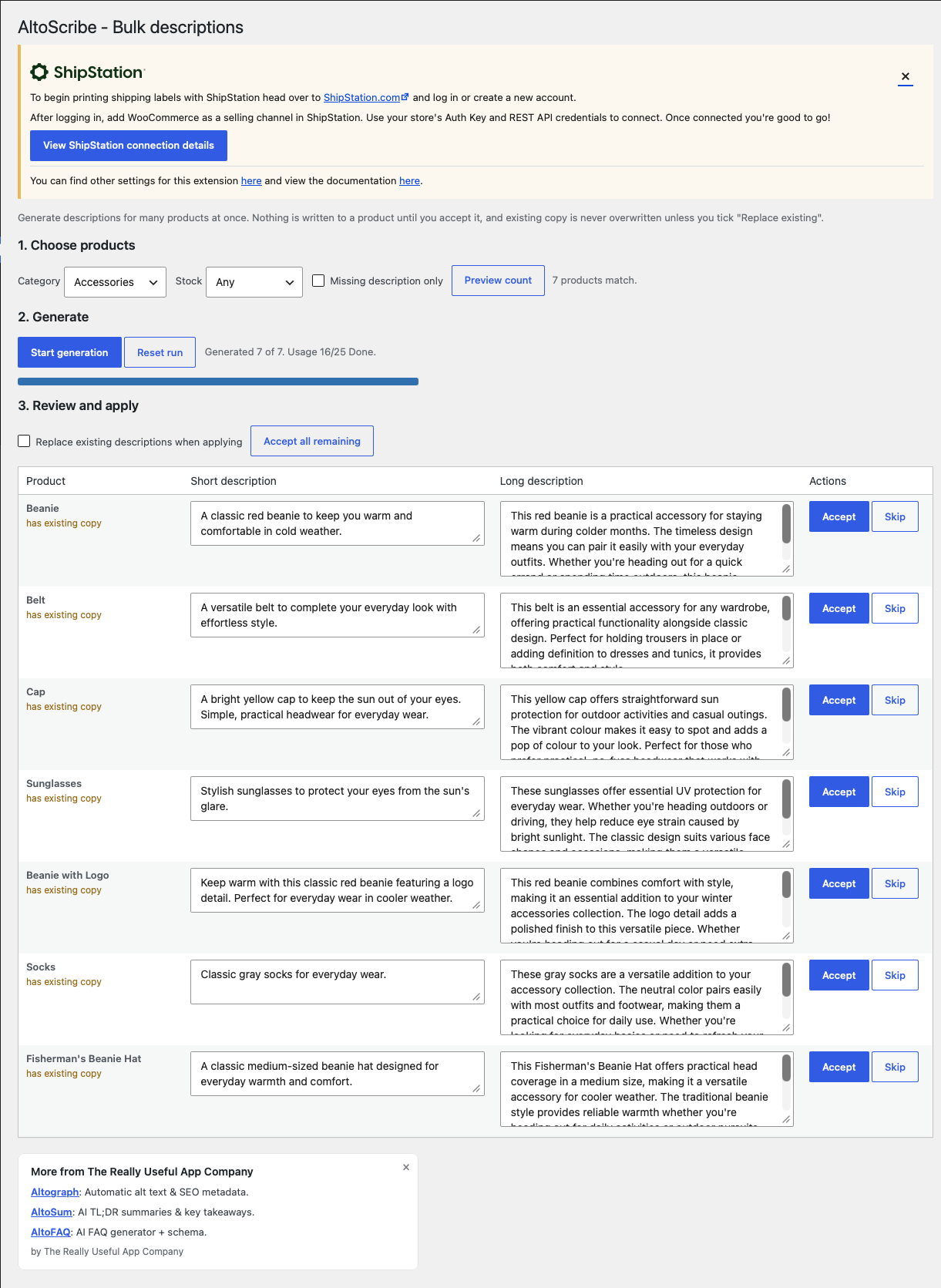
Do one product from the product editor, or generate for many products at once from the bulk screen: filter by category, stock status, or “missing description only”, generate to a staging area, then accept, skip or edit each result. A big run can be paused and resumed.
- No API key or third-party account. The AI runs on our service.
- One click to generate a short and long description from the product editor.
- Bulk generation with a filtered, resumable queue and a review grid.
- Review, edit and accept before anything is written to the product.
- Never overwrites existing copy unless you ask, and one-click undo of the last apply.
- Tone and length presets, plus optional keywords to weave in.
- Privacy-friendly: to generate a description we send the product’s name, attributes and categories, with a hashed site ID and the plugin version that do not identify you. The External services section below lists everything that is sent.
- 10 free descriptions every month; paid plans add higher monthly allowances, plus credit top-ups for big imports.
AI-generated content can be inaccurate. AltoScribe writes from the product’s own name, attributes and categories, and shows you every description to review before it is saved. Always check descriptions for accuracy before publishing.
External services
This plugin connects to the Really Useful App Company API to generate product descriptions. It is required for the plugin’s core feature.
- What is sent and when: the plugin sends the product name, its attributes and categories to the API on each of these actions, and nothing else triggers a send:
- when you click “Generate description” on a product
- when you run a bulk generation from the Products screen
- Also sent: a non-identifying site ID (a hash of your site URL) for usage counting, and the plugin version, so we can tell which release a report relates to. Neither identifies you. Whether this site’s review prompt was shown, snoozed, dismissed or clicked is also sent, so we can tell whether that prompt is working. It records the site, not the individual user, and says nothing about what you did on WordPress.org afterwards.
- Where it goes: the API (default
https://api.thereallyusefulappcompany.com), which uses Anthropic as an AI subprocessor to generate the text. - Terms / privacy: https://www.thereallyusefulappcompany.com/altoscribe/terms , https://www.thereallyusefulappcompany.com/altoscribe/privacy , https://www.anthropic.com/legal/privacy
No data is sent until you click generate or run a bulk generation.
Installation
- Install and activate AltoScribe. WooCommerce must be installed and active.
- Go to Settings → AltoScribe, review the external-service notice, and set your default tone, length and keywords.
- Edit a product and click Generate description in the AltoScribe box, review it, then click Apply to product.
- For many products at once, go to Products → AltoScribe Bulk.
- (Optional) Enter a paid-plan licence key to raise your monthly allowance.
Frequently asked questions
Do I need an AI API key?
No. The AI runs on our service. There is nothing to sign up for and no key to paste in.
Is it free?
You get 10 free descriptions every month. Paid plans add higher monthly allowances for larger catalogues, plus one-off credit top-ups for big one-time imports.
Will it overwrite my existing descriptions?
No. AltoScribe never overwrites a description that already has content unless you tick “Replace existing”. You can also undo the last apply.
Does it change my products automatically?
No. Every description is shown to you to review and edit, and nothing is written to a product until you accept it.
Does it work with my product attributes?
Yes. AltoScribe reads the product’s name, its WooCommerce attributes and its categories, and writes from those facts.
What does it send?
Only the product’s name, attributes and categories, plus a non-identifying hashed site ID for usage counting. See the External Services section.
Changelog
Maintenance release. Nothing changes in how AltoScribe works or what it sends.
1.0.15
- Changed: an update to the code shared across the Alto plugins. No change to how AltoScribe works.
1.0.14
- Fixed: with a licence key saved, the usage panel could read “Not confirmed yet” indefinitely and hide the upgrade and credits button. It now shows your plan after your next generation.
- Added: a notice when this site has used its free descriptions for the month, on the Dashboard, the settings screen and the product screens, with the date it resets.
- Added: once 80% of the month’s allowance is used, the product screens show how many descriptions are left.
- Changed: the request for a review is not shown while the site is at its monthly limit.
1.0.13
- Fixed: a licence key that our service does not recognise is no longer shown as “Pro”. The plugin now says the key was not recognised and keeps the upgrade link visible, instead of silently putting you on the free allowance with no way to correct it.
- Changed: your licence key is no longer shown in full or left in an editable box. Settings now shows only the last four characters, and replacing the key takes a deliberate click on “Update key”, so it cannot be typed over by accident. Removing a key is its own checkbox.
- Added: the licence field now says to paste your subscription key when you also hold credit packs. Credits are held against your account, so they are found either way, but a credit-pack key on its own puts the site on the free monthly allowance.
1.0.11
- Fixed: the address the plugin uses to reach our AI service is now required to be https, both when it is saved and every time it is read. Only an administrator could ever have changed it, and the default has always been secure, but an insecure address entered by hand would have sent your licence key and your content unencrypted. An address that is not https is now refused and the secure default is used instead.
- Fixed: a bulk run checked once that you can edit products, then generated for every product in the run. It now checks your permission on each product individually, and counts anything you cannot edit as skipped. This only makes a difference on a store where several people manage different products.
- Fixed: on the bulk screen, Start generation, Preview count and Resume are now greyed out while a run is in progress. They previously stayed active and a click did nothing.
- Fixed: the panel no longer labels your product’s existing description as “AI-generated”. That note now appears only for text AltoScribe has just written.
- Fixed: the product panel now loads the script it depends on rather than relying on another plugin or screen to load it.
1.0.6
- Added: a Settings link on the Plugins screen, and a short notice after activation saying where to go.
1.0.5
- Added: the plugin now reports whether this site’s review prompt was shown, snoozed, dismissed or clicked, so we can tell whether the prompt is working at all. It rides the request the plugin already makes, so no new outbound request is made and no new action triggers a send. It records the site rather than the individual user, and nothing about what happens on WordPress.org afterwards.
Screenshots
For developers
Is this your plugin? Show off the numbers.
Add a live badge to your site, docs or GitHub README. It updates on its own — no account needed.
Best AltoScribe alternatives
All AI plugins →





FAQ
AltoScribe: quick answers
Straight answers, pulled from live WordPress.org data.
Live data from WordPress.org · checked Oct 10, 2026
Is AltoScribe free?
Yes. AltoScribe is free to download and use from the official WordPress.org plugin directory.
Is AltoScribe safe to use in 2026?
AltoScribe is a solid plugin choice in 2026, with a few things worth checking first. Was last updated 2 days ago, and scores 64/100 on our health check.
How many websites use AltoScribe?
AltoScribe is active on <10 WordPress websites and has been downloaded 668 times since it launched in July 2026. It was downloaded 365 times in the last 30 days.
Does AltoScribe work with WordPress 7.1?
Yes. The developer has tested AltoScribe up to WordPress 7.1.3, the latest release. It requires WordPress 6.0 or newer.
What PHP version does AltoScribe need?
AltoScribe requires PHP 7.4 or higher. Most hosts run PHP 8.x today, so it works on any modern WordPress hosting.
When was AltoScribe last updated?
The latest version, 1.0.15, was released on October 8, 2026 (2 days ago).
Who makes AltoScribe?
AltoScribe is developed and maintained by The Really Useful App Company.
What are the best alternatives to AltoScribe?
The most popular alternatives to AltoScribe are Elementor Website Builder (10M+ installs), All in One SEO (2M+ installs) and AI Agent by SiteGround (1M+ installs).
Powered by PageForge
Want thousands of pages that rank like these? Build them in an afternoon.
This directory runs on the same engine as PageForge. Turn any spreadsheet, CSV or API into thousands of fast, SEO-ready WordPress pages — with schema, internal links and AI-written copy baked in.
- CSV, Google Sheets & API data sources
- AI content, schema & internal links per page
- Works with Elementor, Gutenberg, Yoast & Rank Math
- Free on WordPress.org — no credit card


