



Almost Ready Temporary Page
A simple plugin that displays a customizable temporary page to visitors while you work on your site. Fully editable using native WordPress blocks.

Solid choice
Almost Ready Temporary Page is a solid plugin choice in 2026, with a few things worth checking first. It runs on 40+ sites, is rated 5/5 and was last updated 2 months ago, and scores 74/100 on our health check.
- Tested with the latest WordPress (7.1)
- Small user base (40+ active installs)
- Very few reviews so far
How does it stack up?
Side-by-side on installs, updates, ratings & support



Daily downloads
Download spikes usually follow a new release — each site that auto-updates counts as a download.
Rankings
Where Almost Ready Temporary Page stands todayWordPress.org search rankings
Live position in the plugin search, top 100| Keyword | Position |
|---|---|
| blocks | >100 |
| coming soon | >100 |
| maintenance mode | >100 |
| temporary page | #2 |
| under construction | #45 |
Version adoption
Share of active sites per release.
Rating breakdown
★★★★★★★★★★ 5 from 1 reviews
About Almost Ready Temporary Page
From the official readme · v1.1.2Description
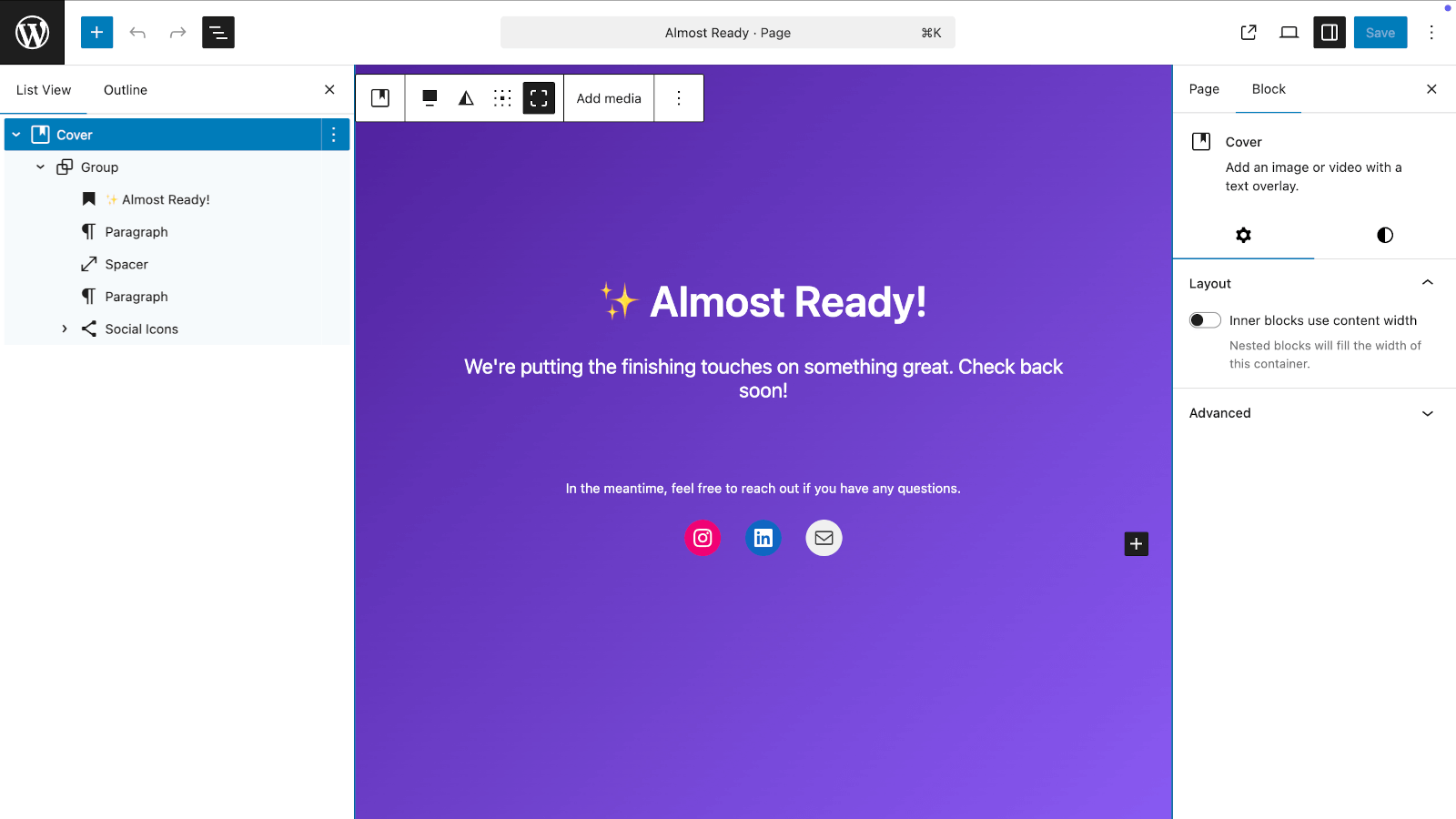
Almost Ready Temporary Page is a simple plugin that shows a friendly temporary page to visitors while you work on your WordPress site. Unlike other plugins, it uses native WordPress core blocks — no custom builders or proprietary templates required.
What it does:
- Creates a simple temporary page automatically when activated
- Shows this page to all website visitors
- Lets you and other logged-in users access the site normally to keep working
- Uses your theme’s styling so it looks consistent with your brand
- Completely customizable using WordPress’s native block editor
Key Features:
- Native Blocks – Uses WordPress core blocks, no proprietary builders
- Automatic Setup – No complicated configuration needed
- Smart Detection – Visitors see the temporary page, logged-in users see the normal site
- Fully Customizable – Change text, colors, layout, add images using blocks
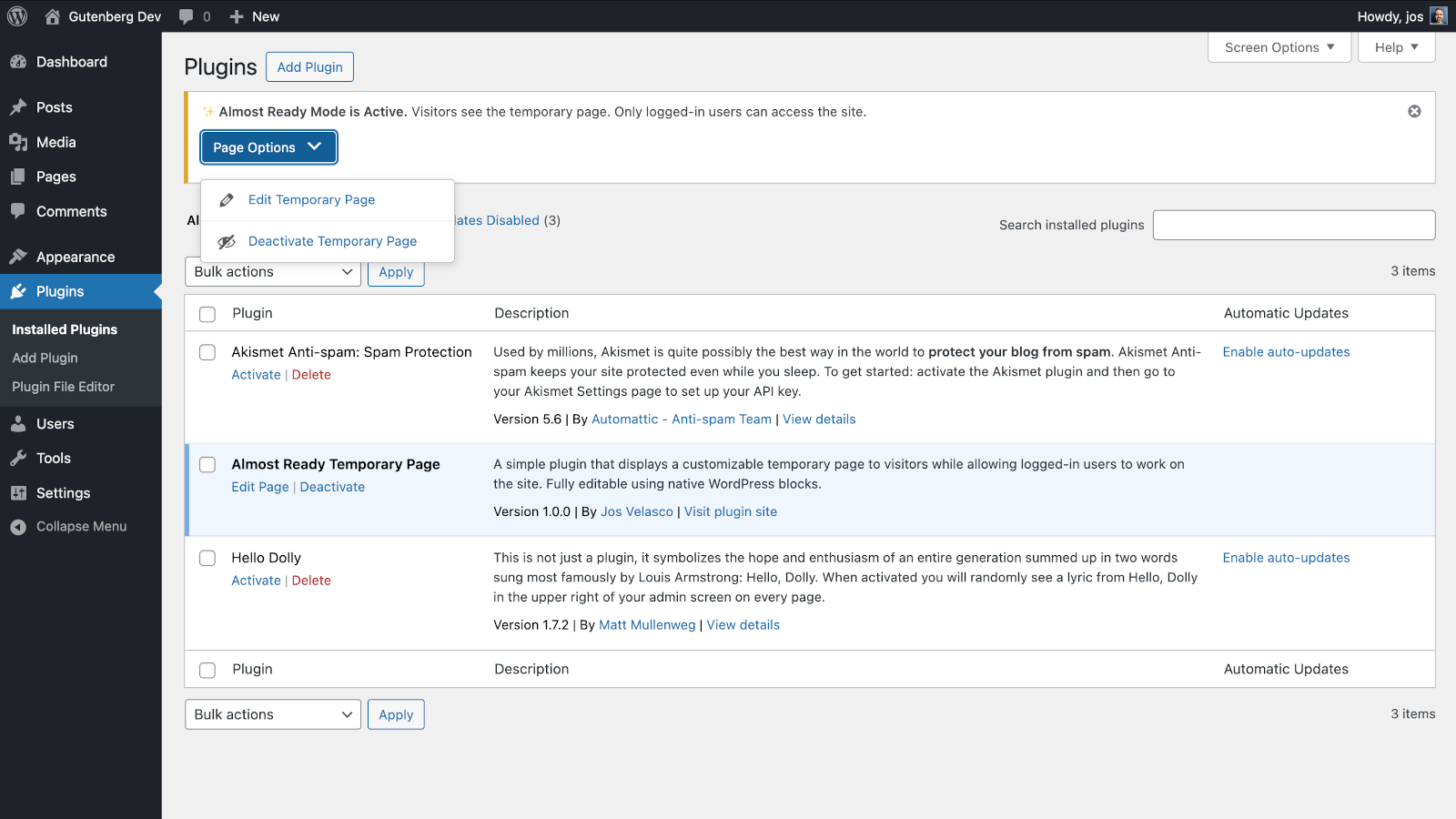
- Settings Page – Activate/deactivate and assign any page directly from Settings > Almost Ready
- Rename Freely – Rename the page title and slug without breaking anything — the plugin tracks it by ID
- SEO Friendly – Tells search engines not to index the temporary page
- Theme Compatible – Works with any WordPress theme
- Clean Removal – When deactivated, everything returns to normal
- Clean Uninstall – Optionally delete all plugin data when uninstalling (the page itself is kept)
Perfect for:
- Website updates and maintenance
- Launching new websites while still working on them
- Making design changes without visitors seeing work-in-progress
- Temporary downtime periods
- Any time you need privacy while working on your site
Installation
- Upload the plugin files to
/wp-content/plugins/almost-ready-temporary-pageor install through WordPress admin - Activate the plugin through the ‘Plugins’ screen
- That’s it! The temporary page is now live for visitors
- To customize the page, go to Pages > All Pages and edit “Almost Ready”
- To manage settings, go to Settings > Almost Ready
Frequently asked questions
How do I customize the temporary page?
Go to Pages > All Pages in your WordPress admin and click “Edit” on the “Almost Ready” page. You can change the text, add images, modify colors, and rearrange the layout using the block editor – just like editing any other page.
Can I preview what visitors see?
Yes! Either log out of WordPress or open a private/incognito browser window to see exactly what your visitors see.
Will this affect my website permanently?
Not at all. When you deactivate the plugin, your website returns to normal immediately. The temporary page becomes hidden (saved as a draft) but isn’t deleted, so you can reactivate the plugin anytime.
Can I still access my admin area?
Absolutely. You and anyone else who is logged in can access everything normally – the admin area, your regular pages, everything. Only visitors who aren’t logged in see the temporary page.
What about search engines?
The plugin tells search engines not to index the temporary page, so it won’t hurt your SEO. When you deactivate it, your normal site pages will be crawled again.
Do I need to know any code?
Nope! Everything works automatically. If you want to customize the page, you can do it through the familiar WordPress page editor without touching any code.
Can I rename the temporary page?
Yes! You can rename the page title and slug to anything you like. The plugin tracks the page by its ID, not its slug, so renaming it won’t break anything.
Can I use an existing page instead of the one the plugin created?
Yes. Go to Settings > Almost Ready and select any page from the dropdown.
Will the plugin delete my page if I uninstall it?
No. The temporary page is always kept. If you want the plugin to also remove its data from the database on uninstall, enable “Delete plugin data when uninstalling” in Settings > Almost Ready before deleting the plugin.
What makes this different from other maintenance plugins?
Almost Ready Temporary Page is the only plugin that uses native WordPress core blocks for the temporary page. Other plugins use custom builders or proprietary templates. This means your page is lightweight, future-proof, and works exactly like any other WordPress page.
Changelog
Fixes translations not loading. Removes the bundled es_ES translation — community translations are available on translate.wordpress.org.
1.1.2
- Fix: Plugin textdomain was never loaded, preventing translations from being applied
- Removed incomplete bundled es_ES translation in favour of community translations on translate.wordpress.org
1.1.1
- Fix: /login and /admin URL shortcuts now correctly redirect to wp-login.php when the temporary page is active
- Props @pmmueller for the report
1.1.0
- Added Settings page under Settings > Almost Ready
- Activate/deactivate the temporary page from the Settings page
- Assign any existing page as the temporary page via a dropdown
- Pages are now tracked by ID instead of slug — renaming the page title or slug is fully supported
- Plugin row link switches to Settings when the temporary page is inactive
- Added “Delete plugin data when uninstalling” option (the temporary page itself is always kept)
- Existing installs are migrated automatically
- Props @pmmueller for suggesting the ability to rename the temporary page
1.0.0
- Initial release
- Automatic temporary page creation
- Native block editor customization
- SEO-friendly noindex tags
- Smart user detection
Screenshots

For developers
Is this your plugin? Show off the numbers.
Add a live badge to your site, docs or GitHub README. It updates on its own — no account needed.
Best Almost Ready Temporary Page alternatives
All blocks plugins →





FAQ
Almost Ready Temporary Page: quick answers
Straight answers, pulled from live WordPress.org data.
Live data from WordPress.org · checked Oct 21, 2026
Is Almost Ready Temporary Page free?
Yes. Almost Ready Temporary Page is free to download and use from the official WordPress.org plugin directory.
Is Almost Ready Temporary Page safe to use in 2026?
Almost Ready Temporary Page is a solid plugin choice in 2026, with a few things worth checking first. It runs on 40+ sites, is rated 5/5 and was last updated 2 months ago, and scores 74/100 on our health check.
How many websites use Almost Ready Temporary Page?
Almost Ready Temporary Page is active on 40+ WordPress websites and has been downloaded 854 times since it launched in February 2026. It was downloaded 113 times in the last 30 days.
Does Almost Ready Temporary Page work with WordPress 7.1?
Yes. The developer has tested Almost Ready Temporary Page up to WordPress 7.1.3, the latest release. It requires WordPress 6.0 or newer.
What PHP version does Almost Ready Temporary Page need?
Almost Ready Temporary Page requires PHP 7.4 or higher. Most hosts run PHP 8.x today, so it works on any modern WordPress hosting.
When was Almost Ready Temporary Page last updated?
The latest version, 1.1.2, was released on August 17, 2026 (2 months ago).
Who makes Almost Ready Temporary Page?
Almost Ready Temporary Page is developed and maintained by Jos Velasco.
What are the best alternatives to Almost Ready Temporary Page?
The most popular alternatives to Almost Ready Temporary Page are Spectra Legacy (1M+ installs), Kadence Blocks (600K+ installs) and Extendify (500K+ installs).
Powered by PageForge
Want thousands of pages that rank like these? Build them in an afternoon.
This directory runs on the same engine as PageForge. Turn any spreadsheet, CSV or API into thousands of fast, SEO-ready WordPress pages — with schema, internal links and AI-written copy baked in.
- CSV, Google Sheets & API data sources
- AI content, schema & internal links per page
- Works with Elementor, Gutenberg, Yoast & Rank Math
- Free on WordPress.org — no credit card


