



Air WP Sync – Airtable to WordPress
Swiftly sync Airtable to your WordPress website!

Solid choice
Air WP Sync is a solid plugin choice in 2026, with a few things worth checking first. It runs on 1K+ sites, is rated 4.8/5 and was last updated 3 months ago, and scores 66/100 on our health check.
How does it stack up?
Side-by-side on installs, updates, ratings & support



Daily downloads
Download spikes usually follow a new release — each site that auto-updates counts as a download.
Rankings
Where Air WP Sync stands todayWordPress.org search rankings
Live position in the plugin search, top 100| Keyword | Position |
|---|---|
| Airtable | #2 |
| api | >100 |
| automation | >100 |
| integration | >100 |
| synchronization | #8 |
Version adoption
Share of active sites per release.
Rating breakdown
★★★★★★★★★★ 4.8 from 16 reviews
About Air WP Sync – Airtable to WordPress
From the official readme · v2.9.0Description
By connecting your Airtable database platform to your WordPress website, this plugin helps you manage your content better. Identify the Airtable fields you wish to link to WordPress and choose the format for your imported contents: articles, pages, products, users, taxonomies, etc. Simply define your ideal update frequency. Your plugin will automatically sync everything swiftly!
Upgrade to Pro+ Version to unleash advanced features, including CPTs, ACF, SEO plugin integration (Yoast, Rank Math, AllInOne SEO, SEOPress), and more — or even better, try our Air WP Sync for WooCommerce which includes all the Pro+ features and full compatibility with WooCommerce to manage your products, inventory, orders, and more.
Keep your content fresh and your workflow smooth.
What’s New?
Since our latest releases, we’ve expanded Air WP Sync with new functionalities:
– Improved UI/UX experience
– Support for multiple post types and meta fields
– Enhanced automation logic
– Compatibility with major SEO plugins
– New product: Air WP Sync for WooCommerce to sync products and orders
Features
Create connections to your Airtable tables
- Set up as many connections as you want
- Publish an unlimited number of connections (Pro+ Version)
Choose the content format you want to import
- Import your contents in your preferred format: articles, pages, etc.
- Import Users and Taxonomie terms
- Link Airtable columns to WordPress fields
Sync your personalized data
- Create new custom fields (Pro+ Version)
- Use specific content formats “Custom Post Types” (Pro+ Version)
Define synchronization setups
- Sync your data manually or automatically
- Select update frequency (Pro+ Version)
- Set up synchronization method (add, update, delete)
Third-party plugins support
(Pro+ Version)
* ACF (Advanced Custom Fields) & JetEngine CPT
* SEO plugins: Yoast, Rank Math, SEOPress, AllInOne SEO
* The Events Calendar
* WooCommerce (products & orders sync) – (Available in Air WP Sync for WooCommerce)
How to unleash your plugin’s full potential?
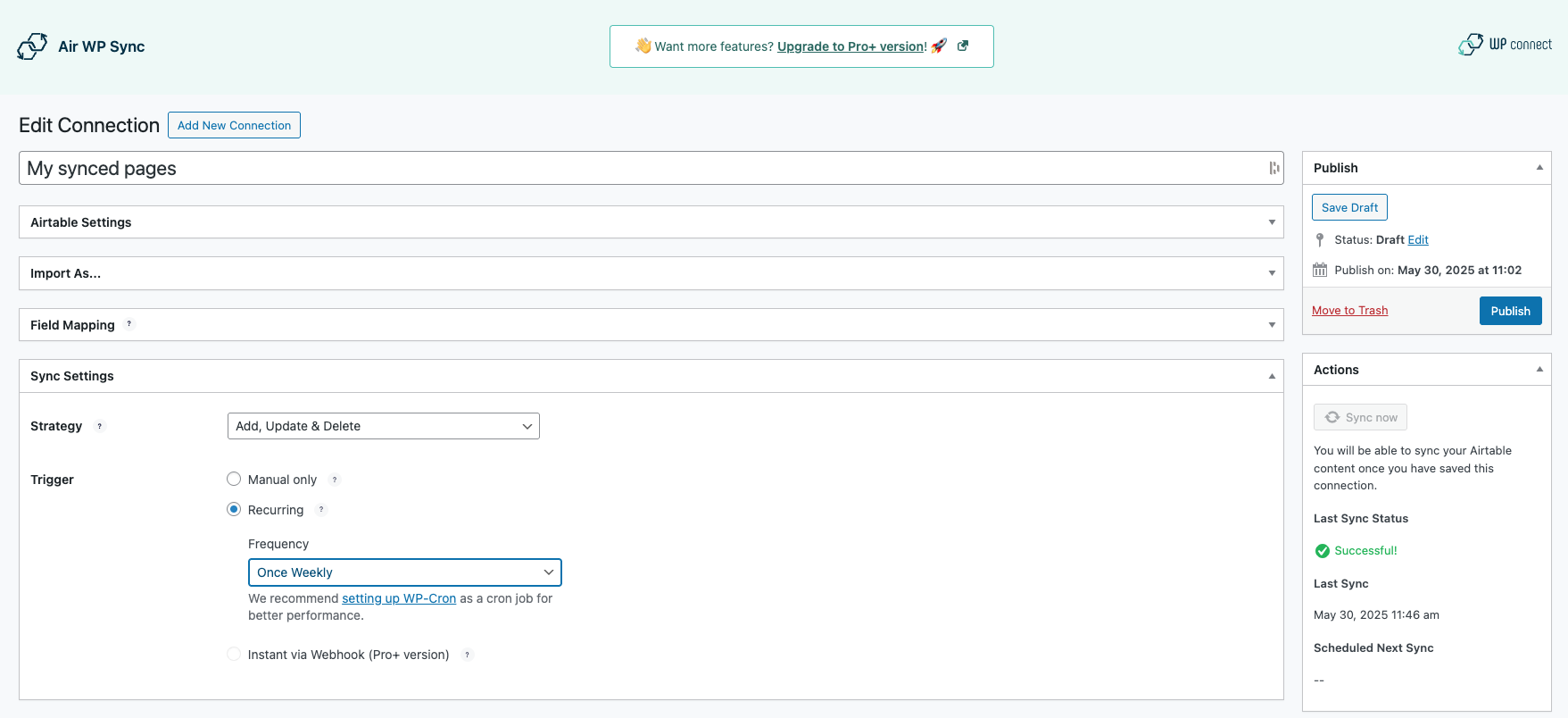
- Go to the Air WP Sync plugin page, click on “Add New” next to “Connections”.
- Enter a name for your new connection.
- Fill in the Airtable Settings (Airtable Access token available here).
- Select the form in which you want to import your content from your table (article, page, etc.) and set up the additional settings.
- Link your table fields with WordPress fields.
- Choose the Sync Settings (Strategy and Trigger).
- Publish the connection.
- Press “Sync Now” to sync your content for the first time.
Troubleshooting
Make sure you have created your databases and Airtable columns names before adding a new connection. If you don’t see it, wait 15 minutes. For performance reasons, your Airtable elements are cached for 15 minutes.
If needed, you can access to logs from a FTP server in this folder: /wp-content/uploads/airwpsync-logs/
Support
Open a ticket via the WordPress support forum
Installation
- From your WordPress Dashboard, go to “Plugins > Add New”.
- Search for “Air WP Sync”.
- Click on “Install Now” and activate the plugin.
- Find Air WP Sync in the sidebar to start using it.
Frequently asked questions
What is Airtable?
Offered in SaaS mode, Airtable is a database tool designed to create a simple online form and a project management environment or even a custom CRM. Equipped with an automatic translation function, Airtable manages multiple views: maps, calendars, Kanban boards, Gantt charts, etc.
Why do I need an Airtable account?
Air WP Sync plugin uses the Airtable Access token to link columns with fields and send data. Creating an account on Airtable is free. Once connected, you can get the Airtable Access token here).
Do I need a paid Airtable plan?
Not necessarily. Airtable offers a free plan with up to 1000 records per base and 1GB attachments, enough for many projects.
What do I get with Pro+ version?
Pro+ adds CPTs, custom fields, unlimited scheduling, ACF, SEO support, and extra power features. See details: Compare Plans
Do I have to pay to use the plugin and Airtable?
We offer two versions of our plugin: – Free Version: This version is available to all users at no cost Learn more and get the Free Version here. – Pro+ Version: This version provides extended functionalities, designed for those who need the most from our plugin. Learn more and get the Pro+ Version here. Airtable offers a free plan for an unlimited number of databases and small teams of up to 5 people. You will be able to add up to 1000 entries in each database and store up to 1 GB of attachments, but you will be limited to 1,000 API calls per workspace/per month. Depending on your needs…
How are my databases synchronized?
Once you have defined the synchronization frequency and published your connection, relax: everything is automatic. It is also possible to manually synchronize the connection – whenever you want – using the ‘Sync Now’ button.
Screenshots
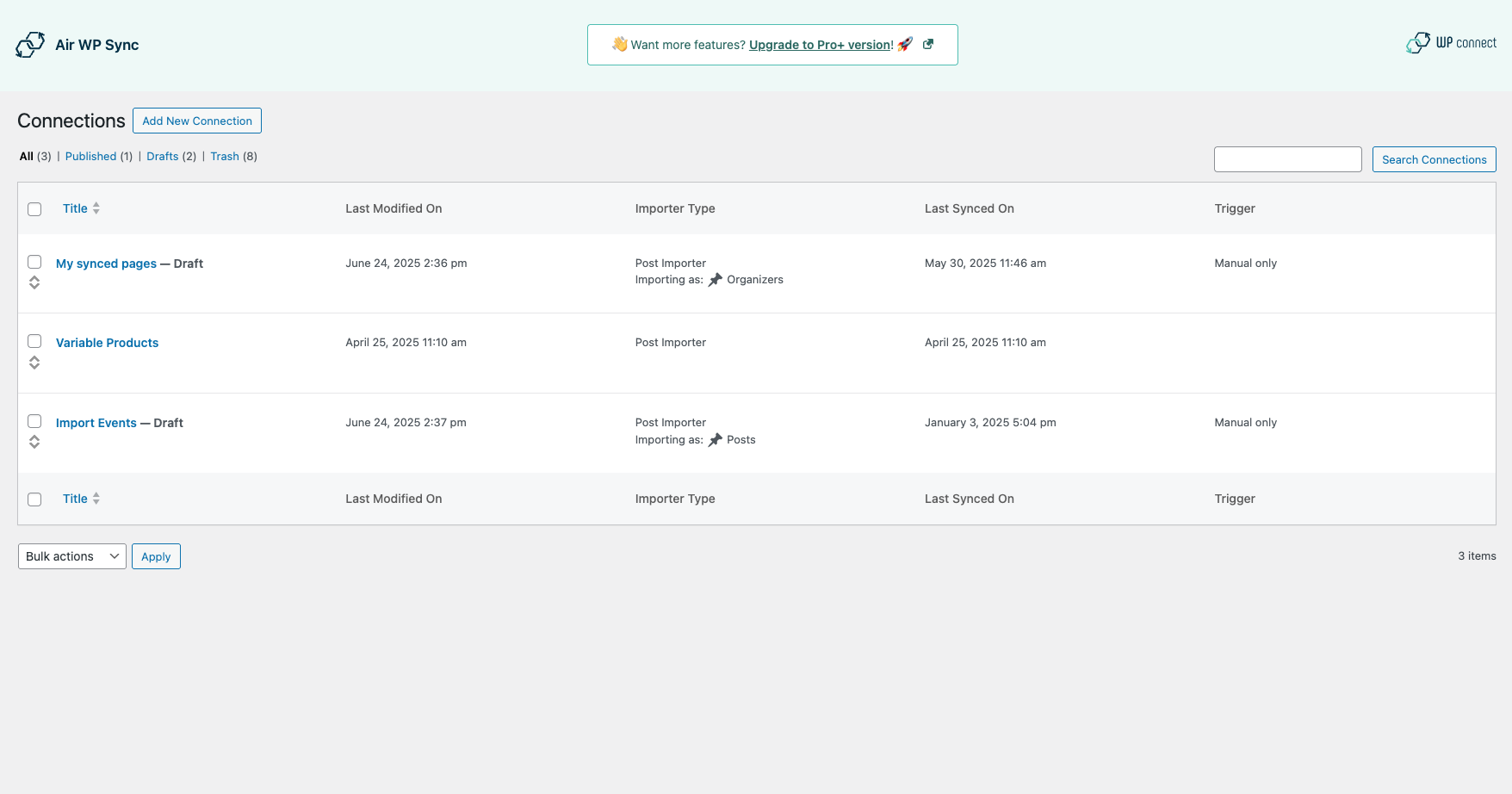
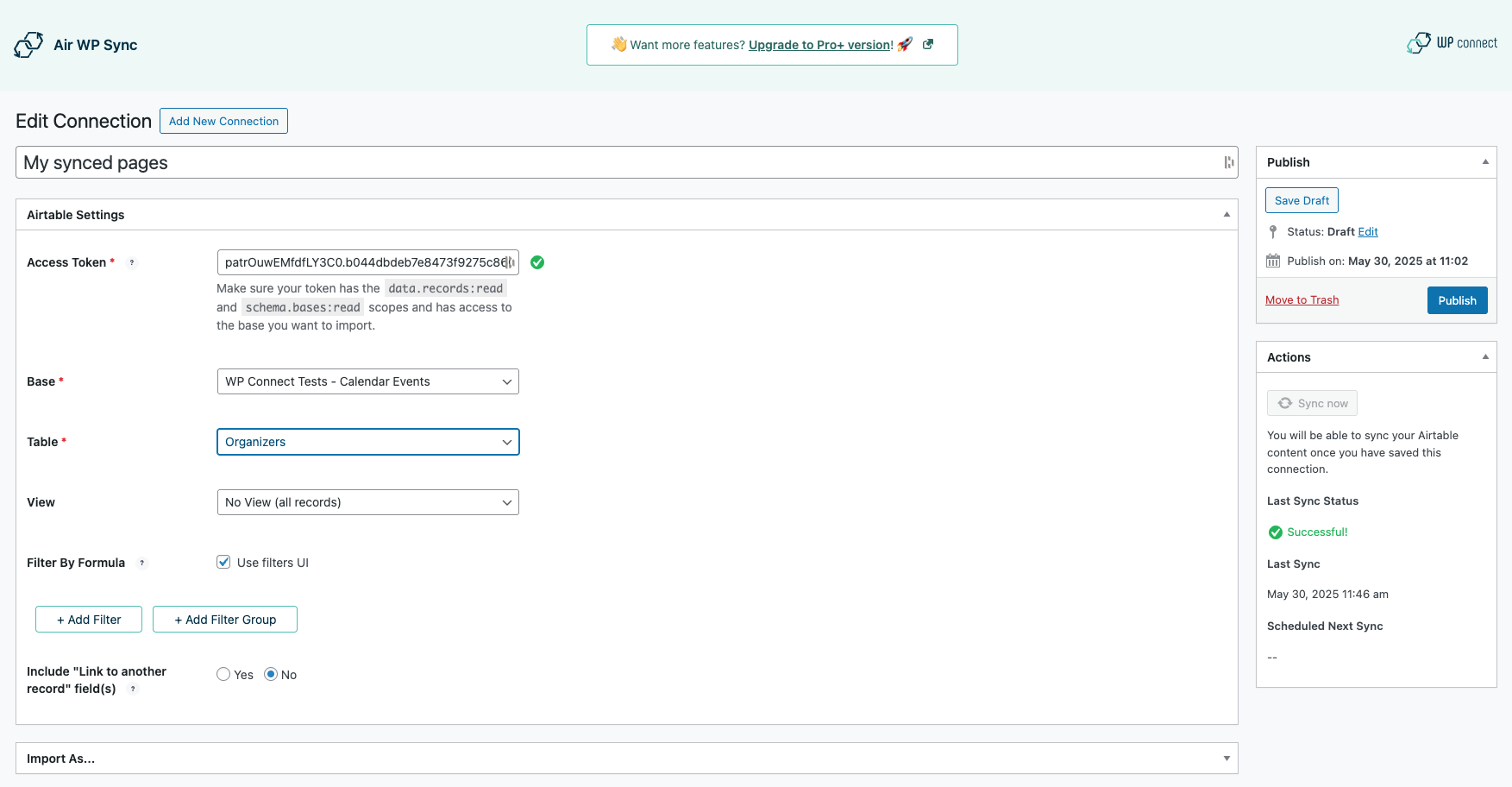
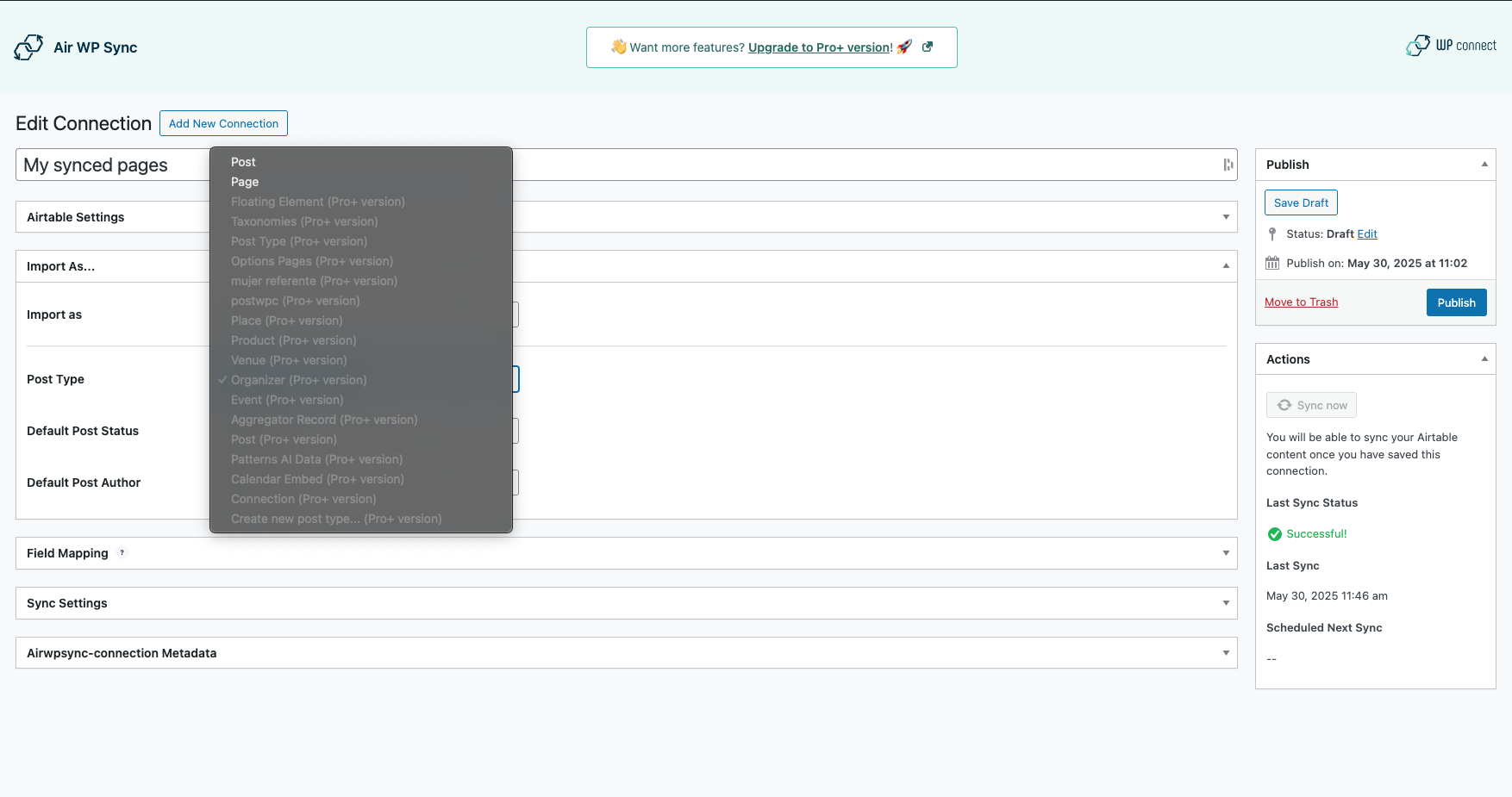
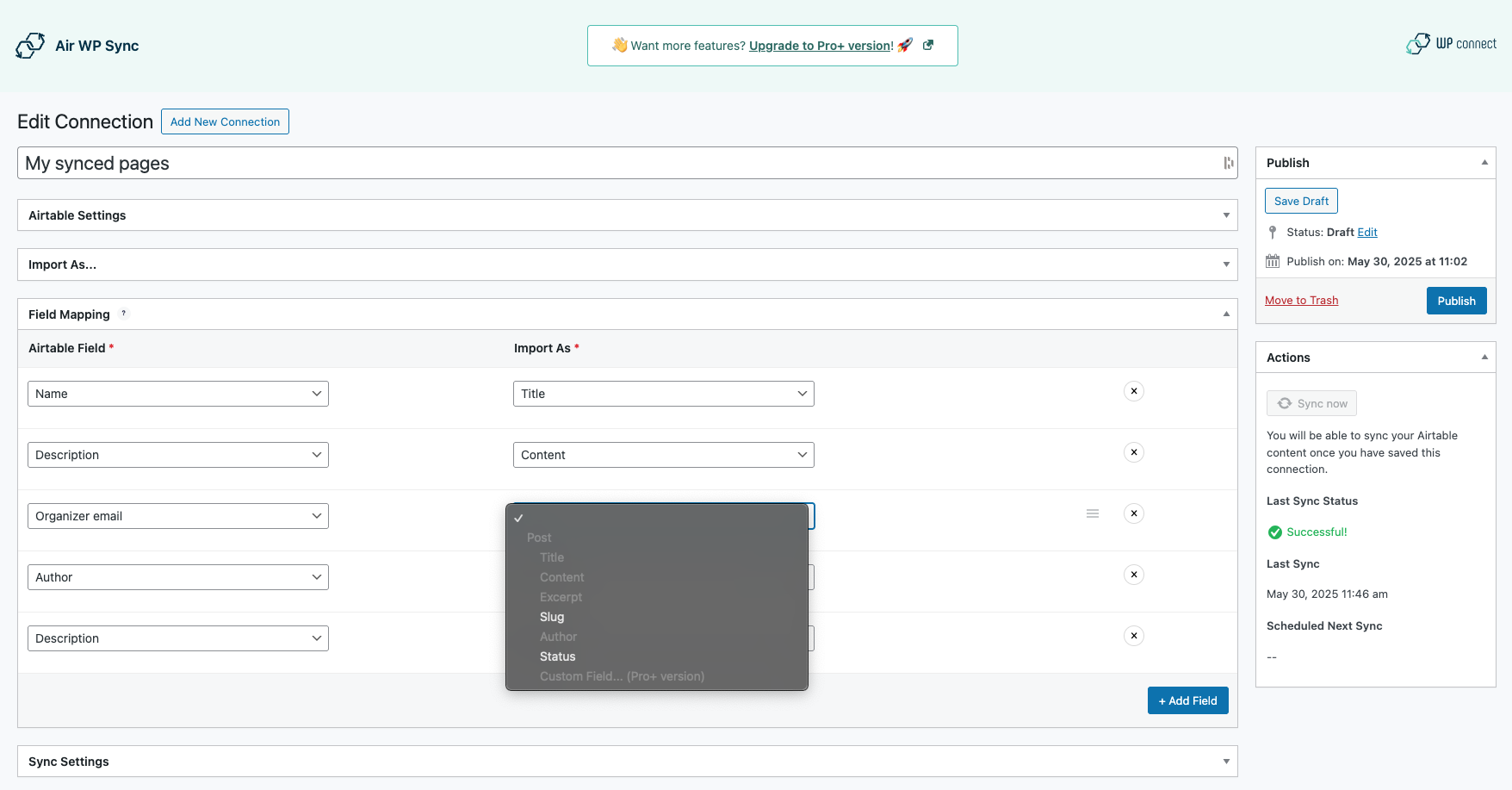
For developers
Is this your plugin? Show off the numbers.
Add a live badge to your site, docs or GitHub README. It updates on its own — no account needed.
Best Air WP Sync alternatives
All Airtable plugins →


FAQ
Air WP Sync – Airtable to WordPress: quick answers
Straight answers, pulled from live WordPress.org data.
Live data from WordPress.org · checked Oct 8, 2026
Is Air WP Sync free?
Yes. Air WP Sync is free to download and use from the official WordPress.org plugin directory.
Is Air WP Sync safe to use in 2026?
Air WP Sync is a solid plugin choice in 2026, with a few things worth checking first. It runs on 1K+ sites, is rated 4.8/5 and was last updated 3 months ago, and scores 66/100 on our health check.
How many websites use Air WP Sync?
Air WP Sync is active on 1K+ WordPress websites and has been downloaded 32,460 times since it launched in July 2022. It was downloaded 405 times in the last 30 days.
Does Air WP Sync work with WordPress 7.1?
Air WP Sync is officially tested up to WordPress 7.0.7, while the latest release is 7.1.3. It may still work, but try it on a staging site first.
What PHP version does Air WP Sync need?
Air WP Sync requires PHP 7.4 or higher. Most hosts run PHP 8.x today, so it works on any modern WordPress hosting.
When was Air WP Sync last updated?
The latest version, 2.9.0, was released on July 7, 2026 (3 months ago).
Who makes Air WP Sync?
Air WP Sync is developed and maintained by WP connect.
What are the best alternatives to Air WP Sync?
The most popular alternatives to Air WP Sync are Add-On for Contact Form 7 t… (300+ installs), Aeropage Sync for Airtable (40+ installs) and Orders Sync to Airtable for… (30+ installs).
Powered by PageForge
Want thousands of pages that rank like these? Build them in an afternoon.
This directory runs on the same engine as PageForge. Turn any spreadsheet, CSV or API into thousands of fast, SEO-ready WordPress pages — with schema, internal links and AI-written copy baked in.
- CSV, Google Sheets & API data sources
- AI content, schema & internal links per page
- Works with Elementor, Gutenberg, Yoast & Rank Math
- Free on WordPress.org — no credit card


