



AI Text to Speech – TTS Plugin For WordPress
Easily generate a realistic audio version for your content and posts using OpenAI's Text to Speech API.

Use with caution
AI Text to Speech works, but test it on a staging site before relying on it in 2026. It runs on 80+ sites, is rated 4.3/5 and was last updated 5 months ago, and scores 55/100 on our health check.
- Momentum — downloads up 93.2% vs the previous 30 days
- Small user base (80+ active installs)
- Only tested up to WordPress 6.9 (latest is 7.1)
How does it stack up?
Side-by-side on installs, updates, ratings & support



Daily downloads
Download spikes usually follow a new release — each site that auto-updates counts as a download.
Rankings
Where AI Text to Speech stands todayWordPress.org search rankings
Live position in the plugin search, top 100| Keyword | Position |
|---|---|
| AI | >100 |
| ai tts | #3 |
| text to audio | #20 |
| text to speech | #7 |
| tts | #6 |
Version adoption
Share of active sites per release.
Rating breakdown
★★★★★★★★★★ 4.3 from 6 reviews
About AI Text to Speech
From the official readme · v3.2.0Description
A simple plugin that allows you to create an AI generated audio version of your posts, or any other type of content like videos and podcasts, using OpenAI’s Text to Speech API.
When the audio has been generated for a post, an audio player will be displayed automatically at the top of your post, which visitors can listen to.
If you don’t want to create a post, use the admin “AI text-to-speech” generator page instead to generate audio files for other purposes.
This plugin is perfect for bloggers, content creators, businesses, and anyone who wants to generate a realistic audio version of their text and posts.
Key Features
- Powered by OpenAI’s Text to Speech API.
- Easily generate an audio version of your posts on the post editor page.
- Quickly generate an audio version of any text on the “AI text-to-speech generator” admin page.
- Choose between 10 natural-sounding AI voices for your TTS audio.
- Choose between several “voice style” presets to change the tone and style of the generated audio.
- Automatically display an audio player at the top of your posts.
- Supports text to speech generation for over 50 languages.
- Optionally include the post title, author name and post date at the start of the audio.
- View a log of the last 50 audio generation API requests.
Pro Features
- Statistics tracking and analytics reporting.
- Integration with Dropbox to store generated audio files.
- Add custom text before and after the generated audio. This can be done on a global or per post basis.
- Fully replace the content used when generating the audio for a post.
- Specify how certain words should be pronounced with custom pronunciation settings or shortcodes.
- Choose from 20+ additional voice style presets.
- Enter your own custom voice style instructions to change the tone and style of the generated audio.
- Multi-voice feature to allow multiple voices to be used within a post for different pieces of text.
- Choose a default voice to be used when generating audio.
- Automatically generate TTS audio for new posts when they are published.
- Audio player style customisation settings.
Learn more about the PRO version.
Suggestions and Support
If you have any suggestions for additional functionality, need any help, or have found a bug, please create a support ticket.
Installation
- Upload the ‘ai-text-to-speech’ plugin to the ‘/wp-content/plugins/’ directory.
- Activate the affiliate plugin through the ‘Plugins’ menu in WordPress.
- Modify additional plugin settings with your OpenAI key. View the “Setup Guide” link for more instructions.
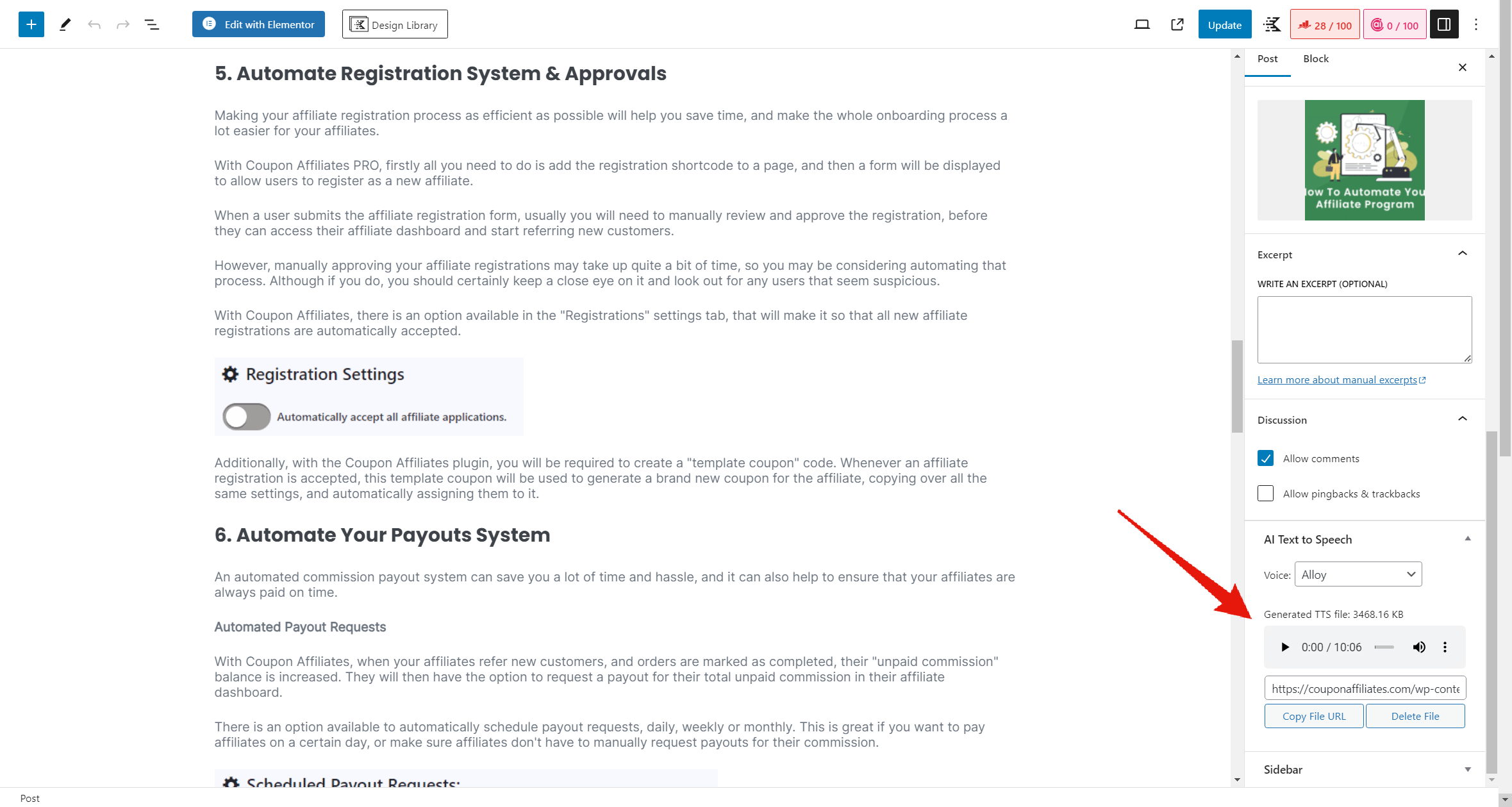
- Go to the post editor, and you will see a new meta box on the sidebar called “AI Text To Speech”.
Frequently asked questions
How do I get an OpenAI key?
You can get an OpenAI key by signing up for an account at OpenAI.com.
Does this plugin use a 3rd party service?
Yes, this AI Text to Speech plugin relys on a 3rd party service “OpenAI.com” to generate the audio, so you will need to sign up for an account and get an API key to use this plugin. You can view the OpenAI terms of service here. The plugin may also make calls to “publish.twitter.com” in order to retrieve the text/content from certain posts. You can view the Twitter terms of service here.
Is the plugin free?
This plugin is free to use, however it does have a paid “PRO” version which offers some additional features. The plugin does also depend on the OpenAI API in which their usage costs will apply.
What languages are supported?
OpenAI Text to Speech currently supports the following languages: English, Afrikaans, Arabic, Armenian, Azerbaijani, Belarusian, Bosnian, Bulgarian, Catalan, Chinese, Croatian, Czech, Danish, Dutch, Estonian, Finnish, French, Galician, German, Greek, Hebrew, Hindi, Hungarian, Icelandic, Indonesian, Italian, Japanese, Kannada, Kazakh, Korean, Latvian, Lithuanian, Macedonian, Malay, Marathi, Maori, Nepali, Norwegian, Persian, Polish, Portuguese, Romanian, Russian, Serbian, Slovak, Slovenian, Spanish, Swahili, Swedish, Tagalog, Tamil, Thai, Turkish, Ukrainian, Urdu, Vietnamese, and Welsh. You…
Do you provide support?
Yes. If you need any help setting up the affiliate plugin, please free to get in touch and we’ll be happy to help!
How can I report issues/bugs with the plugin?
You can report feature bugs by creating a support ticket. Please provide as much information as possible to make it easier for us to find a solution for you.
How can I report security bugs?
You can report security bugs through the Patchstack Vulnerability Disclosure Program. The Patchstack team help validate, triage and handle any security vulnerabilities. Report a security vulnerability.
Changelog
Version 3.2.0 – 8th May 2026
- New: Added 3 new voices from OpenAI (Marin, Cedar, and Verse).
- New: (PRO) Added options to customise the audio player colors (accent and background).
- Improvement: Redesigned the admin pages within the plugin, and added a new header bar with quick links to the different pages.
- Tweak: Moved the “Custom Voice Style Instructions” field to be always visible on the post editor page.
- Tweak: Reduced memory and database overhead when generating audio for larger posts.
- Tweak: Admin-generated TTS files (from the generator page) now appear on the TTS Files page, and files generated with Dropbox storage are no longer incorrectly removed from the list.
- Fix: Added missing escaping for some strings.
- Fix: Improved long-content chunking to keep OpenAI TTS requests within token limits.
- Fix: Improved TTS generation error messages to show actionable OpenAI API details instead of generic alerts.
- Fix: Changed the generated audio file format to MP3 to prevent inaccurate player duration displays.
- Fix: Fixed undefined variable $post_types on the admin enqueue posts styles function.
- Security: Made a few precautionary code security improvements.
Version 3.1.0 – 18th November 2025
- New: Added a new “TTS Files” page to view and manage all generated TTS audio files in one place.
- Tweak: Added new “Upload new custom file” and “Generate New” buttons to the post meta box when a TTS file is already present.
- Fix: Fixed a JS error on the block editor post page.
- Other: Updated to Freemius SDK 2.13.0
Version 3.0.6 – 14th September 2025
- Fix: Fixed an issue with the AI text-to-speech admin generator page.
Version 3.0.5 – 13th August 2025
- New: Added [ai_tts_player] shortcode for displaying the audio player in a custom area.
- Fix: Fixed an issue with the “Post Types To Enable” setting not working correctly.
- Fix: Fixed an issue with the audio player not displaying on normal pages.
- Other: Updated to Freemius SDK 2.12.1
Version 3.0.4 – 10th April 2025
- Fix: All shortcodes are now removed from the post content when generating audio.
- Fix: Precautionary fix for a potential small security issue.
Version 3.0.3 – 24th March 2025
- Tweak: Fixed the redirect on plugin activation to the settings page.
Screenshots

For developers
Is this your plugin? Show off the numbers.
Add a live badge to your site, docs or GitHub README. It updates on its own — no account needed.
Best AI Text to Speech alternatives
All AI plugins →





FAQ
AI Text to Speech: quick answers
Straight answers, pulled from live WordPress.org data.
Live data from WordPress.org · checked Oct 4, 2026
Is AI Text to Speech free?
Yes. AI Text to Speech is free to download and use from the official WordPress.org plugin directory.
Is AI Text to Speech safe to use in 2026?
AI Text to Speech works, but test it on a staging site before relying on it in 2026. It runs on 80+ sites, is rated 4.3/5 and was last updated 5 months ago, and scores 55/100 on our health check.
How many websites use AI Text to Speech?
AI Text to Speech is active on 80+ WordPress websites and has been downloaded 6,849 times since it launched in March 2024. It was downloaded 707 times in the last 30 days.
Does AI Text to Speech work with WordPress 7.1?
AI Text to Speech is officially tested up to WordPress 6.9.9, while the latest release is 7.1.2. It may still work, but try it on a staging site first.
When was AI Text to Speech last updated?
The latest version, 3.2.0, was released on May 9, 2026 (5 months ago).
Who makes AI Text to Speech?
AI Text to Speech is developed and maintained by Elliot Sowersby / RelyWP.
What are the best alternatives to AI Text to Speech?
The most popular alternatives to AI Text to Speech are Elementor Website Builder (10M+ installs), All in One SEO (2M+ installs) and AI Agent by SiteGround (1M+ installs).
Powered by PageForge
Want thousands of pages that rank like these? Build them in an afternoon.
This directory runs on the same engine as PageForge. Turn any spreadsheet, CSV or API into thousands of fast, SEO-ready WordPress pages — with schema, internal links and AI-written copy baked in.
- CSV, Google Sheets & API data sources
- AI content, schema & internal links per page
- Works with Elementor, Gutenberg, Yoast & Rank Math
- Free on WordPress.org — no credit card


