



SlopStopper: AI Generative Content Obscurer
Make AI-generated content go dark at the flick of a switch, rehumanizing the web one site at a time.

Consider an alternative
SlopStopper: AI Generative Cont… shows warning signs in 2026 — compare the alternatives below before installing. Was last updated 7 months ago, and scores 36/100 on our health check.
- Small user base (<10 active installs)
- Very few reviews so far
- Only tested up to WordPress 6.9 (latest is 7.1)
How does it stack up?
Side-by-side on installs, updates, ratings & support



Daily downloads
Download spikes usually follow a new release — each site that auto-updates counts as a download.
Rankings
Where SlopStopper: AI Generative… stands todayWordPress.org search rankings
Live position in the plugin search, top 100| Keyword | Position |
|---|---|
| AI | >100 |
| blocker | >100 |
| gpt | >100 |
| hide | >100 |
| images | >100 |
About SlopStopper: AI Generative Content Obsc…
From the official readme · v1.1.1Description
Give your users control over their AI slop intake. SlopStopper lets website owners identify AI-generated content and provides visitors with a simple toggle to show or hide it.
Some website owners find that a bit of AI assistance can be a helpful time-saver. Others use it to extend their verbal or artistic skills. However, many users are turned off by AI content on aesthetic or moral grounds.
SlopStopper provides websites with an on-off toggle for AI content, allowing site owners to employ AI as needed, better disclose its non-human provenance, and grant users the ability to scrub AI content from their user experience if they prefer.
Links
Plugin Features
- Visual toggle for generative content
- Supports multiple content types
- Administrative control panel
- Responsive design
- Persistent preferences
- Background image support
- Custom AI container block
- Customize or randomize obscuration filter
- Cache plugin compatible
Visual Toggle
SlopStopper adds a floating toggle switch on front end of your site. When clicked by a user, their localized display of the site will toggle between modes of showing or hiding your AI-generated content.
The switch is unobtrusive by default, becoming prominent when hovered over. The labels and position of the switch can be configured from the admin control panel in the settings section of your site’s backend.
Multiple Content Types
AI-generated content can be identified by image, post, page, or by a custom Gutenberg block type for sections of AI content within any post, page, or template.
AI Images
Compatible with all image formats!
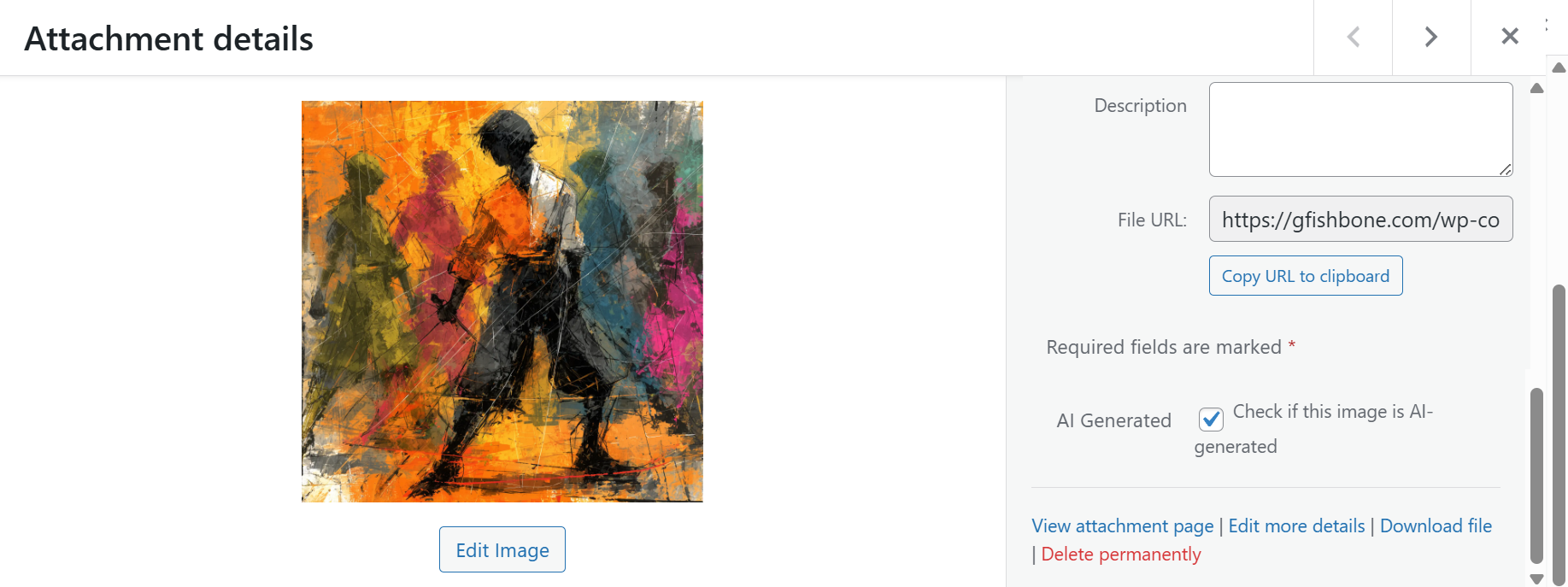
SlopStopper adds an “AI generated” checkbox to the Details modal of every image in your Media Library. Checking the box will identify that image as being AI-generated.
When the user elects to hide AI-generated content, these images will be hidden behind a black overlay. Clicking the toggle to show AI content will remove the overlay, allowing the image to display.
Posts and Pages
SlopStopper adds a checkbox to the edit screen of every post and page. Checking the box will identify that post or page as being entirely AI-generated.
When the user elects to hide AI-generated content, the content of the page will be replaced by a notice that the content is AI generated. Clicking the toggle to show AI content will reveal the content of the post or page.
Other Content
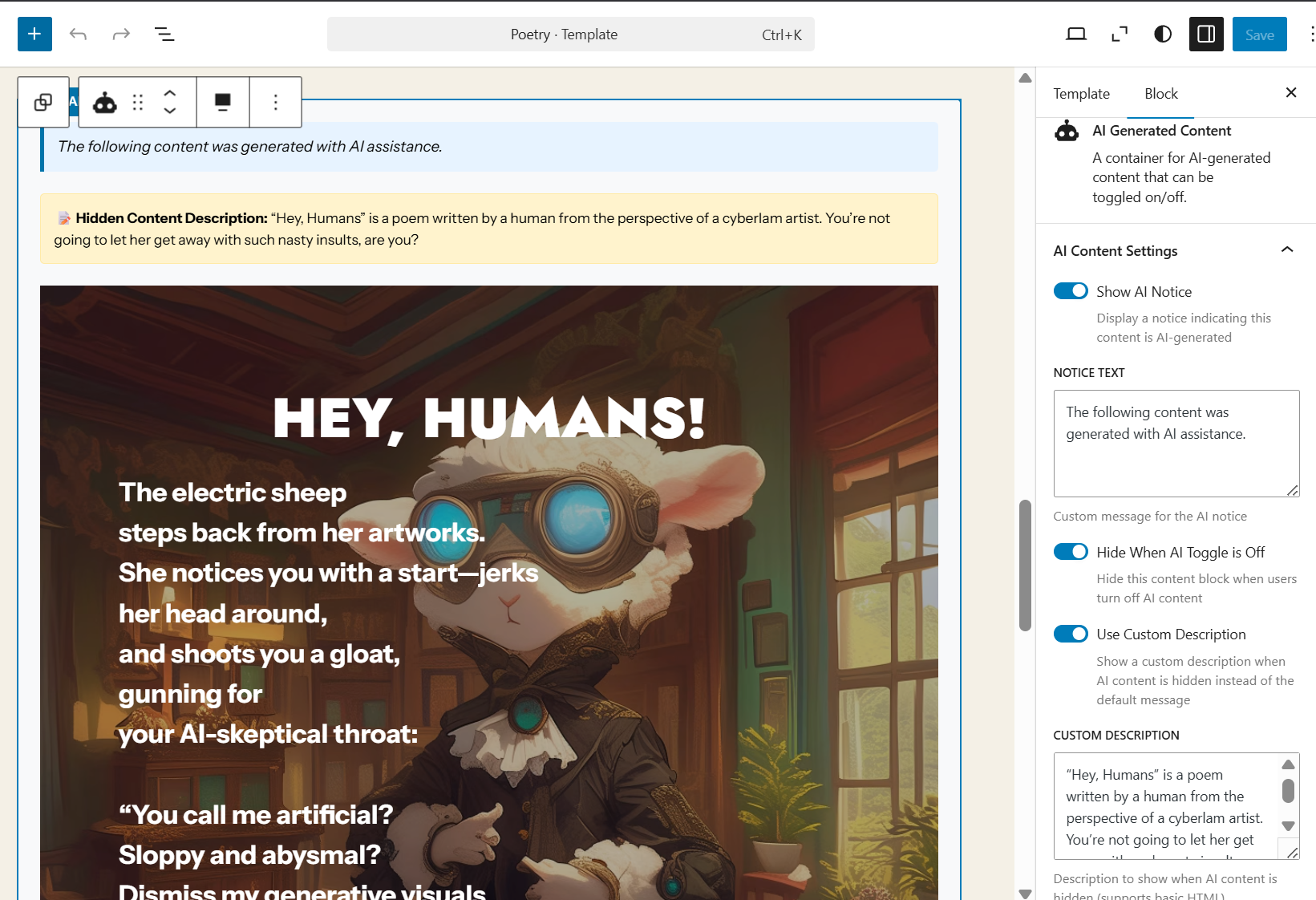
SlopStopper adds a custom “AI Generated Content” block type that serves as a container for blocks containing any AI-generated sections within a post, page, or template. Any number of blocks can be placed within the “AI Generated Content” container.
When the user elects to hide AI-generated content, contained content will be hidden or replaced. Clicking the toggle will reveal the hidden content.
Admin Control Panel
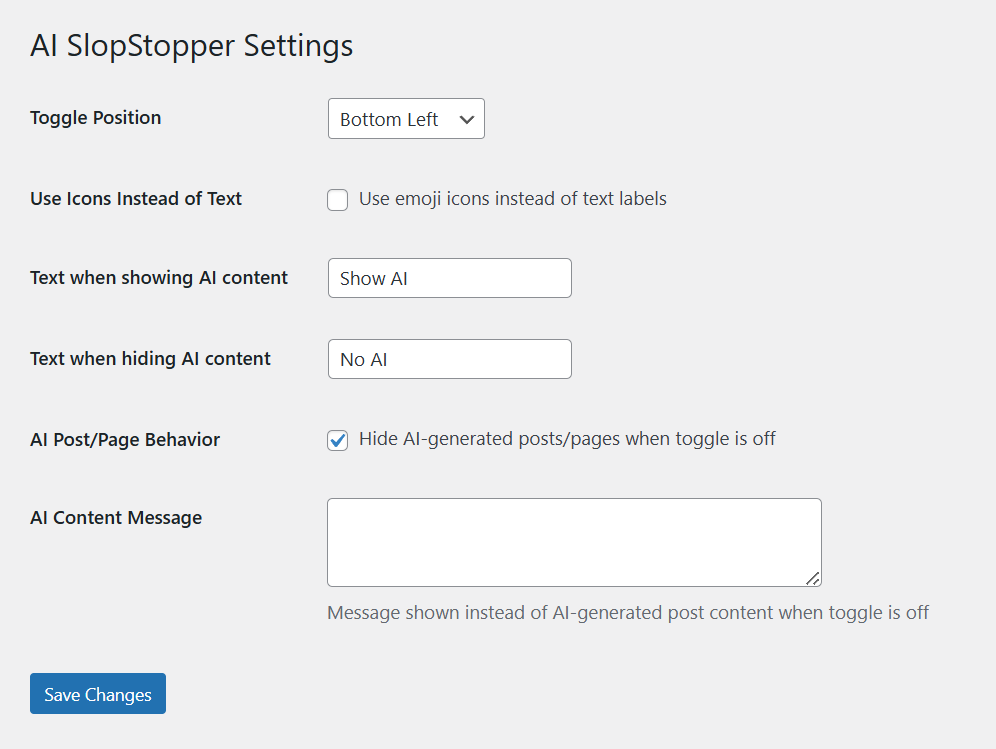
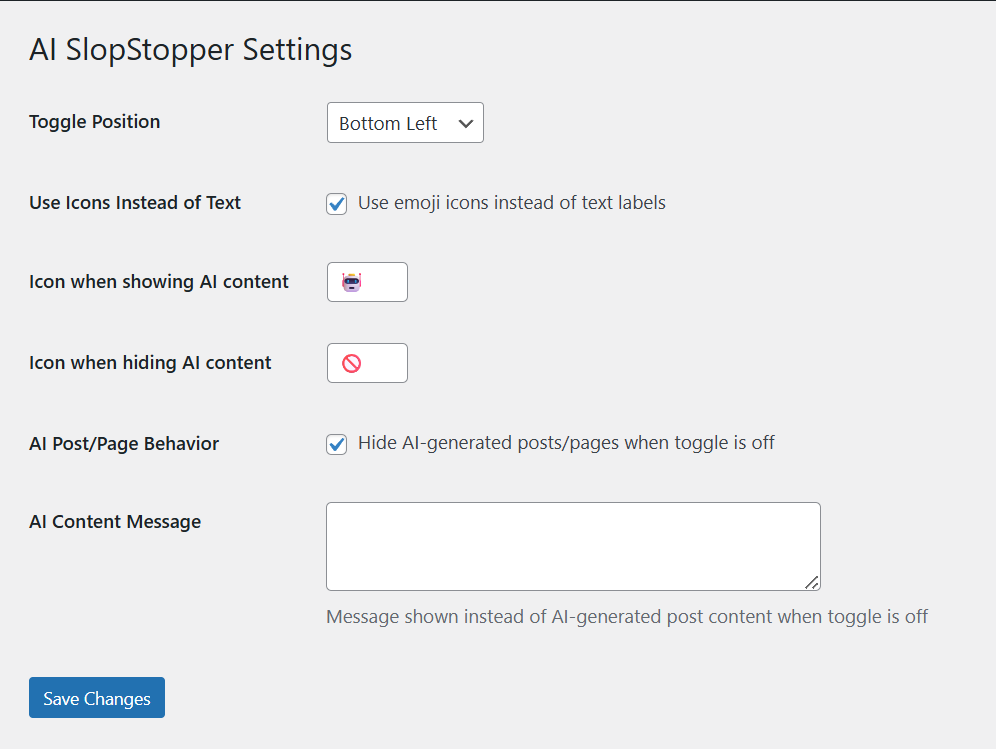
SlopStopper adds an SlopStopper settings page under the Settings section of your WordPress backend. From here, you can set the position and labels of the toggle switch and an optional message to show when AI content has been hidden.
Responsive Design
SlopStopper uses responsive design techniques to adjust to displays on desktop and mobile devices.
User Preference Memory
SlopStopper remembers a user’s preference for showing or hiding the AI-generated content on your site, providing a consistent experience as the user navigates from page to page. The preference is saved to the user’s browser and is not accessible to the website owner or plugin developer.
Background Image Support
When an image is identified as AI-generated and used as a background image, the AI-generated image will be overlaid in black while the foregrounded content will not be affected unless also identified as AI-generated.
Custom Gutenberg Block
SlopStopper adds an “AI Generated Content” block to the Gutenberg editor. This block acts as a container for content in any blocks of AI content placed within it.
Customize Obscuration Filter
From the admin settings, slop images can be obscured with four basic filters: light and dark patterns, solid color, and a circuitry pattern. These can be customized with hue, saturation, and brightness to match the look of any website. The appearance can also be randomized and set to change daily.
Cache Plugin Compatibility
SlopStopper integrates with 15+ popular caching plugins including:
* WP-Optimize
* WP Rocket
* W3 Total Cache
* LiteSpeed Cache
* WP Super Cache
* And many more…
This ensures AI content changes are immediately reflected without manual cache clearing.
Installation Instructions
There are three methods to install this plugin.
1. Via WordPress dashboard
- Click on ‘Add New’ in the Plugins dashboard
- Search for ‘SlopStopper’
- Click ‘Install Now’ button
- Activate the plugin from the same page or from the Plugins dashboard
- You will now be able to identify the AI-generated content on your site (see below)
2. Via uploading the plugin to WordPress dashboard
- Download the plugin to your computer from (https://wordpress.org/plugins/ai-slopstopper/)
- Click on ‘Add New’ in the Plugins dashboard
- Click on ‘Upload Plugin’ button
- Select the zip file of the plugin that you have downloaded to your computer before
- Click ‘Install Now’
- Activate the plugin from the Plugins dashboard
- You will now be able to identify the AI-generated content on your site (see below)
3. Via FTP
- Download the plugin to your computer from (https://wordpress.org/plugins/ai-slopstopper/)
- Unzip the zip file, which will extract the ‘ai-slopstopper’ directory
- Upload the ‘ai-slopstopper’ directory to the /wp-content/plugins/ directory in your web space
- Activate the plugin from the Plugins dashboard
- You will now be able to identify the AI-generated content on your site (see below)
For Multisite installation
- Log in to your primary site and go to “My Sites” » “Network Admin” » “Plugins”
- Install the plugin following one of the above ways
- Network-activate the plugin
- You will now be able to identify the AI-generated content on your site (see below)
After Activation
Activating the plugin will enable you to identify the AI-generated content on your site and will allow visitors the option to show or to hide as they prefer.
- In your Media Library, check the “AI generated” checkbox on your AI-generated images.
- For AI-generated posts and pages, check the “AI generated” checkbox on each edit page.
- Wrap AI-generated content on posts, pages, and templates into “AI Generated Content” blocks in the Gutenberg editor.
- As you add new AI-generated content to your website, always remember to identify it accordingly.
- The plugin settings page can be accessed via “Dashboard” » “Settings” » “SlopStopper”
Pro Tip for Site Owners Using Caching
If you use a caching plugin, SlopStopper automatically clears relevant caches when you mark content as AI-generated. However, you may need to view the page while logged in to see changes immediately. Regular visitors will see the updates after the cache naturally expires or on their next visit.
Frequently asked questions
What does SlopStopper do?
The SlopStopper WordPress plugin allows website owners to proactively identify the AI-generated content included on their sites and to provide a toggle so that visitors may choose to avoid the sloppy elements.
How does SlopStopper scan for AI content?
It doesn’t. Individuals responsible for adding images, posts, pages, and other content to a SlopStopper-enabled website are responsible for identifying content as AI-generated. Installing the SlopStopper plugin, and doing nothing else, will not stop any slop.
What content is considered slop?
For some, the term has been applied to any product of an artificial mind, while others reserve the term for content of especially low quality and increasingly high volume. Even when AI content is subsequently cleaned up by a human editor, some would consider it to be slop-tainted or slop-adjacent. The current version of SlopStopper relies on each site owner to determine and self-report the elements they consider to be slop that will be subject to obscuration on their particular site. For example, a site owner may decide to obscure decorative AI images while excluding those that function as…
Why should I stop the slop?
Many users have legitimate moral objections to the environmental impact of AI development and usage, the theft of intellectual property for training sets without the permission of or compensation to creators, the potential AI replacement of human jobs, the use of AI-generated content in misinformation campaigns, and the greater than zero chance that an artificial superhuman intelligence will someday kill us all. Giving users a way to opt out of objectionable AI-generated design elements or text will make them more likely to stick around to enjoy the human-created content on your site.
Will SlopStopper stop all the slop on my site?
The plugin allows the site owner to designate content as AI generated but does not require a site owner to eliminate all AI content. For example, a site owner might choose to keep an AI-generated logo visible for branding purposes, or an AI-generated avatar that’s used for personal identity. But even slop that’s considered too important to hide can be identified as AI-assisted, and users will benefit from better disclosure of what they are viewing.
Did AI assist in the coding of SlopStopper?
Full disclosure: Yes. I’m not a WordPress plugin dev, just a writer who has used AI-generated images to enhance the presentation of the poems I posted to my website throughout 2025. I stopped using generative AI images in 2026, but the legacy poems may remain sloppy for some time yet until I’m able to replace them with the work of human collaborators. Being sensitive to the downsides of artificial intelligence, I wanted to allow my readers a chance to toggle these images on or off, but among the hundreds of plugins offering ways to add more AI content to the web, I couldn’t find any that were…
Did AI assist in the drafting of this readme file?
This readme file is 100% human-generated. All typos are my own.
Why release SlopStopper to the public?
As a website owner, I’ve agonized over how or whether to responsibly incorporate AI-generated content into my site. I’ve always leaned into technology, adopting whatever tools have helped me to express myself, which is why I started an author page in the first place. But it’s becoming clear to me that this technology has to be handled with more care than most other technologies that have come before. At the same time, as a website visitor, I hate that I have no input into how much AI content I’m seeing. All I can do, if a site is heavy on AI images or text, is choose whether to visit or not…
Who’s that robot on the logo?
That’s Sloppy-bot. He’s a slop-hoppy little guy who only shows up when you want him and vanishes when you don’t. Sloppy’s a lot of fun, even if we are always cleaning up his sloppy little messes.
Changelog
Fixes critical caching issues for parallax background images. Adds daily randomization feature for obscuration patterns.
2026.02.28 – version 1.1.1
- Added – Daily randomization feature for the image obscuration patterns.
- Fixed – Critical caching issues for parallax background images.
2025.10.12 – version 1.1
- Added – New feature: customizable patterns to obscure images.
- Added – Pattern picker, hue, brightness, and saturation controls to admin page.
- Added – Real-time preview of image obscure patterns.
- Tweaked – Cleared some outdated code.
- Tweaked – Cache management updates.
2025.09.23 – version 1.0.4
- Initial Public Release
- Fixed – Compliant enqueing of JavaScript and CSS.
2025.09.06 – version 1.0.3
- Fixed – Implemented updated coding practices.
2025.08.26 – version 1.0.2
- Initial Public Submission
- Fixed – Cleared validation errors.
- Changed – Better caching.
- Changed – Better security.
2025.08.24 – version 1.0.1
- Beta Release (internal)
- Added – ARIA labels for accessibility.
- Tweaked – Many small tweaks
Screenshots
For developers
Is this your plugin? Show off the numbers.
Add a live badge to your site, docs or GitHub README. It updates on its own — no account needed.
Best SlopStopper: AI Generative Co… alternatives
All AI plugins →





FAQ
SlopStopper: AI Generative Content…: quick answers
Straight answers, pulled from live WordPress.org data.
Live data from WordPress.org · checked Sep 29, 2026
Is SlopStopper: AI Generative Cont… free?
Yes. SlopStopper: AI Generative Cont… is free to download and use from the official WordPress.org plugin directory.
Is SlopStopper: AI Generative Cont… safe to use in 2026?
SlopStopper: AI Generative Cont… shows warning signs in 2026 — compare the alternatives below before installing. Was last updated 7 months ago, and scores 36/100 on our health check.
How many websites use SlopStopper: AI Generative Cont…?
SlopStopper: AI Generative Cont… is active on <10 WordPress websites and has been downloaded 1,619 times since it launched in September 2025. It was downloaded 165 times in the last 30 days.
Does SlopStopper: AI Generative Cont… work with WordPress 7.1?
SlopStopper: AI Generative Cont… is officially tested up to WordPress 6.9.9, while the latest release is 7.1.2. It may still work, but try it on a staging site first.
What PHP version does SlopStopper: AI Generative Cont… need?
SlopStopper: AI Generative Cont… requires PHP 7.4 or higher. Most hosts run PHP 8.x today, so it works on any modern WordPress hosting.
When was SlopStopper: AI Generative Cont… last updated?
The latest version, 1.1.1, was released on February 28, 2026 (7 months ago).
Who makes SlopStopper: AI Generative Cont…?
SlopStopper: AI Generative Cont… is developed and maintained by Author GRF.
What are the best alternatives to SlopStopper: AI Generative Cont…?
The most popular alternatives to SlopStopper: AI Generative Cont… are Elementor Website Builder (10M+ installs), All in One SEO (2M+ installs) and AI Agent by SiteGround (1M+ installs).
Powered by PageForge
Want thousands of pages that rank like these? Build them in an afternoon.
This directory runs on the same engine as PageForge. Turn any spreadsheet, CSV or API into thousands of fast, SEO-ready WordPress pages — with schema, internal links and AI-written copy baked in.
- CSV, Google Sheets & API data sources
- AI content, schema & internal links per page
- Works with Elementor, Gutenberg, Yoast & Rank Math
- Free on WordPress.org — no credit card


