



AI Slop Checker
Finds ChatGPT and Claude output pasted straight into posts, and fact-checks claims a model's training cutoff left behind.

Use with caution
AI Slop Checker works, but test it on a staging site before relying on it in 2026. Was last updated 2 months ago, and scores 60/100 on our health check.
- Tested with the latest WordPress (7.1)
- Small user base (<10 active installs)
- Very few reviews so far
How does it stack up?
Side-by-side on installs, updates, ratings & support



Daily downloads
Download spikes usually follow a new release — each site that auto-updates counts as a download.
Rankings
Where AI Slop Checker stands todayWordPress.org search rankings
Live position in the plugin search, top 100| Keyword | Position |
|---|---|
| AI | >100 |
| ChatGPT | >100 |
| content quality | >100 |
| fact checking | #27 |
About AI Slop Checker
From the official readme · v1.0.0Description
Two problems, one plugin.
1. Pasted chat sessions. When someone copies an answer out of ChatGPT or Claude and drops it into the editor, the reply usually comes with its packaging: a “Certainly! Here’s the article you asked for” on top, and a “Would you like me to expand on any section?” at the bottom. The pattern scanner looks for that packaging. It runs locally, costs nothing, and needs no API key.
Hits near the end of a long post are weighted more heavily, because that is where the tail of a chat reply lands.
2. Facts that have moved on. A model writes confidently from training data with a cutoff date. Version numbers, prices, “the current largest”, “as of 2023” — all of it can be quietly wrong by the time it publishes. The plugin pulls the most checkable sentences out of a post and runs them past a search-grounded model. Anything contested or low-confidence gets a second look from Google.
Verdicts are one of: accurate, outdated, inaccurate, or unverifiable. “Outdated” is the one to care about — it means the claim used to be true, which is exactly the failure mode a knowledge cutoff produces.
Choosing a fact-check provider
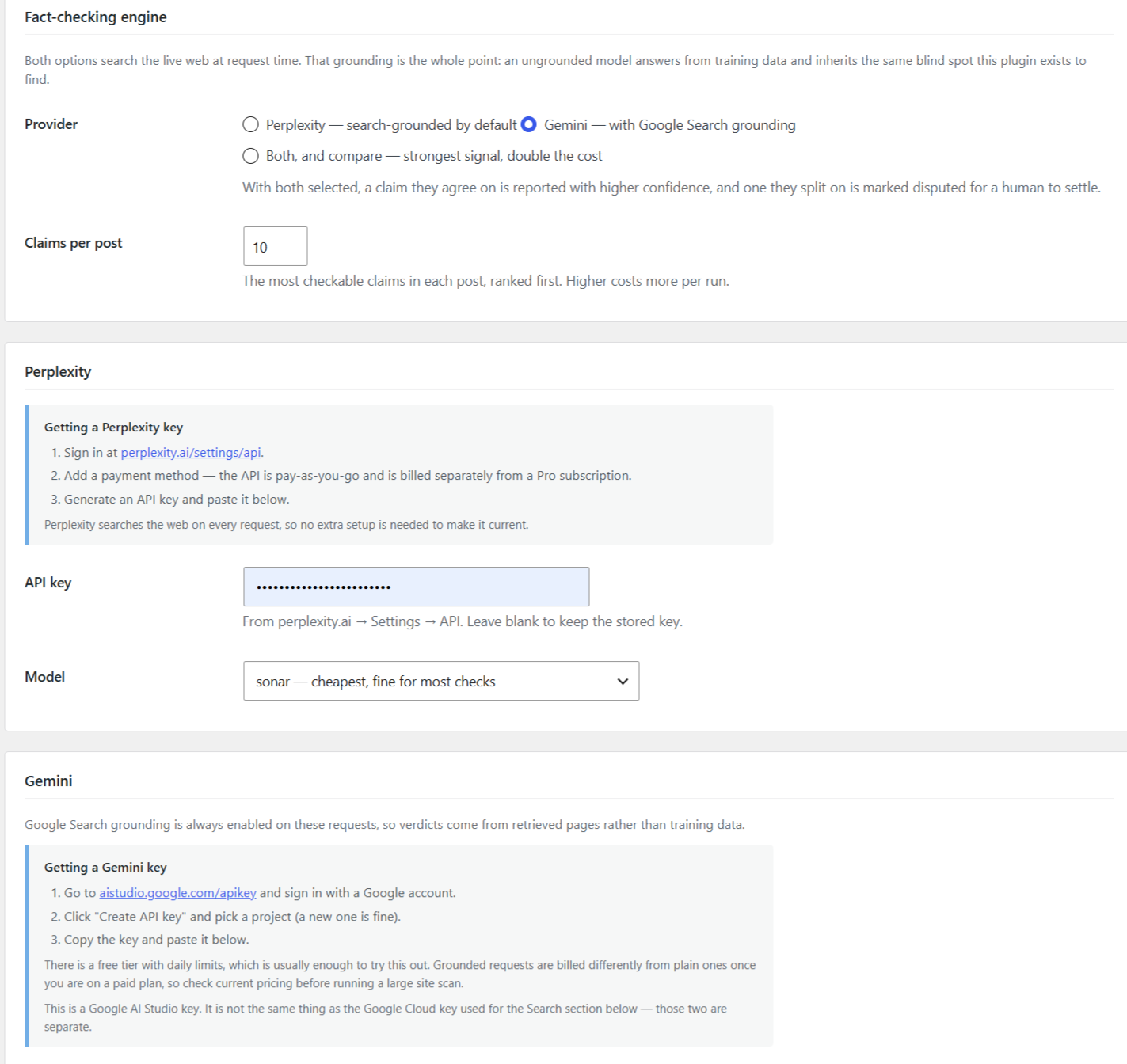
You can use Perplexity, Gemini, or both.
Both are grounded: Perplexity searches at request time by default, and the Gemini requests always attach the Google Search tool. That grounding matters more than which model you pick. An ungrounded model answers a fact-check from its own training data, which means it carries the same cutoff blind spot the plugin exists to find — it would be checking stale facts against stale facts.
Running both costs twice as much but is meaningfully stronger: claims the two agree on are reported with higher confidence, and claims they split on are marked disputed so a human decides rather than the plugin guessing.
What it looks at
- Dangling offers to keep working (“Would you like me to…”, “Let me know if you’d like…”, “3 more prompts”)
- Assistant self-reference (“As an AI language model”, “I don’t have access to real-time data”)
- Prompt echoes and delivery framing (“Certainly! Here’s a draft”, “As requested”)
- Unfilled scaffolding (
[Insert company name], “Word count: 1,450”, stray SEO briefing fields) - Raw markdown that never converted (
**bold**,## headings) - Knowledge-cutoff language (“as of my last update”, “the latest version is”)
- Stock generated phrasing (“delve into”, “in today’s fast-paced world”, “a testament to”)
The last category is deliberately low-weight. Plenty of human writers say “it’s important to note”. On its own it proves nothing, and the scoring reflects that.
External services
Pattern scanning is entirely local. The plugin makes no network requests at all until you add an API key and turn on AI mode.
When you do enable fact-checking, the plugin sends data to whichever services you have configured. In every case what leaves your site is the same: individual sentences extracted from the post being checked, plus the post title and its publication date for context. Never the full post, never user accounts, never visitor data.
Perplexity AI — used to fact-check claims when Perplexity is the selected provider.
Data sent: extracted claim sentences, post title, post publication date.
Sent to: https://api.perplexity.ai/chat/completions
Terms: https://www.perplexity.ai/hub/legal/terms-of-service
Privacy: https://www.perplexity.ai/hub/legal/privacy-notice
Google Gemini API — used to fact-check claims when Gemini is the selected provider. Google Search grounding is enabled on these requests, so your claim text is used as a search input.
Data sent: extracted claim sentences, post title, post publication date.
Sent to: https://generativelanguage.googleapis.com/
Terms: https://ai.google.dev/gemini-api/terms
Privacy: https://policies.google.com/privacy
Note that Google treats its free and paid Gemini tiers differently. On the free tier, Google’s terms state that submitted content may be used to develop Google products and that human reviewers may read it. On a paid tier it is not used to improve their products. If you are checking unpublished drafts, read those terms before using a free key.
Google Fact Check Tools API — optional. Looks for published fact-checks matching a claim.
Data sent: keywords derived from a single claim sentence.
Sent to: https://factchecktools.googleapis.com/
Terms: https://developers.google.com/terms
Privacy: https://policies.google.com/privacy
Google Programmable Search (Custom Search JSON API) — optional, and only active if you supply a Search Engine ID. Used to corroborate contested claims and judge how recent the supporting sources are.
Data sent: keywords derived from a single claim sentence.
Sent to: https://www.googleapis.com/customsearch/v1
Terms: https://developers.google.com/terms
Privacy: https://policies.google.com/privacy
Responses are cached for 24 hours so repeated checks of unchanged content do not re-send anything.
Installation
- Upload the
ai-slop-checkerfolder to/wp-content/plugins/. - Activate it.
- Open AI Slop in the admin menu.
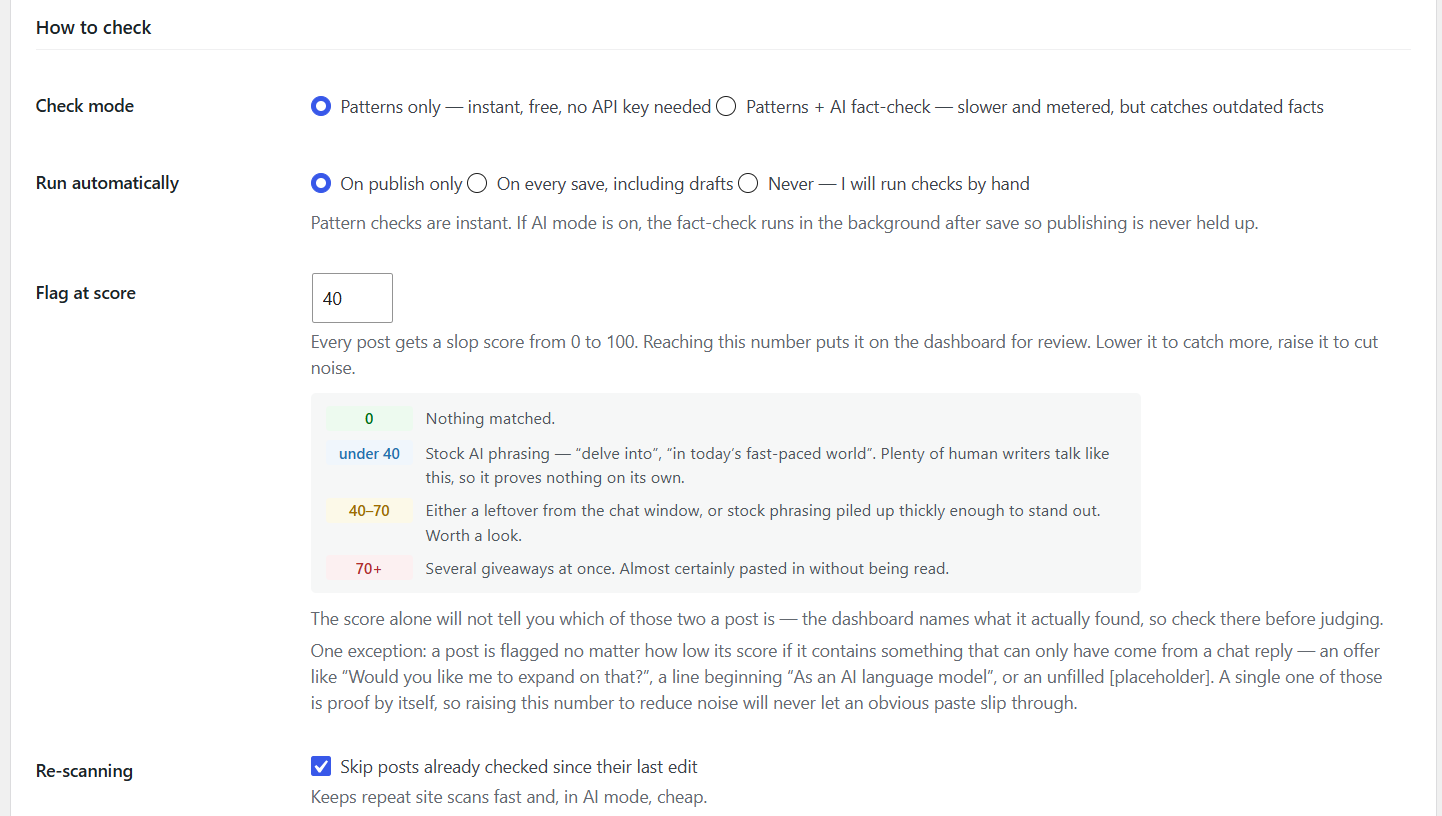
Pattern checking works immediately. For fact-checking, switch Check Mode to “Patterns + AI”, pick a provider, and add that provider’s key:
- Perplexity — key from perplexity.ai → Settings → API.
- Gemini — key from Google AI Studio. There is a free tier.
The Gemini model ID is a free-text field on purpose. Google retires and releases IDs faster than this plugin ships, so you can type a current one without waiting for an update.
The separate Google Search & Fact Check section is optional and independent of Gemini. The Fact Check Tools API needs only an API key; web corroboration also needs a Programmable Search Engine ID set to search the whole web.
Frequently asked questions
Does this prove something was written by AI?
No, and it does not try to. It finds evidence of a specific, sloppy workflow: pasting a chat reply in without reading it. A high score means artifacts of a chat session survived into the published text. That is a real editorial problem whether or not you care how the draft was produced. A well-edited AI-assisted post scores clean here. That is the intended behaviour.
Will the check slow down publishing?
No. The pattern scan runs inline and takes milliseconds. If AI mode is on, the fact-check is queued to run just after the save completes, so hitting Publish never waits on a network call.
Can I close the tab during a site-wide scan?
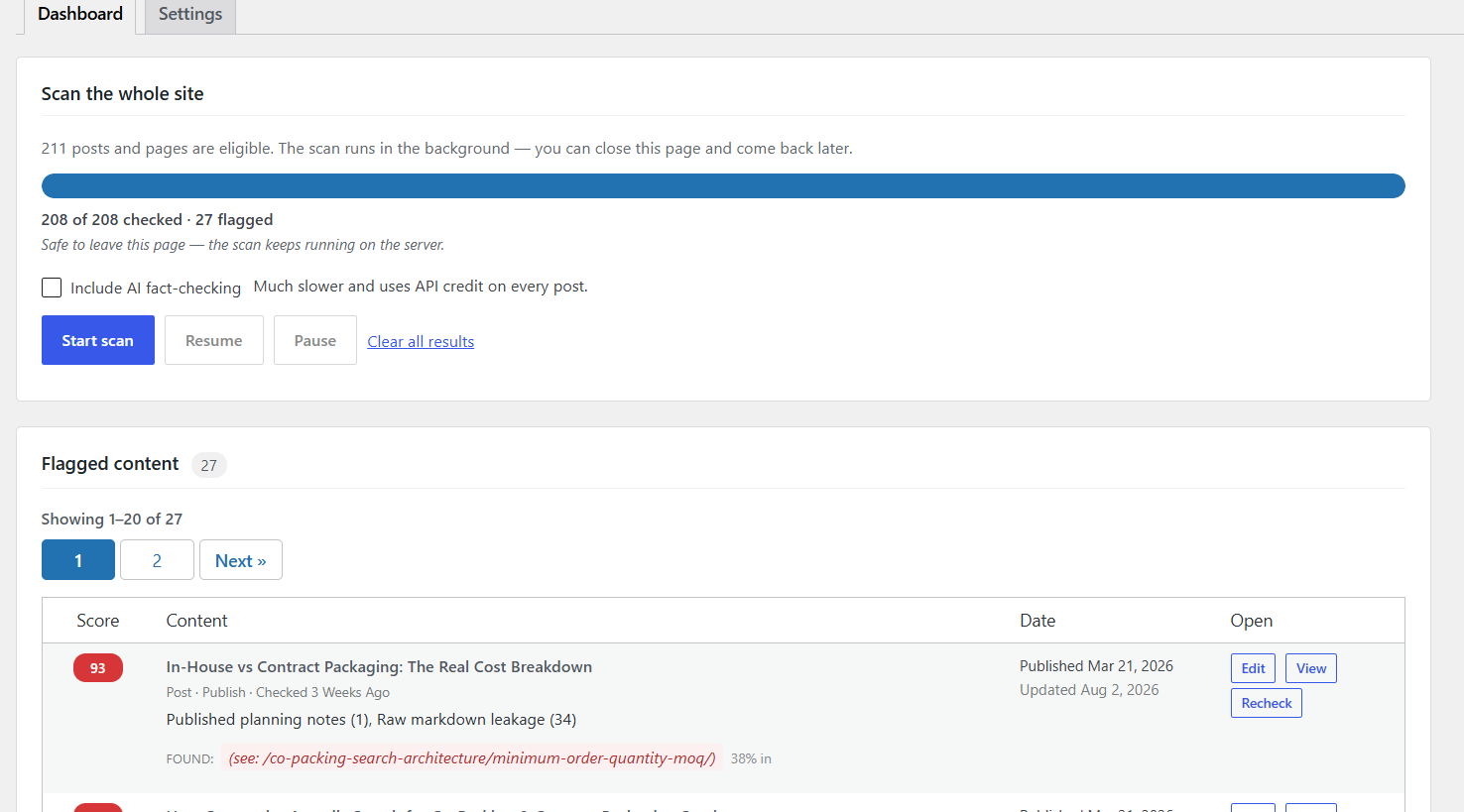
Yes. The scan keeps a cursor in the database and runs server-side on WP-Cron, so it survives page navigation and picks up where it stopped. If your host has WP-Cron disabled, or blocks the loopback requests it depends on, the scan still completes as long as the dashboard is open — the page drives the work itself rather than waiting on cron. Leaving the tab open is the reliable option; closing it relies on cron working. A scan that dies part way through, for any reason, loses at most the single post it was working on. If a particular post crashes the scanner twice, it is stepped over and…
How much does a site scan cost?
Pattern-only scans are free and make no network requests, so running one across a whole site costs nothing. With AI fact-checking enabled, each post costs one call to your chosen provider — two if you have both selected — plus up to a couple of Google calls for contested claims. Across a large site that adds up, and free API tiers have rate limits a full crawl will hit. Check your provider’s limits before starting one. “Skip posts already checked since their last edit” is on by default so repeat scans stay cheap, and API responses are cached for 24 hours. A practical approach on a large site…
Screenshots
For developers
Is this your plugin? Show off the numbers.
Add a live badge to your site, docs or GitHub README. It updates on its own — no account needed.
Best AI Slop Checker alternatives
All AI plugins →





FAQ
AI Slop Checker: quick answers
Straight answers, pulled from live WordPress.org data.
Live data from WordPress.org · checked Oct 12, 2026
Is AI Slop Checker free?
Yes. AI Slop Checker is free to download and use from the official WordPress.org plugin directory.
Is AI Slop Checker safe to use in 2026?
AI Slop Checker works, but test it on a staging site before relying on it in 2026. Was last updated 2 months ago, and scores 60/100 on our health check.
How many websites use AI Slop Checker?
AI Slop Checker is active on <10 WordPress websites and has been downloaded 321 times since it launched in August 2026. It was downloaded 165 times in the last 30 days.
Does AI Slop Checker work with WordPress 7.1?
Yes. The developer has tested AI Slop Checker up to WordPress 7.1.3, the latest release. It requires WordPress 5.8 or newer.
What PHP version does AI Slop Checker need?
AI Slop Checker requires PHP 7.4 or higher. Most hosts run PHP 8.x today, so it works on any modern WordPress hosting.
When was AI Slop Checker last updated?
The latest version, 1.0.0, was released on August 25, 2026 (2 months ago).
Who makes AI Slop Checker?
AI Slop Checker is developed and maintained by tampawebtech.
What are the best alternatives to AI Slop Checker?
The most popular alternatives to AI Slop Checker are Elementor Website Builder (10M+ installs), All in One SEO (2M+ installs) and AI Agent by SiteGround (1M+ installs).
Powered by PageForge
Want thousands of pages that rank like these? Build them in an afternoon.
This directory runs on the same engine as PageForge. Turn any spreadsheet, CSV or API into thousands of fast, SEO-ready WordPress pages — with schema, internal links and AI-written copy baked in.
- CSV, Google Sheets & API data sources
- AI content, schema & internal links per page
- Works with Elementor, Gutenberg, Yoast & Rank Math
- Free on WordPress.org — no credit card


