



AI Provider for ChatGPT – ChatGPT Connector, No API Key Needed
AI Provider for ChatGPT connects the AI features in WordPress to your own ChatGPT plan. You sign in with Sign in with ChatGPT, OpenAI’s official sign-in for apps that use a ChatGPT plan, and AI requests from your site…

Solid choice
AI Provider for ChatGPT is a solid plugin choice in 2026, with a few things worth checking first. It runs on 30+ sites and was last updated 2 days ago, and scores 67/100 on our health check.
- Actively developed — last update 2 days ago
- Tested with the latest WordPress (7.1)
- Momentum — downloads up 30.9% vs the previous 30 days
- Small user base (30+ active installs)
- Very few reviews so far
How does it stack up?
Side-by-side on installs, updates, ratings & support



Daily downloads
Download spikes usually follow a new release — each site that auto-updates counts as a download.
Rankings
Where AI Provider for ChatGPT stands todayWordPress.org search rankings
Live position in the plugin search, top 100| Keyword | Position |
|---|---|
| AI | >100 |
| ai-provider | >100 |
| ChatGPT | #83 |
| connector | >100 |
| openai | >100 |
Version adoption
Share of active sites per release.
About AI Provider for ChatGPT
From the official readme · v1.0.1Description
AI Provider for ChatGPT connects the AI features in WordPress to your own ChatGPT plan. You sign in with Sign in with ChatGPT, OpenAI’s official sign-in for apps that use a ChatGPT plan, and AI requests from your site are billed to that ChatGPT Plus, Pro or Go plan. You do not need an OpenAI API key or a separate API account.
Any plugin or theme that uses the WordPress AI Client can call ChatGPT models the same way it calls other providers.
Connecting takes about a minute and the settings screen walks you through every step. Your ChatGPT account stays private: the plugin runs only on your website, and the plugin developer never receives your sign-in, your tokens or anything you send.
Features:
- Text generation with the models your ChatGPT plan offers, listed from your account
- Multi-turn chat history
- Function calling and tool use
- Structured output via JSON schema
- Image input
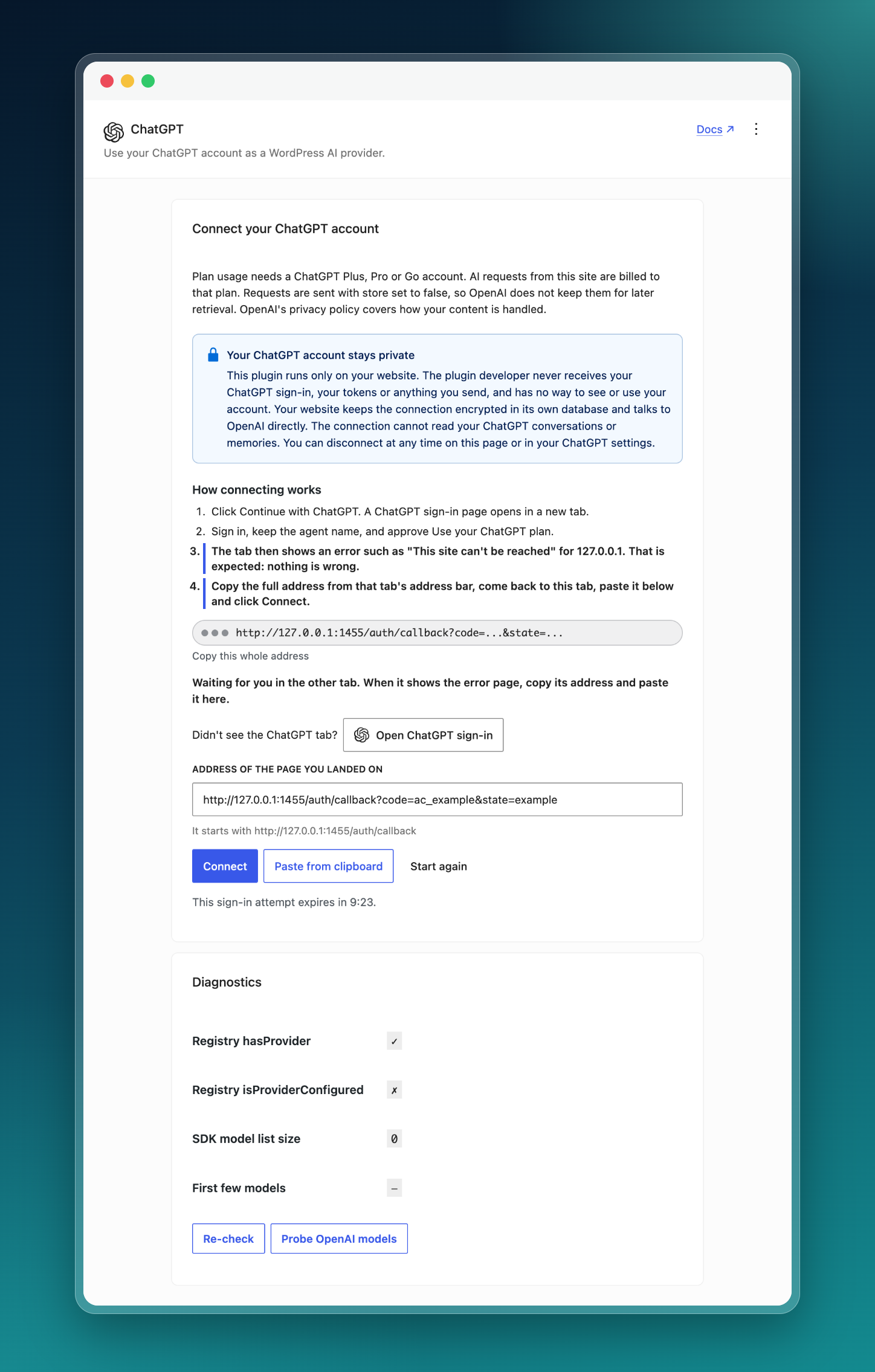
- A guided settings screen: step-by-step instructions, Paste from clipboard, and a button to reopen the ChatGPT sign-in page
- Refresh, disconnect and switch to a different ChatGPT account from the settings screen, with connection diagnostics
- Clear messages when your ChatGPT session ends or your plan’s usage limit is reached, with a link to manage usage in ChatGPT
Requirements:
- PHP 7.4 or higher, with the
sodiumandopensslextensions - A ChatGPT Plus, Pro or Go account. Free accounts are not eligible for plan usage.
- WordPress 7.0+ (AI Client is bundled in core), or WordPress 6.9 with the WordPress/php-ai-client package installed
Privacy:
Prompts and content you send through the AI Client are sent to OpenAI for processing. Requests are sent with store set to false, so OpenAI does not keep them for later retrieval. OpenAI’s privacy policy covers how your content is handled. Your tokens are stored encrypted in your site’s database and are sent only to OpenAI. See the External services section for what is sent and when.
External services
This plugin connects to services operated by OpenAI, L.L.C. so the WordPress AI Client can use your ChatGPT plan. Nothing is sent to OpenAI until an administrator starts a sign-in. The plugin contacts two OpenAI domains, auth.openai.com and api.openai.com, and no other third-party service.
https://auth.openai.com/api/accounts/authorizeis opened in the administrator’s browser when they click Continue with ChatGPT. The address carries the client id, a stable id for this site, the requested permissions, a one-time state and nonce, and a PKCE challenge. On the first sign-in it also carries the agent name “AI Provider for ChatGPT” (not when theCHATGPT_OAUTH_CLIENT_IDconstant is set). On a new sign-in for an existing connection it carries the connected account’s email and ID token as hints.POST https://auth.openai.com/api/accounts/oauth/tokenis called from your server when the administrator pastes the sign-in address (sends the client id, the one-time code, the PKCE verifier, the redirect address and the API resource), and when the access token is due for renewal, including a weekly scheduled refresh (sends the client id, the refresh token and the API resource). No prompt or user content is sent.GET https://auth.openai.com/.well-known/jwks.jsonis called from your server to fetch OpenAI’s public keys and verify the ID token at sign-in. Nothing about your site or account is sent. The keys are cached for 24 hours.POST https://auth.openai.com/api/accounts/oauth/revokeis called when the administrator clicks Disconnect or Use a different ChatGPT account, and once when the plugin is deleted while still connected (sends the client id and the refresh token). On deletion the call is best effort: if it fails, the plugin’s data is removed anyway.GET https://api.openai.com/v1/modelsis called with the access token to list the models your plan offers, usually at most once an hour (the list is cached on your site and fetched again after a sign-in, a disconnect or Clear cached model list) and from the diagnostics probe. No prompt or user content is sent.POST https://api.openai.com/v1/responsesis called whenever a plugin or theme on your site uses the AI Client with a ChatGPT model. The request carries the access token and what the calling code supplies: the prompt and conversation, system instructions, tool definitions, JSON schema, and any attached images or files.
These services are provided by OpenAI. By connecting an account and using this provider you agree to OpenAI’s terms:
- Terms of Use: https://openai.com/policies/terms-of-use/
- Privacy Policy: https://openai.com/policies/privacy-policy/
- Sign in with ChatGPT: https://developers.openai.com/siwc/token-sharing-open-source
Installation
- Upload the plugin files to
/wp-content/plugins/ai-provider-for-chatgpt/, or install through the WordPress plugin browser. - Activate the plugin through the Plugins menu in WordPress.
- Go to Settings > ChatGPT and click Continue with ChatGPT. A ChatGPT sign-in page opens in a new tab.
- Sign in, keep the agent name, and approve Use your ChatGPT plan. The tab then shows an error such as “This site can’t be reached” for 127.0.0.1. That is expected.
- Copy the full address from that tab’s address bar (it starts with
http://127.0.0.1:1455/auth/callback), paste it on the settings screen, or use Paste from clipboard, and click Connect. - Any plugin or theme that uses the WordPress AI Client can now generate text with the ChatGPT models your plan offers.
Frequently asked questions
How do I connect?
Settings > ChatGPT shows the steps under How connecting works: Click Continue with ChatGPT. A ChatGPT sign-in page opens in a new tab. Sign in, keep the agent name, and approve Use your ChatGPT plan. The tab then shows an error such as “This site can’t be reached” for 127.0.0.1. That is expected: nothing is wrong. Copy the full address from that tab’s address bar, come back to the settings tab, paste it and click Connect. Paste from clipboard pastes it for you; the address starts with http://127.0.0.1:1455/auth/callback. If no ChatGPT tab opened, click Open ChatGPT sign-in under “Didn’t see…
Why does the browser show a page that cannot load?
After you approve, ChatGPT sends your browser to http://127.0.0.1:1455/auth/callback, an address on your own computer where nothing is listening, so the tab shows an error such as “This site can’t be reached”. That is expected: nothing is wrong. Copy the full address from that tab’s address bar and paste it on the settings screen. The page address carries a one-time code; your site exchanges it for tokens when you paste it. The code is useless without the secret your site kept when you clicked Continue with ChatGPT.
Which accounts are eligible?
ChatGPT Plus, Pro and Go accounts. OpenAI grants plan usage to other apps only on these plans. If your account does not grant plan usage, the plugin shows a message and saves nothing.
How do I connect a different ChatGPT account?
Disconnect keeps the site’s registration with OpenAI, so the next sign-in reuses it and must use the same ChatGPT account. To switch accounts, click Use a different ChatGPT account on Settings > ChatGPT. It revokes any stored tokens and deletes the site’s copy of the registration (the issued client id and the account’s id, email and name); the app stays listed under ChatGPT Settings > Security and login > Sign in with ChatGPT, where you can disconnect it. Then sign in with the other account.
Where do I manage usage?
Usage and per-app limits are at https://chatgpt.com/settings/usage. The settings screen links there with Manage usage in ChatGPT. To disconnect the plugin from your ChatGPT account, go to ChatGPT Settings > Security and login > Sign in with ChatGPT and select Disconnect.
I used version 0.1.x. What changes?
Version 1.0.0 connects with Sign in with ChatGPT and no longer uses the command line tool or auth.json files. Existing connections are removed on update; sign in again under Settings > ChatGPT. Free accounts are no longer eligible.
Does this plugin work without the WordPress AI Client?
No. The plugin registers ChatGPT with the AI Client provider registry, so the AI Client must be available, either bundled in WordPress 7.0+ or installed as a separate package on 6.9.
Does it support image generation?
No. OpenAI does not allow image generation for apps that use a ChatGPT plan through Sign in with ChatGPT; it is only available with an OpenAI API key. If your site needs image generation, use the official AI Provider for OpenAI plugin with an API key next to this one. This plugin covers text generation, chat, tool use, structured output and image input (reading images you attach).
Can the plugin developer see my ChatGPT account?
No. This plugin runs only on your website. The plugin developer never receives your ChatGPT sign-in, your tokens or anything you send, and has no way to see or use your account. Your website keeps the connection encrypted in its own database and talks to OpenAI directly; the plugin contacts no other service (see External services). The connection cannot read your ChatGPT conversations or memories; it only lets your site use your plan for AI requests. OpenAI says so in Using your ChatGPT plan in other apps and sites (conversations and memories) and in the Sign in with ChatGPT documentation…
How are tokens stored?
Tokens are stored in the WordPress options table on your own site, encrypted with sodium_crypto_secretbox using a key derived from your wp-config.php salts. They are sent only to OpenAI, to make requests and to refresh or revoke the connection.
Changelog
Fixes a fatal error on WordPress 7 when updating from 0.1.x. Update now.
1.0.1
- Fixed a fatal error on WordPress 7 (Psr\SimpleCache\CacheInterface not found) when updating from 0.1.x with a connected account, connecting or disconnecting.
1.0.0
- Connect with Sign in with ChatGPT on a guided settings screen: no command line tool, no API key, billed to your ChatGPT Plus, Pro or Go plan.
- Existing connections must sign in again after updating, and Free ChatGPT accounts are no longer eligible.
0.1.4
- WordPress 7.1 compatibility.
0.1.3
- Removed the direct reads of the core
connectors_ai_chatgpt_api_keyoption from the connection and diagnostics REST endpoints. The connector’s configured state is now read solely through the AI Client API (isProviderConfigured()); the option is still written so the WordPress AI plugin can detect the connector’s credentials, but it is no longer read back by this plugin.
0.1.2
- Prefixed all plugin-owned options, transients, and hooks with
halawa_chatgpt_to avoid collisions in WordPress’s shared namespaces. - Documented every external service the plugin contacts and corrected the model-list endpoint URL in the readme.
- Made the public CLI-pairing REST route’s intentionally-public design explicit (
__return_true) while keeping its single-use-token security boundary and per-IP rate limiting. - Added uninstall cleanup that removes the plugin’s stored options and transients.
0.1.1
- Fixed a “Missing the output key” error from the Codex
/responsesstream.
Screenshots
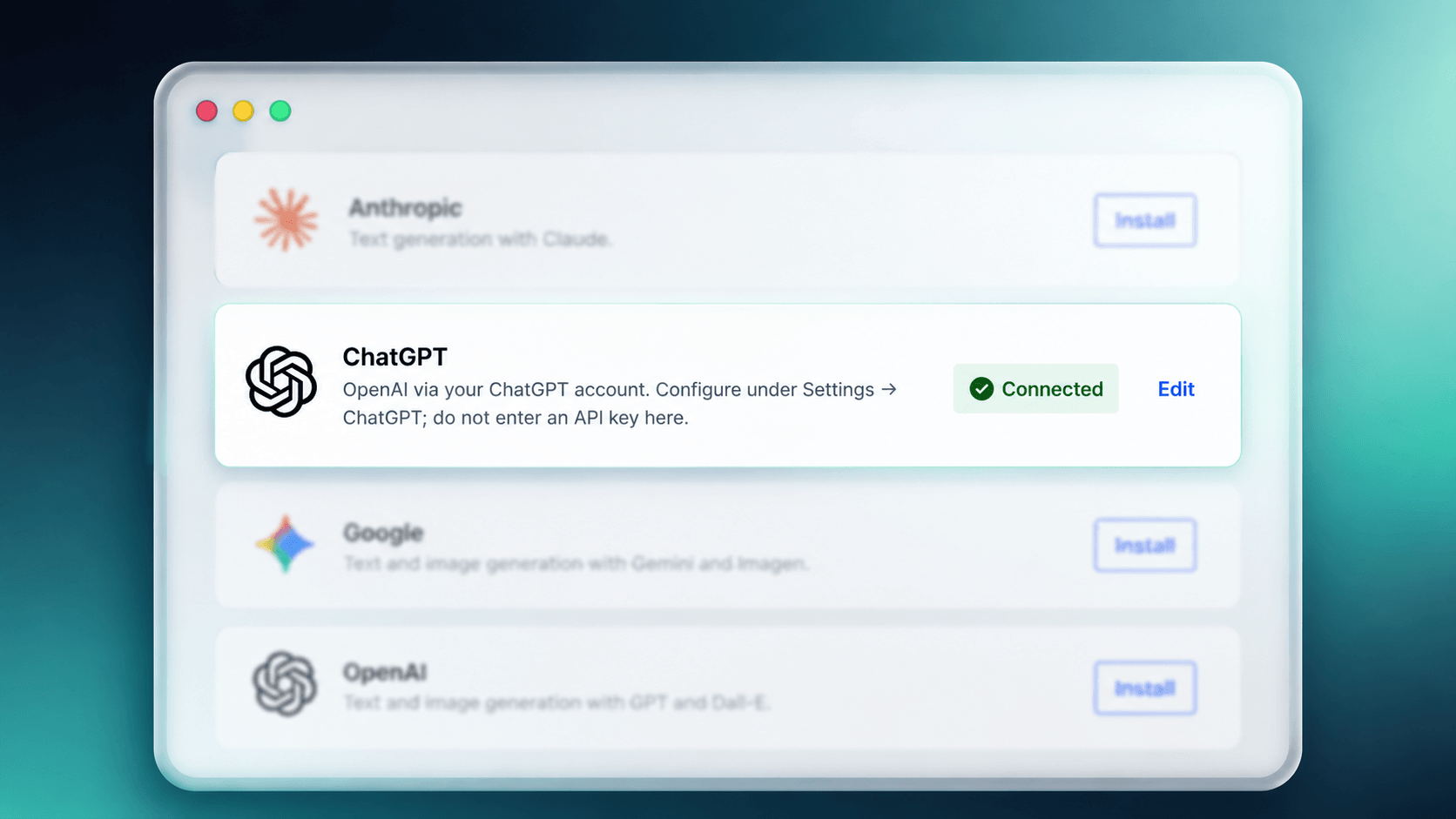
For developers
Is this your plugin? Show off the numbers.
Add a live badge to your site, docs or GitHub README. It updates on its own — no account needed.
Best AI Provider for ChatGPT alternatives
All AI plugins →





FAQ
AI Provider for ChatGPT: quick answers
Straight answers, pulled from live WordPress.org data.
Live data from WordPress.org · checked Oct 19, 2026
Is AI Provider for ChatGPT free?
Yes. AI Provider for ChatGPT is free to download and use from the official WordPress.org plugin directory.
Is AI Provider for ChatGPT safe to use in 2026?
AI Provider for ChatGPT is a solid plugin choice in 2026, with a few things worth checking first. It runs on 30+ sites and was last updated 2 days ago, and scores 67/100 on our health check.
How many websites use AI Provider for ChatGPT?
AI Provider for ChatGPT is active on 30+ WordPress websites and has been downloaded 1,710 times since it launched in June 2026. It was downloaded 771 times in the last 30 days.
Does AI Provider for ChatGPT work with WordPress 7.1?
Yes. The developer has tested AI Provider for ChatGPT up to WordPress 7.1.3, the latest release. It requires WordPress 6.9 or newer.
What PHP version does AI Provider for ChatGPT need?
AI Provider for ChatGPT requires PHP 7.4 or higher. Most hosts run PHP 8.x today, so it works on any modern WordPress hosting.
When was AI Provider for ChatGPT last updated?
The latest version, 1.0.1, was released on October 17, 2026 (2 days ago).
Who makes AI Provider for ChatGPT?
AI Provider for ChatGPT is developed and maintained by Abdalsalaam Halawa.
What are the best alternatives to AI Provider for ChatGPT?
The most popular alternatives to AI Provider for ChatGPT are Elementor Website Builder (10M+ installs), All in One SEO (2M+ installs) and AI Agent by SiteGround (1M+ installs).
Powered by PageForge
Want thousands of pages that rank like these? Build them in an afternoon.
This directory runs on the same engine as PageForge. Turn any spreadsheet, CSV or API into thousands of fast, SEO-ready WordPress pages — with schema, internal links and AI-written copy baked in.
- CSV, Google Sheets & API data sources
- AI content, schema & internal links per page
- Works with Elementor, Gutenberg, Yoast & Rank Math
- Free on WordPress.org — no credit card


