


AI + Block Editor
Generate Captions/Headlines, Summaries, Slugs, SEO Keywords using our amazing plugin. It is fast and very useful for users who need to quickly generate high-quality content with minimal effort. Whether you’re a blogger…

Solid choice
AI + Block Editor is a solid plugin choice in 2026, with a few things worth checking first. It runs on 100+ sites, is rated 5/5 and was last updated 3 months ago, and scores 66/100 on our health check.
- Momentum — downloads up 54% vs the previous 30 days
- Small user base (100+ active installs)
- Very few reviews so far
How does it stack up?
Side-by-side on installs, updates, ratings & support



Daily downloads
Download spikes usually follow a new release — each site that auto-updates counts as a download.
Rankings
Where AI + Block Editor stands todayWordPress.org search rankings
Live position in the plugin search, top 100| Keyword | Position |
|---|---|
| AI | >100 |
| assistant | >100 |
| block | >100 |
| chat gpt | #17 |
| editor | #92 |
Version adoption
Share of active sites per release.
Rating breakdown
★★★★★★★★★★ 5 from 1 reviews
About AI + Block Editor
From the official readme · v1.10.0Description
Add AI Capabilities to the Block Editor.
Generate Captions/Headlines, Summaries, Slugs, SEO Keywords using our amazing plugin. It is fast and very useful for users who need to quickly generate high-quality content with minimal effort. Whether you’re a blogger, editor, or content creator, our plugin helps streamline your workflow by providing intelligent suggestions that enhance readability and SEO performance.
Save time and improve engagement with AI-powered insights directly within the WordPress block editor.
✔️ Features
Our plugin comes with everything you need to add AI capabilities to your Block Editor.
✔️ Support for LLMs such as ChatGPT, Gemini, Deepseek, Grok, Claude and a host of others.
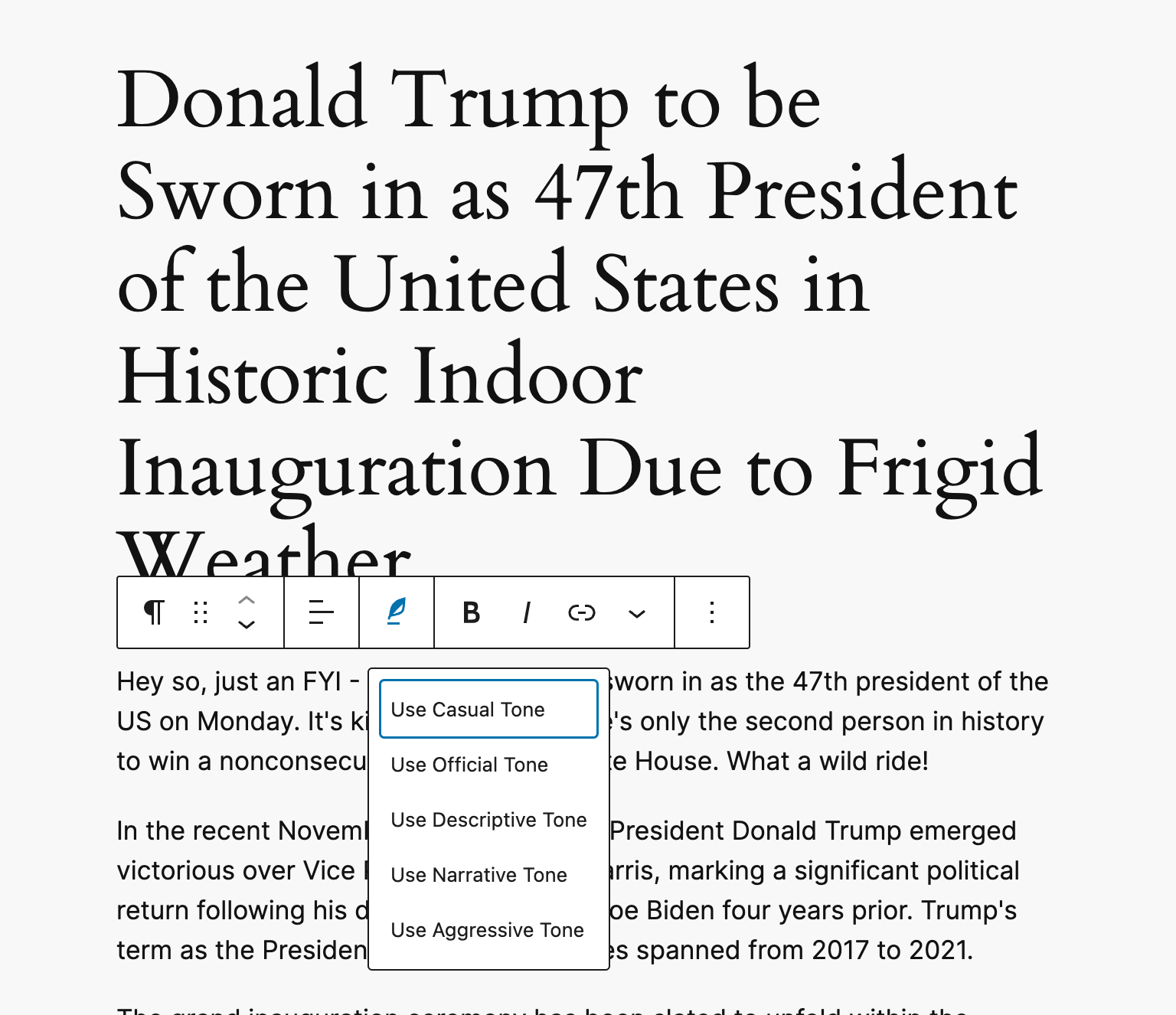
✔️ Change Text Tone (casual, official, narrative, and so on…) in block editor.
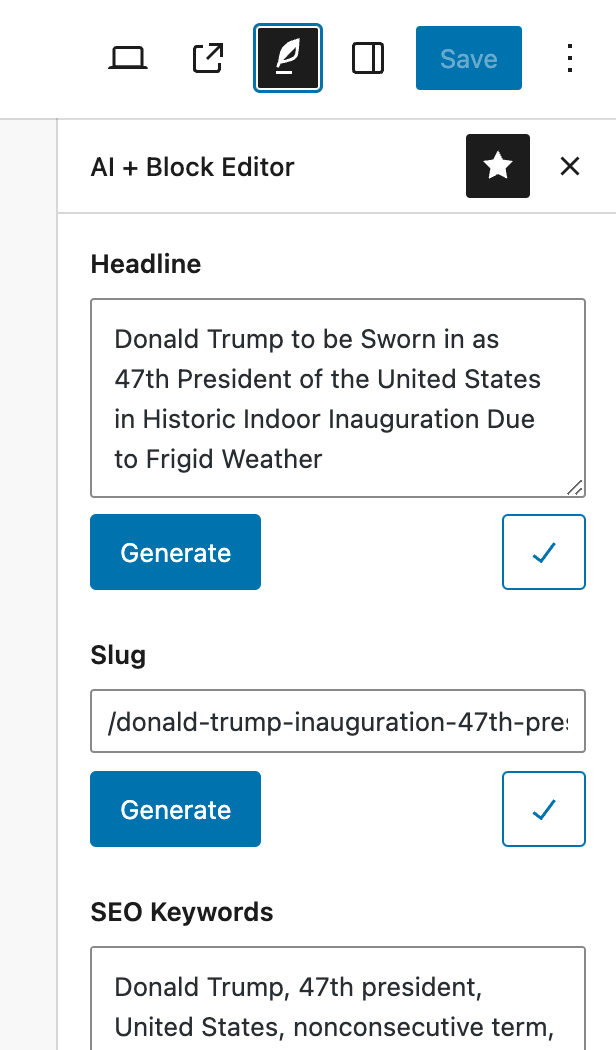
✔️ Generate Title/Headline using AI.
✔️ Generate Summary/Excerpts.
✔️ Generate SEO friendly URL Slugs for your post articles.
✔️ Generate SEO Keywords to help with SEO optimisation.
✔️ Custom Filters to help user modify AI prompts.
✔️ Shortcut Keys – CMD + SHIFT + A + I.
✔️ Available in mutiple langauges such as Arabic, Chinese, Hebrew, Hindi, Russian, German, Italian, Croatian, Spanish & French languages.
✔️ Backward compatible, works with most WP versions.
✨ Getting Started
-
To get started, you would need to have an API key from your API Provider. For e.g. Open AI is https://platform.openai.com/api-keys.
-
If you have gotten your API key, you should save it into your plugin options page.
-
Make sure to enable the checkbox for your API Provider for e.g. Enable Open AI or any other as applicable to you.
You can get a taste of how this plugin works, by using the demo link.
🔌🎨 Plug and Play or Customize
The AI Plus Block Editor plugin is built to work right out of the box. Simply install, activate and start using.
Want to add your personal touch? All of our documentation can be found here. You can override the plugin’s behaviour with custom logic of your own using hooks.
Contribute
If you’d like to contribute to the development of this plugin, you can find it on GitHub.
To build, clone repo and run yarn install && yarn build
Installation
- Go to Plugins > Add New on your WordPress admin dashboard.
- Search for AI + Block Editor plugin from the official WordPress plugin repository.
- Click ‘Install Now’ and then ‘Activate’.
- To get started, you would need to have an API key from your API Provider. For e.g. Open AI is https://platform.openai.com/api-keys.
- If you have gotten your API key, you should save it into your plugin options page.
- Make sure to enable the checkbox for your API Provider for e.g. Enable Open AI or any other as applicable to you.
- That’s it! You’re all set to start using AI.
Changelog
1.10.0
- Feat: Add More Plugins options page.
- Refactor: Abstract changes to Pluginate packagist monorepo.
- Fix issues with missing logos for plugins.
1.9.2
- Tested up to WP 7.0.
1.9.1
- Chore: Update CI/CD pipeline.
1.9.0
- Feat: Add custom filters for LLM options
apbe_open_ai_options,apbe_gemini_options,apbe_deepseek_options,apbe_grok_options,apbe_claude_options. - Feat: Add language translations for Japanese, Indonesia, Turkish, Polish, Dutch, Brazil, Portuguese.
- Refactor: Replace
get_400_responsewithget_error_response. - Refactor: Replace repeated mocks using WPMockTestCase library.
- Refactor: Replace fully qualified class paths with their use counterparts.
- Refactor: Move admin page options to the various provider classes respectively.
- Refactor: Make
showAnimatedAiTextfunction reusable. - Test: Add e2e tests for plugin codebase.
- Tested up to WP 6.9.
1.8.1
- Specify
wordpress-pluginas Composer package type. - Tested up to WP 6.9.
1.8.0
- Feat: Implement Claude AI provider.
- Fix: Load missing Grok provider correctly.
- Feat: Implement AI provider abstraction.
- Refactor: Improve AI providers.
- Feat: Enable filtering of AI Switcher options.
- Feat: Add error logging capabilities.
- Chore: Update plugin menu icon.
- Feat: Add custom filters:
apbe_ai_provider_success_call.apbe_ai_provider_fail_call.apbe_ai_provider_response.apbe_ai_providers.apbe_claude_api_url.apbe_claude_args.apbe_claude_system_prompt.apbe_deepseek_system_prompt.apbe_open_ai_system_prompt.
- Docs: Update README docs.
- Test: Update unit tests.
- Tested up to WP 6.8.2.
Screenshots


For developers
Is this your plugin? Show off the numbers.
Add a live badge to your site, docs or GitHub README. It updates on its own — no account needed.
Best AI + Block Editor alternatives
All AI plugins →





FAQ
AI + Block Editor: quick answers
Straight answers, pulled from live WordPress.org data.
Live data from WordPress.org · checked Sep 30, 2026
Is AI + Block Editor free?
Yes. AI + Block Editor is free to download and use from the official WordPress.org plugin directory.
Is AI + Block Editor safe to use in 2026?
AI + Block Editor is a solid plugin choice in 2026, with a few things worth checking first. It runs on 100+ sites, is rated 5/5 and was last updated 3 months ago, and scores 66/100 on our health check.
How many websites use AI + Block Editor?
AI + Block Editor is active on 100+ WordPress websites and has been downloaded 12,706 times since it launched in January 2025. It was downloaded 884 times in the last 30 days.
Does AI + Block Editor work with WordPress 7.1?
AI + Block Editor is officially tested up to WordPress 7.0.6, while the latest release is 7.1.2. It may still work, but try it on a staging site first.
What PHP version does AI + Block Editor need?
AI + Block Editor requires PHP 7.4 or higher. Most hosts run PHP 8.x today, so it works on any modern WordPress hosting.
When was AI + Block Editor last updated?
The latest version, 1.10.0, was released on July 8, 2026 (3 months ago).
Who makes AI + Block Editor?
AI + Block Editor is developed and maintained by badasswp.
What are the best alternatives to AI + Block Editor?
The most popular alternatives to AI + Block Editor are Elementor Website Builder (10M+ installs), All in One SEO (2M+ installs) and AI Agent by SiteGround (1M+ installs).
Powered by PageForge
Want thousands of pages that rank like these? Build them in an afternoon.
This directory runs on the same engine as PageForge. Turn any spreadsheet, CSV or API into thousands of fast, SEO-ready WordPress pages — with schema, internal links and AI-written copy baked in.
- CSV, Google Sheets & API data sources
- AI content, schema & internal links per page
- Works with Elementor, Gutenberg, Yoast & Rank Math
- Free on WordPress.org — no credit card


