



Mind – AI Page Builder
Mind is a WordPress plugin that transforms your page building experience. Powered by AI technology, it helps you create and modify entire page sections, layouts, and content directly in the WordPress editor. With…

Solid choice
Mind – AI Page Builder is a solid plugin choice in 2026, with a few things worth checking first. It runs on 10+ sites and was last updated 1 month ago, and scores 62/100 on our health check.
- Tested with the latest WordPress (7.1)
- Momentum — downloads up 50.1% vs the previous 30 days
- Small user base (10+ active installs)
- Very few reviews so far
How does it stack up?
Side-by-side on installs, updates, ratings & support



Daily downloads
Download spikes usually follow a new release — each site that auto-updates counts as a download.
Rankings
Where Mind – AI Page Builder stands todayWordPress.org search rankings
Live position in the plugin search, top 100| Keyword | Position |
|---|---|
| AI | >100 |
| ai editor | >100 |
| ai page builder | >100 |
| copilot | #64 |
| gpt | >100 |
Version adoption
Share of active sites per release.
About Mind – AI Page Builder
From the official readme · v1.0.1Description
Mind is a WordPress plugin that transforms your page building experience. Powered by AI technology, it helps you create and modify entire page sections, layouts, and content directly in the WordPress editor. With support for Anthropic and OpenAI models through WordPress Connectors, Mind seamlessly integrates with the WordPress block editor to enhance your page building workflow.
🏗️ Complete Page Building Solution
Mind is not just an AI writing assistant – it’s a full-featured page builder that allows you to:
- Create entire page layouts with a simple text prompt
- Design custom sections with specific styles and content
- Modify and improve existing page sections
- Build complex page structures without coding knowledge
🚀 Community-Driven Development
This plugin was created as an experiment in the hope that the community will influence the course of its development. We welcome any wishes, feature requests, or bug reports. Join the discussion on GitHub Discussions to help shape the future of Mind.
✍️ Writing Assistance
Mind provides various tools to help with writing content. You can use it to write an entire post, create a catchy post title, or draft a comprehensive post outline. Whether you need assistance in brainstorming ideas or structuring your content, Mind is there to support you.
- Write a post about a specific topic
- Write a post title about a specific topic
- Write a post outline about a specific topic
📝 Writing Language Improvement
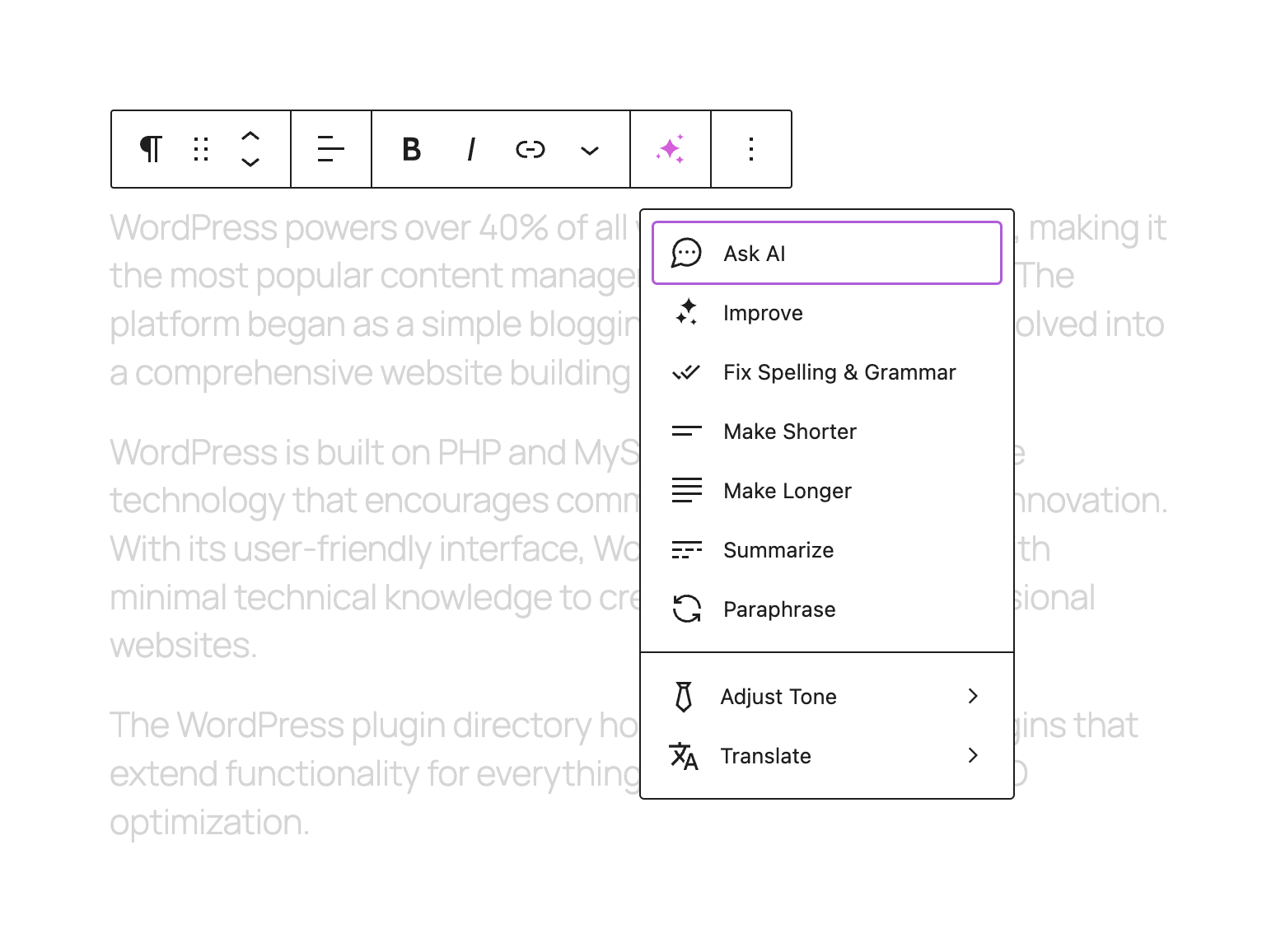
With Mind, you can improve the language of your writing. It helps you fix spelling and grammar errors, ensuring that your content is polished and professional. Additionally, Mind can make your writing shorter or longer, based on your preferences.
- Improve writing language
- Fix spelling & grammar
- Make shorter
- Make longer
✂️ Summarization and Paraphrasing
Mind offers the ability to summarize lengthy content, making it easier for readers to grasp the main points. It can also help you paraphrase sentences or paragraphs, ensuring that your content is unique and engaging.
- Summarize
- Paraphrase
🤗 Tone Adjustment
Mind allows you to adjust the tone of your writing to suit your desired style.
- Professional
- Friendly
- Straightforward
- Educational
- Confident
- Witty
- Heartfelt
🌐 Translation
Mind supports translation into multiple languages. It enables you to reach a wider audience by translating your content accurately and efficiently. Supported languages:
- Chinese
- Dutch
- English
- Filipino
- French
- German
- Indonesian
- Italian
- Japanese
- Korean
- Portuguese
- Russian
- Spanish
⚙️ Features
There are multiple ways to use Mind in your WordPress site:
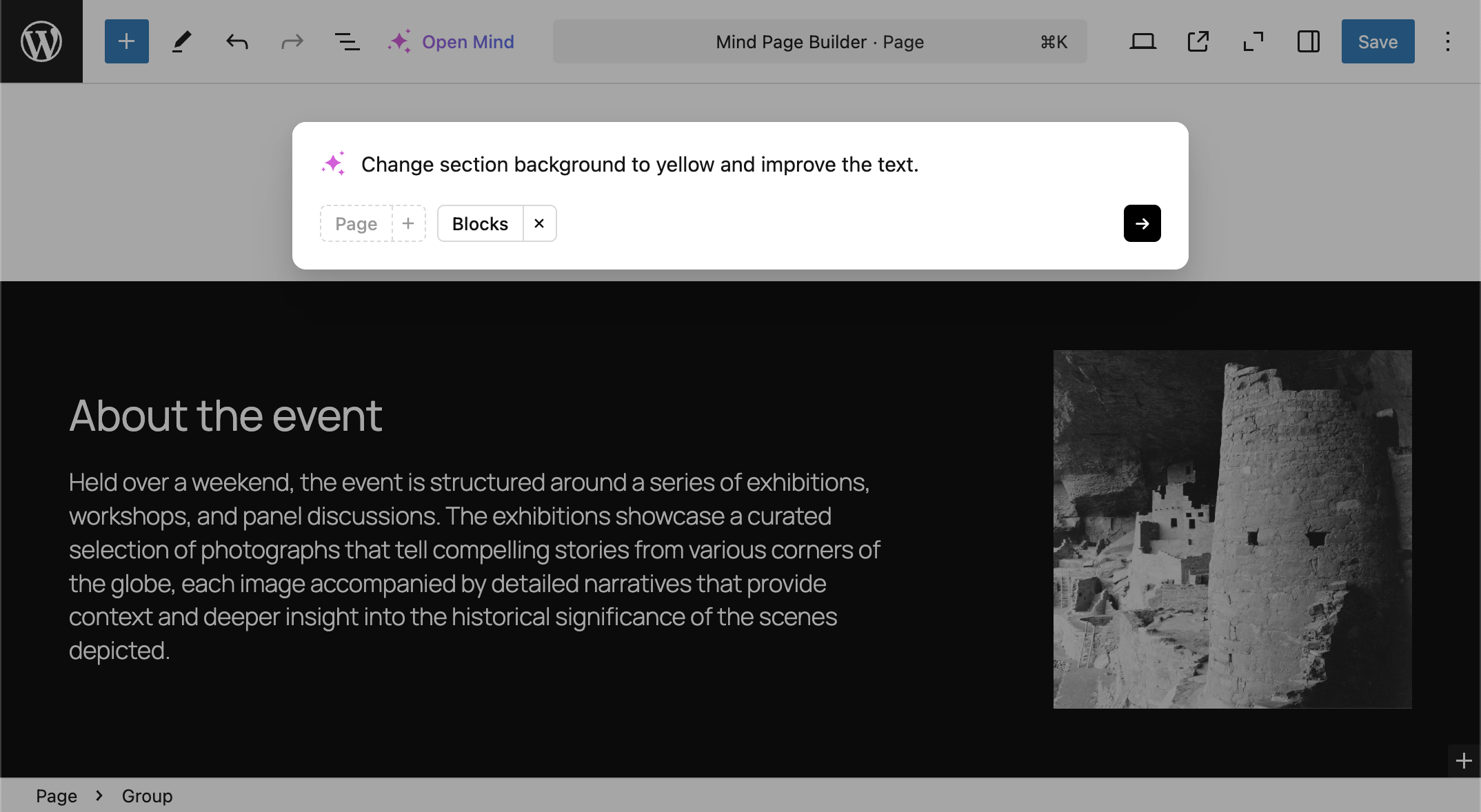
- Mind Popup – Open the popup to talk with AI to write blog post content, create page sections, etc…
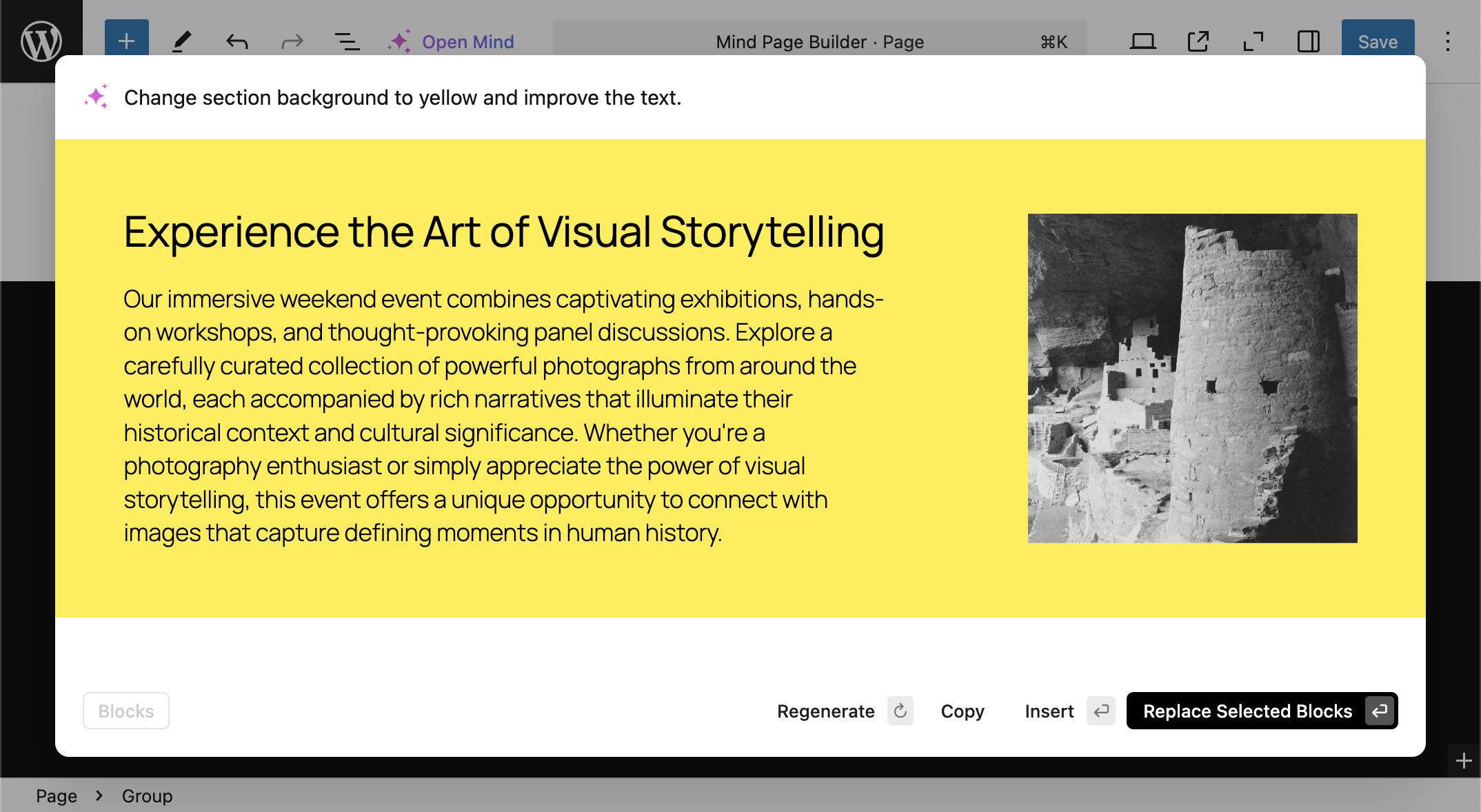
- Page Section Builder – Generate complete page sections with custom layouts and content
- Block Enhancement – Select existing blocks and enhance them using the Toolbar Mind button
- Quick Access – Press
spacein an empty paragraph to instantly open the Mind Popup and make a request - Whole Page Creation – Generate entire pages based on your requirements with a single prompt
Other
With its comprehensive set of features, Mind empowers content creators to build high-quality pages and engaging posts, while saving time and effort in the content creation process.
P.S. This plugin description was created using Mind with an OpenAI connector.
AI Providers and Connectors
Mind sends requests through WordPress Connectors to supported AI providers such as OpenAI and Anthropic without collecting any personal information. Data transmitted to these providers’ servers includes post content and specified context needed to generate responses.
For the Mind plugin to function correctly, you need to configure a supported provider in WordPress Settings → Connectors:
– Sign up at https://platform.openai.com/account/api-keys to obtain an OpenAI API key
– Sign up at https://console.anthropic.com/ to obtain an Anthropic API key
Both services have their own data handling policies:
OpenAI Data Usage:
– Data sent to OpenAI may be used to improve their models
– You can opt out of having your data used for training in your OpenAI account settings
– Please review their Privacy Policy and Terms of Use for more information
Anthropic Data Usage:
– Anthropic has similar data retention policies for service improvement
– They offer data handling options for enterprise customers
– Please review their Privacy Policy and Terms of Service for more information
Your choice of AI model can be configured in the plugin settings, and provider credentials are managed in WordPress Settings → Connectors.
Installation
Automatic installation
Install Mind either via the WordPress plugin directory or by uploading the files to your server at wp-content/plugins.
Usage
To start using Mind features, connect a supported AI provider in WordPress Settings → Connectors.
- Get an OpenAI API key at https://platform.openai.com/account/api-keys or an Anthropic API key at https://console.anthropic.com/
- Insert the key in WordPress Settings → Connectors
- Open any post or page in the WordPress editor (Gutenberg) and you will see the new button in the editor and paragraph toolbars
Frequently asked questions
Website and Documentation
Documentation will be available at https://www.wp-mind.com/
Supported page builders
Mind is designed for the native WordPress block editor (Gutenberg). Support for 3rd-party page builders is not currently available.
Can I create entire page layouts with Mind?
Yes! Mind can now generate complete page layouts and sections based on your text prompts. Simply describe what you want, and the AI will create responsive sections that fit your needs.
How do I improve existing page sections?
Select the section you want to enhance, click the Mind button in the toolbar, and describe how you’d like to improve it. Mind will intelligently modify the selected section while maintaining its structure.
Changelog
1.0.1 – Aug 26, 2026
- added WordPress 7.1 compatibility
- removed the duplicate warning above the AI provider card on the settings screen
1.0.0 – Jun 10, 2026
- migrated AI provider setup to WordPress Connectors; API keys are now managed in Settings → Connectors
- requires WordPress 7.0+ and PHP 7.4+
- breaking change: Mind settings are reset on upgrade; reconnect your AI provider in WordPress Connectors
- Mind settings now only store provider and model selection with Default auto-resolution
0.4.0 – Nov 27, 2025
- added support for Claude 4.5 Sonnet, Claude 4.5 Haiku, GPT-5.1 and GPT-5 mini
0.3.0 – Mar 16, 2025
- rewrite code from simple text generation to block building
- added support for Claude 3.7 Sonnet, Claude 3.5 Haiku, OpenAI GPT-4o and OpenAI GPT-4o mini
0.2.0 – Dec 9, 2024
- added stream AI response for better experience
- fixed JS error when inserting response to editor
- changed model to gpt-4o-mini
0.1.3 – Nov 28, 2024
- fixed the Open Mind button display issue in the WordPress 6.7 posts toolbar
Screenshots
For developers
Is this your plugin? Show off the numbers.
Add a live badge to your site, docs or GitHub README. It updates on its own — no account needed.
Best Mind – AI Page Builder alternatives
All AI plugins →





FAQ
Mind – AI Page Builder: quick answers
Straight answers, pulled from live WordPress.org data.
Live data from WordPress.org · checked Sep 29, 2026
Is Mind – AI Page Builder free?
Yes. Mind – AI Page Builder is free to download and use from the official WordPress.org plugin directory.
Is Mind – AI Page Builder safe to use in 2026?
Mind – AI Page Builder is a solid plugin choice in 2026, with a few things worth checking first. It runs on 10+ sites and was last updated 1 month ago, and scores 62/100 on our health check.
How many websites use Mind – AI Page Builder?
Mind – AI Page Builder is active on 10+ WordPress websites and has been downloaded 4,488 times since it launched in November 2023. It was downloaded 617 times in the last 30 days.
Does Mind – AI Page Builder work with WordPress 7.1?
Yes. The developer has tested Mind – AI Page Builder up to WordPress 7.1.2, the latest release. It requires WordPress 7.0 or newer.
What PHP version does Mind – AI Page Builder need?
Mind – AI Page Builder requires PHP 7.4 or higher. Most hosts run PHP 8.x today, so it works on any modern WordPress hosting.
When was Mind – AI Page Builder last updated?
The latest version, 1.0.1, was released on August 26, 2026 (1 month ago).
Who makes Mind – AI Page Builder?
Mind – AI Page Builder is developed and maintained by nK.
What are the best alternatives to Mind – AI Page Builder?
The most popular alternatives to Mind – AI Page Builder are Elementor Website Builder (10M+ installs), All in One SEO (2M+ installs) and AI Agent by SiteGround (1M+ installs).
Powered by PageForge
Want thousands of pages that rank like these? Build them in an afternoon.
This directory runs on the same engine as PageForge. Turn any spreadsheet, CSV or API into thousands of fast, SEO-ready WordPress pages — with schema, internal links and AI-written copy baked in.
- CSV, Google Sheets & API data sources
- AI content, schema & internal links per page
- Works with Elementor, Gutenberg, Yoast & Rank Math
- Free on WordPress.org — no credit card


