



Advanced Product Fields (Product Addons) for WooCommerce
Add options (addons) to your WooCommerce products so your customers can personalize their products. Product forms for everyone!

Safe pick
Yes — Advanced Product Fields (Produc… is a safe, well-maintained plugin to use in 2026. It runs on 50K+ sites, is rated 4.8/5 and was last updated 3 months ago, and scores 85/100 on our health check.
- Proven at scale on 50K+ active sites
- Loved by users — 4.8/5 from 283 reviews
- Responsive support — 100% of recent threads resolved
How does it stack up?
Side-by-side on installs, updates, ratings & support



Daily downloads
Download spikes usually follow a new release — each site that auto-updates counts as a download.
Rankings
Where Advanced Product Fields (Pr… stands todayWordPress.org search rankings
Live position in the plugin search, top 100| Keyword | Position |
|---|---|
| Product Addons | #4 |
| product fields | #1 |
| woocommerce | #29 |
| Woocommerce Product Addons | #4 |
| woocommerce product options | #5 |
Version adoption
Share of active sites per release.
Rating breakdown
★★★★★★★★★★ 4.8 from 283 reviews
About Advanced Product Fields (Product Addons…
From the official readme · v1.7.1Description
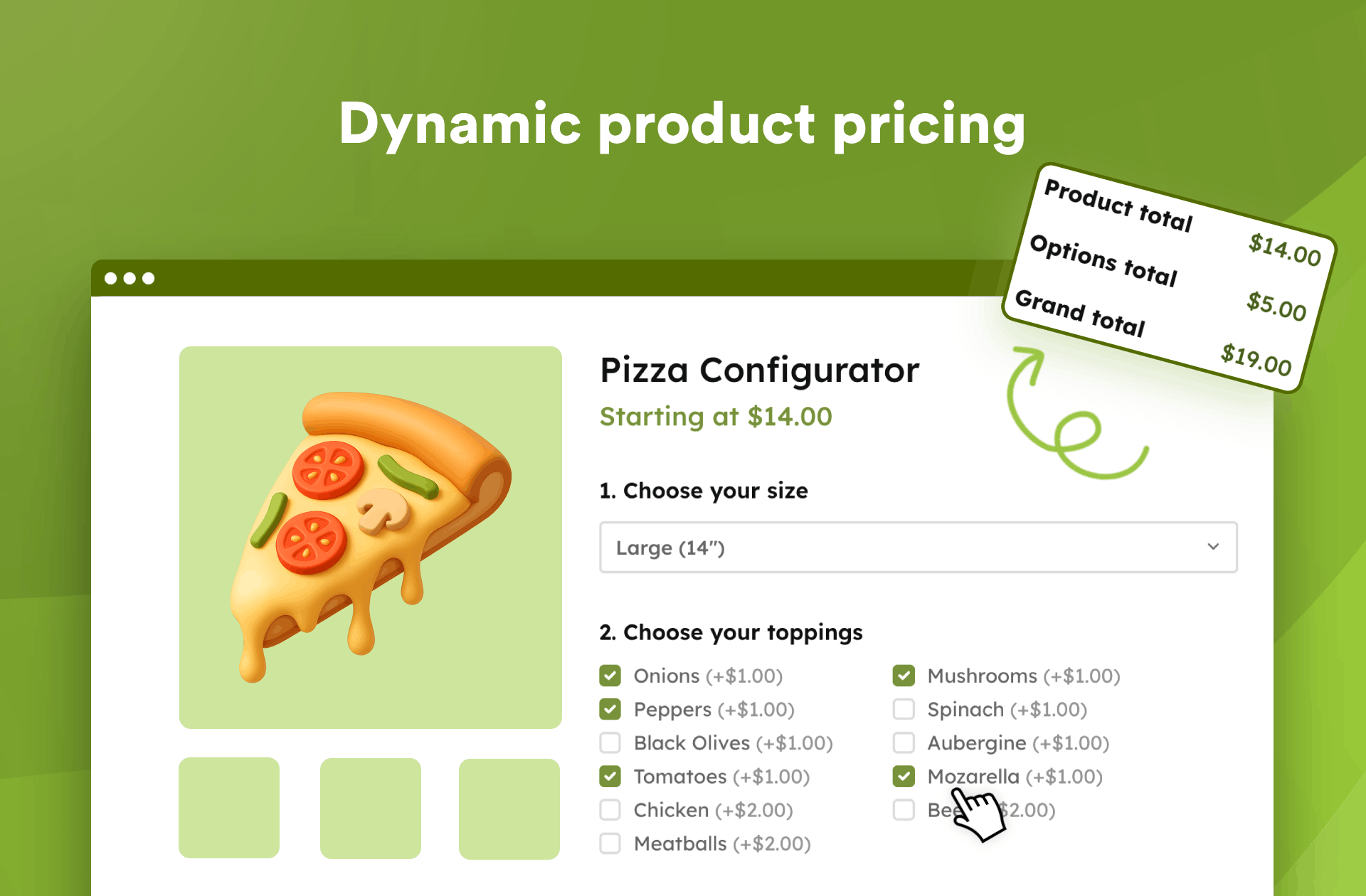
Advaced Product Fields (Product Addons) for WooCommerce allows you to add extra product options (form input fields) to your WooCommerce product pages. Whether you want to create a pizza configurator or add extra options, this plugin has got you covered!
Allow customers to personalize their product with a handful of extra choices, input fields, etc… These product addons can increase the final product price too. The extra form data submitted by the customer will be shown on the cart and checkout pages and will be saved on the backend order.
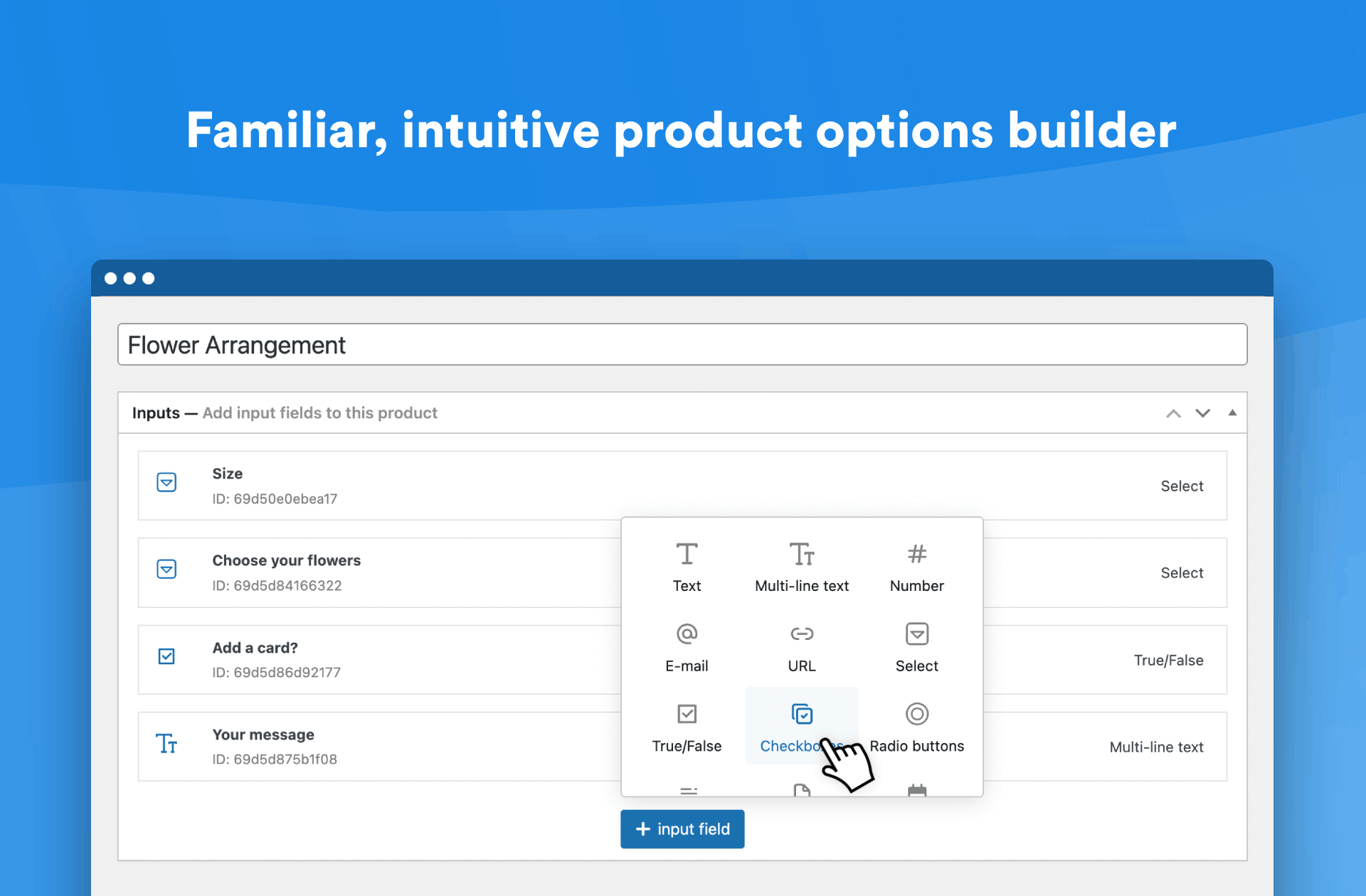
The backend looks & works similar to ACF, so you are familiar with setting up the extra product options without a hassle.
This plugin is the best modern free WooCommerce Product Addons alternative currently available.
👉️ Features
- Intuitive and beautiful backend builder which looks like Advanced Custom Fields
- 10 different form elements to choose from:
- Text field – A normal text input field to collect single-line text
- Text area – To collect multi-line text
- Email – An input field to accept only email addresses
- URL – A text field to accept only links (URLs)
- Number – A number field to accept both decimal or whole numbers
- Select (drop-down) – A dropdown field to select one option from a list of options
- Checkboxes – To choose one or more options
- Radio buttons – To select one option from multiple options
- True/false – A single “yes or no” checkbox, which you usually know from “accept the terms of conditions” fields
- Paragraph – If you want to add static blocks of text in between input fields, this does the trick!
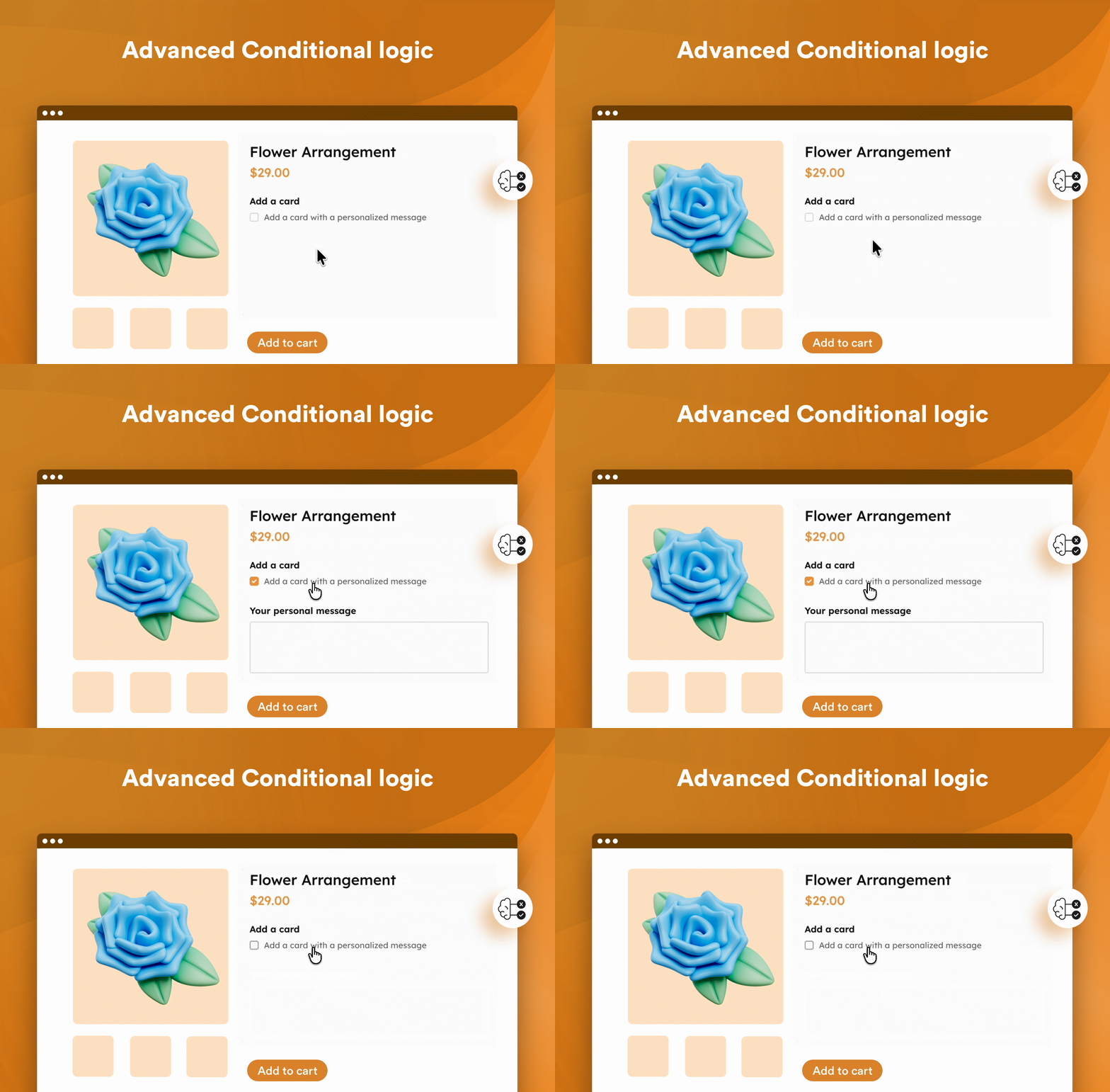
- Conditional logic (show/hide fields based on other input fields)
- Increase final product price: add a flat fee to your products depending on the field value(s)
- Works with your WooCommerce tax settings
- Optimized for speed and faster than other plugins in this genre
- Visibility options: decide on which product(s) to show your fields
- Works with both simple & variable products and also supports variable products over ajax
- Frontend already translated in English, French, German, Spannish, and Dutch
- Translation-ready for other languages
👉 How can our plugin be useful and what should you use it for?
WooCommerce only has limited features to display extra product options (often also called product addons) on your product pages. You can use their “variable products” which can add a few select (dropdown) lists to a product.
But what if you’re selling customizable t-shirts where customers can print their name on a t-shirt? Or what if you’d like your customers to build their own pizza where they can freely choose extra toppings?
These product types can’t be built with WooCommerce out-of-the-box. That’s where our plugin comes in. It allows you to build more complex WooCommerce products that can easily be personalized by your customer.
When should you use WooCommerce built-in variations versus our plugin? We wrote a handy blog post to answer that question.
👉️ What makes our plugin different from the competition?
During your research, you may have seen other plugins that do (more or less) the same. Here is how we are different:
✅️ Our plugin is younger than the competition. It does not have to support older WooCommerce or WordPress versions, so you benefit from modern code.
✅️ Quality above quantity. We carefully choose what & how we implement features so the plugin remains lightweight and fast.
✅️ The plugin’s frontend scripts are tiny (~7kb) and doesn’t impact your SEO score.
✅️ Easy-to-use modern backend (based on ACF) which follows WordPress & WooCommerce standards.
✅️ Regular updates to stay on top of new WordPress & WooCommerce versions.
✅️ Our plugin runs fewer database queries because we’ve spent time optimizing how data is stored.
✅️ No nags! We do not like to plaster your WP admin with unnecessary ads or asking for a review. We do hope you leave a review to help us grow.
We understand these statements are meaningless without additional proof to back them up, so here are a few links to help make up your mind:
- Check out the WordPress reviews here.
- Plugin comparison with screenshots and proof.
- Unofficial plugin test & rating.
Having doubts? Just contact us with your questions!
👉️ Why Studio Wombat?
- ✅ A small but friendly team of WooCommerce professionals.
- ✅ We do this full-time, we are not hobby-developers.
- ✅ Over 50,000 happy customers.
- ✅ We understand your success is our success, so we do our absolute best to help you out.
- ✅ Dedicated support team.
- ✅ Ahead of time, we test our plugins the latest WordPress and WooCommerce versions.
- ✅ We choose quality over quantity: not every feature makes it in the plugins, but those that do are quality coded.
- ✅ We care about your site speed.
👉️ Requirements
- WooCommerce 3.6.0 or higher
- WordPress 4.7 or higher
- PHP 7.0 or higher
👉️ Limitations of the free version
Our free version is great for small stores or stores that don’t need to add many complex options (product addons) to their products.
There are a few limitations of the free version that you should be aware of:
- The free version doesn’t integrate with 3rd party plugins such as WooCommerce Subscriptions or a multi-currency plugin (unless they write an integration).
- It doesn’t work with themes using Ajax technology for their product “add to cart” button.
- The free version allows only allows you to add an extra flat fee ( = not quantity based) to your product price.
- You can’t add fields to separate variations.
If you need those features, you may consider our premium version. You can read ahead what’s included with premium.
👉️ Premium Features
Everything from the free version, plus:
- Works on these product types: Simple, Variable (including separate variations), and Subscriptions.
- More field types:
- File upload – allowing your customers to upload one or multiple files
- Image swatches – multi and single choice options with images (and image zoom)
- Color swatches – multi and single color options
- Text swatches – text options
- Date – adds a calendar picker
- Calculation – adds an informative calculation (like “square meters”) or a separate extra cost calculation.
- Image with quantities – image swatches with quantity inputs underneath.
- Child products – select other products from your store as options (and enjoy stock control).
- Cards – clickable cards with nicely layout information.
- Content fields to add content to your product pages (no form inputs):
- Image – to add extra images
- Text/HTML – to add extra text, HTML, or even shortcodes
- Section – to group fields in a section
- Support for modern themes using “ajax add to cart” technology
- The product image on the frontend can be changed when different options are selected
- Set a minimum/maximum allowed number of selections on multi-select fields
- More pricing options: formula-based pricing, quantity-based pricing, percentage-based pricing, value-based pricing, and character length pricing
- You can also give discounts (negative pricing) on options
- Repeatable fields: repeat fields if your visitors press an ‘add new’ button
- Quantity-based fields: fields can repeat based on the quantity the customer selects
- Works with page/product builders like Elementor, Oxygen, Beaver Builder, and Divi
- Variable builder for more complex pricing possibilities
- More options to attach one field group to multiple products at once (via product name, variation, category, tag, …)
- Support for multilingual stores through WPML or Polylang
- Works with your WooCommerce tax settings
- Support for multi-currency stores via the WOOCS plugin
- More integrations with other plugins (such as WooCommerce Subscriptions) & popular themes. See here
- More options for text fields: min. and max. length, or HTML validation (regex pattern)
- Actions & filters so you can extend the plugin with additional features
- HTML output allowing you to more easily style certain aspects with CSS
- Great tutorials to display a multi-step form, make a donation product, build a pizza configurator, etc …
- Add-on plugins to make it even more powerful. You can create product configurators with live preview, powerup file uploads, add an image editor, integrate with ACF, …
- And more..!
Installation
From your WordPress dashboard
- Visit Plugins > Add New
- Search for “Advanced Product Fields for WooCommerce”
- Activate the plugin from your Plugins page
- Click on the new menu item WooCommerce > Product Fields and create your first Custom Field Group (product addons).
Frequently asked questions
How do I add input fields to my products?
Once the plugin is installed, go to WooCommerce > Product Input Fields to start adding options to your products! Alternatively, you can also add input fields via each “Edit Product” page in WooCommerce.
Does APF slow down my website?
No, APF is designed with performance in mind. We prioritize speed and efficiency, ensuring it remains lightweight without compromising on features (something other plugins overlook). We regularly check our plugin against competitors and our code remains small, lightweight, and among the fastest!
Do I need coding knowledge to use APF?
No, APF is a no-code solution that’s intuitive and easy to use, so you don’t need any coding experience.
Can I create as many options as I want?
Yes, you can create unlimited product options with APF, giving you full flexibility to customize your products however you need.
What are the system or server requirements to use APF?
You’ll need WooCommerce 6.0 or higher, WordPress 6.0 or higher, and PHP 7.0 or higher to make this plugin work.
Changelog
If you've generated your own .po/.mo files, you'll need to rename those to match the new slug "advanced-product-fields-for-woocommerce".
1.7.1
- Fix: fixed minor admin styling inconsistencies due to WordPress 7.0 style changes.
1.7
- Improvement: Enhanced the admin UI for a more intuitive user experience and updated the overall look and feel.
- Improvement: improved guidance throughout some settings.
- Other: we’ll increase the minimum WP version (possibly to 6.0) soon.
1.6.22
- Improvement: improved integration with Gift Card plugins.
1.6.21
- Fix: fixed fields not appearing at cart when dealing with variable products.
1.6.20
- Improvement: added minor extra security improvements.
1.6.19
- Improvement: added extra security to validate the cart data.
- Fix: fixed pricing hints sometimes showing when there is no price set.
- Other: increased minimum required WooCommerce version to 6.0.
- Other: verify WP 7.0 (beta) 10.4 compatibility.
Screenshots
For developers
Is this your plugin? Show off the numbers.
Add a live badge to your site, docs or GitHub README. It updates on its own — no account needed.
Best Advanced Product Fields (Prod… alternatives
All Product Addons plugins →





FAQ
Advanced Product Fields (Product Ad…: quick answers
Straight answers, pulled from live WordPress.org data.
Live data from WordPress.org · checked Sep 26, 2026
Is Advanced Product Fields (Produc… free?
Yes. Advanced Product Fields (Produc… is free to download and use from the official WordPress.org plugin directory.
Is Advanced Product Fields (Produc… safe to use in 2026?
Yes — Advanced Product Fields (Produc… is a safe, well-maintained plugin to use in 2026. It runs on 50K+ sites, is rated 4.8/5 and was last updated 3 months ago, and scores 85/100 on our health check.
How many websites use Advanced Product Fields (Produc…?
Advanced Product Fields (Produc… is active on 50K+ WordPress websites and has been downloaded 1,266,485 times since it launched in August 2019. It was downloaded 7,266 times in the last 30 days.
Does Advanced Product Fields (Produc… work with WordPress 7.1?
Advanced Product Fields (Produc… is officially tested up to WordPress 7.0.6, while the latest release is 7.1.2. It may still work, but try it on a staging site first.
What PHP version does Advanced Product Fields (Produc… need?
Advanced Product Fields (Produc… requires PHP 7.0 or higher. Most hosts run PHP 8.x today, so it works on any modern WordPress hosting.
When was Advanced Product Fields (Produc… last updated?
The latest version, 1.7.1, was released on June 27, 2026 (3 months ago).
Who makes Advanced Product Fields (Produc…?
Advanced Product Fields (Produc… is developed and maintained by Maarten B.
What are the best alternatives to Advanced Product Fields (Produc…?
The most popular alternatives to Advanced Product Fields (Produc… are Extra Product Options For W… (30K+ installs), PPOM (20K+ installs) and WPC Product Options for Woo… (4K+ installs).
Powered by PageForge
Want thousands of pages that rank like these? Build them in an afternoon.
This directory runs on the same engine as PageForge. Turn any spreadsheet, CSV or API into thousands of fast, SEO-ready WordPress pages — with schema, internal links and AI-written copy baked in.
- CSV, Google Sheets & API data sources
- AI content, schema & internal links per page
- Works with Elementor, Gutenberg, Yoast & Rank Math
- Free on WordPress.org — no credit card


