


Advanced Data Table Block
The Advanced Data Table Block block is the ultimate solution for displaying complex data in WordPress. With powerful features and extensive customization options, it’s perfect for any data presentation needs.

Consider an alternative
Advanced Data Table Block shows warning signs in 2026 — compare the alternatives below before installing. It runs on 70+ sites and was last updated 8 months ago, and scores 40/100 on our health check.
- Small user base (70+ active installs)
- Very few reviews so far
- Only tested up to WordPress 6.9 (latest is 7.1)
How does it stack up?
Side-by-side on installs, updates, ratings & support



Daily downloads
Download spikes usually follow a new release — each site that auto-updates counts as a download.
Rankings
Where Advanced Data Table Block stands todayWordPress.org search rankings
Live position in the plugin search, top 100| Keyword | Position |
|---|---|
| block | >100 |
| csv | >100 |
| pagination | >100 |
| responsive | >100 |
| table | >100 |
Version adoption
Share of active sites per release.
About Advanced Data Table Block
From the official readme · v1.0.3Description
The Advanced Data Table Block block is the ultimate solution for displaying complex data in WordPress. With powerful features and extensive customization options, it’s perfect for any data presentation needs.
🎯 Core Features:
- Display CSV Data – Easily import CSV files and display data with advanced DataTables functionality
- Configurable Settings – Complete control over sorting, searching, and pagination from the block settings
- Responsive Design – Tables look great on both desktop and mobile devices with automatic adaptation
- Advanced Sorting – Allow users to sort columns in ascending or descending order with visual indicators
- Powerful Search – Enable search functionality to filter data based on user input in real-time
- Smart Pagination – Display numeric pagination with customizable page sizes for easier navigation
- Flexible Dimensions – Set table width and height in percentages or fixed pixel values
- Sticky Table Headers – Keep header rows fixed while scrolling through large datasets
- Dynamic Column Sizing – Adjust individual column widths to perfectly suit your data presentation
- Extensive UI Customization – Complete control over colors, backgrounds, hover effects, and styling
- Separate Header/Row Styling – Independent customization options for table headers and data rows
- Multiple Color Schemes – Apply single or multiple color themes to match your site design
📊 Perfect For:
– Product catalogs and comparison tables
– Financial reports and data analytics
– Team directories and contact lists
– Event schedules and timetables
– Inventory and stock management
– Research data presentation
– Survey results and statistics
– Price lists and service offerings
🎨 Styling Options:
– Modern, Striped, Bordered, Minimal, and Card layouts
– Custom color schemes (Blue, Green, Red, Purple, Orange, Gray)
– Individual color controls for headers, rows, borders, and text
– Hover effects and interactive states
– Typography and spacing controls
📱 Mobile Optimized:
– Horizontal scrolling for large tables
– Card-based layout for mobile devices
– Touch-friendly pagination controls
– Responsive search and filter interfaces
Installation
- Upload the plugin files to the
/wp-content/plugins/advanced-data-table-blockdirectory, or install the plugin through the WordPress plugins screen directly. - Activate the plugin through the ‘Plugins’ screen in WordPress
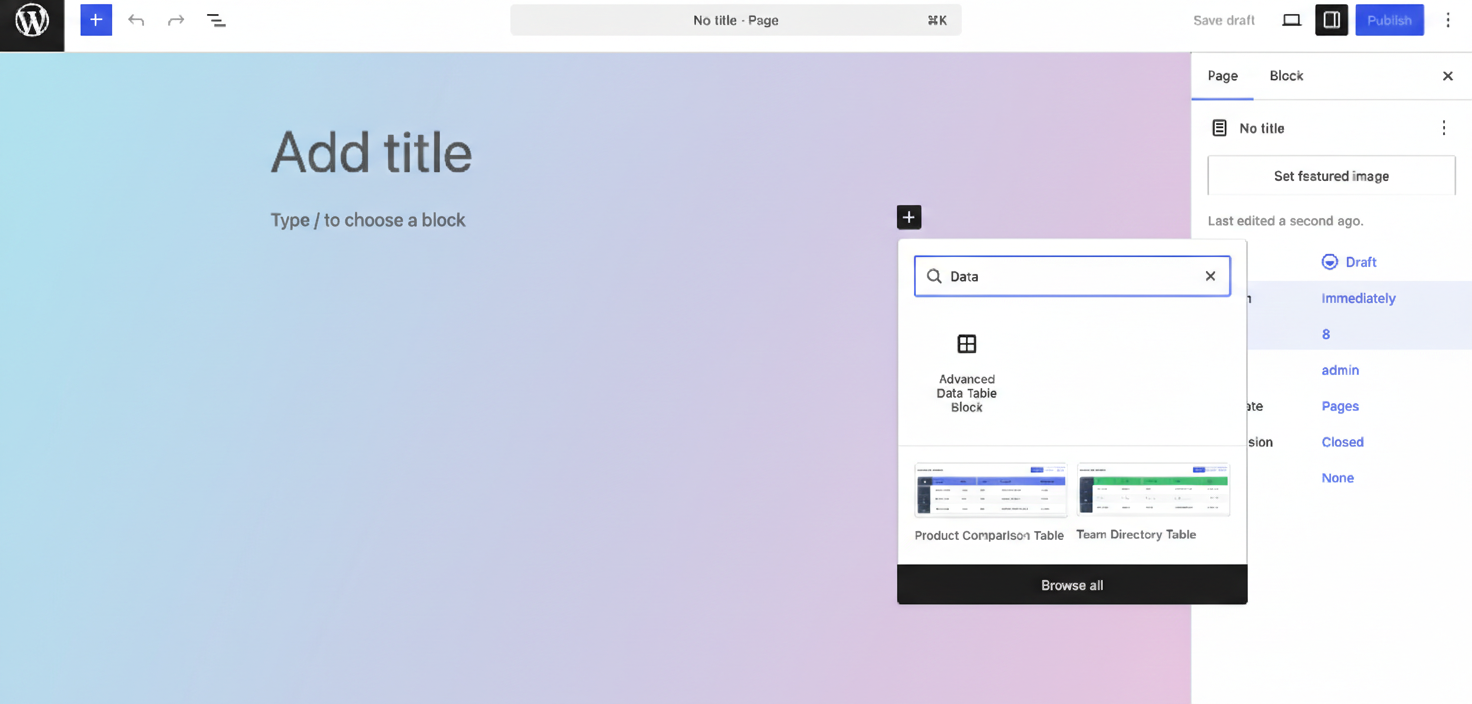
- Use the block editor to add the “Advanced Data Table Block ” block to any post or page
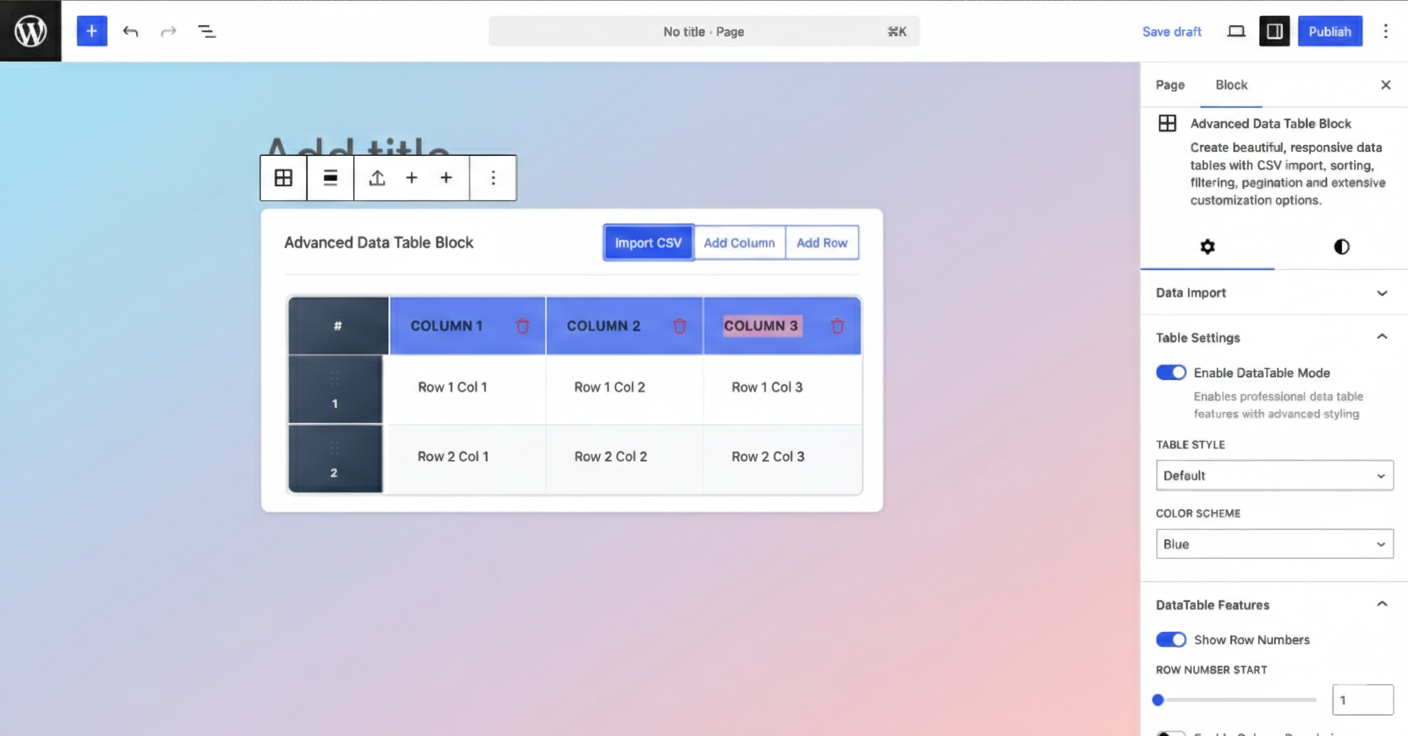
- Import your CSV data or create tables manually
- Customize appearance and functionality in the block settings
- Publish and enjoy your professional data tables!
Frequently asked questions
Can I import data from CSV files?
Yes! The block includes a powerful CSV import feature that allows you to upload CSV files directly in the editor. The data is automatically parsed and formatted into your table.
Is the table responsive on mobile devices?
Absolutely! Tables automatically adapt to smaller screens with horizontal scrolling or switch to a mobile-optimized card layout for better viewing experience.
Can I customize colors and styling?
Yes! The block provides extensive styling options including custom colors for headers, rows, borders, and text. You can also choose from predefined color schemes and table styles.
Does it support sorting and filtering?
Yes! Users can sort any column by clicking the header, and the built-in search functionality filters table content in real-time. All features are configurable from the block settings.
Can I control the table dimensions?
Yes! You can set both width and height using percentages or fixed pixel values. The sticky header feature keeps headers visible when scrolling through tall tables.
Is pagination supported?
Yes! The block includes smart pagination with configurable page sizes (10, 25, 50, 100+ rows per page) and numeric navigation controls.
Changelog
Complete data table solution with CSV import, advanced features, and extensive customization options. Perfect for professional data presentation.
1.0.3
- Tested Upto: WordPress 6.9.1
1.0.2
- Improvements: Code improved
1.0.1
- Improvements: Code improved
1.0.0
- Initial release with full feature set
- CSV import and export functionality
- Advanced sorting, searching, and pagination
- Responsive design with mobile optimization
- Extensive customization options
- Sticky headers and flexible dimensions
- Multiple table styles and color schemes
- Configurable features and settings
Screenshots
For developers
Is this your plugin? Show off the numbers.
Add a live badge to your site, docs or GitHub README. It updates on its own — no account needed.
Best Advanced Data Table Block alternatives
All block plugins →





FAQ
Advanced Data Table Block: quick answers
Straight answers, pulled from live WordPress.org data.
Live data from WordPress.org · checked Oct 16, 2026
Is Advanced Data Table Block free?
Yes. Advanced Data Table Block is free to download and use from the official WordPress.org plugin directory.
Is Advanced Data Table Block safe to use in 2026?
Advanced Data Table Block shows warning signs in 2026 — compare the alternatives below before installing. It runs on 70+ sites and was last updated 8 months ago, and scores 40/100 on our health check.
How many websites use Advanced Data Table Block?
Advanced Data Table Block is active on 70+ WordPress websites and has been downloaded 1,076 times since it launched in October 2025. It was downloaded 138 times in the last 30 days.
Does Advanced Data Table Block work with WordPress 7.1?
Advanced Data Table Block is officially tested up to WordPress 6.9.10, while the latest release is 7.1.3. It may still work, but try it on a staging site first.
What PHP version does Advanced Data Table Block need?
Advanced Data Table Block requires PHP 7.4 or higher. Most hosts run PHP 8.x today, so it works on any modern WordPress hosting.
When was Advanced Data Table Block last updated?
The latest version, 1.0.3, was released on February 7, 2026 (8 months ago).
Who makes Advanced Data Table Block?
Advanced Data Table Block is developed and maintained by Ninja.
What are the best alternatives to Advanced Data Table Block?
The most popular alternatives to Advanced Data Table Block are Spectra Legacy (1M+ installs), Breadcrumb NavXT (800K+ installs) and PDF Embedder (300K+ installs).
Powered by PageForge
Want thousands of pages that rank like these? Build them in an afternoon.
This directory runs on the same engine as PageForge. Turn any spreadsheet, CSV or API into thousands of fast, SEO-ready WordPress pages — with schema, internal links and AI-written copy baked in.
- CSV, Google Sheets & API data sources
- AI content, schema & internal links per page
- Works with Elementor, Gutenberg, Yoast & Rank Math
- Free on WordPress.org — no credit card


