


Adminkeep – Email Log, Custom CSS, Disable Comments, Site Lockdown & Admin Enhancements
Email log, custom CSS, disable comments, site lockdown and more admin enhancements. Every feature is off until you switch it on.

Solid choice
Adminkeep is a solid plugin choice in 2026, with a few things worth checking first. It runs on 50+ sites and was last updated 1 day ago, and scores 68/100 on our health check.
- Actively developed — last update 1 day ago
- Tested with the latest WordPress (7.1)
- Small user base (50+ active installs)
- Very few reviews so far
How does it stack up?
Side-by-side on installs, updates, ratings & support



Daily downloads
Download spikes usually follow a new release — each site that auto-updates counts as a download.
Rankings
Where Adminkeep stands todayWordPress.org search rankings
Live position in the plugin search, top 100| Keyword | Position |
|---|---|
| custom css | >100 |
| disable comments | >100 |
| email log | >100 |
| enhancements | >100 |
| lockdown | #16 |
Version adoption
Share of active sites per release.
About Adminkeep
From the official readme · v2.0.0Description
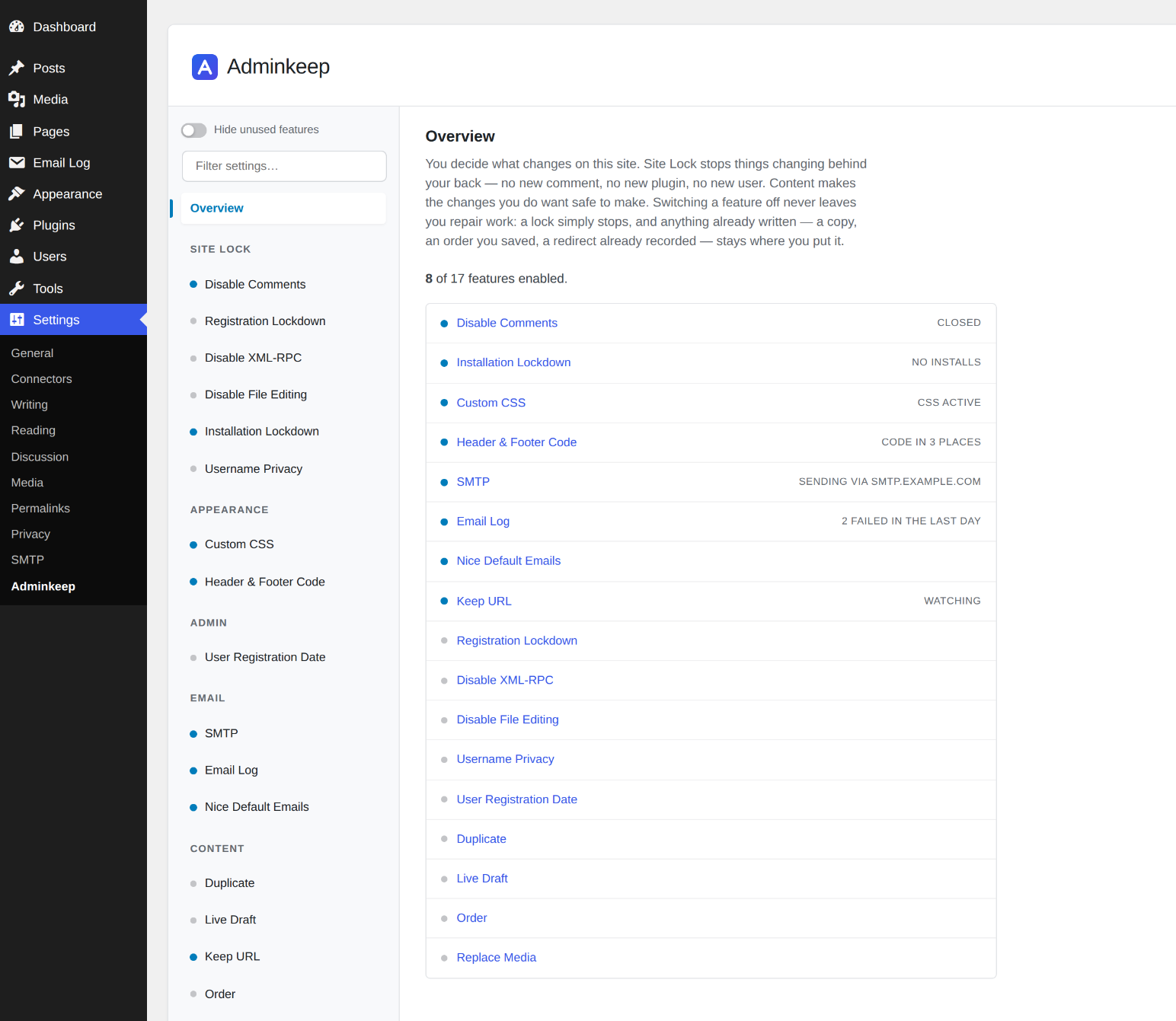
You decide what changes on this site.
Adminkeep is a set of tools under that one idea. Site Lock stops things changing behind
your back — no new comment, no new plugin, no new user. Content makes the changes you do want
safe to make.
Every feature is a single switch, off until you turn it on. Switching one off never leaves you
repair work: the locks work purely through WordPress filters, so your site is exactly as it was,
and what you made with the Content features stays where you put it.
Site Lock
- Disable Comments — comments off everywhere, including direct POSTs from spam bots and the REST API. Nothing is written to your database, so switching it off brings every comment back. An optional cleanup button deletes spam and trashed comments, after showing you the exact count. Guide
- Registration Lockdown — stops new accounts being created, and refuses creation of or promotion to administrator. Blocked attempts are logged. Guide
- Disable XML-RPC — closes
xmlrpc.phpcompletely, including pingbacks andsystem.multicall. Guide - Disable File Editing — removes the built-in plugin and theme file editors, reversibly.
- Installation Lockdown — no new plugins or themes, from WordPress.org or a ZIP, and no replacing one by uploading a ZIP, for anyone. Updates keep working, so security releases still reach your site. Guide
- Username Privacy — keeps your usernames out of public view. Author pages, the
?author=1probe, the REST users list, author sitemaps and embed previews stop naming your accounts to visitors; anyone logged in sees everything as before. Nothing is written, so switching it off reopens it all. Guide
Content
- Duplicate — copy any post or page as a draft. Custom fields, taxonomies, the featured image and page builder layouts (Elementor, ACF) come along intact, and the original is never modified. Guide
- Live Draft — rework a published page in a private working copy, then publish it over the original. Same ID, same URL, and the old version is kept as a revision. Guide
- Keep URL — rename or move a page and its old address keeps working, child pages included. Fills the gaps WordPress leaves for pages and leaves posts to core. Guide
- Order — drag posts into the order you want on a dedicated Sort screen, one post type at a time. Lists that already ask for their own order, such as WooCommerce products and search results, are left alone. Guide
- Replace Media — upload a new version of a file over the old one. Same file type keeps the same URL; a different type updates the posts that use it and redirects the old address. Guide
Appearance
- Custom CSS — CSS that belongs to your site instead of your theme. Edit it under Appearance with WordPress’s own code editor; it stays when you switch themes, and your theme’s Additional CSS is left alone.
- Header & Footer Code — a home for the snippets services ask you to paste into your site: analytics and verification tags in the head, a tag manager’s fallback just after the body opens, chat widgets and scripts in the footer. Three boxes under Appearance with WordPress’s code editor, printed on the front end exactly as you saved them, and kept when you change or update your theme. Each box shows who last changed it and when. Only administrators allowed to post unfiltered HTML can edit them.
Admin
- User Registration Date — a sortable Registered column on the Users screen. WordPress records when every account was created but never shows it; this does, for every existing user, and newest-first sorting makes a wave of spam signups easy to spot. Guide
- SMTP — Send your site’s email through an SMTP server so password resets and form messages arrive. Presets for Amazon SES, Brevo, Mailgun, SendGrid, Postmark, Zoho and Gmail; a test email that shows the server’s own error; settings can live in wp-config.php. Moving from WP Mail SMTP? One click copies its SMTP connection settings. Guide
- Email Log — Email Log, in its own item in the admin menu by default (or under Tools, if you prefer), lists the email your site sends, with recipient, subject and whether it was sent or failed, plus filters by status and date and a search. Open any email to see its sender and headers, and the email itself the way it looked when it went out, with remote images blocked. Content storage can be switched off to keep only the envelope. Password-reset and sign-in links are removed before an email is stored. Works with or without the SMTP feature, and with other SMTP plugins too.
- Nice Default Emails — WordPress’s own plain-text emails (password resets, new-user and comment notices, update reports, personal data requests, and multisite sign-ups) go out in one clean HTML layout headed by your site’s name, with links you can click. WooCommerce and other plugins’ emails, and anything already sent as HTML, are left exactly as they are. No settings.
wp adminkeep emails send --all --to=you@example.comshows every one of them in your own inbox.
Performance
A feature you have not enabled registers zero hooks and loads zero assets.
Links
WP-CLI
Everything on the Adminkeep settings screen, plus the Custom CSS, Header & Footer Code and SMTP screens, can be done from a shell with wp adminkeep.
wp adminkeep feature list — every feature and whether it is on
wp adminkeep feature enable disable_comments — switch a feature on (or `disable` it)
wp adminkeep feature set order post_types=post,page — change a feature's settings
wp adminkeep setting set hide_unused=true — change a plugin-level setting
wp adminkeep comments purge — delete spam and trashed comments, in batches
wp adminkeep css set site.css — replace the Custom CSS from a file
wp adminkeep code set head analytics.html — replace one Header & Footer Code box (head, body or footer) from a file
wp adminkeep smtp set --host=smtp.example.com --port=587 — configure SMTP
wp adminkeep smtp test you@example.com — send a test email and see the server's reply
wp adminkeep emails send --all --to=you@example.com — see WordPress's own emails in the Nice Default Emails layout
wp adminkeep smtp import wp-mail-smtp — copy the SMTP connection settings from WP Mail SMTP
Run wp help adminkeep for the full reference. A change made here is cleaned and checked exactly as it is on the screen, and a mistyped value is refused rather than guessed at.
Installation
- In your WordPress admin, go to Plugins → Add New Plugin, search for “Adminkeep” and click Install Now, then Activate.
- Open Settings → Adminkeep, or the Settings link under Adminkeep on the Plugins screen. Every feature starts off; switch on only the ones you want.
- To remove the plugin, deactivate and delete it as usual. Uninstalling removes its settings and its own redirect table. Nothing it changed while enabled outlives switching the feature off.
Or with WP-CLI:
wp plugin install adminkeep --activate
Frequently asked questions
Will this delete my comments?
Not unless you ask it to. Turning Disable Comments on only hides them — a test asserts the comment rows are untouched after a full enable-and-disable cycle. There is a separate cleanup button that does delete, and it deletes spam and trashed comments only unless you tick the box to include approved ones. It shows the exact count, asks you to confirm, and cannot be undone.
Can I turn it back off?
Yes, instantly. There is never a migration to run or a repair step to find. The locks work purely through WordPress filters, so nothing was written to your database to undo — switch one off and your site is exactly as it was. The Content features are deliberately different: they write the things you asked them to write. A copy you made, an order you saved, a file you replaced, a redirect recorded when you renamed a page — switching the feature off stops it doing any more, and leaves what it already did alone. Work you did on purpose should not disappear because you unticked a checkbox.
Does this actually stop comment spam bots?
Yes. Bots usually POST straight to wp-comments-post.php without ever loading your page, so hiding the comment form does nothing. Adminkeep refuses those requests with a 403 before WordPress processes them, and refuses comment creation through the REST API as well.
Is Installation Lockdown a security feature?
Not exactly, and it would be dishonest to say otherwise. It is enforced in PHP, so anyone with filesystem, database or WP-CLI access can bypass it. It reliably stops accidents and casual changes — a client uploading a plugin zip from who knows where, or overwriting an installed plugin with one. Treat it as a policy guard, not a security boundary.
Why not just use the DISALLOW_FILE_MODS constant?
Because it cannot be switched off from the admin. Once it is in wp-config.php you need file access to undo it, which strands people. Installation Lockdown filters capabilities instead, so you can always turn it off from the settings screen. If you want the harder version, the constant is still there and this plugin does not interfere with it.
Does the SMTP feature work with Gmail or Microsoft 365?
Gmail and Google Workspace: yes, with an app password. Microsoft 365 and Outlook.com: no — Microsoft now requires signing in through Microsoft (OAuth) for SMTP, which this feature does not support. A dedicated SMTP plugin is the better choice there.
Where is my SMTP password kept?
Encrypted in your site’s database, which protects it in database backups. For the strongest setup define ADMINKEEP_SMTP_PASS (and the other ADMINKEEP_SMTP_* constants) in wp-config.php: values set there are not saved to the database, and the settings form does not display them.
Does the email log store password-reset links?
They are removed before an email is stored, along with sign-in and account-activation links. The common link formats are covered, not every possible one, so treat it as a safeguard rather than a guarantee. If you would rather not store email content at all, Email Log has a setting to keep only the envelope — sender, recipient, subject and status — and switch content storage off.
What happens to the email log if I switch the feature off?
Switching it off stops logging. What is already logged stays until you switch it back on, delete it, or uninstall. While it is off nothing new is recorded and the entries are not aged out, so if you want the log emptied, empty it first — from the Email Log screen, or with wp adminkeep email-log purge –all — and then switch the feature off.
Where does Header & Footer Code print?
On the front end of your site, on every page. The Head box goes inside , before your theme’s own styles and scripts. The Body open box goes just after opens, on themes that support it (current themes do). The Footer box goes at the end of the page, after WordPress’s own footer scripts. None of it is added to the admin, the login page, feeds or the REST API. Each box holds up to 64 KB. A snippet from an analytics or chat service is a few kilobytes; for anything larger, upload the script as a file and load it with . The code is printed exactly as you saved it, so check a snippet on a test page…
Can I manage Adminkeep with WP-CLI?
Yes, since 1.5.0. wp adminkeep feature list shows every feature, and wp help adminkeep lists the commands for switching features, changing their settings, cleaning up comments, replacing the Custom CSS or the Header & Footer Code, configuring SMTP and choosing whether the settings screen hides unused features for a user. If Installation Lockdown has locked you out of the admin, wp adminkeep feature disable install_lock is the way back in.
Changelog
2.0.0
- New: Header & Footer Code, in Appearance. Three boxes (Head, Body open and Footer) for analytics and verification tags, tag managers and chat widgets, printed on the front end of every page exactly as saved. Each box shows who last changed it and when, and holds up to 64 KB. Only administrators who are allowed to post unfiltered HTML can open it.
- New WP-CLI commands:
wp adminkeep code get <head|body|footer>prints one box, andwp adminkeep code set <head|body|footer> [<file>]replaces it from a file or standard input. - Changed: Email Log now has its own item in the admin menu, right below where the Email Log plugin puts its own, with a different envelope icon so the two can be told apart. To keep it under Tools, tick “Show Email Log under the Tools menu” in the Email Log settings. Old Tools → Email Log links still work.
- Changed: the Adminkeep logo beside each feature screen’s heading (Email Log, SMTP, Custom CSS, Header & Footer Code, Sort, Replace file) opens that feature’s own settings instead of the settings overview.
- Changed:
wp adminkeep css getprints the CSS exactly as stored, with no newline added, so its output can be piped back intocss setunchanged. - Fixed: Custom CSS that starts with a blank line keeps it when saved from the screen.
1.10.0
- New: Nice Default Emails, in Email. WordPress’s own plain-text emails (password resets, new-user and comment notices, update reports, personal data requests, and multisite sign-ups; 25 in all) go out in one clean HTML layout headed by your site’s name, with clickable links. WooCommerce and other plugins’ emails, and anything already sent as HTML, are left as they are. No settings. Developers can keep an email plain with the
adminkeep_nice_emails_wrapfilter. - New: Settings → SMTP can copy your SMTP connection settings from WP Mail SMTP in one click (server, port, encryption, username, password, From address and name). Only SMTP-mailer setups can be copied; values held in wp-config.php are kept.
wp adminkeep smtp import wp-mail-smtp [--dry-run]does the same from a shell. - New WP-CLI commands:
wp adminkeep emails listandwp adminkeep emails send <id>...|--all --to=<email>send WordPress’s own emails to one address so you can see them in a real inbox. - Fixed: Disable File Editing now applies to super admins on a multisite network.
1.9.0
- New: Username Privacy, in Site Lock. Author pages and the
?author=1probe answer “not found” to visitors, the REST users list is closed to them, authors are left out of the sitemap (WordPress’s own and Yoast SEO’s) and out of embed previews, and author names in your theme stop linking to author pages. Logged-in users see everything as before; nothing is written.
1.8.1
- Changed: “Hide unused features” is now one setting for the whole site instead of one per administrator. If any administrator had it on, it stays on.
- Changed: WP-CLI
wp adminkeep viewis replaced bywp adminkeep setting get [<key>]andwp adminkeep setting set key=value, the same shape asfeature set, so plugin-level settings and feature settings read alike.wp adminkeep setting set hide_unused=truedoes whatview hide-unused --user=<user>did, for the whole site.
1.8.0
- Fixed: with Installation Lockdown on, “View details” for a plugin (from an update notice or a “Requires:” line) opened on an error. It now opens; installing from it is still blocked.
- New WP-CLI commands:
wp adminkeep view get|hide-unused|show-all --user=<user>read and set whether the settings screen hides unused features for that user. (Replaced in 1.8.1 bywp adminkeep setting set hide_unused=true|false, site-wide.)
1.7.0
- New: Email Log. Tools → Email Log lists the email your site sends, with recipient, subject and whether it was sent or failed, plus filters by status and date and a search; the sender, headers and content are one click away in the preview.
- New: Email Log filters sit in the list’s top bar, with a Period filter (1 hour to 30 days, or a custom date range), and Screen Options shows or hides columns, including a From column that starts hidden.
- New: Preview a logged email in a window, rendered as it was sent, with its source a tab away. Scripts and remote images are blocked in the preview. Emails that carry both HTML and plain text show each in its own tab.
- The log records the sender an SMTP plugin really used, even one that sets it at send time such as FluentSMTP, with the sender’s name.
- Password-reset, sign-in and activation links are removed before an email is stored, and you can switch content storage off.
- Old entries are deleted automatically (30 days by default; choose from 7 days up to 2 years) and the log is trimmed to the newest 10,000.
- New WP-CLI commands:
wp adminkeep email-log list|get|count|purge. - New: bring your history across from the Email Log plugin with
wp adminkeep email-log import email-log. Emails are stored the way Adminkeep would have stored them (links removed, the retention setting respected), running it again only adds what is new, and the other plugin’s log is left as it was. - New: while the Email Log plugin is active, Tools → Email Log shows a “Copy from Email Log” button that does the same import from the screen, and says how many emails it copied and skipped.
- Works with or without the SMTP feature, and only administrators can open the log.
- Changed: Adminkeep’s settings moved from their own top-level menu to Settings → Adminkeep. Old links and bookmarks still work, and the Plugins screen now has a Settings link.
- Fixed: saving the SMTP screen while ADMINKEEP_SMTP_* constants were set in wp-config.php cleared the saved values for those fields, so removing the constants later left SMTP without a host or password. The saved values are now kept, as
wp adminkeep smtp setalready did.
Screenshots


For developers
Is this your plugin? Show off the numbers.
Add a live badge to your site, docs or GitHub README. It updates on its own — no account needed.
Best Adminkeep alternatives
All custom css plugins →





FAQ
Adminkeep: quick answers
Straight answers, pulled from live WordPress.org data.
Live data from WordPress.org · checked Sep 27, 2026
Is Adminkeep free?
Yes. Adminkeep is free to download and use from the official WordPress.org plugin directory.
Is Adminkeep safe to use in 2026?
Adminkeep is a solid plugin choice in 2026, with a few things worth checking first. It runs on 50+ sites and was last updated 1 day ago, and scores 68/100 on our health check.
How many websites use Adminkeep?
Adminkeep is active on 50+ WordPress websites and has been downloaded 573 times since it launched in September 2026. It was downloaded 584 times in the last 30 days.
Does Adminkeep work with WordPress 7.1?
Yes. The developer has tested Adminkeep up to WordPress 7.1.2, the latest release. It requires WordPress 6.9 or newer.
What PHP version does Adminkeep need?
Adminkeep requires PHP 7.4 or higher. Most hosts run PHP 8.x today, so it works on any modern WordPress hosting.
When was Adminkeep last updated?
The latest version, 2.0.0, was released on September 26, 2026 (1 day ago).
Who makes Adminkeep?
Adminkeep is developed and maintained by Shazzad Hossain Khan.
What are the best alternatives to Adminkeep?
The most popular alternatives to Adminkeep are Simple Custom CSS and JS (600K+ installs), Insert Headers And Footers (300K+ installs) and Simple Custom CSS Plugin (100K+ installs).
Powered by PageForge
Want thousands of pages that rank like these? Build them in an afternoon.
This directory runs on the same engine as PageForge. Turn any spreadsheet, CSV or API into thousands of fast, SEO-ready WordPress pages — with schema, internal links and AI-written copy baked in.
- CSV, Google Sheets & API data sources
- AI content, schema & internal links per page
- Works with Elementor, Gutenberg, Yoast & Rank Math
- Free on WordPress.org — no credit card


