



Admin Search
Admin Search makes searching your WordPress website easy by bringing results from all your post types, media, taxonomies, comments, users and admin pages together in a single, simple-to-use interface, seamlessly…

Solid choice
Admin Search is a solid plugin choice in 2026, with a few things worth checking first. It runs on 1K+ sites, is rated 4.5/5 and was last updated 4 months ago, and scores 65/100 on our health check.
How does it stack up?
Side-by-side on installs, updates, ratings & support



Daily downloads
Download spikes usually follow a new release — each site that auto-updates counts as a download.
Rankings
Where Admin Search stands todayWordPress.org search rankings
Live position in the plugin search, top 100| Keyword | Position |
|---|---|
| admin | #28 |
| advanced | >100 |
| search | #42 |
Version adoption
Share of active sites per release.
Rating breakdown
★★★★★★★★★★ 4.5 from 18 reviews
About Admin Search
From the official readme · v1.5.0Description
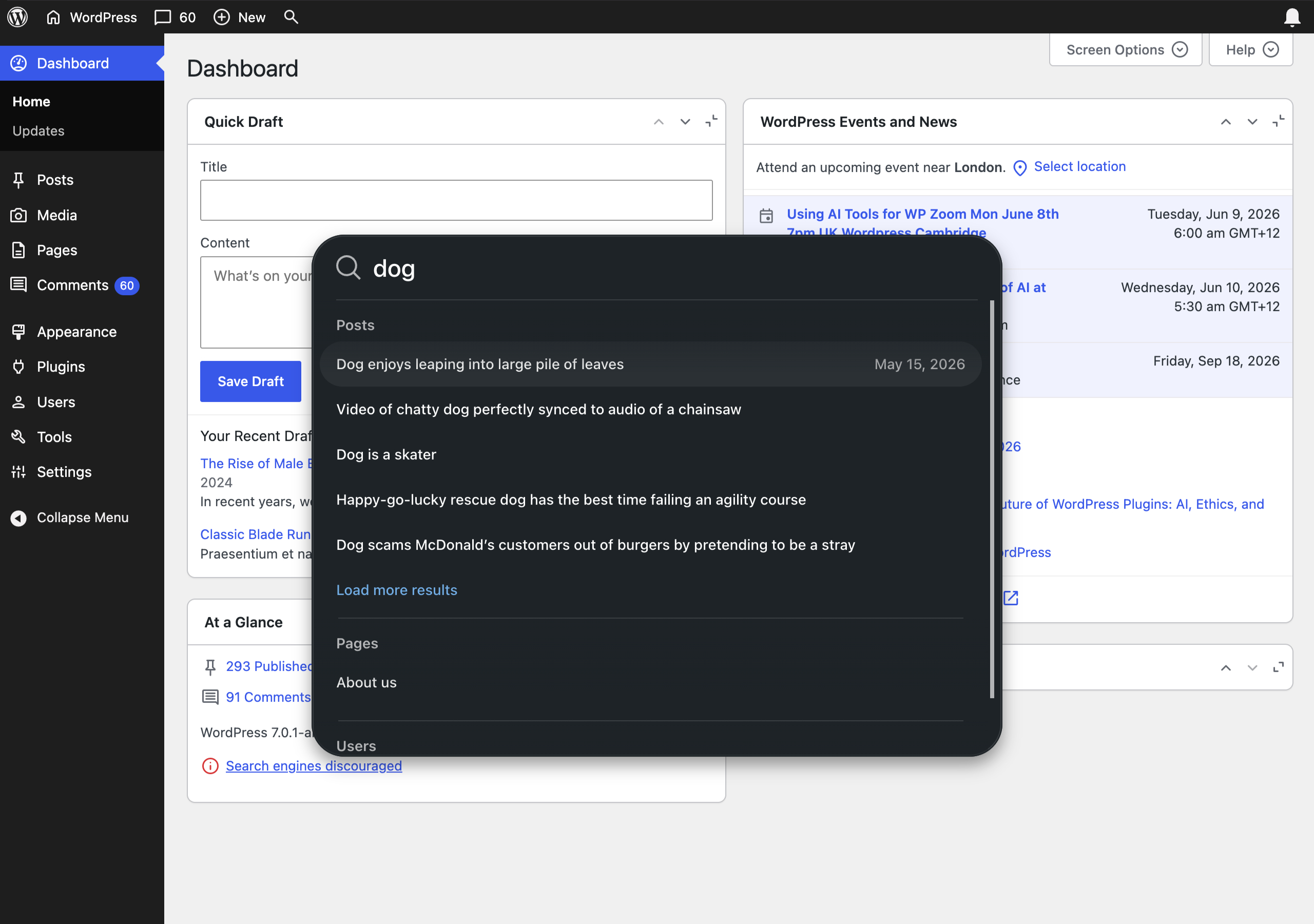
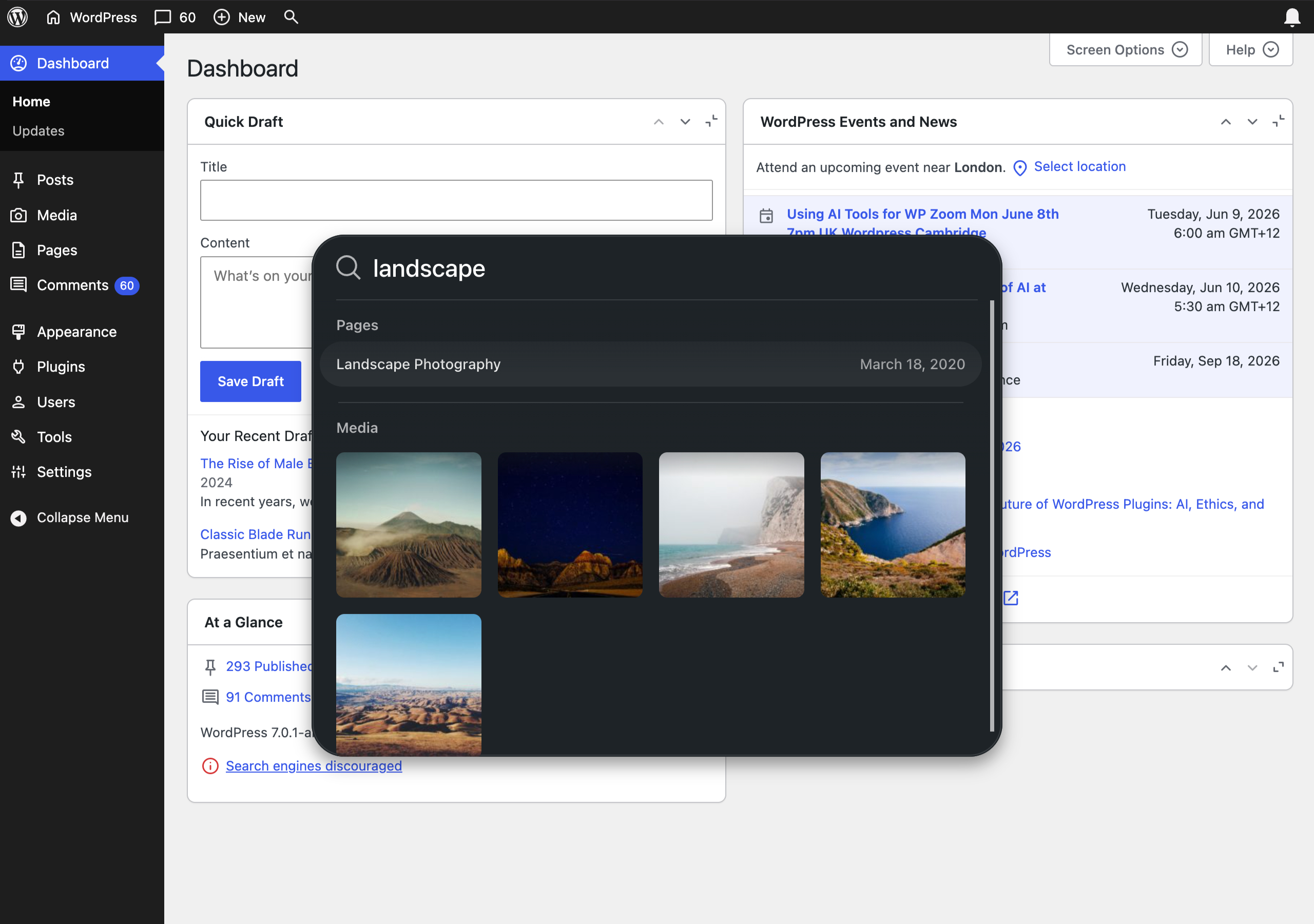
Admin Search makes searching your WordPress website easy by bringing results from all your post types, media, taxonomies, comments, users and admin pages together in a single, simple-to-use interface, seamlessly integrated into the WordPress admin interface.
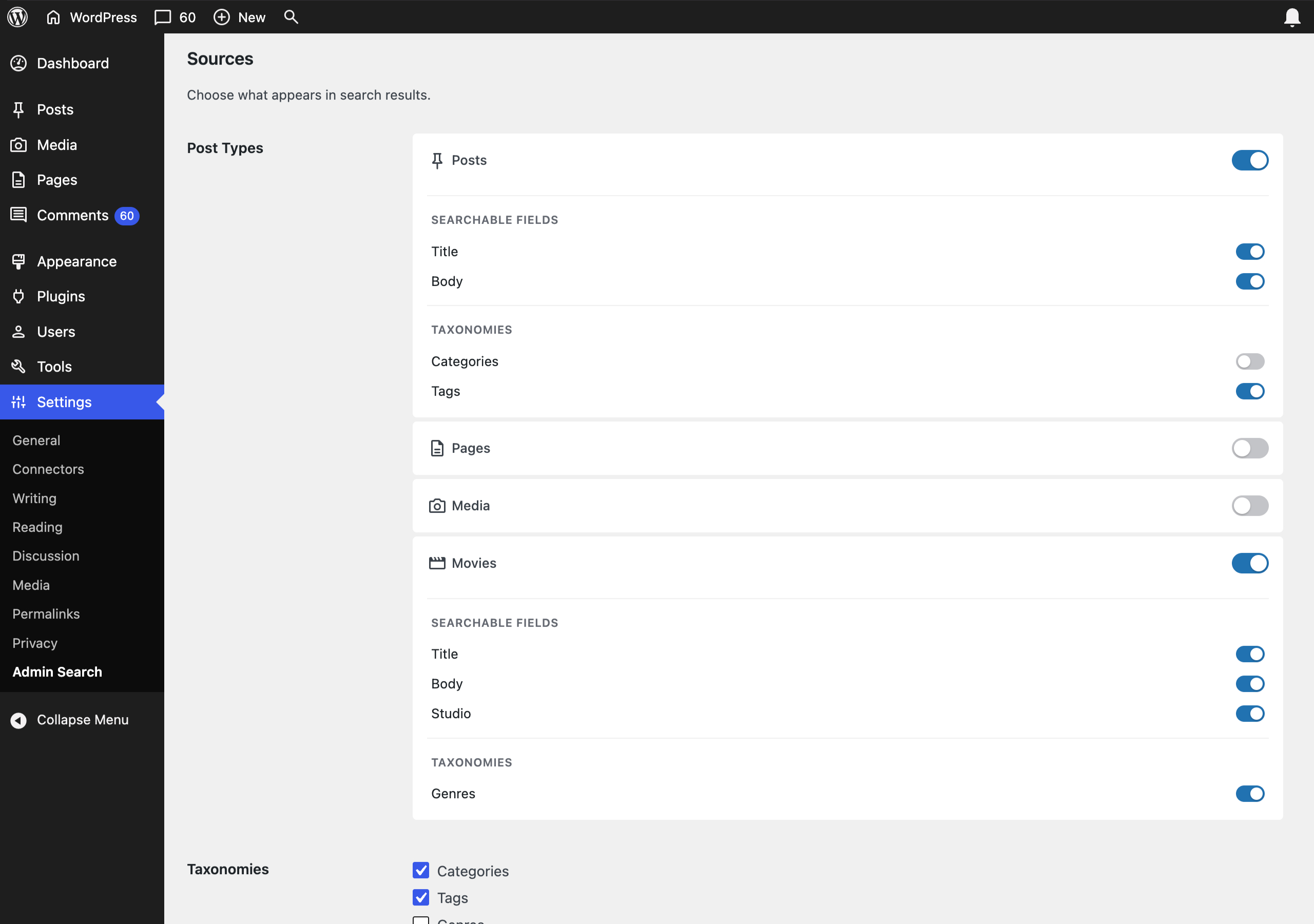
Choose which post types and taxonomies are searched and the number of results displayed for each. Admin Search also supports custom post types and taxonomies.
Admin Search is a lightweight plugin with filter hooks for deep customization.
Features
- Search everything on your WordPress site, anywhere
- Simple and easy to use
- Sources of search results are customizable
- Extend the search query with filter hooks
Configure & Extend
Admin Search can be extended by using filter hooks. The following filters are available:
admin_search_queryto modify the search query string. The filter argument supplied is a string containing the search queryadmin_search_sourcesto modify the search sources. The filter argument supplied is an array of sources, add, remove or modify sourcesadmin_search_posts_queryto modify theWP_Queryarguments array for all searched post types. The filter argument supplied is an array ofWP_Queryarguments, add, remove or modify supported argumentsadmin_search_{Post Type}_queryto modify theWP_Queryarguments array for a specific post type. The filter argument supplied is an array ofWP_Queryarguments, add, remove or modify supported arguments. Replace {Post Type} with the name of the post type to modifyadmin_search_terms_queryto modify theget_termsarguments array for all searched terms (taxonomies). The filter argument supplied is an array ofget_termsarguments, add, remove or modify supported argumentsadmin_search_{Term}_queryto modify theget_termsarguments array for a specific term (taxonomy). The filter argument supplied is an array ofget_termsarguments, add, remove or modify supported arguments. Replace {Term} with the name of the term to modifyadmin_search_comments_queryto modify theWP_Comment_Queryarguments array for all searched comments. The filter argument supplied is an array ofWP_Comment_Queryarguments, add, remove or modify supported argumentsadmin_search_users_queryto modify theWP_User_Queryarguments array for all searched users. The filter argument supplied is an array ofadmin_search_users_queryarguments, add, remove or modify supported argumentsadmin_search_website_titlesto modify the labels array for external websites. The filter argument supplied is an array of predefined domains and titles, add, remove or modify domains and titlesadmin_search_pre_resultsandadmin_search_post_resultsto modify the results array before or after results are appended to the array. The filter argument supplied is an empty array foradmin_search_pre_resultsor search results for a given query foradmin_search_post_results, add, remove or modify result itemsadmin_search_fieldsto modify the searchable fields array. The filter argument supplied is an array of searchable fields (post_title,post_name,post_excerptandpost_content)admin_search_meta_queriesto add custom fields to the searchable fields array. The filter argument supplied is an empty array. Use this filter instead ofadmin_search_fieldswhen adding custom fields
Examples:
Modify the query string before a search is initiated
// Correct the spelling of dog when searching
add_filter( 'admin_search_query', function( $query ) {
    if ( 'dog' === $query ) {
        $query = 'doggo';
    }

    return $query;
} );
Modify the WP_Query parameters before a search is initiated
// Exclude post with the ID 96
add_filter( 'admin_search_posts_query', function( $query ) {
    $query['post__not_in'] = array( 96 );

    return $query;
} );
Add a custom field to the searchable fields
// Add the price custom field to the searchable fields
add_filter( 'admin_search_meta_queries', function( $fields, $post_type ) {
    if ( 'post' === $post_type ) {
        $fields[] = 'price';
    }

    return $fields;
}, 10, 2 );
Modify the search results after a search has initiated
// Add custom results from external API
add_filter( 'admin_search_post_results', function( $results, $q ) {
    $results[ 'custom' ][ 'post_type' ] => array(
        'name' => 'custom',
        'label' => 'Custom'
    );

    $json = file_get_contents( 'https://example.com?search=' . $q );
    $obj = json_decode( $json );

    foreach ( $obj as $item ) {
        $results[ 'custom' ][ 'posts' ][] = array(
            …
        );
    }

    return $results;
}, 10, 2 );
Installation
- Visit Plugins > Add New
- Search for “Admin Search”
- Activate Admin Search from your Plugins page
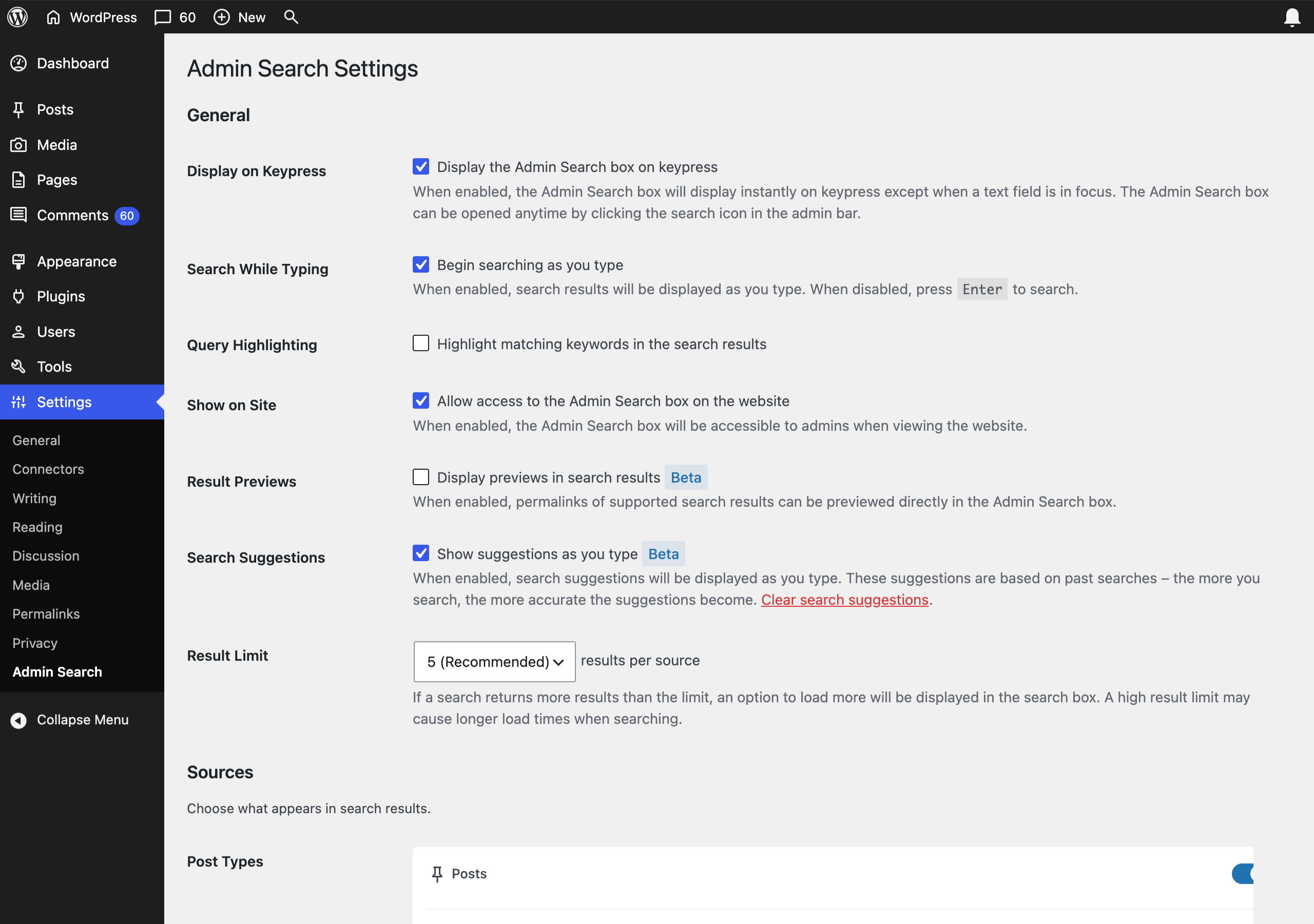
- Go to Settings > Admin Search and choose what to search on your WordPress website
Changelog
1.5.0
- New Feature: Choose what fields to search in settings. By default, Admin Search searches post titles and bodies, searches can now be extended to any public custom fields
- New Feature: Search by taxonomies
- Extended natural language searches. More date options, including “between 01/01/20 and 01/01/26”, “before 01/01/26”, “after 01/01/20”, “last 2 weeks”. These can be combined with query searches such as “corgi facts between 01/01/20 and 01/01/26”
- Tested on WordPress 7
1.4.2
- Fixed an issue where pasting text from some sources may also paste the style
1.4.1
- Tested up to 6.7
- Added a filter hook to add taxonomies to the searchable fields. This can be hooked into using
admin_search_taxonomies, this hook has two arguments:$taxonomies(a list of taxonomies being searched, this is empty initially) and$post_type(returns the current post type being searched so you can optionally apply the filter to a specific post type). Searching taxonomies significantly delays the return of results, it is not recommended you use this unless you’re willing to wait for your results. - Fixed issue with javascript function toggle instantly closing search box after opening
1.4.0
- New Feature: Introducing search suggestions! Now, whenever you search using a term with 9 or more characters and it returns results, it will be added to a database. The more you search that term, the higher it will rank. When you start typing 3 or more characters into the search box, autocomplete will display if it matches a term in the database, hit the right arrow key to apply it. This feature is disabled by default, go to Settings > Admin Search to enable it
- A new setting to enable or disable auto searching has been added. Typically, search results start displaying as you type, you can now disable this and only show results by hitting the enter key
- Many UI updates and some improvements to the mobile interface
- Fixed issues with hotkey handling. Navigating the results with the up and down keys is improved, hitting the right arrow key and the enter key behave better depending on what is in focus
- The search input has been switched from a traditional HTML input field and form to a contenteditable div, this shouldn’t affect most users but may affect OS or browser settings and extensions that alter the way inputs work. Testing is ongoing
- Added support for WP_Block post type
- Removed the user display as setting. Users will be displayed using their username from now on
- Reduced the default result count to 5. This can still be increased to show more results initially
- Disabled Ctrl + S and Cmmd + S keyboard shortcut due to conflicts with WordPress and browser functionality
- Fixed PHP8 related issues
- Fixed an issue where default settings weren’t applied when first installing and activating the plugin
- Fixed an issue where no message is displayed if there’re no results
- Fixed an issue where multiple results are focussed initially
- Fixed an issue with an undefined value displaying on the account setting page
- Tested on WordPress up to version 6.5.3
1.3.3
- Fixed visual issues with media results
- Updated donation link
1.3.2
- Tested on WordPress up to version 6.4.4a
- Added Woocommerce SKU field as searchable field
Screenshots
For developers
Is this your plugin? Show off the numbers.
Add a live badge to your site, docs or GitHub README. It updates on its own — no account needed.
Best Admin Search alternatives
All admin plugins →




FAQ
Admin Search: quick answers
Straight answers, pulled from live WordPress.org data.
Live data from WordPress.org · checked Sep 30, 2026
Is Admin Search free?
Yes. Admin Search is free to download and use from the official WordPress.org plugin directory.
Is Admin Search safe to use in 2026?
Admin Search is a solid plugin choice in 2026, with a few things worth checking first. It runs on 1K+ sites, is rated 4.5/5 and was last updated 4 months ago, and scores 65/100 on our health check.
How many websites use Admin Search?
Admin Search is active on 1K+ WordPress websites and has been downloaded 29,262 times since it launched in March 2020. It was downloaded 616 times in the last 30 days.
Does Admin Search work with WordPress 7.1?
Admin Search is officially tested up to WordPress 7.0.6, while the latest release is 7.1.2. It may still work, but try it on a staging site first.
What PHP version does Admin Search need?
Admin Search requires PHP 5.2 or higher. Most hosts run PHP 8.x today, so it works on any modern WordPress hosting.
When was Admin Search last updated?
The latest version, 1.5.0, was released on May 28, 2026 (4 months ago).
Who makes Admin Search?
Admin Search is developed and maintained by Andrew Stichbury.
What are the best alternatives to Admin Search?
The most popular alternatives to Admin Search are Loginizer (1M+ installs), Redux Framework (900K+ installs) and Admin Menu Editor (300K+ installs).
Powered by PageForge
Want thousands of pages that rank like these? Build them in an afternoon.
This directory runs on the same engine as PageForge. Turn any spreadsheet, CSV or API into thousands of fast, SEO-ready WordPress pages — with schema, internal links and AI-written copy baked in.
- CSV, Google Sheets & API data sources
- AI content, schema & internal links per page
- Works with Elementor, Gutenberg, Yoast & Rank Math
- Free on WordPress.org — no credit card


