



Admin Screenshots
Want to take a screenshot of any page in your admin Dashboard and share it with someone else? It couldn't be easier with Admin Screenshots!

Solid choice
Admin Screenshots is a solid plugin choice in 2026, with a few things worth checking first. It runs on 10+ sites, is rated 5/5 and was last updated 2 months ago, and scores 69/100 on our health check.
- Tested with the latest WordPress (7.1)
- Small user base (10+ active installs)
- Very few reviews so far
How does it stack up?
Side-by-side on installs, updates, ratings & support



Daily downloads
Download spikes usually follow a new release — each site that auto-updates counts as a download.
Rankings
Where Admin Screenshots stands todayWordPress.org search rankings
Live position in the plugin search, top 100| Keyword | Position |
|---|---|
| admin | >100 |
| debug | >100 |
| screenshot | #17 |
| share | >100 |
Version adoption
Share of active sites per release.
Rating breakdown
★★★★★★★★★★ 5 from 1 reviews
About Admin Screenshots
From the official readme · v1.0.6Description
Summary
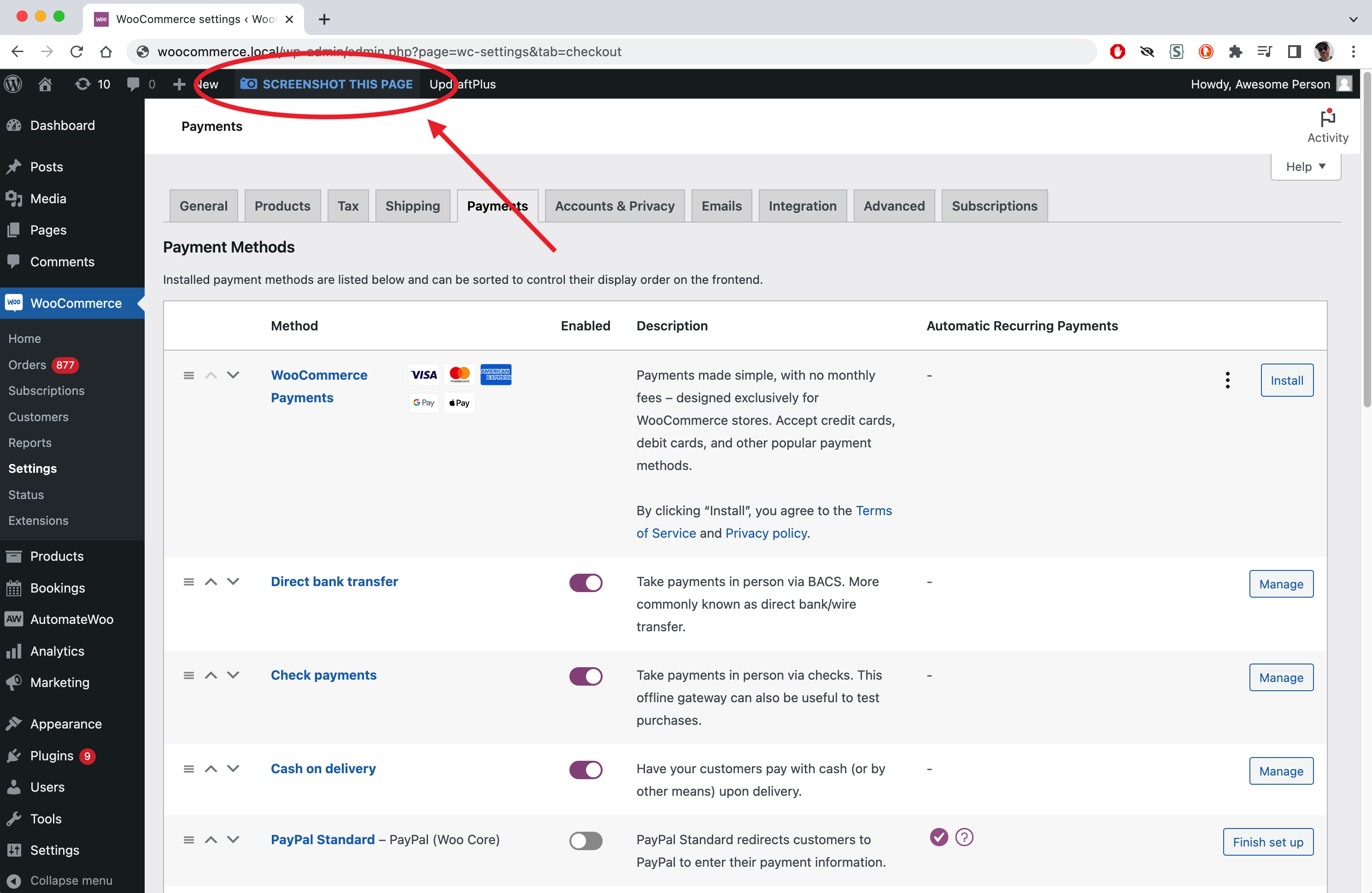
Admin Screenshots for WordPress will add a button to every page in the admin Dashboard, allowing you to take a screenshot of the page you’re on. The screenshot will be saved in your Media Library, and you will get a direct link to it to share. This will let you show how certain settings are, without giving them access to your backend.
If you’re on the other end (like a support agent) and you need to know how someone’s site settings without having to log in, tell your customer to install the plugin, take a screenshot of the page that you want to see, and send you the link.
Features
- Saves screenshots in Media Library: every image is saved in the /admin-screenshots/ subdirectory under /uploads.
- Gives you direct link to images: immediately after taking the screenshot, you get the link to it, easy to copy to your clipboard and share with others.
Installation
- Upload the “admin-screenshot” directory to your “wp-content/plugins” directory.
- In your WordPress admin, go to PLUGINS and activate “Admin Screenshot”.
- Go to any page in your admin Dashboard.
- Select the “TAKE SCREENSHOT” button.
- Copy the link to the screenshot and share it with anyone.
- Party!
Frequently asked questions
Some images are not showing, and some of the styles seem to be a bit off in the screenshots, esp. form elements (input fields, dropdowns, etc.)
This is a known issue and is likely a bug in the original HTML2Canvas library that this plugin is built on. You can read a bit more about this library here: https://github.com/niklasvh/html2canvas Relevant examples: https://github.com/niklasvh/html2canvas/issues/2958 / https://github.com/niklasvh/html2canvas/issues/2937 While the screenshots aren’t perfect, they should be sufficient for most cases where you’re just trying to share the settings on a page.
Is it possible to make a screenshot of the entire page, and not just the visible part?
Working on it. Next version.
Is it possible to delete all the screenshots that were created with this plugin all at once?
Hopefully in a future version.
The screenshot is not saving. Is there a debugging feature to see what might be wrong here?
Not yet, but hopefully in a future version.
I’ll need more help please!
Please go to the plugin’s WordPress.org support forum and let me know.
I’ve noticed that something doesn’t work right, or I have an idea for improvement. How can I report this?
It’s very possible, or even likely, that something’s not right; I can only do so much testing and it’s impossible to test the plugin with every single setup out there, so there’s a good chance that it will have some issues. Please report any bugs on the plugin’s WordPress.org support forum.
Changelog
Code updates
1.0.6
- All strings translateable.
1.0.5
- Adjusted some code to better adhere to plugin standards.
1.0.4
- Fix for a bug in HTML2CANVAS library that rendered text with wrong spacing: https://github.com/niklasvh/html2canvas/issues/3037
1.0.3
- Small bugfixes, typos, cleanup
1.0
- First public release
Screenshots

For developers
Is this your plugin? Show off the numbers.
Add a live badge to your site, docs or GitHub README. It updates on its own — no account needed.
Best Admin Screenshots alternatives
All admin plugins →




FAQ
Admin Screenshots: quick answers
Straight answers, pulled from live WordPress.org data.
Live data from WordPress.org · checked Oct 16, 2026
Is Admin Screenshots free?
Yes. Admin Screenshots is free to download and use from the official WordPress.org plugin directory.
Is Admin Screenshots safe to use in 2026?
Admin Screenshots is a solid plugin choice in 2026, with a few things worth checking first. It runs on 10+ sites, is rated 5/5 and was last updated 2 months ago, and scores 69/100 on our health check.
How many websites use Admin Screenshots?
Admin Screenshots is active on 10+ WordPress websites and has been downloaded 1,860 times since it launched in March 2023. It was downloaded 70 times in the last 30 days.
Does Admin Screenshots work with WordPress 7.1?
Yes. The developer has tested Admin Screenshots up to WordPress 7.1.3, the latest release. It requires WordPress 5.0 or newer.
When was Admin Screenshots last updated?
The latest version, 1.0.6, was released on August 25, 2026 (2 months ago).
Who makes Admin Screenshots?
Admin Screenshots is developed and maintained by Senff - a11n.
What are the best alternatives to Admin Screenshots?
The most popular alternatives to Admin Screenshots are Loginizer (1M+ installs), Redux Framework (900K+ installs) and Admin Menu Editor (300K+ installs).
Powered by PageForge
Want thousands of pages that rank like these? Build them in an afternoon.
This directory runs on the same engine as PageForge. Turn any spreadsheet, CSV or API into thousands of fast, SEO-ready WordPress pages — with schema, internal links and AI-written copy baked in.
- CSV, Google Sheets & API data sources
- AI content, schema & internal links per page
- Works with Elementor, Gutenberg, Yoast & Rank Math
- Free on WordPress.org — no credit card


