



AboveWP Admin Dark Mode
Toggle between light and dark modes in your WordPress admin area with multiple themes, scheduling, and advanced customization options.

Solid choice
AboveWP Admin Dark Mode is a solid plugin choice in 2026, with a few things worth checking first. It runs on 90+ sites, is rated 5/5 and was last updated 4 weeks ago, and scores 75/100 on our health check.
- Actively developed — last update 4 weeks ago
- Tested with the latest WordPress (7.1)
- Small user base (90+ active installs)
- Very few reviews so far
How does it stack up?
Side-by-side on installs, updates, ratings & support


Daily downloads
Download spikes usually follow a new release — each site that auto-updates counts as a download.
Rankings
Where AboveWP Admin Dark Mode stands todayWordPress.org search rankings
Live position in the plugin search, top 100| Keyword | Position |
|---|---|
| admin theme | #59 |
| admin ui | #19 |
| dark mode | #8 |
| dark theme | #9 |
| Night Mode | #8 |
Version adoption
Share of active sites per release.
Rating breakdown
★★★★★★★★★★ 5 from 2 reviews
About AboveWP Admin Dark Mode
From the official readme · v1.2.1Description
AboveWP Admin Dark Mode provides a comprehensive dark mode solution for WordPress admin with multiple themes, automatic scheduling, and extensive customization options. Switch between light and dark modes manually or let the plugin automatically adapt based on your schedule or local sunset/sunrise times.
Key Features
Multiple Dark Themes:
* Classic Dark – Traditional dark gray theme with orange accents
* OLED Black – Pure black theme optimized for OLED displays
* Blue Dark – Dark theme with blue accents for a modern look
* Live theme preview in settings
* Instant theme switching
Automatic Scheduling:
* Schedule dark mode by specific times (e.g., 6:00 PM to 6:00 AM)
* Automatic sunset to sunrise mode using your browser’s geolocation
* Custom time ranges for weekdays and weekends
* Smart scheduling that adapts to your location
User Experience:
* Easy-to-use dark mode toggle in the admin bar
* FOUC (Flash of Unstyled Content) prevention for seamless experience
* User-specific preferences that persist across sessions
* Fully responsive design that works on all screen sizes
* Comprehensive settings panel with intuitive controls
Advanced Customization:
* Form elements styled consistently across all themes
* Smooth visual transitions
* Admin bar integration
* AboveWP dashboard integration
Usage
Manual Toggle:
Click the dark mode icon in the WordPress admin bar to instantly toggle between light and dark modes.
Theme Selection:
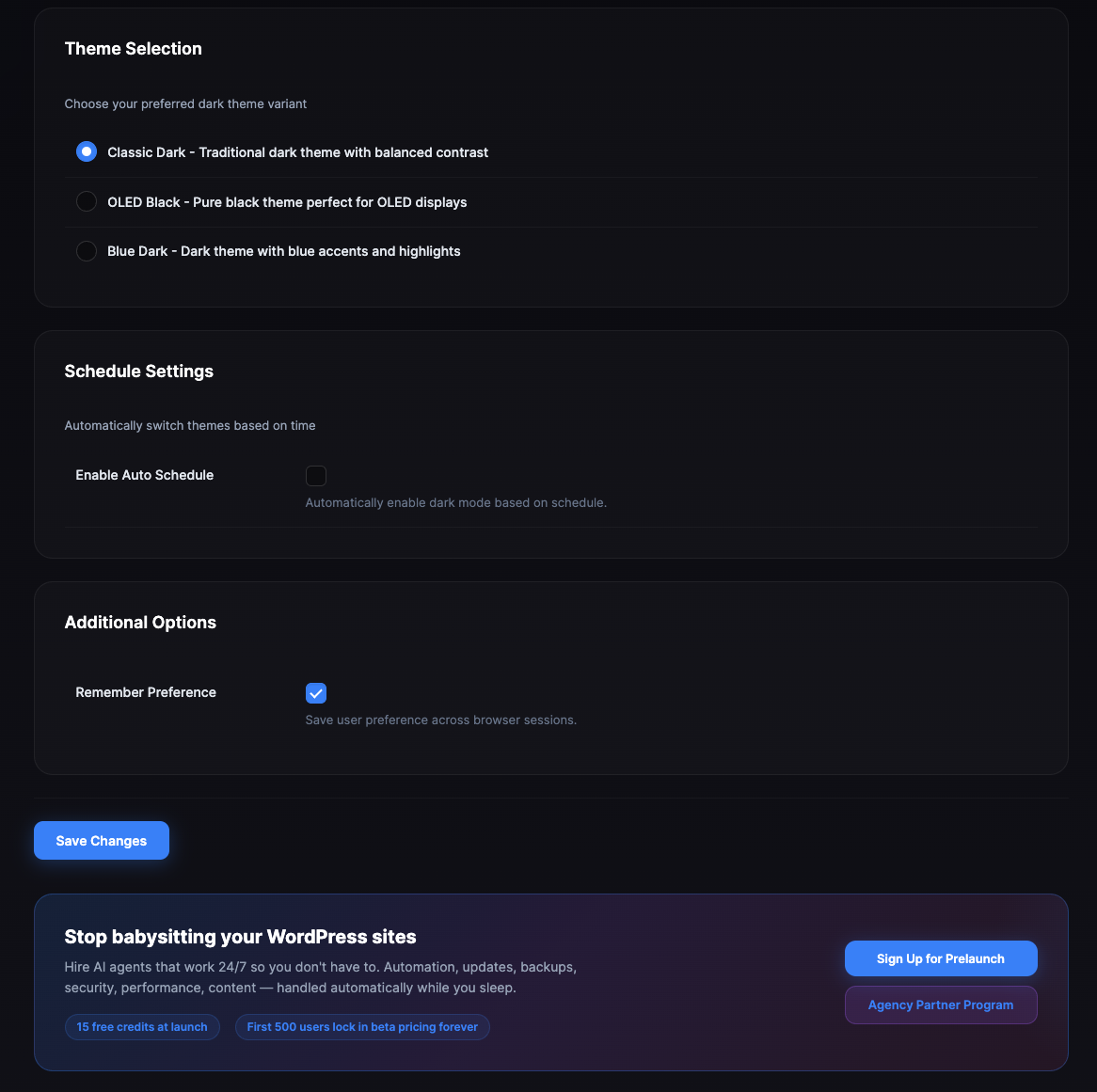
Go to AboveWP → Dark Mode to choose from three available themes:
* Classic Dark (default)
* OLED Black
* Blue Dark
Automatic Scheduling:
Configure automatic dark mode activation in the settings:
* Set custom time ranges (e.g., 7:00 PM to 7:00 AM)
* Enable sunset to sunrise mode for natural light adaptation
* Allow geolocation access for accurate sunset/sunrise times
Settings Panel:
Access comprehensive settings through:
* WordPress Admin → AboveWP → Dark Mode
* AboveWP Dashboard → Dark Mode plugin card → Configure button
Requirements
- WordPress 5.0 or higher
- Modern browsers (Chrome, Firefox, Safari, Edge)
- JavaScript enabled
- For sunset/sunrise scheduling: Browser geolocation support
Privacy
This plugin may use your browser’s geolocation feature (with your permission) solely for calculating sunset and sunrise times for automatic scheduling. No location data is stored or transmitted to external servers.
Support
For support, feature requests, or bug reports, please visit AboveWP or contact us directly.
Installation
- Upload the
abovewp-admin-dark-modefolder to the/wp-content/plugins/directory - Activate the plugin through the ‘Plugins’ menu in WordPress
- Access settings through AboveWP → Dark Mode or click Configure on the AboveWP Dashboard
- Choose your preferred theme and configure scheduling options
- Use the dark mode toggle in the admin bar for manual control
Frequently asked questions
How do I change the dark theme?
Go to AboveWP → Dark Mode, select your preferred theme from the Theme Selection section, and click Save Changes.
Can I schedule dark mode automatically?
Yes! Enable “Automatic Dark Mode Scheduling” in the settings and choose between custom time ranges or sunset to sunrise mode.
Why do I need to allow location access?
Location access is only required for the sunset to sunrise scheduling feature. It helps determine accurate sunset and sunrise times for your area.
Will my preferences sync across devices?
Preferences are saved per-user in your WordPress database, so they’ll persist across browser sessions on the same WordPress site.
Does this work with all WordPress themes?
This plugin only affects the WordPress admin area, not your website’s frontend. It works with all WordPress admin interfaces.
Changelog
Major feature update! New multiple themes, automatic scheduling, and comprehensive settings panel. Recommended for all users.
1.2.1
- Removed the AboveWP promotional banner and admin notice
- Tested up to WordPress 7.1
1.2.0
- Design update
1.1.0
- Added multiple dark themes (Classic Dark, OLED Black, Blue Dark)
- Implemented automatic scheduling with custom time ranges
- Added sunset to sunrise scheduling with geolocation support
- Created comprehensive settings panel with live theme preview
- Added FOUC (Flash of Unstyled Content) prevention
- Improved form element styling across all themes
- Enhanced user experience with better visual feedback
- Added AboveWP dashboard integration
- Implemented WordPress Settings API for better data persistence
1.0.0
- Initial release
Screenshots


For developers
Is this your plugin? Show off the numbers.
Add a live badge to your site, docs or GitHub README. It updates on its own — no account needed.
Best AboveWP Admin Dark Mode alternatives
All admin theme plugins →





FAQ
AboveWP Admin Dark Mode: quick answers
Straight answers, pulled from live WordPress.org data.
Live data from WordPress.org · checked Oct 1, 2026
Is AboveWP Admin Dark Mode free?
Yes. AboveWP Admin Dark Mode is free to download and use from the official WordPress.org plugin directory.
Is AboveWP Admin Dark Mode safe to use in 2026?
AboveWP Admin Dark Mode is a solid plugin choice in 2026, with a few things worth checking first. It runs on 90+ sites, is rated 5/5 and was last updated 4 weeks ago, and scores 75/100 on our health check.
How many websites use AboveWP Admin Dark Mode?
AboveWP Admin Dark Mode is active on 90+ WordPress websites and has been downloaded 2,063 times since it launched in April 2025. It was downloaded 302 times in the last 30 days.
Does AboveWP Admin Dark Mode work with WordPress 7.1?
Yes. The developer has tested AboveWP Admin Dark Mode up to WordPress 7.1.2, the latest release. It requires WordPress 5.0 or newer.
When was AboveWP Admin Dark Mode last updated?
The latest version, 1.2.1, was released on September 4, 2026 (4 weeks ago).
Who makes AboveWP Admin Dark Mode?
AboveWP Admin Dark Mode is developed and maintained by AboveWP.
What are the best alternatives to AboveWP Admin Dark Mode?
The most popular alternatives to AboveWP Admin Dark Mode are Add Admin CSS (10K+ installs), Slate Admin Theme (6K+ installs) and UiPress lite (6K+ installs).
Powered by PageForge
Want thousands of pages that rank like these? Build them in an afternoon.
This directory runs on the same engine as PageForge. Turn any spreadsheet, CSV or API into thousands of fast, SEO-ready WordPress pages — with schema, internal links and AI-written copy baked in.
- CSV, Google Sheets & API data sources
- AI content, schema & internal links per page
- Works with Elementor, Gutenberg, Yoast & Rank Math
- Free on WordPress.org — no credit card


