


Markdown Editor (Formerly Dark Mode)
If you want to quickly edit content in WordPress without thinking about blocks, Markdown Editor is the choice for you! Get an immersive, peaceful and natural writing experience with the coolest editor – Markdown Editor…

Use with caution
Markdown Editor (Formerly Dark… works, but test it on a staging site before relying on it in 2026. It runs on 1K+ sites, is rated 3.3/5 and was last updated 11 months ago, and scores 51/100 on our health check.
- Mixed reviews — 3.3/5 from 86 ratings
- Only tested up to WordPress 6.9 (latest is 7.1)
How does it stack up?
Side-by-side on installs, updates, ratings & support


Daily downloads
Download spikes usually follow a new release — each site that auto-updates counts as a download.
Rankings
Where Markdown Editor (Formerly D… stands todayWordPress.org search rankings
Live position in the plugin search, top 100| Keyword | Position |
|---|---|
| admin theme | >100 |
| dark mode | #11 |
| dashboard | >100 |
| editor | >100 |
| markdown | #15 |
Version adoption
Share of active sites per release.
Rating breakdown
★★★★★★★★★★ 3.3 from 86 reviews
About Markdown Editor (Formerly Dark Mode)
From the official readme · v4.2.1Description
If you want to quickly edit content in WordPress without thinking about blocks, Markdown Editor is the choice for you! Get an immersive, peaceful and natural writing experience with the coolest editor – Markdown Editor.
Whether you are a Markdown fan or newbie as a Markdown writer, you will love Markdown Editor. This is the simplest plugin for a developer to write content in WordPress.
Using technology at night time can have a negative effect on your eyesight.
Markdown Editor will also darken the colors of your admin dashboard making it easier for you to work at night.
Use Markdown Editor plugin to create a stunning dark version for your WordPress admin dashboard. Dark Mode works automatically as per their preferred operating system preference.
Markdown Editor (Formerly Dark Mode) Features
- Typography Settings – You can change the typography of your editor screen, using four different fonts, and controls for font size, line height, line width, and paragraph spacing.
- Ready-made Color Schema – Quickly choose your favourite color from the ready-made color schema available in Markdown. Highlight and edit your content the way you want.
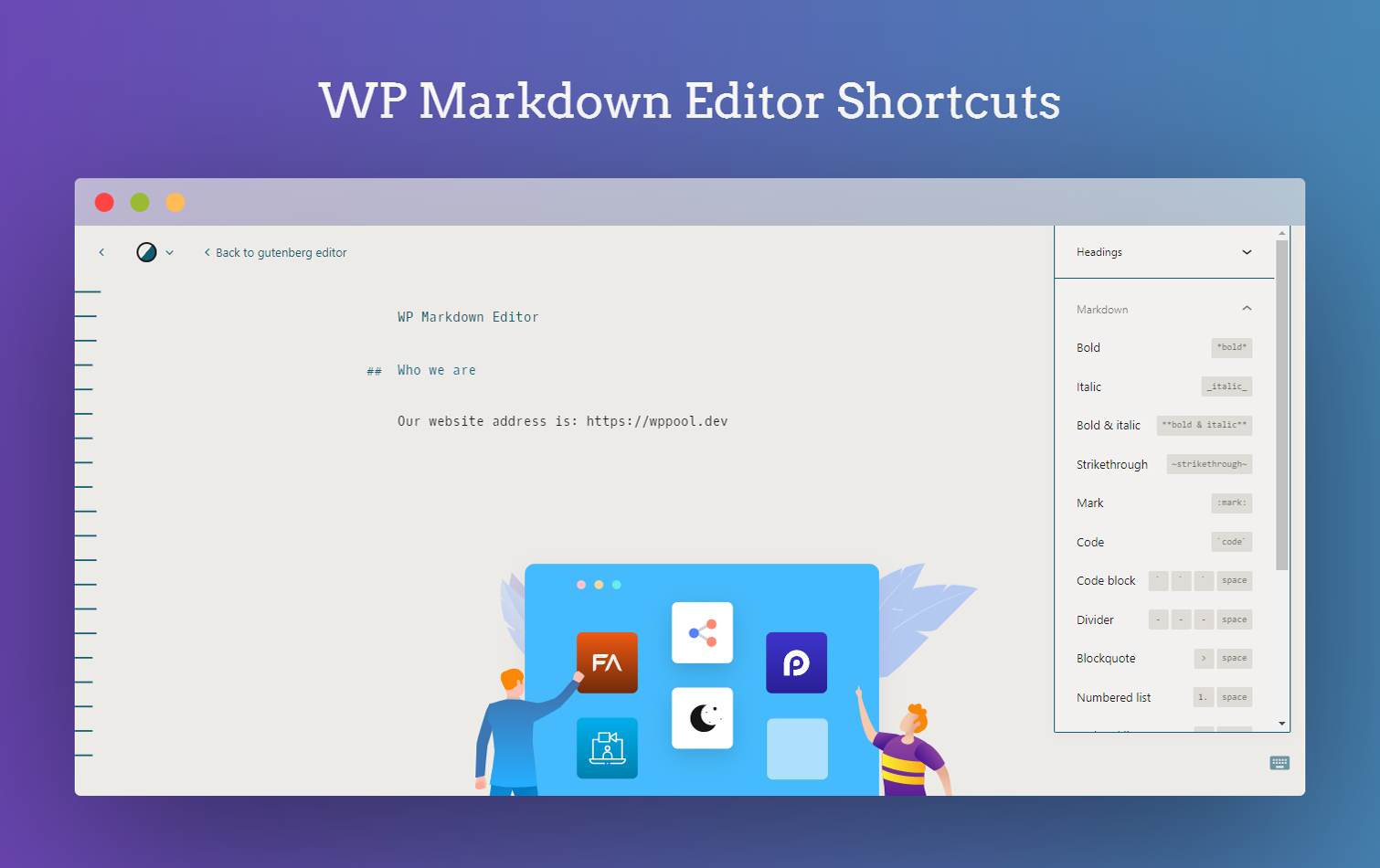
- Syntax Shortcuts – A Markdown cheat sheet is available for you which shows other keyboard shortcuts for heading, formatting and the interface.
- Emoji Supported – You can make your content more interactive and attractive with emojis. Markdown Editor supports all types of emojis in your write up.
- Custom Colors – You can customize the background text and color as you want with the custom color feature of our Markdown Editor. Pick the color schema of your preference and make it yours!
- Makes it easy and fast – formatting in WordPress without thinking about the blocks.
- Dark Mode Switch – You can toggle between the dark and light mode using the admin bar dark mode switch menu anytime.
- Auto Match OS Theme – Automatically shows Darkmode if the OS preferred theme is dark.
- Remember Dark Mode – The dark mode remains saved once you activated the dark mode.
How to use?
After activating the plugin, a new row action Edit (Markdown) will be added in the post/ page table row actions.
For editing any page/ post with the markdown editor, you need to click the Edit (Markdown) button in the post/ page row actions.
Then you will redirect to the Markdown editor and can start editing with the markdown syntax.
You can find the Markdown editor shortcuts by clicking the keyboard icon at the right-bottom side of the editor.
You can see a Dark mode switch added to the admin bar menu.
You can toggle between the dark and light mode by using that switch any time.
External services
This plugin does not connect to any third-party or external services.
Privacy Policy
Markdown Editor uses Appsero SDK to collect some telemetry data upon user’s confirmation. This helps us to troubleshoot problems faster & make product improvements.
Appsero SDK does not gather any data by default. The SDK only starts gathering basic telemetry data when a user allows it via the admin notice. We collect the data to ensure a great user experience for all our users.
Integrating Appsero SDK DOES NOT IMMEDIATELY start gathering data, without confirmation from users in any case.
Learn more about how Appsero collects and uses this data.
Changelog
4.2.1
- Improvement: Enhanced compatibility to support WordPress 6.9
4.2.0
- Improvement: Resolved all coding standard issues to improve code quality, compliance, and compatibility.
4.1.8
- Improvement: Updated plugin icon, banners and identity
4.1.7
- Improvement: Removed Appsero client
- Improvement: Checked compatibility with WordPress 6.5
4.1.6
- Improvement: Updated Appsero client
- Improvement: Updated WPPOOL sdk
4.1.5
- Fix: Fixed FluentCRM not collect leads
Screenshots




For developers
Is this your plugin? Show off the numbers.
Add a live badge to your site, docs or GitHub README. It updates on its own — no account needed.
Best Markdown Editor (Formerly Dar… alternatives
All admin theme plugins →



FAQ
Markdown Editor (Formerly Dark Mode): quick answers
Straight answers, pulled from live WordPress.org data.
Live data from WordPress.org · checked Nov 17, 2026
Is Markdown Editor (Formerly Dark… free?
Yes. Markdown Editor (Formerly Dark… is free to download and use from the official WordPress.org plugin directory.
Is Markdown Editor (Formerly Dark… safe to use in 2026?
Markdown Editor (Formerly Dark… works, but test it on a staging site before relying on it in 2026. It runs on 1K+ sites, is rated 3.3/5 and was last updated 11 months ago, and scores 51/100 on our health check.
How many websites use Markdown Editor (Formerly Dark…?
Markdown Editor (Formerly Dark… is active on 1K+ WordPress websites and has been downloaded 118,981 times since it launched in October 2017. It was downloaded 483 times in the last 30 days.
Does Markdown Editor (Formerly Dark… work with WordPress 7.1?
Markdown Editor (Formerly Dark… is officially tested up to WordPress 6.9.11, while the latest release is 7.1.4. It may still work, but try it on a staging site first.
What PHP version does Markdown Editor (Formerly Dark… need?
Markdown Editor (Formerly Dark… requires PHP 7.4 or higher. Most hosts run PHP 8.x today, so it works on any modern WordPress hosting.
When was Markdown Editor (Formerly Dark… last updated?
The latest version, 4.2.1, was released on December 9, 2025 (11 months ago).
Who makes Markdown Editor (Formerly Dark…?
Markdown Editor (Formerly Dark… is developed and maintained by azizultex.
What are the best alternatives to Markdown Editor (Formerly Dark…?
The most popular alternatives to Markdown Editor (Formerly Dark… are Add Admin CSS (10K+ installs), Slate Admin Theme (6K+ installs) and UiPress lite (6K+ installs).
Powered by PageForge
Want thousands of pages that rank like these? Build them in an afternoon.
This directory runs on the same engine as PageForge. Turn any spreadsheet, CSV or API into thousands of fast, SEO-ready WordPress pages — with schema, internal links and AI-written copy baked in.
- CSV, Google Sheets & API data sources
- AI content, schema & internal links per page
- Works with Elementor, Gutenberg, Yoast & Rank Math
- Free on WordPress.org — no credit card


