



Zoho CRM Lead Magnet
Websites are one of the most important sources of leads for your business.

Use with caution
Zoho CRM Lead Magnet works, but test it on a staging site before relying on it in 2026. It runs on 3K+ sites, is rated 3.1/5 and was last updated 4 months ago, and scores 53/100 on our health check.
- Mixed reviews — 3.1/5 from 25 ratings
How does it stack up?
Side-by-side on installs, updates, ratings & support



Daily downloads
Download spikes usually follow a new release — each site that auto-updates counts as a download.
Rankings
Where Zoho CRM Lead Magnet stands todayWordPress.org search rankings
Live position in the plugin search, top 100| Keyword | Position |
|---|---|
| contact form 7 | >100 |
| lead capture | #16 |
| lead magnet | #2 |
| Web to lead | #9 |
| zoho crm wordpress | #2 |
Version adoption
Share of active sites per release.
Rating breakdown
★★★★★★★★★★ 3.1 from 25 reviews
About Zoho CRM Lead Magnet
From the official readme · v1.8.2.3Description
Websites are one of the most important sources of leads for your business. That means your CRM system should be well integrated with your website to contextually capture each and every visitor to turn them into a lead.
Introducing the Zoho CRM Lead Magnet plugin for WordPress. This lets you create webforms, embed them in your website, and automatically capture leads directly into your CRM with zero attenuation.
Not only is the integration easy to set-up but it’s also easy on your wallet.
Overall usage flow
- Install the Zoho CRM forms plugin from the WordPress plugin Marketplace.
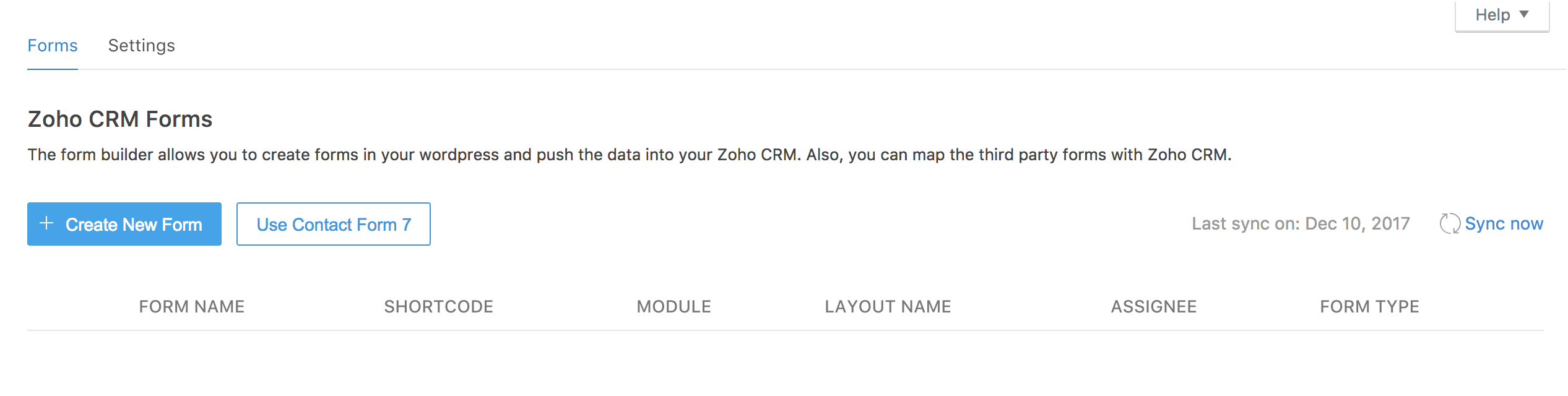
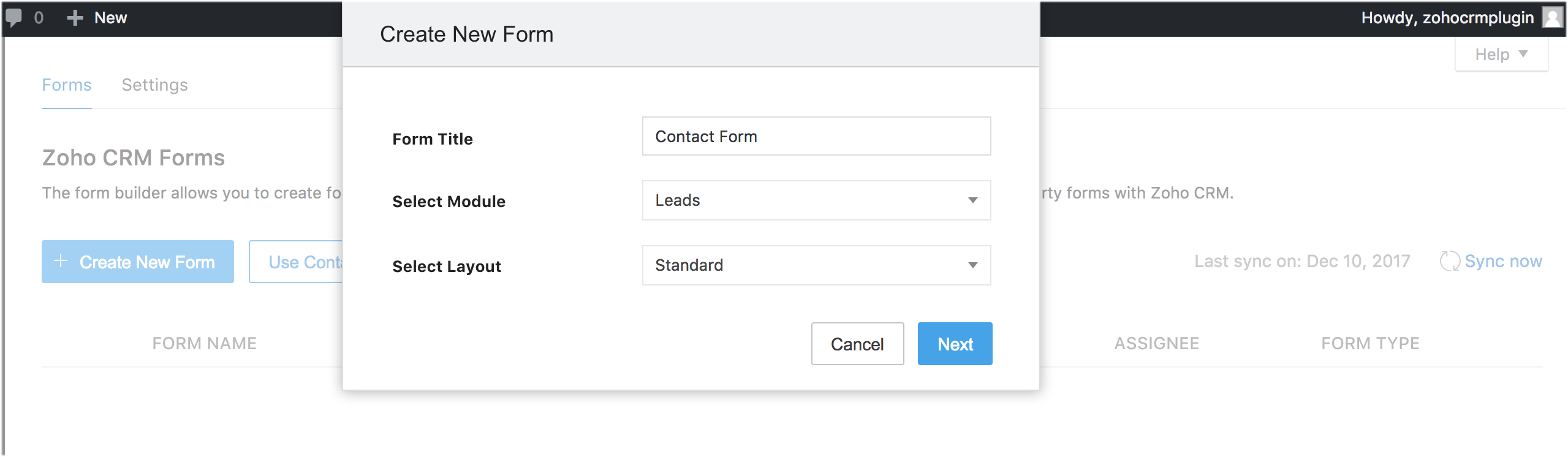
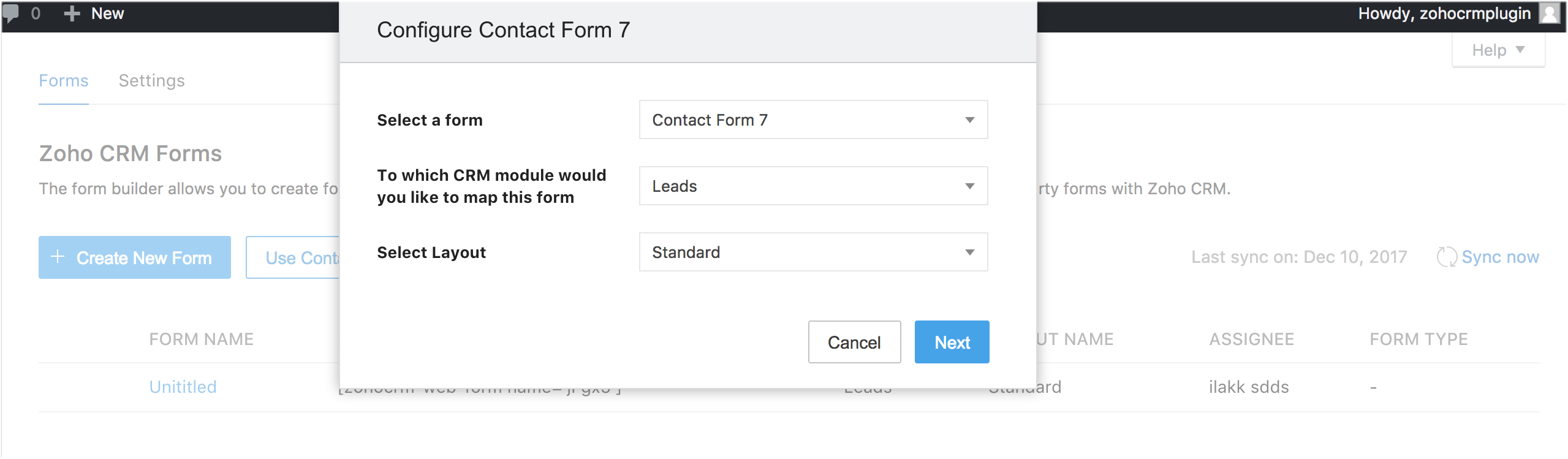
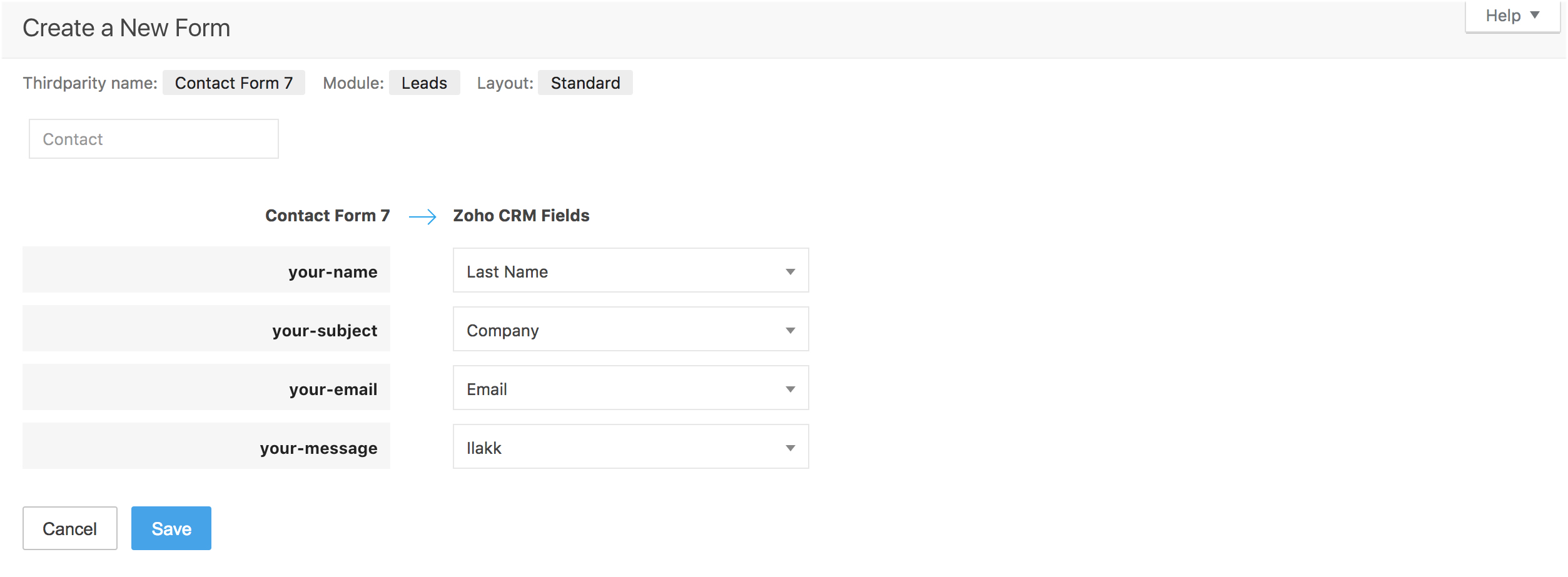
- Create a form using Zoho CRM webforms or Contact form 7 plugin.
- Configure the settings for your form.
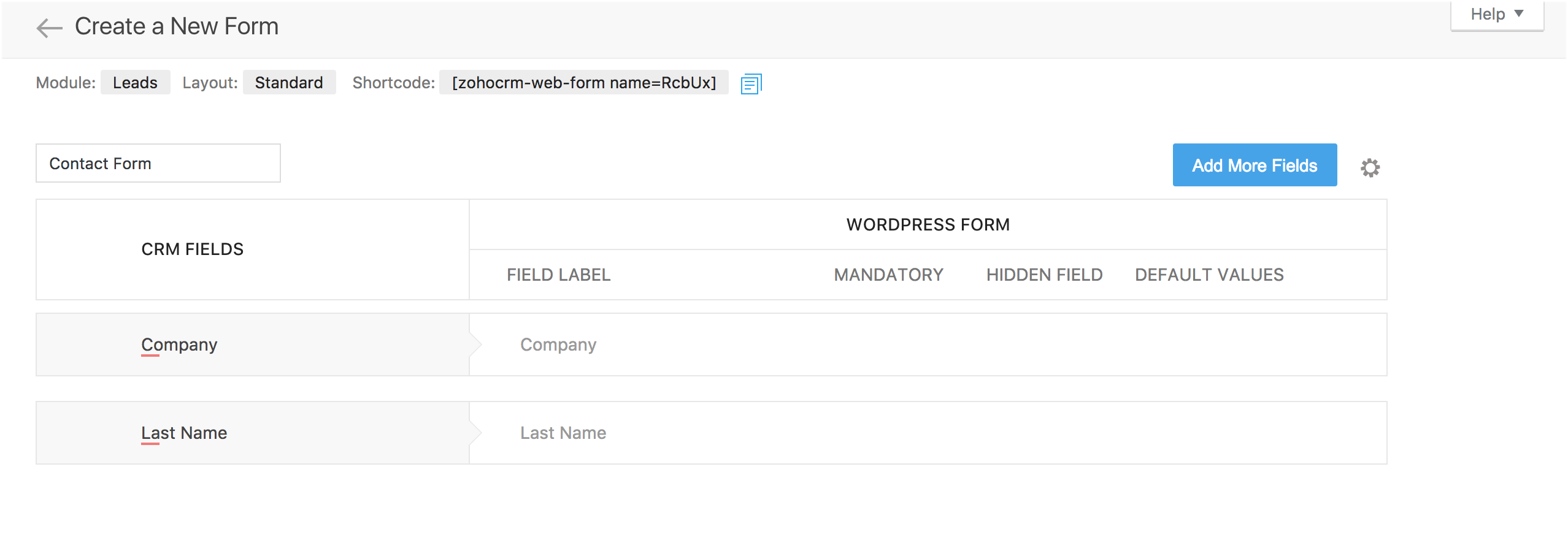
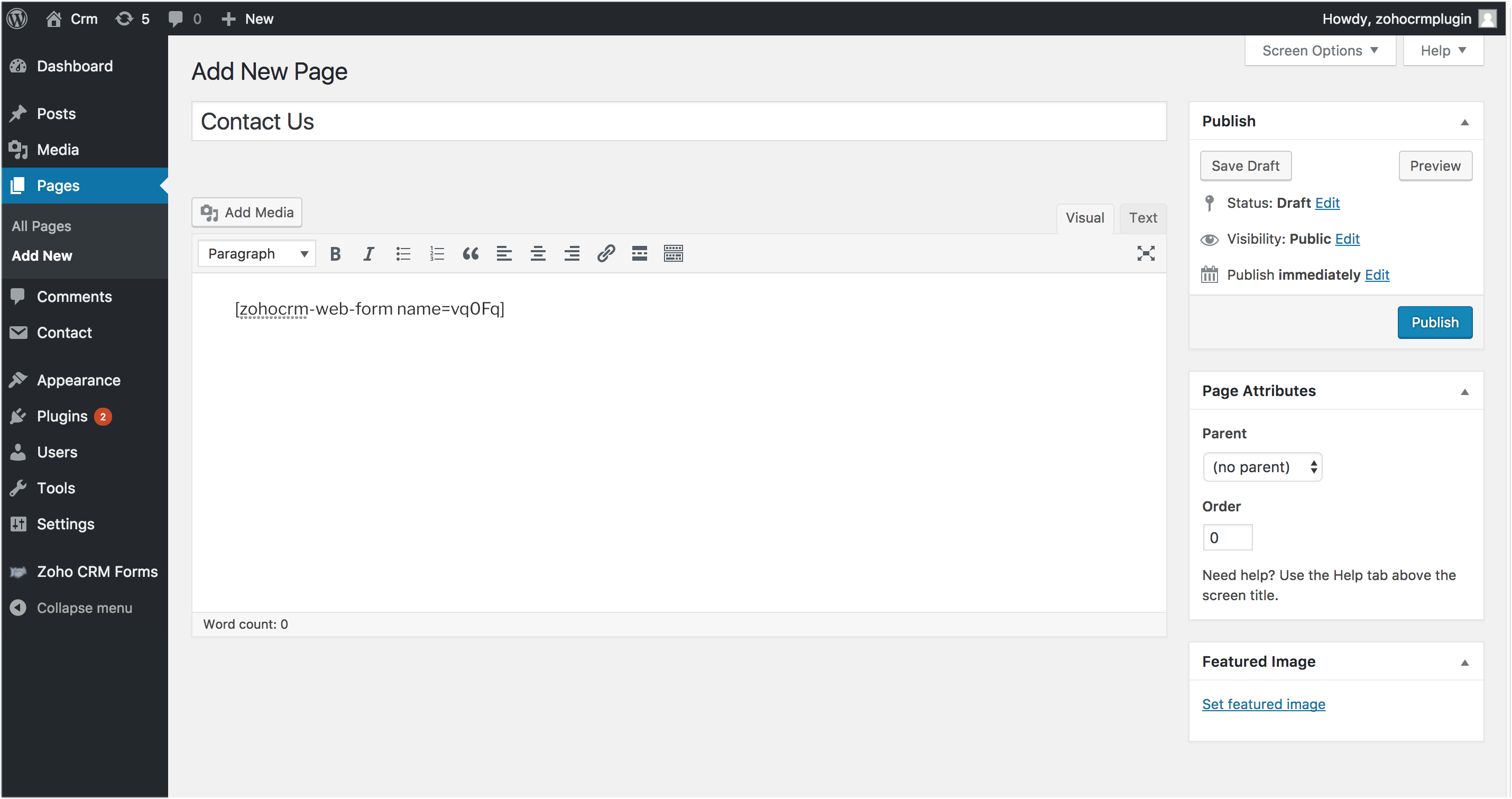
- Use the short code to embed the form.
- A prospect’s information is automatically captured upon entering your site. All that’s left is lead nurturing.
For businesses that want to maximize their websites, the Zoho CRM Lead Capture plugin for WordPress CMS is an ideal solution.
Key features
Two forms, one solution
This plugin works well with forms created using Zoho CRM and Contact 7 Form plugin.
Light on code
Creating a form is incredibly simple and the entire process of establishing an integration involves a few drag-drops and copy-pastes. Simply create, embed, and capture.
Capture leads and more
Using this plugin not only lets you capture leads but also additional custom modules you create for unique business needs.
Capture. nurture. win.
The Information entered in a website’s form is automatically pushed into Zoho CRM with zero attenuation. Now you never miss out on another lead.
Light on your purse
The plugin is absolutely free of cost. No hidden fees, no additional costs. All you need is a website hosted with WordPress and a Zoho CRM account.
Special mail-tags support
- [_url]
- [_site_title]
- [_site_description]
- [_site_url]
For examples
[hidden get-url default:_url]
[hidden site_title default:_site_title]
[hidden site-description default:_site_description]
[hidden site-url default:_site_url]
Please feel free to contact us for any further assistance: support@zohoextensions.com
A vulnerability reporting program in “Bug Bounty”, to reach the community of researchers, is in place, which recognizes and rewards the work of security researchers. We are committed to working with the community to verify, reproduce, respond and implement appropriate solutions for the reported vulnerabilities.
If you happen to find any, please submit the issues at https://bugbounty.zohocorp.com/. If you want to directly report vulnerabilities to us, mail us at security@zohocorp.com.
Installation
- Install the WordPress plugin from WordPress Marketplace. Upload the plugin folder to the /wp-content/plugins/ directory or install via the Add New Plugin menu.
- Activate the plugin through the ‘Plugins’ menu in WordPress.
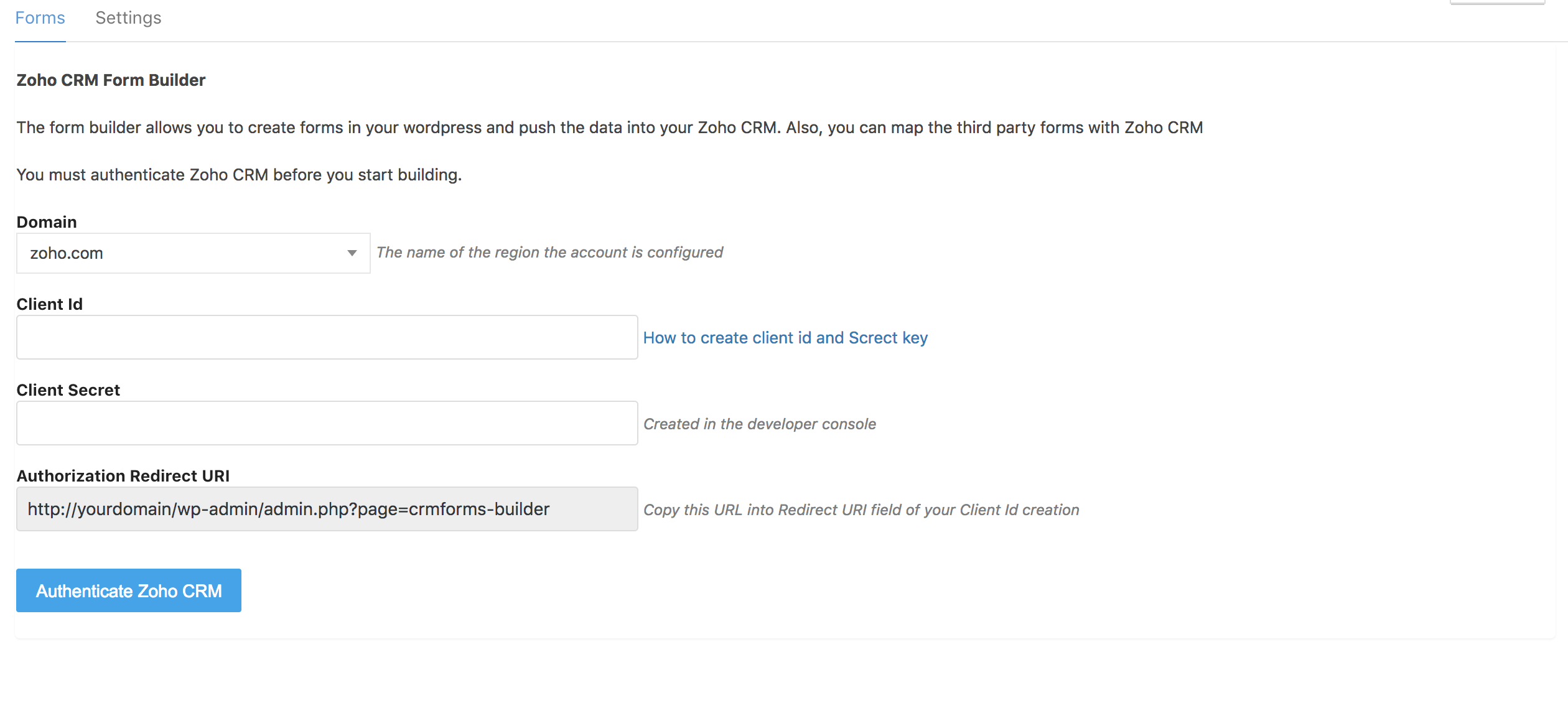
- Once you activate your Zoho CRM forms plugin, you’ll be asked to authenticate access from Zoho CRM. To do that, simply enter the username and password of your CRM account.
The plugin installation is now complete and the integration between Zoho CRM forms and WordPress is established.
Changelog
1.2
- Added: Contact form relation issue fixed.
1.3.1 - Responsive issue fixed
1.3.2
Added jquery ui css file
1.3.4 - Contact form hidden field issue fixed
1.3.5 - jquery ui css file missing issue fixed
1.3.6 - Multiselectpicklist hidden field issue fixed
1.4
Added functionality for EU Account
1.4.1
Css loading issue fixed
1.4.2
Checkbox mapping issue fixed
1.4.3
Registeration magic intergration merge issue fixed
1.4.4
We have added authorization url (https://extensions.zoho.com/plugin/wordpress/callback) and 402,403 authorization issue fixed
1.4.5
We have added authorization url (https://extensions.zoho.eu/plugin/wordpress/callback) issue fixed
1.4.6
We have added authorization url (https://extensions.zoho.eu/plugin/wordpress/callback) issue fixed
1.4.7
Code optimaztion
1.4.8
Code optimaztion
1.5.0
Specific layout issue fixed
1.5.1
Code optimaztion
1.5.2
Code optimaztion
1.5.3
Code optimaztion
1.5.4
EU Setup Authentication issue fixed
1.5.5
Field migration issue fixed
1.5.7
Added Multipicklist
1.5.8
Code optimaztion
1.5.9
Php version issue fixed
1.6.0
Code optimaztion
1.6.1
Contact form 7 captcha v3 api issue fixed
1.6.2
Contact form 7 v3 api script issue fixed
(Latest Contact form7 version)
1.6.3
Php Notice issue fixed
1.6.3
Php Notice issue fixed
1.6.6
Added Form Submit Logs
1.6.7
Added Form Submit Logs
1.6.8
Custom module related issue fixed
1.6.9
Hidden field related issue fixed
1.6.9.1
Security issue fixed check_admin_referer
1.6.9.2
performance issue fixed
1.6.9.3
performance issue fixed
1.6.9.4
performance issue fixed
1.6.9.5
performance issue fixed
1.6.9.6
redirection url issue fixed
1.6.9.7
rewrite an arbitrary option added
1.7.0.1
Hidden field issue fixed
1.7.0.2
checkbox field issue fixed
1.7.0.3
Added au domain centre
1.7.0.5
Lead Score mapping issue fixed
1.7.0.6
Added in domain centre and hidden field issue fixed
1.7.0.8
Security issue fixed
1.7.1.0
Security issue fixed
1.7.1.1
Security issue fixed
1.7.1.2
Security issue fixed and latest version updated
1.7.1.3
added option for international telephone option
1.7.1.4
Modules log added
1.7.1.5
Modules log added
1.7.1.6
Loading issue fixed
1.7.1.7
Added user lookup
1.7.2.0
performance issue fixed
1.7.2.1
performance issue fixed
1.7.2.5
Security issue fixed
1.7.2.6
Latest wordpress version updated and Security issue fixed
1.7.2.7
Security issue has been fixed
1.7.2.8
Security issue has been fixed
1.7.2.9
Security issue has been fixed
1.7.3.0
Security issue has been fixed
1.7.3.1
Get-url and site description field support added
1.7.3.2
Special mail-tags support
1.7.3.3
Added: GCLID field Support in Zoho CRM for Contact Form 7.
1.7.3.4
Added: A new tab added in the Zoho authentication.
1.7.3.5
Added: webform form save script error fixed.
1.7.3.6
Added: performance issue fixed.
1.7.3.7
Added: UI changes.
1.7.3.9
Added: Script issue has been fixed.
1.7.4.0
Added:Added Authentication check.
1.7.4.1
Added: SSL verified issue fixed
1.7.4.4
Added: GCLID field api issue fixed
1.7.4.5
Added: Japan data centre authentication option added
1.7.4.6
Added: Multiselect hidden field issue fixed
1.7.4.7
Added: Api data added to logs
1.7.4.8
Added: Api data added to logs
1.7.4.9
Added: removed empty space for email id
1.7.5.1
zcga.js file 404 issue fixed
1.7.5.2
Added : added fetch field option in the contact form
1.7.5.3
Added: In Japan dc added check for email encode
1.7.5.4
Added: Unused css removed
1.7.5.5
Added : Select2 component z-index issue has been fixed
1.7.5.6
Added : Unwanted Caching file has been removed
1.7.5.8
Added : Arbitrary Options Update vulnerability and Security check_admin_referer issue fixed
1.7.6.0
Added : Description Content Updated
1.7.6.1
Added much more escaping and sanitization where required. Attributes, URLs, and bare HTML are escaped.
Added individual function nonces for additional security, no longer reliant on a single nonce.
Changed most concatenation to formatted strings for clarity and ease of escaping.
1.7.6.2
Added Authorisation check and CSRF nonce for all the function
1.7.6.3
Added prefix for missing cases
1.7.6.4
Custom Phonetext field Supported
1.7.6.5
Custom Phonetext field Supported
1.7.6.6
Re authendication dynamic select issue fixed
1.7.6.7
Deal module api enabled
1.7.6.8
Php latest version compatibility check added
1.7.6.10
Jappense mapping issue fixed
1.7.7.0
Jappense mapping issue fixed
1.7.7.1
Removed unused javascript
1.7.7.2
Directorist plugin image loading issue fixed
1.7.7.3
Exclude html rendering issue fixed
1.7.7.4
Field reorder and owner field issue has been fixed
1.7.7.5
Wordpress latest version compatibility check and update
1.7.8.0
Wordpress latest version compatibility check and update
1.7.8.1
Wordpress latest version compatibility check and update
1.7.8.2
Added group by field support
1.7.8.3
Wordpress latest version compatibility check
1.7.8.4
Php latest version compatibility check and stripslashes version issue fixed
1.7.8.5
Added delete field option
1.7.8.6
Re authentication issue has been fixed
1.7.8.7
Php latest version compatibility check and stripslashes version issue fixed
1.7.8.8
Php latest version compatibility check and stripslashes version issue fixed
1.7.8.9
Security review issue has been fixed
1.7.9.0
Auto increment field issue fixed
1.7.9.1
Wordpress latest version compatibility check
1.7.9.2
Security review issue has been fixed
1.7.9.3
Security review issue has been fixed
1.7.9.4
Wordpress latest version compatibility check
1.7.9.5
Security review changes has been updated
1.7.9.6
Security review changes has been updated
1.7.9.7
Wordpress latest version compatibility check
1.7.9.8
Security review changes has been updated
1.8.0.7
Php latest version compatibility checking
1.8.0.9
Wordpress latest version compatibility checking
1.8.1.0
Wordpress latest version compatibility checking
1.8.1.1
Security review changes has been updated
1.8.1.2
Security review changes has been updated
1.8.1.3
Security review changes has been updated
1.8.1.4
Security review changes has been updated
1.8.1.5
The PHP warning issue has been fixed and updated
1.8.1.6
Wordpress latest version compatibility checking
1.8.1.7
Wordpress latest version compatibility checking
1.8.1.8
Wordpress latest version compatibility checking
1.8.1.9
The security issue related to Broken Access Control has been fixed.
1.8.2.0
The security issue related to Broken Access Control has been fixed and WordPress latest version compatibility checking.
1.8.2.1
The security issue related to Broken Access Control has been fixed and WordPress latest version compatibility checking.
1.8.2.2
The security issue related to Broken Access Control has been fixed.
1.8.2.3
The security issue related to Broken Access Control has been fixed.
Screenshots
For developers
Is this your plugin? Show off the numbers.
Add a live badge to your site, docs or GitHub README. It updates on its own — no account needed.
Best Zoho CRM Lead Magnet alternatives
All contact form 7 plugins →





FAQ
Zoho CRM Lead Magnet: quick answers
Straight answers, pulled from live WordPress.org data.
Live data from WordPress.org · checked Sep 27, 2026
Is Zoho CRM Lead Magnet free?
Yes. Zoho CRM Lead Magnet is free to download and use from the official WordPress.org plugin directory.
Is Zoho CRM Lead Magnet safe to use in 2026?
Zoho CRM Lead Magnet works, but test it on a staging site before relying on it in 2026. It runs on 3K+ sites, is rated 3.1/5 and was last updated 4 months ago, and scores 53/100 on our health check.
How many websites use Zoho CRM Lead Magnet?
Zoho CRM Lead Magnet is active on 3K+ WordPress websites and has been downloaded 228,557 times since it launched in December 2017. It was downloaded 827 times in the last 30 days.
Does Zoho CRM Lead Magnet work with WordPress 7.1?
Zoho CRM Lead Magnet is officially tested up to WordPress 7.0.0, while the latest release is 7.1.2. It may still work, but try it on a staging site first.
When was Zoho CRM Lead Magnet last updated?
The latest version, 1.8.2.3, was released on June 9, 2026 (4 months ago).
Who makes Zoho CRM Lead Magnet?
Zoho CRM Lead Magnet is developed and maintained by zohocrm.
What are the best alternatives to Zoho CRM Lead Magnet?
The most popular alternatives to Zoho CRM Lead Magnet are Database Addon for Contact… (600K+ installs), Redirection for Contact For… (200K+ installs) and ReCaptcha v2 for Contact Fo… (200K+ installs).
Powered by PageForge
Want thousands of pages that rank like these? Build them in an afternoon.
This directory runs on the same engine as PageForge. Turn any spreadsheet, CSV or API into thousands of fast, SEO-ready WordPress pages — with schema, internal links and AI-written copy baked in.
- CSV, Google Sheets & API data sources
- AI content, schema & internal links per page
- Works with Elementor, Gutenberg, Yoast & Rank Math
- Free on WordPress.org — no credit card


