


Zmanim WP
This plugin lets you configure a variety of halachic time calculations and add them via shortcodes.

Use with caution
Zmanim WP works, but test it on a staging site before relying on it in 2026. Was last updated 3 months ago, and scores 49/100 on our health check.
- Small user base (<10 active installs)
- Very few reviews so far
Daily downloads
Download spikes usually follow a new release — each site that auto-updates counts as a download.
Rankings
Where Zmanim WP stands todayWordPress.org search rankings
Live position in the plugin search, top 100| Keyword | Position |
|---|---|
| #time #zmanim #jewish | #3 |
About Zmanim WP
From the official readme · v2.7.2Description
This plugin lets you configure a variety of halachic time calculations and add them via shortcodes.
Zmanim WP
This plugin lets WordPress administrators configure a variety of shitot (halachic opinions) on time calculation. A series of shortcodes, along with standard options to control the date, formatting, time offset, and more. These shortcodes can be used to display the zmanim (times) in any post, page, widge, or even outbound email coming from the site.
For detailed information on how it works, including how to set shitot and the shortcode options available, see: https://adatosystems.com/zmanim-wp/.
The shortcodes available are:
Location and Reference
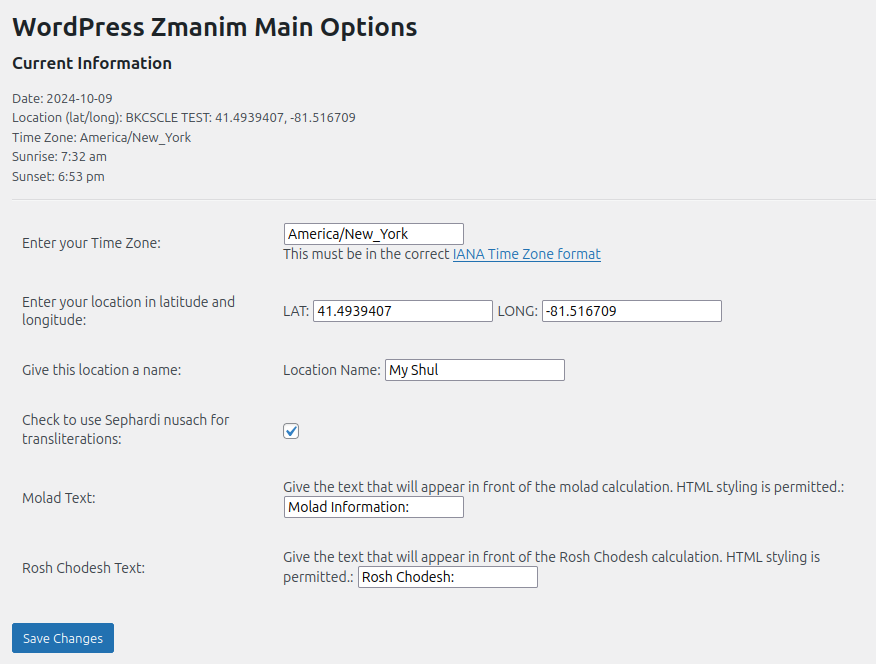
– zman_location – Displays the location, as defined on the admin page.
– zman_lat – Shows the latitude, as defined on the admin page.
– zman_long – Shows the longitude, as defined on the admin page.
– zman_tzone – Shows the Time Zone, as defined on the admin page.
Special Dates and Days
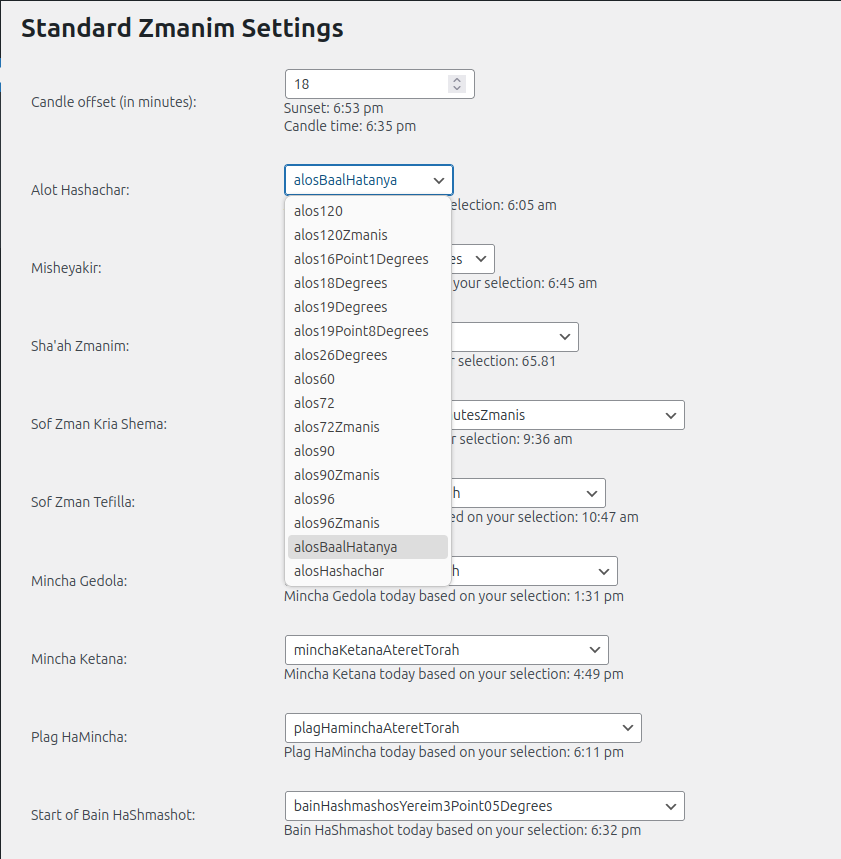
– zman_shaah – A halachic hour, or 1/12 of the available daylight, as calculated based on the shita selected in the drop-down on the admin page.
– zman_parsha – Provides the Torah reading for that week
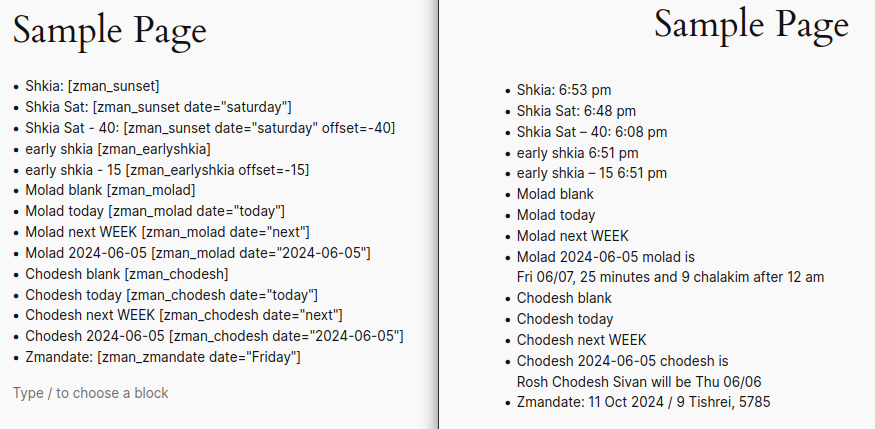
– zman_zmandate – Provides the date
– zman_chodesh – The day(s) for the indicated Rosh Chodesh. If the date indicated is “today” or “next”, text ONLY be visible if this week/next week is Rosh Chodesh.
– zman_molad – The day/time for the indicated Molad. If the date indicated is “today” or “next”, text ONLY be visible if this week/next week is the Molad.
– zman_omer – prints the day of the omer, if it is during that period of the year.
– zman_yomtov – prints any special days including fast days, special shabbatot, etc.
Standard Zmanim
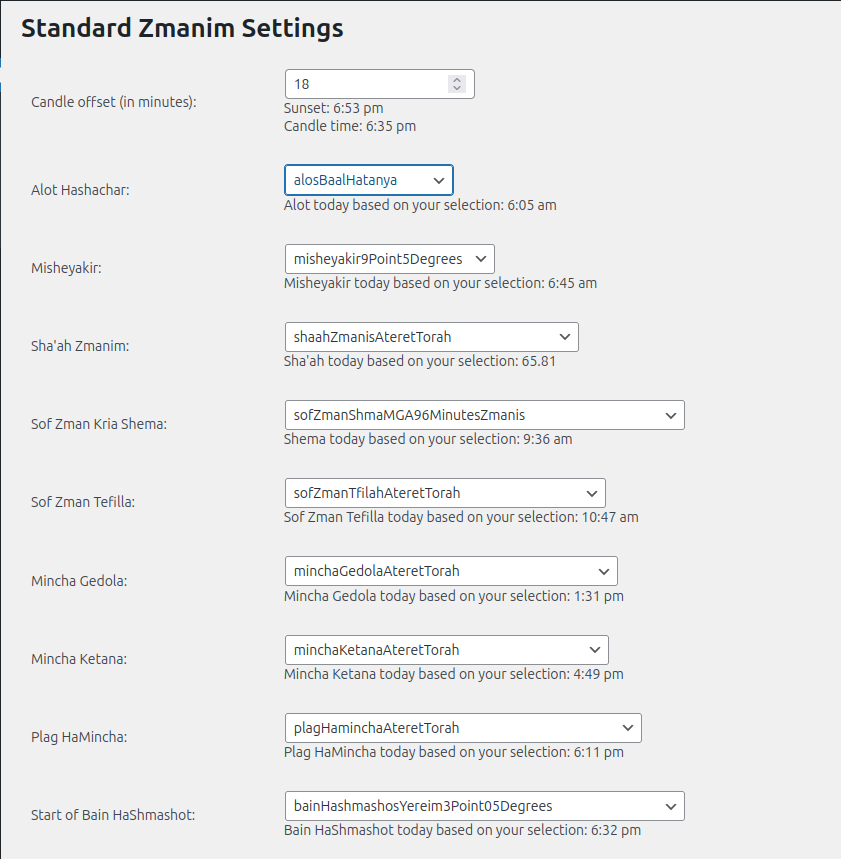
– zman_sunrise – Netz haChachma (nautical sunrise, without elevation).
– zman_sunset – Shkia (nautical sunset, without elevation).
– zman_candles – The time for Shabbat candles, which is sunset/shkia minus the number of minutes indicated on the admin page.
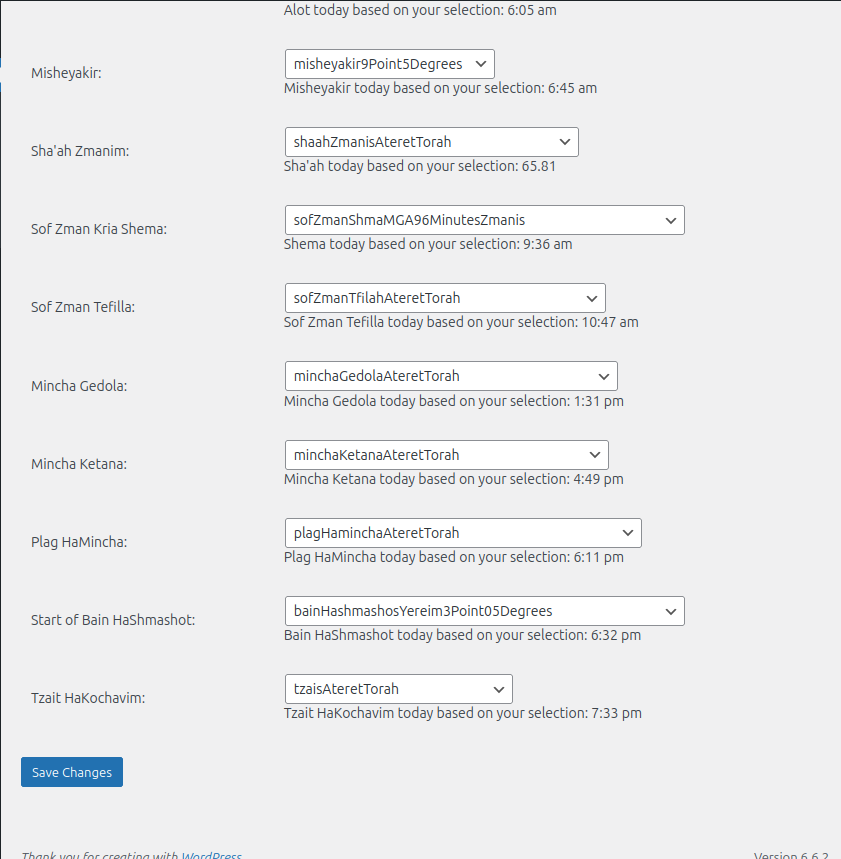
– zman_alot – Alot haShachar (earliest time for tallit & tefillin).
– zman_misheyakir – Misheyakir (earliest time for tefillot).
– zman_shema – Sof Zman Kriat Shema (latest time to say Shema)
– zman_tefilla – Sof Zman Tefilla (latest time to say Shacharit)
– zman_gedola – Mincha Gedola
– zman_ketana – Mincha Ketana
– zman_plag – Plag haMincha
– zman_bain – B’ain haShmashot (time between sunset/shkia and tzeit haKochavim).
– zman_tzait – Tzait haKochavim (the time 3 stars are visible in the night sky).
Secondary shitot
A few zmanim have a secondary option so that two opinions can be used in certain cases:
– zman_shema2
– zman_tefillah2
– zman_tzait2
– zman_plag2
Advanced and Special Zmanim
– zman_chatzot – halfway through the day
– zman_earlyshkia -Displays the earliest shkia time for the week (Sunday – Thursday) in which the provided date occurs.
– zman_lateshkia – Displays the latest shkia time for the week (Sunday – Thursday) in which the provided date given
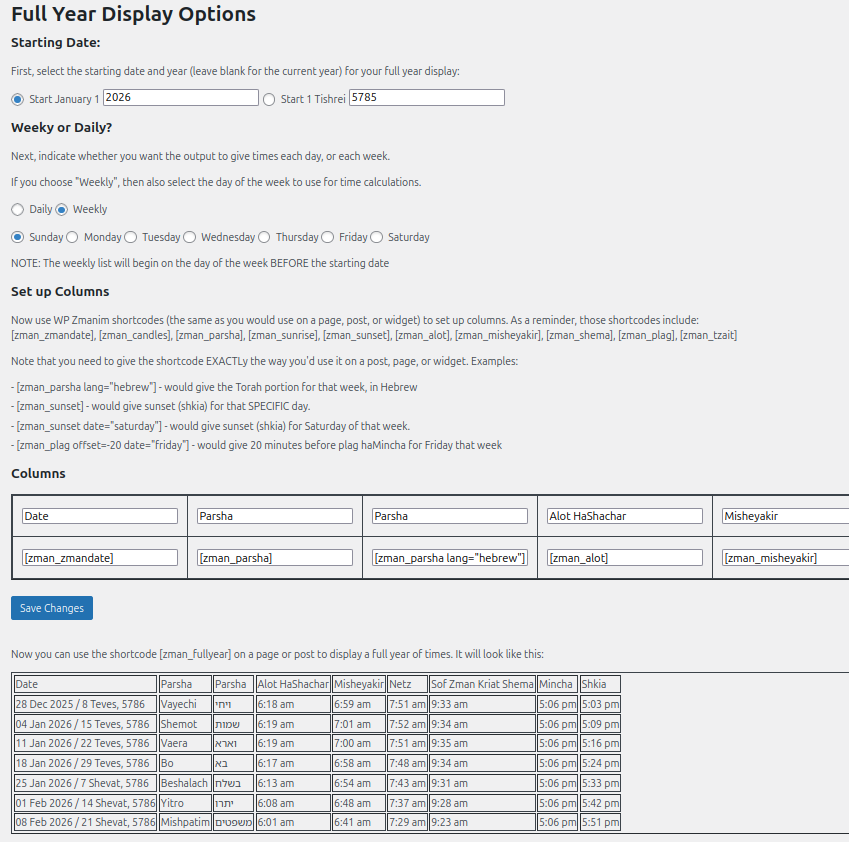
– zman_fullyear* – as described in the “Full Year Display” section above, this displays a grid of times for a complete year.
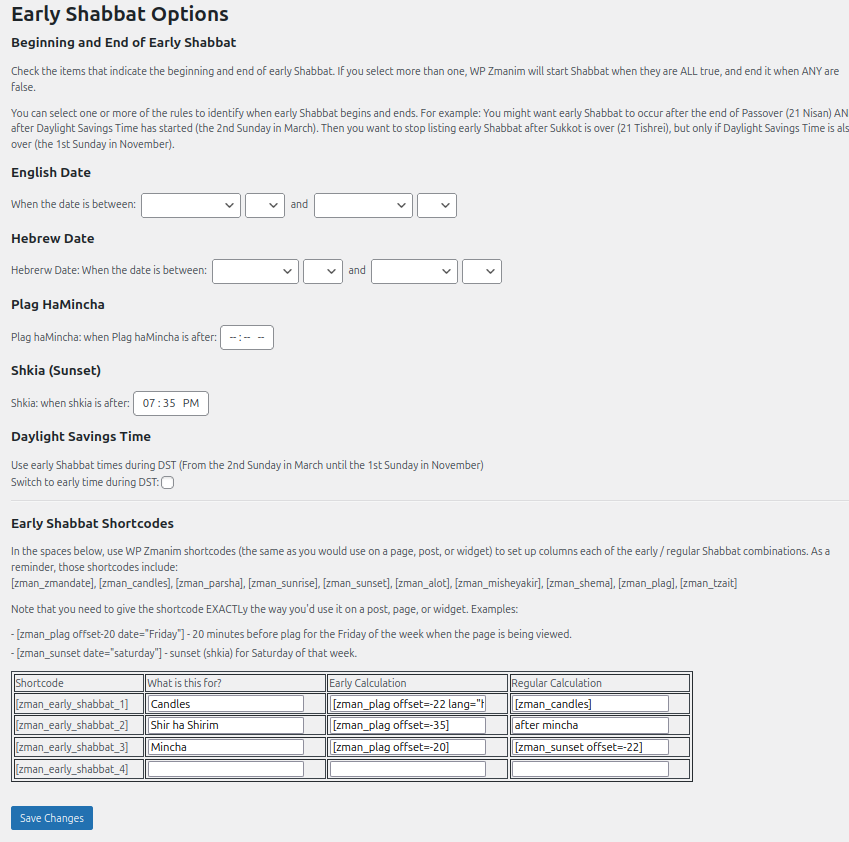
– zman_early_shabbat_1* through zman_early_shabbat_4* – As described in the “Early Shabbat Options” section above, each of these will display one of two shortcode outputs for early/regular Shabbat.
– zman_misheyakirweekly – provide an array of times for misheyakir, either for this week or next week. Specific times are accessed by using the “daynum” option.
– zman_announcement1 through zman_announcement4 – text blocks you can use to place announcements on the page and then change them through the zmanim-wp interface.
Installation
As with most WordPress plugins, you download the zip file and Activate the plugin through the ‘Plugins’ menu in WordPress.
Changelog
(none at this time)
2.7.2
- fixed bug with “weekday” datevalues pushing to next week on that weekday instead of showing the current day.
2.7.1
- No changes from 2.7.0, I just borked up svn again.
2.7.0
- Added secondary zman/shortcode for sof zman kria shema, Sof Tefilah, Tzait, and Plag haMincha that can use a different shita. (use shortcodes zman_shema2, zman_tefillah2, zman_tzait2, and zman_plag2)
- Added a new page to set choices for parsha, month, and holiday transliterations
- Changed “Sefardic nusach” checkbox to “Custom Transliterations”
- Added a second set of conditional zmanim for custom edge cases.
2.6.0
- Fixed issue with using correct dictionary for holidays when set to Sephardic nusach
- Fixed issue with blank parsha information on days with special readings
- Added zman_omer function
2.5.0
- add more early/late shabbat entries
- add “rounding” option to times. Up, down, nearest (nearest is default)
- Bugfixes
2.4.0
- Added 3 additional announcement boxes (shortcode: zman_announcement1 through zman_announcement4)
Screenshots
For developers
Is this your plugin? Show off the numbers.
Add a live badge to your site, docs or GitHub README. It updates on its own — no account needed.
FAQ
Zmanim WP: quick answers
Straight answers, pulled from live WordPress.org data.
Live data from WordPress.org · checked Oct 12, 2026
Is Zmanim WP free?
Yes. Zmanim WP is free to download and use from the official WordPress.org plugin directory.
Is Zmanim WP safe to use in 2026?
Zmanim WP works, but test it on a staging site before relying on it in 2026. Was last updated 3 months ago, and scores 49/100 on our health check.
How many websites use Zmanim WP?
Zmanim WP is active on <10 WordPress websites and has been downloaded 3,159 times since it launched in February 2025. It was downloaded 160 times in the last 30 days.
Does Zmanim WP work with WordPress 7.1?
Zmanim WP is officially tested up to WordPress 7.0.7, while the latest release is 7.1.3. It may still work, but try it on a staging site first.
When was Zmanim WP last updated?
The latest version, 2.7.2, was released on July 6, 2026 (3 months ago).
Who makes Zmanim WP?
Zmanim WP is developed and maintained by adatosystems.
Powered by PageForge
Want thousands of pages that rank like these? Build them in an afternoon.
This directory runs on the same engine as PageForge. Turn any spreadsheet, CSV or API into thousands of fast, SEO-ready WordPress pages — with schema, internal links and AI-written copy baked in.
- CSV, Google Sheets & API data sources
- AI content, schema & internal links per page
- Works with Elementor, Gutenberg, Yoast & Rank Math
- Free on WordPress.org — no credit card


