


xLanguage
Allows you to blog in multi-language, and users to select which to read. Works on every blog UI elements, not just the post.
 By
By Consider an alternative
xLanguage shows warning signs in 2026 — compare the alternatives below before installing. It runs on 100+ sites, is rated 4/5 and was last updated 17 years ago, and scores 29/100 on our health check.
- Small user base (100+ active installs)
- Very few reviews so far
- No update in 17 years
- Only tested up to WordPress 2.7 (latest is 7.1)
Daily downloads
Download spikes usually follow a new release — each site that auto-updates counts as a download.
Rankings
Where xLanguage stands todayWordPress.org search rankings
Live position in the plugin search, top 100| Keyword | Position |
|---|---|
| babel | >100 |
| l10n | #91 |
| language | >100 |
| multilanguage | >100 |
| multilingual | >100 |
Version adoption
Share of active sites per release.
Rating breakdown
★★★★★★★★★★ 4 from 2 reviews
About xLanguage
From the official readme · v2.0.4Description
If your want to present your blog in different languages (totally with title, rss, categories working, not just the post) and allows visitors to pick the language they want, this plugin is for you.
xLanguage is a full featured plugin allows you to blog in different language, and allows user to select which version to read. It works for blog post, page, tags, categories. The user language preferences will also select the right theme and plugins MO files.
Customization is the No. 1 design goal, after all that’s probably the reason why you want to setup a multilingual blog. The language configuration combination is highly customizable to facilitate multiple fallbacks. Every UI is extracted out, which could be optionally overridden by theme design without touching the plugin file at all.
The language preference is detected from browser’s preferences, as well as from Cookie if user visited before. Widget and template functions are also provided to allow user to switch the language easily. The presentation of the template functions can also be customized in your theme folder without touching the code in the plugins.
See Other Notes for the comparisons against similar plugins.
Feature Highlights
- Does not touch the WordPress database schema at all. All language text are stored in the same post and hence more friendly to other plugins.
- For post that written in reader’s foreign language. You could hide them, or optionally show them with a notice prepended. Your choice!
- Optionally present a total independent view to the search engine crawlers. So that you can have all languages text being crawled under a single URL. Think of SEO!
- Each language can be presented in a different theme.
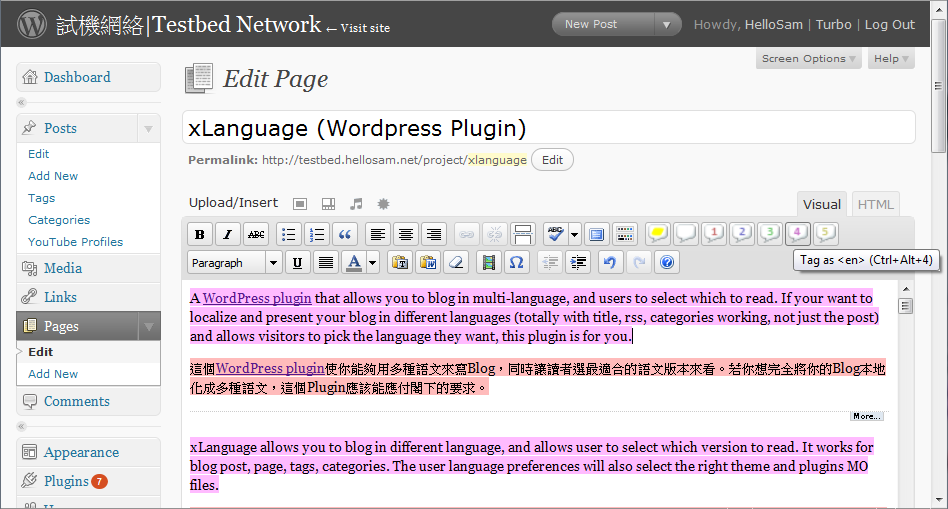
- Language composing are done in inline instead of separated side by side posting, see Screenshot 1. The former is like Simplified/Traditional Chinese within Wikipedia-ZH, while latter is like Wikipedia-Zh and -EN version.
- Many-to-many mappings between viewable language and authoring language is possible. Hong Kong-based reader could read Cantonese and Chinese, but average Chinese reader could only read Chinese, xLanguage specifically enables this scenario!
Usage Guide
To fully enjoy the power of customization, please refer to the usage guide hosted on my blog project page. Also see my blog for live demostration.
There are some known problems and limitations, please make sure you are aware of those.
Change Log
Please refer to my blog page for recent changes.
Upgrade Notice
Permalinks Postfix appending position is known to be not working with WordPress 2.7 paged comments mode and potentially causing conflicts with many other plugins. The mode will be changed to Prefix when you upgrade from v1.x. If you are using the Postfix mode and want to keep using it, please change the settings manually.
Comparisons
Compare to qTranslate v2.0.2 (Jan 2009)
The logic behind qTranslate is similar to that of xLanguage – both using HTML tag to differentiate the contents of languages and requires no database modification. qTranslate uses HTML comment tag while xLanguage uses the lang=”..” attribute.
The major differences lie within the admin interface, qTranslate provides strong Admin UI integration such that user enters the title, the category name and so on in independent textbox. The post is also to be post to an independent editor. While xLanguage, user enters the data in the same input box. For authoring in language that are very similar (like Cantonese and Written Chinese), and that cross-authoring is common, the method that xLanguage use will reduce much duplication work.
Due to the above restriction, qTranslate supports only one-to-one mapping between authoring and viewable lanugage. while xLanguage does not have this restriction. And hence, xLanguage allows all texts to be presented under one single URL for search engine to crawl with. (Think of SEO)
Feature-wise, xLanguage currently lacks of Pre-domain URL Permalinks mode, as well as automatic MO file download. (Note: MO does work in xLanguage but just have to be downloaded manually). Contribution would certainly help in accelerate these getting done :).
Compare to Gengo v2.5.3 (Jan 2009)
Gengo v2.5.3 is not tested with WordPress 2.7 according to the published plugin info.
In Gengo, each translations is a standalone post, linked to the original post. It enables you to create maps between different content. Think of different language version of Wikipedia, basically Gengo is the same – and it helps you to maintain such link table.
In xLanguage, everything is in the same post. The xLanguage approaches make no structural changes to the WordPress itself, and hence should be easier maintain. No extra magic in xLanguage is needed to keep the commenting, searching, popularity counter works.
Compare to Language Switcher v1.11 (Jan 2008)
This is actually the plugin that inspired me to build the xLanguage. The Language Switcher and the xLanguage is working in a very similar way — Both enable multilingual post by tagging the it. The Language Switcher uses square bracket instead of HTML tag, but have no assisting tools when composing the post. The language code is limited to the length of 2, and offer no fallbacking and overlapping possibility. The permalink url tag must be placed at the end.
Same as xLanguage, it allows user to enable multilingual functionality on single line content like tag, title and such.
Compare to jLanguage v1.4 (Jan 2008)
Almost the same as Language Switcher, both functionality and working principle. However, jLanguage v1.4 does not have widget for user to select their favorite language. In addition, It currently offer almost no customization, plus it does not work for single line content. The language selection could not affect the MO file selection.
It enables the language tagging by using square brakets instead of standard tag, similar to that of Language Switcher.
Compare to Multilingual post v0.2 (Jan 2008)
Please be aware that Multilingual post v0.2 does not belong to this category at all. It does not enable poster to publish mixed language in a post. The user also cannot selectively view the post in a particular language.
It only does insert the lang=”..” tag at the HEAD such that browser can render the page better. xLanguage also does this.
Compare to Bunny’s Language Linker v0.2 (Jan 2008)
Bunny’s Language Linker’s way to enable multilanguage blog is minimal and simple, yet the integration is very loose. It works like Gengo, the pros and cons compare to xLanguage is very similar.
Compare to Basic Bilingual v0.31 (Jan 2008)
Basic Bilingual v0.31 allows you to insert a summaries in a different language. It is yet another very simple plugin.
Installation
This plugin can be installed like all the other plugin. It requires no extra configuration except being activated.
- Extract the downloaded zip file to the
/wp-content/plugins/directory. You might also want to use OneClick Installer to automate this step. - In the Admin control panel, goes to the
Pluginspage and activate thexLanguageplugin. - Configure the plugin under the
Optionspage. - Start blogging with the multi-langual functionalities!
There are some known problems and limitations, please make sure you are aware of those. Full usage guide is kept at the plugin homepage.
Screenshots


For developers
Is this your plugin? Show off the numbers.
Add a live badge to your site, docs or GitHub README. It updates on its own — no account needed.
FAQ
xLanguage: quick answers
Straight answers, pulled from live WordPress.org data.
Live data from WordPress.org · checked Oct 13, 2026
Is xLanguage free?
Yes. xLanguage is free to download and use from the official WordPress.org plugin directory.
Is xLanguage safe to use in 2026?
xLanguage shows warning signs in 2026 — compare the alternatives below before installing. It runs on 100+ sites, is rated 4/5 and was last updated 17 years ago, and scores 29/100 on our health check.
How many websites use xLanguage?
xLanguage is active on 100+ WordPress websites and has been downloaded 79,751 times since it launched in January 2008. It was downloaded 118 times in the last 30 days.
Does xLanguage work with WordPress 7.1?
xLanguage is officially tested up to WordPress 2.7.1, while the latest release is 7.1.3. It may still work, but try it on a staging site first.
When was xLanguage last updated?
The latest version, 2.0.4, was released on June 9, 2009 (17 years ago).
Powered by PageForge
Want thousands of pages that rank like these? Build them in an afternoon.
This directory runs on the same engine as PageForge. Turn any spreadsheet, CSV or API into thousands of fast, SEO-ready WordPress pages — with schema, internal links and AI-written copy baked in.
- CSV, Google Sheets & API data sources
- AI content, schema & internal links per page
- Works with Elementor, Gutenberg, Yoast & Rank Math
- Free on WordPress.org — no credit card


