


XealBrax Auto Indexer
Automatically ping the Google Indexing API when posts or pages are published to force instant crawling without waiting for Googlebot.

Solid choice
XealBrax Auto Indexer is a solid plugin choice in 2026, with a few things worth checking first. Was last updated 4 weeks ago, and scores 64/100 on our health check.
- Actively developed — last update 4 weeks ago
- Tested with the latest WordPress (7.1)
- Small user base (<10 active installs)
- Very few reviews so far
Daily downloads
Download spikes usually follow a new release — each site that auto-updates counts as a download.
Rankings
Where XealBrax Auto Indexer stands todayWordPress.org search rankings
Live position in the plugin search, top 100| Keyword | Position |
|---|---|
| Fast Index | >100 |
| google indexing api | >100 |
| indexing | >100 |
| Search Console | >100 |
| seo | >100 |
About XealBrax Auto Indexer
From the official readme · v1.0.0Description
Getting your content indexed by Google shouldn’t take weeks. The XealBrax Auto Indexer connects your WordPress site directly to the official Google Indexing API.
Instead of waiting for Googlebot to passively discover your XML sitemaps, this plugin actively alerts Google the exact second you publish or update a post, prompting near-instant crawling.
Built by the web engineering team at XealBrax, the XealBrax Indexer uses a profoundly lightweight, native PHP OpenSSL engine.
Core Features:
- Instant API Pings: Automatically notify Google the moment you hit “Publish” or “Update”.
- Native JWT Authentication: We generate Google OAuth 2.0 tokens using pure PHP. No heavy dependencies, no Composer vendor folders. The entire plugin is under 100KB.
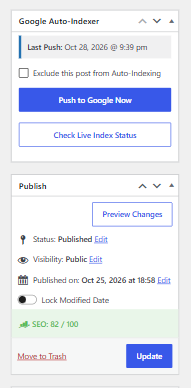
- Granular Control: A custom meta box in your post editor allows you to manually “Push to Google Now” via AJAX, or selectively exclude specific posts from being auto-indexed.
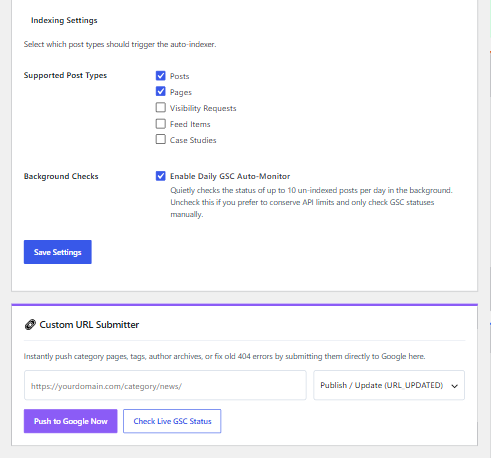
- Custom Post Type Support: Easily enable auto-indexing for WooCommerce Products, Portfolios, Recipes, or any other public custom post type.
- Ecosystem Ready: Works flawlessly alongside your existing SEO plugins (Yoast, Rank Math, AIOSEO, SEOPress) without conflicts.
External services
This plugin connects directly to Google APIs to automate your website’s indexing process.
When you publish or update a post, this plugin sends the specific URL of that post to the Google Indexing API to request an immediate crawl. To authenticate this request, the plugin uses the Google OAuth 2.0 token service using the Google Service Account JSON key you provide in the settings.
The only data sent to Google is the URL being indexed/updated and your provided Service Account credentials. No visitor data or other site data is transmitted.
This service is provided by Google LLC.
– Google Terms of Service: https://policies.google.com/terms
– Google Privacy Policy: https://policies.google.com/privacy
Additionally, if you choose to opt-in to usage tracking during activation or submit a bug report via the plugin dashboard, basic site data and contact information are routed securely to XealBrax servers to assist with troubleshooting and product improvement.
– XealBrax Terms of Service: https://xealbrax.com/terms-of-service/
– XealBrax Privacy Policy: https://xealbrax.com/privacy-policy/
Installation
Step 1: Plugin Installation
- Upload the
xealbrax-auto-indexerdirectory to your/wp-content/plugins/directory, or install directly through the WordPress plugins screen. - Activate the plugin through the ‘Plugins’ screen in WordPress.
Step 2: Google Cloud Setup
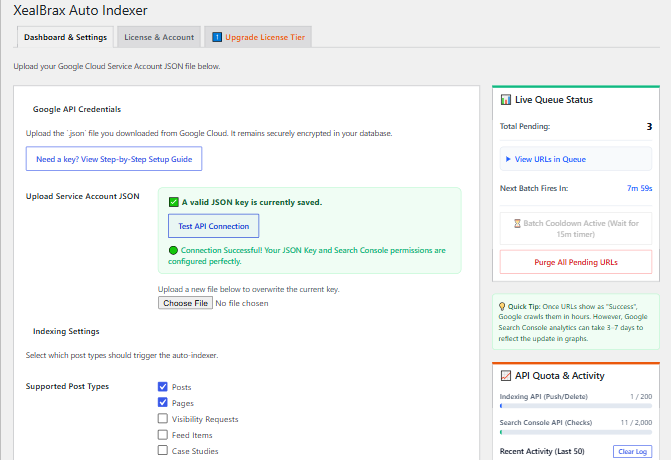
To use this plugin, you need a free Google Service Account JSON key.
1. Go to the Google Cloud Console and create a new project.
2. Search for the Web Search Indexing API and click Enable.
3. Go to IAM & Admin > Service Accounts and create a new service account. Copy the generated email address (ending in iam.gserviceaccount.com).
4. Click on the Service Account, go to the Keys tab, and click Add Key > Create new key (JSON format). Download this .json file to your computer.
Step 3: Google Search Console Setup
Google will block the API if the service account does not have permission to manage your site.
1. Go to Google Search Console and select your website.
2. Go to Settings > Users and permissions.
3. Click Add User, paste the iam.gserviceaccount.com email address, and set the permission to Owner (Full or Restricted will not work).
Step 4: Finalize in WordPress
- In your WordPress admin, go to XB Indexer.
- Click “Choose File” and upload the
.jsonfile you downloaded from Google Cloud. - Select which post types you want to auto-index and hit Save. You’re done!
Changelog
1.0.0
- Initial launch of the XealBrax Auto Indexer engine.
- Implemented native OpenSSL JWT signing for zero-dependency API connections.
- Added Editor Meta box for granular AJAX control.
- Added secure file-upload handling for Google JSON keys to prevent database string formatting errors.
- Integrated Freemius SDK for secure deployment.
Screenshots
For developers
Is this your plugin? Show off the numbers.
Add a live badge to your site, docs or GitHub README. It updates on its own — no account needed.
FAQ
XealBrax Auto Indexer: quick answers
Straight answers, pulled from live WordPress.org data.
Source: WordPress.org
Is XealBrax Auto Indexer free?
Yes. XealBrax Auto Indexer is free to download and use from the official WordPress.org plugin directory.
Is XealBrax Auto Indexer safe to use in 2026?
XealBrax Auto Indexer is a solid plugin choice in 2026, with a few things worth checking first. Was last updated 4 weeks ago, and scores 64/100 on our health check.
How many websites use XealBrax Auto Indexer?
XealBrax Auto Indexer is active on <10 WordPress websites and has been downloaded 245 times since it launched in October 2026. It was downloaded 246 times in the last 30 days.
Does XealBrax Auto Indexer work with WordPress 7.1?
Yes. The developer has tested XealBrax Auto Indexer up to WordPress 7.1.5, the latest release. It requires WordPress 6.0 or newer.
What PHP version does XealBrax Auto Indexer need?
XealBrax Auto Indexer requires PHP 7.4 or higher. Most hosts run PHP 8.x today, so it works on any modern WordPress hosting.
When was XealBrax Auto Indexer last updated?
The latest version, 1.0.0, was released on October 29, 2026 (4 weeks ago).
Who makes XealBrax Auto Indexer?
XealBrax Auto Indexer is developed and maintained by XealBrax.
Powered by PageForge
One template and a spreadsheet. A real page for every search.
PageForge turns each row of a CSV into a WordPress page with its own title, URL, SEO fields and schema, built on the layout you already designed. Free on WordPress.org.
- CSV and XLSX, plus Google Sheets on Professional and Enterprise
- Its own title, URL, SEO fields and schema for every page
- Works with the block editor, Elementor, Divi and Avada
- Free on WordPress.org, no credit card