


PDF Invoice and Packing Slip for WooCommerce
Automate PDF invoices, packing slips, delivery notes & shipping labels for WooCommerce. Attach to emails, print in bulk. Fast & lightweight.

Solid choice
PDF Invoice and Packing Slip fo… is a solid plugin choice in 2026, with a few things worth checking first. It runs on 10+ sites, is rated 5/5 and was last updated 4 days ago, and scores 73/100 on our health check.
- Actively developed — last update 4 days ago
- Tested with the latest WordPress (7.1)
- Small user base (10+ active installs)
- Very few reviews so far
How does it stack up?
Side-by-side on installs, updates, ratings & support


Daily downloads
Download spikes usually follow a new release — each site that auto-updates counts as a download.
Rankings
Where PDF Invoice and Packing Sli… stands todayWordPress.org search rankings
Live position in the plugin search, top 100| Keyword | Position |
|---|---|
| delivery note | #98 |
| Packing Slip | #17 |
| pdf invoice | #48 |
| shipping label | >100 |
| woocommerce | >100 |
Version adoption
Share of active sites per release.
Rating breakdown
★★★★★★★★★★ 5 from 1 reviews
About PDF Invoice and Packing Slip for WooCom…
From the official readme · v1.17.0Description
Streamline your eCommerce store’s fulfillment, billing, and accounting with an all-in-one, ultra-fast WooCommerce PDF invoicing solution. Automatically generate professional PDF invoices, packing slips, delivery notes, and shipping labels, attach them directly to customer order emails, and print or download batches in seconds.
Whether you need legally compliant tax invoices for international buyers, price-free packing slips for your fulfillment warehouse, or shipping labels with scannable QR codes, this plugin automates your entire post-order workflow on autopilot.
Built strictly with performance, security, and modern WordPress standards, it runs lightning-fast on your server without database bloat, memory leaks, or checkout slowdowns.
✅ Tested OK with WooCommerce 11.0.1+
🚀 High-Performance Order Storage (HPOS) Compatible
⚡ Zero Bloat – No external telemetry, no background tracking scripts
🔥 4-IN-1 DOCUMENT SUITE (100% FREE)
Unlike other plugins that charge €69 to €99 per year for basic document types, WPWing gives you all 4 essential store documents completely free:
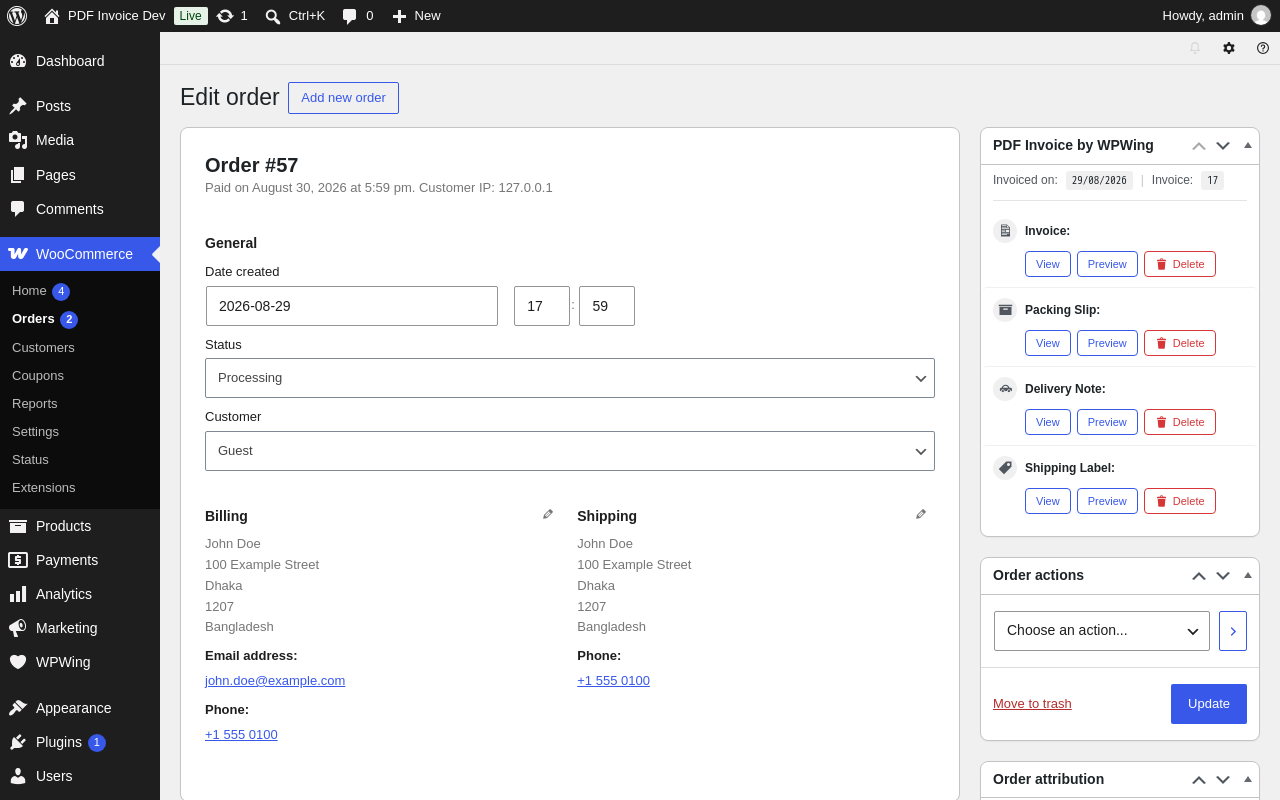
- 📑 PDF Invoices: Fully compliant tax invoices with customizable sequential numbering, tax breakdowns, store branding, and automated email attachments.
- 📦 PDF Packing Slips: Warehouse-ready packing lists showing items and quantities without prices, perfect for picking and packing teams.
- 🚚 Delivery Notes: Price-free delivery slips that travel inside the parcel with item summaries, shipping addresses, and optional customer order notes.
- 🏷️ Shipping Labels: Clean shipping cards with prominent recipient address, sender details, package weight, shipping method, and a scannable QR code.
⚡ KEY FEATURES AT A GLANCE
- 🖼️ Product Thumbnails in Item Tables (New in 1.16.0): Display product images (32px, 48px, or 64px), SKU, and product weight in item tables across all document types. Engineered with memory-safe image downscaling and local disk caching to prevent Dompdf crashes.
- 🧙 2-Minute Setup Wizard: First-time store owners can configure shop name, address, logo, paper size, and email attachments in under two minutes with our skippable onboarding wizard.
- 👁️ Live Interactive Preview Panel: Preview your changes live in real time directly from the settings panel before generating documents for real customers.
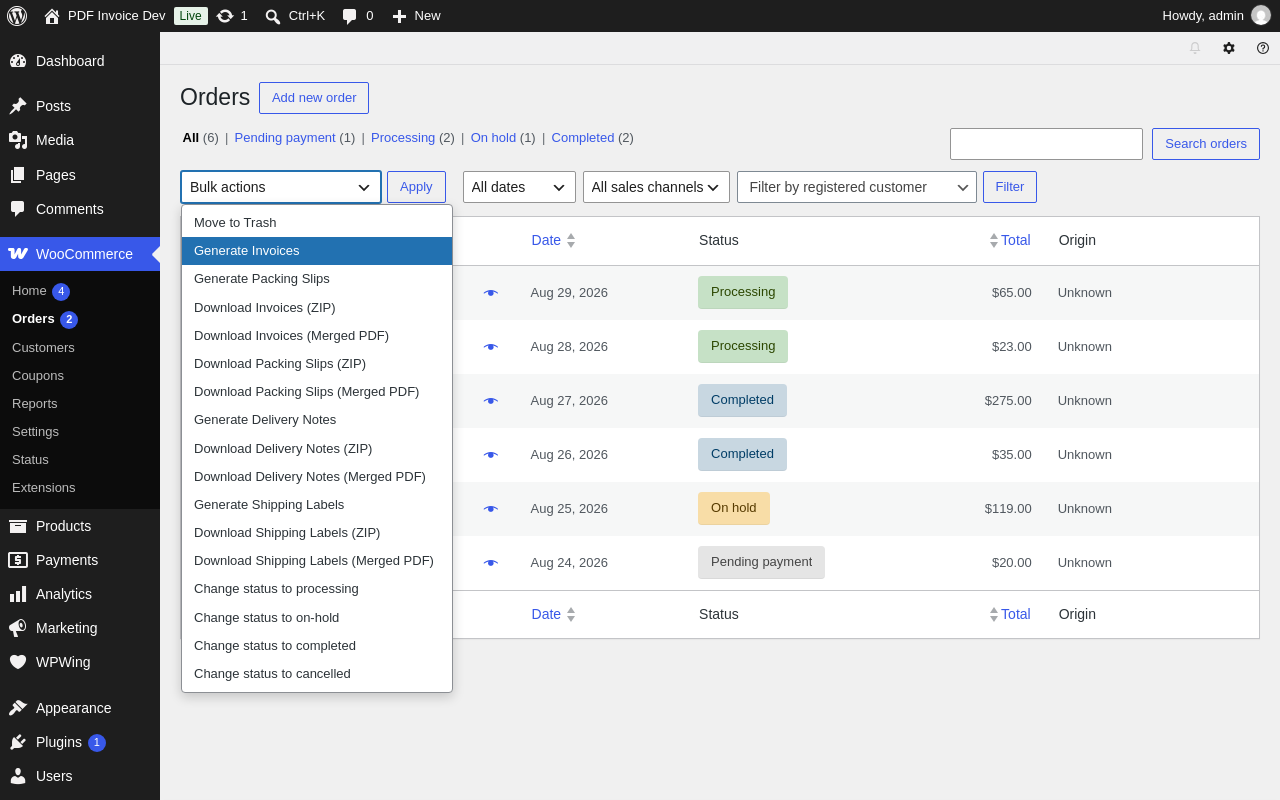
- 📦 1-Click Bulk Downloads (Merged PDF or ZIP): Save hours during shipping rushes. Select orders and download all invoices or packing slips as a single combined PDF or a compressed ZIP archive.
- 🌍 Native International Currency Support: Every WooCommerce currency symbol renders cleanly on your PDFs without broken “tofu” boxes – including the Bangladeshi Taka (৳), Indian Rupee (₹), Thai Baht (฿), and dozens more.
- 📱 Dynamic Scannable QR Codes: Add a scannable QR code to invoices and shipping labels – linking directly to the customer’s order verification page or custom text tokens.
- 🔢 Sequential & Yearly Reset Numbering: Full accounting compliance. Configure custom invoice numbering with personalized prefixes, suffixes, dynamic zero-padding, and optional automatic yearly resets.
- 🛡️ Free Order Suppression: Automatically skip invoice generation or email attachment on free ($0.00) orders when enabled.
- 🔍 Search Orders by Invoice Number: Find any order in seconds by typing its invoice number directly into the WooCommerce order search box (works on classic and HPOS).
- 👤 Customer My-Account Downloads: Customers can view and download past invoices from their My Account order history, or via the
[wpwing_invoice]shortcode anywhere on your site. - 🔒 Rock-Solid Security: 100% CSRF-protected with WordPress nonces. Strict capability checks on every document action.
📊 HOW WE COMPARE
Feature
WP Overnight
WebToffee
WPWing (Free)
Free Document Types
2 (Invoice, Packing)
4 (Invoice, Packing, Delivery, Shipping)
All 4 Free
Product Thumbnails in Tables
Paid Add-on (EUR 99/yr)
Paid Pro ($69/yr)
100% Free
Bulk Merged PDF & ZIP
Paid Add-on (EUR 99/yr)
Paid Pro ($69/yr)
100% Free
QR Code on Documents
Paid Add-on
Paid Pro
100% Free
Native Asian Currencies (৳, ₹, ฿)
Broken tofu boxes
Requires free add-on
Bundled Native Font
Setup Wizard & Live Preview
No
Multi-step form
Wizard + Live Preview
Price
Free / EUR 99+
Free / $69+
100% Free
💡 WHY SHOP OWNERS LOVE WPWING
Most WooCommerce PDF invoice plugins on the market fall into two extremes: either they are abandoned with broken support, or they are bloated with heavy e-invoicing dependencies that slow down your server.
WPWing hits the sweet spot: clean, modern code, blazing fast document generation, and zero paywalls on essential shipping features.
🧑💻 Fast & Friendly Support
Need help or have a feature suggestion? We actively maintain our plugins and respond quickly on the WordPress.org support forums.
Installation
🛠️ Automatic Installation (Recommended):
- In your WordPress dashboard, navigate to Plugins > Add New.
- Search for “PDF Invoice and Packing Slip for WooCommerce”.
- Click Install Now, then click Activate.
- The automatic Setup Wizard will launch to help you set up your logo and details in 2 minutes.
📁 Manual Installation:
- Download the plugin zip file and unpack it.
- Upload the
wpwing-pdf-invoice-packing-slip-for-woocommercefolder to your/wp-content/plugins/directory. - Activate the plugin through the Plugins menu in WordPress.
- Open WooCommerce > PDF Invoices to configure your store settings.
Frequently asked questions
Can I show product images and thumbnails on invoices?
Yes! In WooCommerce > PDF Invoices > Template, simply toggle the “Show product thumbnail” checkbox and choose your desired size (32×32, 48×48, or 64×64). Thumbnails are automatically cached and downscaled to keep PDF generation fast and memory-safe.
Can I bulk download invoices as a single merged PDF?
Yes! From your WooCommerce Orders list, select the orders you want to print, choose Download Invoices (Merged PDF) or Download Invoices (ZIP) from the Bulk Actions dropdown, and click Apply.
Does this support non-Latin currency symbols like Taka (৳) and Rupee (₹)?
Yes! Most PDF plugins render non-Latin currency symbols as empty boxes or question marks because standard PDF fonts lack those glyphs. WPWing includes a custom bundled currency font that renders symbols for the Bangladeshi Taka (৳), Indian Rupee (₹), Thai Baht (฿), Philippine Peso (₱), and many more perfectly out-of-the-box.
Can I prevent invoices from being sent on free ($0) orders?
Yes! Under WooCommerce > PDF Invoices > General, enable the “Disable for free orders” option. Free orders will not generate or attach invoice PDFs to customer emails.
Can I show an invoice download link anywhere on my site?
Yes! Use the [wpwing_invoice] shortcode. On the Thank You page or My Account order details, it detects the order automatically, including guest orders on the Thank You page; elsewhere, use [wpwing_invoice order_id="123"]. You can customize the link text with the label attribute.
Is this plugin compatible with WooCommerce HPOS (High-Performance Order Storage)?
Yes! WPWing fully supports High-Performance Order Storage (HPOS) and standard custom post types.
Do I need coding knowledge to customize my invoices?
Not at all. You can upload your store logo, add company details, adjust invoice numbering, toggle QR codes, and customize colors directly from the settings panel. If you are a developer, we also provide a Custom CSS box and rich action/filter hooks.
Can I contribute or report bugs?
Yes! This plugin is actively maintained on GitHub. We welcome pull requests and issue reports.
Changelog
1.17.0 – 2026-10-12
- New: PDF filename format setting – name generated documents with the {{doc_type}}, {{order_number}}, and {{invoice_date}} tokens (for example invoice-1234.pdf). Leave it empty to keep the current names. Existing documents keep their filenames.
- New: The Invoice column on the WooCommerce orders list now shows the invoice number, linked to the PDF, instead of a checkmark.
- New: Guest customers can download their invoice from the Order Received (Thank You) page with the [wpwing_invoice] shortcode. Access is verified with the WooCommerce order key.
- Fix: The Invoice column was missing from the orders list when WooCommerce uses legacy (non-HPOS) order storage.
- Fix: Generating documents no longer removes callbacks that themes or other plugins attach to the PDF template hooks.
- Hardening: A custom filename format never overwrites an existing PDF – a numeric suffix is added when the name is already taken.
1.16.0 – 2026-09-21
- New: Product thumbnails in item tables – toggle thumbnail display and choose size (32×32, 48×48, 64×64) across all document types (invoices, packing slips, delivery notes, shipping labels) with memory-safe downscaling and local caching.
- New: Product SKU and Weight column visibility options across all document types in both Default and Modern templates.
- Fix: Decoupled database migration routine from plugin semver releases, preventing redundant table migration queries on every release.
- Fix: Suppress PDF invoice email attachments on free orders ($0.00) when the “Disable for free orders” setting is enabled.
- Fix: Relocated invoice QR code adjacent to totals summary table to optimize document layout and eliminate dead space.
- Fix: Resolved template footer overlap on shorter pages and preview panels by replacing absolute positioning with normal document flow.
- Hardening: Wrapped invoice counter advisory lock acquisition and release in try-finally construct to guarantee lock release.
1.15.0 – 2026-09-07
- New: Shipping Label document type – a price-free label with a prominent recipient shipping address, sender details, order weight, shipping method, and an optional scannable QR code linking back to the order. Create it manually, in bulk (ZIP or merged PDF), or automatically on the order statuses you choose – just like invoices, packing slips, and delivery notes.
- New: Shipping label template setting (Default or Modern), included in the same Custom CSS box as the other document types.
1.14.0 – 2026-08-31
- New: Setup Wizard – a first-run wizard walks you through shop name and address, logo upload, paper size, auto-generate statuses, and invoice email attachments. Launches automatically the first time you activate the plugin, is skippable at every step, and can be re-launched any time from a link on the Settings page.
- Fix: The company logo could fail to appear on generated PDFs (showing “Image not found” instead) on some hosts, including most local dev environments. The logo is now embedded directly rather than fetched back over the network.
- Fix: Order metabox action buttons could overflow the sidebar on narrow screens. The destructive action is now labeled “Delete” instead of “Cancel” for clarity.
- Fix: The invoice preview panel in Settings could clip the right side of the invoice on narrower screens instead of showing a scrollbar.
1.13.0 – 2026-08-24
- New: System Status tab in Settings – shows plugin, WordPress, PHP, WooCommerce and Dompdf versions, the document save folder and font cache folder with a writable check, and the active document types. Includes a one-click “Copy system info” button for support requests.
- New: Settings search – a search box above the settings tabs filters the visible tab’s rows in real time as you type, and stays applied when you switch tabs.
- Fix: A brand-new install could trigger a PHP deprecation notice (“Passing null to parameter of type string”) the first time the Settings page was opened, before Save Changes had ever been clicked.
- Compatibility: Tested up to WordPress 7.1.
1.12.0 – 2026-07-19
- New: Delivery Note document type – a price-free document listing the items and shipping address, made to travel with the parcel. Create, view, or cancel it from the order page metabox, just like invoices and packing slips.
- New: Auto-generate delivery notes on the order statuses you choose, with the same once-per-order behaviour as invoices and packing slips.
- New: Delivery note bulk actions on the orders list – generate for selected orders, or download them as a ZIP or one merged PDF.
- New: Delivery note template setting (Default or Modern) and an option to print the customer’s checkout note on the delivery note.
- Improvement: The Custom CSS box now also applies to delivery notes.
Screenshots




For developers
Is this your plugin? Show off the numbers.
Add a live badge to your site, docs or GitHub README. It updates on its own — no account needed.
Best PDF Invoice and Packing Slip… alternatives
All delivery note plugins →

FAQ
PDF Invoice and Packing Slip for Wo…: quick answers
Straight answers, pulled from live WordPress.org data.
Live data from WordPress.org · checked Oct 16, 2026
Is PDF Invoice and Packing Slip fo… free?
Yes. PDF Invoice and Packing Slip fo… is free to download and use from the official WordPress.org plugin directory.
Is PDF Invoice and Packing Slip fo… safe to use in 2026?
PDF Invoice and Packing Slip fo… is a solid plugin choice in 2026, with a few things worth checking first. It runs on 10+ sites, is rated 5/5 and was last updated 4 days ago, and scores 73/100 on our health check.
How many websites use PDF Invoice and Packing Slip fo…?
PDF Invoice and Packing Slip fo… is active on 10+ WordPress websites and has been downloaded 3,517 times since it launched in October 2021. It was downloaded 273 times in the last 30 days.
Does PDF Invoice and Packing Slip fo… work with WordPress 7.1?
Yes. The developer has tested PDF Invoice and Packing Slip fo… up to WordPress 7.1.3, the latest release. It requires WordPress 4.8 or newer.
What PHP version does PDF Invoice and Packing Slip fo… need?
PDF Invoice and Packing Slip fo… requires PHP 7.4 or higher. Most hosts run PHP 8.x today, so it works on any modern WordPress hosting.
When was PDF Invoice and Packing Slip fo… last updated?
The latest version, 1.17.0, was released on October 12, 2026 (4 days ago).
Who makes PDF Invoice and Packing Slip fo…?
PDF Invoice and Packing Slip fo… is developed and maintained by WPWing.
What are the best alternatives to PDF Invoice and Packing Slip fo…?
The most popular alternatives to PDF Invoice and Packing Slip fo… are Awesome Invoice, Delivery N… (10+ installs), Checkmate PDF Invoices, Pac… (10+ installs) and Filogy Invoice (<10 installs).
Powered by PageForge
Want thousands of pages that rank like these? Build them in an afternoon.
This directory runs on the same engine as PageForge. Turn any spreadsheet, CSV or API into thousands of fast, SEO-ready WordPress pages — with schema, internal links and AI-written copy baked in.
- CSV, Google Sheets & API data sources
- AI content, schema & internal links per page
- Works with Elementor, Gutenberg, Yoast & Rank Math
- Free on WordPress.org — no credit card


